
Display a Detail View with a List View 主子视图-列表视图与详细信息视图同时显示
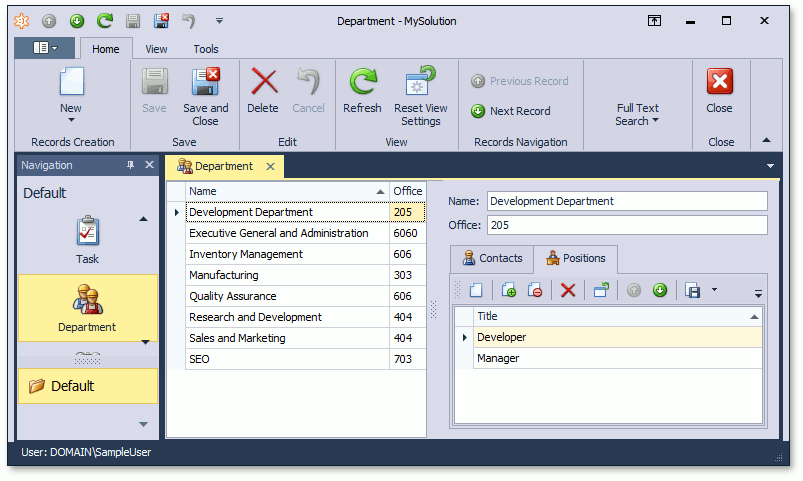
In this lesson, you will learn how to display a Detail View together with a List View. For this purpose, the Department List View will be used. The object selected in it will be displayed in the corresponding Detail View.
在本课中,您将学习如何将详细信息视图与列表视图一起显示。为此,将使用部门列表视图。其中选择的对象将显示在相应的"详细信息视图"中。
Note 注意
Before proceeding, take a moment to review the Place an Action in a Different Location lesson.
在继续之前,请花点时间复习"将操作置于不同位置"课程。
Invoke the Model Editor for the MySolution.Module project. Navigate to the Views | MySolution.Module.BusinessObjects | Department_ListView node. It defines the List View that is used for Department objects using the properties to the right. In the MasterDetailMode property's dropdown list, select ListViewAndDetailView.
调用 MySolution.模块项目的模型编辑器。导航到视图 |My解决方案.模块.业务对象 |Department_ListView节点。它定义使用右侧属性的部门对象使用的列表视图。在"主详细信息模式"属性的下拉列表中,选择"列表视图和详细信息视图"。

Run the WinForms or ASP.NET application. The Department List View will appear as follows.
运行 WinForms 或ASP.NET应用程序。部门列表视图将显示如下。
WinForms Application
WinForms 应用程序
ASP.NET Application
ASP.NET应用程序

In the WinForms application, use the Save ( ) or SaveAndClose (
 ) buttons on the toolbar to commit changes made in the Detail View. To cancel the changes, use the Cancel (
 ) button.
在 WinForms 应用程序中,使用工具栏上的"保存(btn_Save)"或"保存并关闭(btn_SaveClose)"按钮提交在"详细信息视图"中所做的更改。要取消更改,请使用"取消(btn_Cancel)"按钮。
Note 注意
You can specify the Detail View that should be displayed alongside the List View (see ListView.DetailViewId).
您可以指定应在列表视图旁边显示的详细信息视图(请参阅 listView.详细信息视图Id)。
To specify the Detail View location, use the IModelSplitLayout.Direction and IModelListViewSplitLayout.ViewsOrder properties of the ListView | SplitLayout node.
要指定详细视图位置,请使用 Imodel 拆分布局.方向和 IModellist 视图拆分布局。视图顺序属性的列表视图 |拆分布局节点。
The Reset View Settings Action resets settings for both List and Detail Views in the ListViewAndDetailView display mode.
"重置视图设置"操作在"列表视图和详细信息视图"显示模式下重置列表视图和详细信息视图的设置。
In the ASP.NET Application, the IModelListViewWeb.DetailRowMode option is similar to MasterDetailMode, but it allows you to show a Detail View in a List View's Detail Row.
在ASP.NET应用程序中,IModelListViewWeb.detailRowMode 选项与"主详细信息模式"类似,但它允许您在列表视图的"详细信息行"中显示详细信息视图。
You can see the changes made in this lesson in the Model Editor invoked for the Model.DesignedDiffs.xafml file located in the Main Demo | MainDemo.Module project and the Model.DesignedDiffs.xafml file located in the Main Demo | MainDemo.Module.Web project. The MainDemo application is installed in %PUBLIC%\Documents\DevExpress Demos 19.2\Components\eXpressApp Framework\MainDemo by default. The ASP.NET version is available online at http://demos.devexpress.com/XAF/MainDemo/
您可以在本课中为模型调用的模型编辑器中所做的更改。MainDemo.模块项目和模型.设计Diffs.xafml文件位于主演示 |MainDemo.模块.Web项目。主演示应用程序安装在%PUBLIC%\Documents\DevExpress Demos 19.2\Components\eXpressApp Framework\MainDemo by default. The ASP.NET version is available online at http://demos.devexpress.com/XAF/MainDemo/
.
Display a Detail View with a List View 主子视图-列表视图与详细信息视图同时显示的更多相关文章
- Add an Editor to a Detail View 将编辑器添加到详细信息视图
In this lesson, you will learn how to add an editor to a Detail View. For this purpose, the Departme ...
- How to: Specify a Display Member (for a Lookup Editor, Detail Form Caption, etc.)如何:指定显示成员(用于查找编辑器、详细信息表单标题等)
Each business object used in an XAF application should have a default property. The default property ...
- android 给LinearLayout中添加一定数量的控件,并让着一定数量的控件从右到左移动,每隔若干秒停顿一下,最后一个view链接第一个view,然后继续移动循环往复,形成一个死循环简单动画效果
主类:IndexAnimationLinearLayout.java package com.yw.sortlistview; import java.util.ArrayList; import j ...
- Don’t Put View Code Into Your View Controller别把View创建的代码放在VC中(swift)
Don't Put Into Your View Controller别把View创建的代码放在VC中html, body {overflow-x: initial !important;}.Code ...
- 获取View的截图-将View转换为Bitmap对象
开发中,有时候需要获取View的截图来做动画来达到动画流程的目的 原理:将View的内容画到一个Bitmap画布上,然后取出 下面封装了一个从View生成Bitmap的工具类 /** * 将View转 ...
- 创建控制器的方法、控制器加载view过程、控制器view的生命周期、多控制器组合
在介绍四大对象的那篇博客中,可以基本了解到程序启动的过程: main-->UIApplicationMain-->创建UIApplication的实例和app代理AppDelegate的实 ...
- Presenting view controllers on detached view controllers is discouraged <CallViewController: 0x14676e240>.
今天在优化app时,发现程序出现这种警告:“ Presenting view controllers on detached view controllers is discouraged <C ...
- 截取视图某一段另存为部分视图(Partial View)
在做ASP.NET MVC后台管理程序时,根据程序需要,Isus.NET需要实现一个功能,就是动态截取视图某一段另存为部分视图Partial View. 思路为在视图中,使用jQury的程序截图以及P ...
- The method onClick(View) of type new View.OnClickListener(){} must override a superclass
最近在做一个jWebSocket Android客户端的Demo时遇到如下错误: ok —————— 最近在做一个jWebSocket Android客户端的Demo时遇到如下错误: ".. ...
随机推荐
- SAP B1:如何在水晶报表中插入二维码
动态二维码API接口地址:http://www.liantu.com/api.php?text=x备注: 动态网址内可自定义相应的字段拼接(如图5为 [批号]+[质检员]字段) 若API接口链接失效, ...
- latex 对中文字体设置的一些解决
latex 对中文字体设置的一些解决 直接使用Xelatex编译带中文的文件时,会出现无法识别的错误,这是因为latex默认的环境不支持中文,这时可以使用CTex 宏集.ctex 宏包或xeCJK 宏 ...
- tl-wr742n无线路由器怎么设置
tl wr742n无线路由器的设置方法如下: 1.宽带总线(猫出来的网线)连接路由器的WAN口. 2.将网线一头连接路由器任意LAN口,一头连接电脑,启动电脑和路由器设备,也可以通过手机连接无线路由器 ...
- default(T);
在泛型类型中,由于泛型类型即可以是引用类型也可以是值类型,所以不能用null来表示默认值.这里通过default来进行.引用类型的default将泛型类型初始化null,值类型的default将泛型类 ...
- .NET开源类库Nini手册(INI、XML、注册表的配置应用)-中文翻译
目录 1.简介 1.1什么是应用程序配置数据? 1.2问题 1.3介绍Nini 2.入门 2.1一个简单的例子 2.2默认值 2.3设置.保存和删除键 2.4添加和删除配置 2.5键值扩展 3.高级主 ...
- Hadoop生态体系组件
目录: 一.本地数据集上传到数据仓库Hive 二.Hive的基本操作 三.Hive.Mysql.HBase数据互导 正文: 一.本地数据集上传到数据仓库Hive 1.实验数据集的下载 2.数据集的预处 ...
- c++11 auto 与auto& 遍历vector区别
目录 说明 c++11 auto 与auto& 遍历区别 今天被这个问题坑了一天,一直以为是算法错了,debug了一天,最后暴力生成数据才发现,测试代码如下: 说明 转载请注明出处:https ...
- diango下载、创建、启动
下载 命令行 pip install django==1.11.26 -i https://pypi.tuna.tsinghua.edu.cn/simple pycharm 创建项目 命令行 djan ...
- python 中model.py详解
model详解 Django中遵循 Code Frist 的原则,即:根据代码中定义的类来自动生成数据库表. 创建表 基本结构 from django.db import models # Creat ...
- Mysql增量备份之Mysqldump&Mylvmbackup
简单介绍 备份类型 备份方式 热备份:备份期间不需要服务停机,业务不受影响: 温备份:备份期间仅允许读的请求: 冷备份:备份期间需要关闭Mysql服务或读写请求都不受影响: 完全备份:full bac ...