
Display a Detail View with a List View 主子视图-列表视图与详细信息视图同时显示
In this lesson, you will learn how to display a Detail View together with a List View. For this purpose, the Department List View will be used. The object selected in it will be displayed in the corresponding Detail View.
在本课中,您将学习如何将详细信息视图与列表视图一起显示。为此,将使用部门列表视图。其中选择的对象将显示在相应的"详细信息视图"中。
Note 注意
Before proceeding, take a moment to review the Place an Action in a Different Location lesson.
在继续之前,请花点时间复习"将操作置于不同位置"课程。
Invoke the Model Editor for the MySolution.Module project. Navigate to the Views | MySolution.Module.BusinessObjects | Department_ListView node. It defines the List View that is used for Department objects using the properties to the right. In the MasterDetailMode property's dropdown list, select ListViewAndDetailView.
调用 MySolution.模块项目的模型编辑器。导航到视图 |My解决方案.模块.业务对象 |Department_ListView节点。它定义使用右侧属性的部门对象使用的列表视图。在"主详细信息模式"属性的下拉列表中,选择"列表视图和详细信息视图"。

Run the WinForms or ASP.NET application. The Department List View will appear as follows.
运行 WinForms 或ASP.NET应用程序。部门列表视图将显示如下。
WinForms Application
WinForms 应用程序
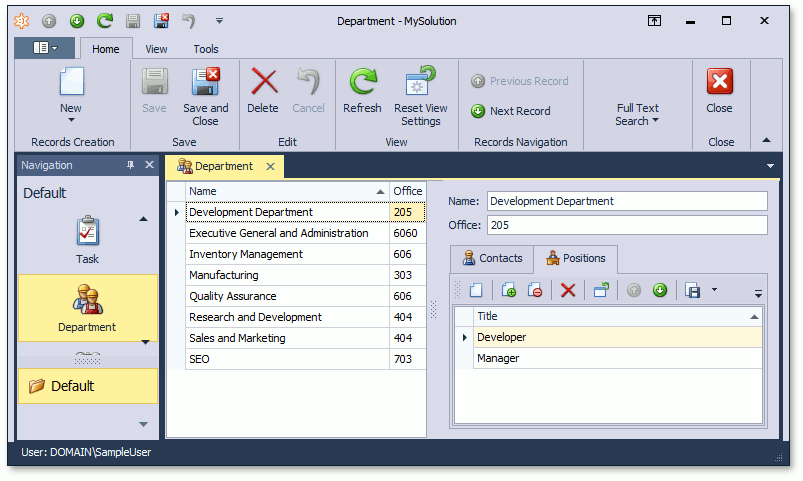
ASP.NET Application
ASP.NET应用程序

In the WinForms application, use the Save ( ) or SaveAndClose (
 ) buttons on the toolbar to commit changes made in the Detail View. To cancel the changes, use the Cancel (
 ) button.
在 WinForms 应用程序中,使用工具栏上的"保存(btn_Save)"或"保存并关闭(btn_SaveClose)"按钮提交在"详细信息视图"中所做的更改。要取消更改,请使用"取消(btn_Cancel)"按钮。
Note 注意
You can specify the Detail View that should be displayed alongside the List View (see ListView.DetailViewId).
您可以指定应在列表视图旁边显示的详细信息视图(请参阅 listView.详细信息视图Id)。
To specify the Detail View location, use the IModelSplitLayout.Direction and IModelListViewSplitLayout.ViewsOrder properties of the ListView | SplitLayout node.
要指定详细视图位置,请使用 Imodel 拆分布局.方向和 IModellist 视图拆分布局。视图顺序属性的列表视图 |拆分布局节点。
The Reset View Settings Action resets settings for both List and Detail Views in the ListViewAndDetailView display mode.
"重置视图设置"操作在"列表视图和详细信息视图"显示模式下重置列表视图和详细信息视图的设置。
In the ASP.NET Application, the IModelListViewWeb.DetailRowMode option is similar to MasterDetailMode, but it allows you to show a Detail View in a List View's Detail Row.
在ASP.NET应用程序中,IModelListViewWeb.detailRowMode 选项与"主详细信息模式"类似,但它允许您在列表视图的"详细信息行"中显示详细信息视图。
You can see the changes made in this lesson in the Model Editor invoked for the Model.DesignedDiffs.xafml file located in the Main Demo | MainDemo.Module project and the Model.DesignedDiffs.xafml file located in the Main Demo | MainDemo.Module.Web project. The MainDemo application is installed in %PUBLIC%\Documents\DevExpress Demos 19.2\Components\eXpressApp Framework\MainDemo by default. The ASP.NET version is available online at http://demos.devexpress.com/XAF/MainDemo/
您可以在本课中为模型调用的模型编辑器中所做的更改。MainDemo.模块项目和模型.设计Diffs.xafml文件位于主演示 |MainDemo.模块.Web项目。主演示应用程序安装在%PUBLIC%\Documents\DevExpress Demos 19.2\Components\eXpressApp Framework\MainDemo by default. The ASP.NET version is available online at http://demos.devexpress.com/XAF/MainDemo/
.
Display a Detail View with a List View 主子视图-列表视图与详细信息视图同时显示的更多相关文章
- Add an Editor to a Detail View 将编辑器添加到详细信息视图
In this lesson, you will learn how to add an editor to a Detail View. For this purpose, the Departme ...
- How to: Specify a Display Member (for a Lookup Editor, Detail Form Caption, etc.)如何:指定显示成员(用于查找编辑器、详细信息表单标题等)
Each business object used in an XAF application should have a default property. The default property ...
- android 给LinearLayout中添加一定数量的控件,并让着一定数量的控件从右到左移动,每隔若干秒停顿一下,最后一个view链接第一个view,然后继续移动循环往复,形成一个死循环简单动画效果
主类:IndexAnimationLinearLayout.java package com.yw.sortlistview; import java.util.ArrayList; import j ...
- Don’t Put View Code Into Your View Controller别把View创建的代码放在VC中(swift)
Don't Put Into Your View Controller别把View创建的代码放在VC中html, body {overflow-x: initial !important;}.Code ...
- 获取View的截图-将View转换为Bitmap对象
开发中,有时候需要获取View的截图来做动画来达到动画流程的目的 原理:将View的内容画到一个Bitmap画布上,然后取出 下面封装了一个从View生成Bitmap的工具类 /** * 将View转 ...
- 创建控制器的方法、控制器加载view过程、控制器view的生命周期、多控制器组合
在介绍四大对象的那篇博客中,可以基本了解到程序启动的过程: main-->UIApplicationMain-->创建UIApplication的实例和app代理AppDelegate的实 ...
- Presenting view controllers on detached view controllers is discouraged <CallViewController: 0x14676e240>.
今天在优化app时,发现程序出现这种警告:“ Presenting view controllers on detached view controllers is discouraged <C ...
- 截取视图某一段另存为部分视图(Partial View)
在做ASP.NET MVC后台管理程序时,根据程序需要,Isus.NET需要实现一个功能,就是动态截取视图某一段另存为部分视图Partial View. 思路为在视图中,使用jQury的程序截图以及P ...
- The method onClick(View) of type new View.OnClickListener(){} must override a superclass
最近在做一个jWebSocket Android客户端的Demo时遇到如下错误: ok —————— 最近在做一个jWebSocket Android客户端的Demo时遇到如下错误: ".. ...
随机推荐
- Git之将master合并到自己分支
工作中常常需要将master合并到自己的分支,这次就记录一下这个过程. 1.切换到master主分支上 git checkout master 2.将master更新的代码pull到本地 git pu ...
- MPV源码探究:背景及准备工作
背景及准备工作 一点历史 古有魏蜀吴三分天下,今有 Mplayer.MPC.VLC 三分天下.这个世界观太庞大,忍不住先讲一点多媒体播放器的历史.实际上目前市面上的开源播放器主要基于三种技术栈: Mp ...
- Ubuntu : apt 命令
apt 命令是一个功能强大的命令行工具,它不仅可以更新软件包列表索引.执行安装新软件包.升级现有软件包,还能够升级整个 Ubuntu 系统(apt 是 Debian 系操作系统的包管理工具).与更专业 ...
- C语言程序设计100例之(25):确定进制
例25 确定进制 问题描述 6*9 = 42 对于十进制来说是错误的,但是对于13进制来说是正确的.即 6(13)* 9(13)= 42(13),因为,在十三进制中,42 = 4 * 13 + ...
- Make a Property Calculable 使属性可计算
In this lesson, you will learn how to manage calculated properties. For this purpose, the Payment cl ...
- Sqoop数据传递
1.环境准备:打开Hadoop.Mysql jps cd /apps/hadoop/sbin ./start-all.sh sudo service mysql start mysql -u root ...
- 记一次在node.js中使用crypto的createCipheriv方法进行加密时所遇到的坑
Node.js的crypto模块提供了一组包括对OpenSSL的哈希.HMAC.加密.解密.签名,以及验证等一整套功能的封装.具体的使用方法可以参考这篇文章中的描述:node.js_crypto模块. ...
- VC遍历访问目录下的文件
访问目录文件夹下的文件是经常需要的操作,C/C++和win32接口都没有提供直接调用的函数.在这里总结了几个经常用到的函数,通过MFC的CFileFind函数递归遍历实现,包括以下几个功能函数: 查找 ...
- 通过传XML格式导入到ORACLE的销售订单
procedure IMPORT_OM(p_unid varchar2, --流程ID p_CUSTOMER_PO varchar2, --合同编号 p_xmlstr varchar2, --clob ...
- 运用arcgis sever 进行地图发布
1.对已有的文件在arcgis中进行编辑:如图 2.从file下拉的目录中找到share as 点击 3.选择自己的manage sever 填写好名称 4.继续下一步 5.重点看capabiliti ...