
JS设置和获取盒模型的宽和高
JS设置和获取盒模型的宽和高
dom.style.width/height:只能取出内联样式的宽度和高度
dom.currentStyle.width/height:获取即时的计算的样式,但是只有IE支持
window.getComputedStyle(dom).width:获取即时计算的样式,支持其他浏览器,兼容性更好
dom.getBoundingClientRect( ).width/height:计算盒模型在页面中的绝对位置,比较少用。
dom.offsetWidth/offectHeight:返回元素实际大小
一、dom.style.width/height
这种方式只能取到dom元素内联样式所设置的宽高,也就是说如果该节点的样式是在style标签中或是外部的CSS样式表中的话,通过这种方法是没办法获取dom的宽高的。
实例:
在这个例子中给box1使用<style>设置样式,给box2使用内联样式设置宽高。
所以在使用 console.log(document.getElementById(" ").style.width/height) 只能返回box2的宽度和高度。
<!DOCTYPE html>

<html lang="zh">

<head>

    <meta charset="UTF-8">

    <title>获取盒子宽高</title>

    <style>

    #box1{

        color: white;

        font-size:50px;

        text-align: center;

        line-height:185px;

        width:300px;height:185px;

        background: plum;

        margin:99px auto;

    }

    </style>

</head>

<body>

    <div id="box1">盒子一</div>

    <div id="box2" style="width:300px;

        height:185px;

        background:pink;

        color: white;

        font-size:50px;

        text-align: center;

        line-height:185px;

        margin: auto;">盒子二</div>

</body>

</html>

控制台输出效果:
只可以获取box2的宽高width:300px;height:185px;

二、dom.currentStyle.width/height
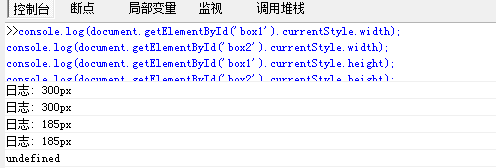
这种方式获取的是在页面渲染完成后的结果,意味着无论以哪种方式,内联也好,style标签中也好,都可以获取的到。但是这种方法只能在IE浏览器中使用。
<!DOCTYPE html>

<html lang="zh">

<head>

    <meta charset="UTF-8">

    <title>获取盒子宽高</title>

    <style>

    #box1{

        color: white;

        font-size:50px;

        text-align: center;

        line-height:185px;

        width:300px;height:185px;

        background: plum;

        margin:99px auto;

    }

    </style>

</head>

<body>

    <div id="box1">盒子一</div>

    <div id="box2" style="width:300px;

        height:185px;

        background:pink;

        color: white;

        font-size:50px;

        text-align: center;

        line-height:185px;

        margin: auto;">盒子二</div>

</body>

</html>

IE控制台输出:
三、window.getComputedStyle(dom).width/height
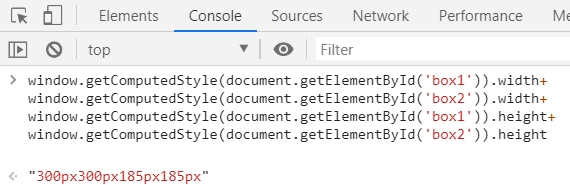
这种方式的原理和方式二是一样的,都可以在任何方式在获取页面在完成渲染之后的结果。相比dom.currentStyle.width/height方式而言,这种方式可以兼容更多的浏览器,不仅仅是IE浏览器。
<!DOCTYPE html>

<html lang="zh">

<head>

    <meta charset="UTF-8">

    <title>获取盒子宽高</title>

    <style>

    #box1{

        color: white;

        font-size:50px;

        text-align: center;

        line-height:185px;

        width:300px;height:185px;

        background: plum;

        margin:99px auto;

    }

    </style>

</head>

<body>

    <div id="box1">盒子一</div>

    <div id="box2" style="width:300px;

        height:185px;

        background:pink;

        color: white;

        font-size:50px;

        text-align: center;

        line-height:185px;

        margin: auto;">盒子二</div>

</body>

</html>
firefox浏览器中的效果:

Chrome浏览器中的效果:
IE七八不支持:

四、dom.getBoundingClientRect( ).width/height
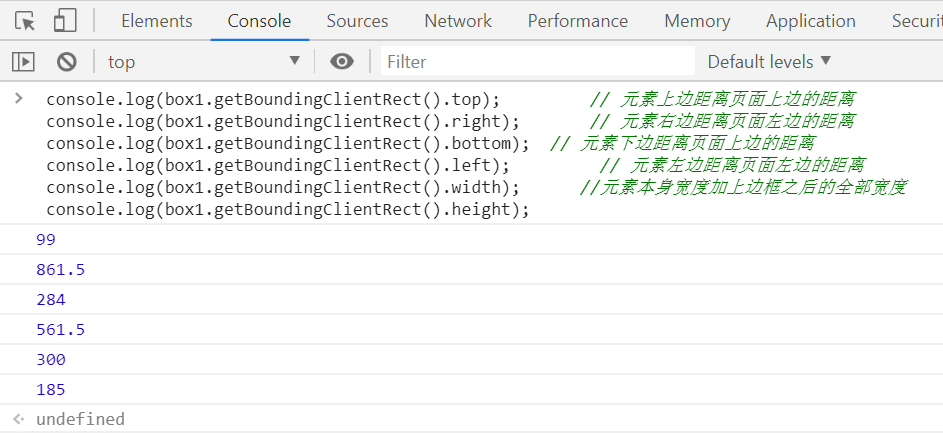
这个方法可以获得运行后的属性。一般用于计算一个元素的绝对定位。返回一个矩形对象,包含四个属性:left、top、right和bottom。分别表示元素各边与页面上边和左边的距离。
console.log(box.getBoundingClientRect().top); // 元素上边距离页面上边的距离
console.log(box.getBoundingClientRect().right); // 元素右边距离页面左边的距离
console.log(box.getBoundingClientRect().bottom); // 元素下边距离页面上边的距离
console.log(box.getBoundingClientRect().left); // 元素左边距离页面左边的距离
console.log(box.getBoundingClientRect().width); //元素本身宽度加上边框之后的全部宽度
console.log(box.getBoundingClientRect().height); //元素本身高度加上边框之后的宽度

#box1{

    	color: white;

    	font-size:50px;

    	text-align: center;

    	line-height:185px;

        width:300px;height:185px;

        background: plum;

        margin:99px auto;

    }
五、dom.offsetWidth/offectHeight
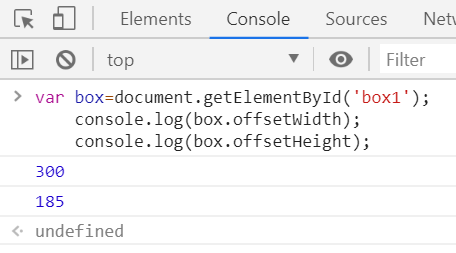
这组方法可以 返回元素实际大小,包含边框,内边距和滚动条。返回元素大小,默认单位是px。如果没有设置任何CSS宽度和高度,也会在计算后得到宽度和高度。理解offsetWidth和offsetHeight设置的元素实际大小:
- 设置边框,输出值等于原本大小+边框大小;
- 设置内边距,输出值等于原本大小+内边距大小;
- 设置外边距 / 滚动条,输出值无变化等于原本大小;
对于元素大小的获取,一般是块级(block)元素并且以设置了CSS大小的元素较为方便。如果是内联元素(inline)或者没有设置大小的元素就尤为麻烦,所以,建议使用的时候注意。
#box1{

        color: white;

        font-size:50px;

        text-align: center;

        line-height:185px;

        width:300px;height:185px;

        background: plum;

        margin:99px auto;

    }

控制台输出:
---恢复内容结束---
JS设置和获取盒模型的宽和高的更多相关文章
- 使用js如何设置、获取盒模型的宽和高
第一种: dom.style.width/height 这种方法只能获取使用内联样式的元素的宽和高. 第二种: dom.currentStyle.width/height 这种方法获取的是浏览器渲染以 ...
- JS如何设置和获取盒模型对应的宽和高
㈠方式一:通过DOM节点的 style 样式获取 dom.style.width/height 只能获取使用内联样式的元素的宽和高. <!DOCTYPE html> <html ...
- js设置、获取单值cookie和多值cookie
js设置.获取单值cookie和多值cookie,代码如下: var CookieUtil = (function () { var Cookie = function () { // 获取单值coo ...
- 【Android】获取控件的宽和高
有时候我们须要在Activity的时候获取控件的宽和高来做一些操作,以下介绍三种获取宽和高的方式: 1. onWindowFocusChanged @Override public void onWi ...
- JS获取盒模型对应的宽高
## 获取内联样式宽高 只能获取内联设置的样式,在style或者.css文件中设置的无法获取 let div = document.querySelect('.test'); let width = ...
- js设置与获取Cookie
/*设置与获取Cookie*/ var Cookie ={} Cookie.write = function(key, value, duration){ var d = new Date(); d. ...
- 获取jsp页面的宽和高
var winWidth; var winHeight; function getResult() { if(window.innerWidth) { winWidth=window.innerWid ...
- POI获取单元格的宽和高
获取单元格的宽,即获取所在列的宽.先获取单元格所在的sheet:cell.getSheet() sheet.getColumnWidth( cell.getColumnIndex() ) 单位不是像 ...
- js设置、获取、清除cookie
<!DOCTYPE html> <html lang="en"> <head> <meta charset="utf-8&quo ...
随机推荐
- ┱Python中关于urllib和urllib2的问题
python3对urllib和urllib2进行了重构主要拆分成了:1.urllib.request 1.urllib.request.Request(url, data=None, headers= ...
- win10 cnpm安装完之后一直说不是内部命令的原因
找到cnpm的默认安装路径 一般默认的是 D:\Program Files\nodejs\node_modules 然后添加环境变量中 win10是在系统环境变量中切记不是在用户变量中.保存之后,重新 ...
- MongoDB 学习笔记之 手动预先分片
手动预先分片: 目的:手动预先分片是为了防止未来chunk的移动,减少IO. sh.shardCollection("shop.users",{"userId" ...
- 利用C++实现模块隐藏(R3层断链)
一.模块隐藏的实现原理 普通API查找模块实现思路:其通过查询在R3中的PEB(Process Environment Block 进程环境块)与TEB(Thread Environment Bloc ...
- 从0开始学FreeRTOS-(列表&列表项)-6
# FreeRTOS列表&列表项的源码解读 第一次看列表与列表项的时候,感觉很像是链表,虽然我自己的链表也不太会,但是就是感觉很像. 在FreeRTOS中,列表与列表项使用得非常多,是Free ...
- 并发新构件之DelayQueue:延时队列
DelayQueue:延时队列,首先是一个队列,所以可以持有对象,但是仅限于实现了Delayed接口的对象.重写getDelay()和compareTo()(因为要比较)方法: 通俗来讲:延时队列的就 ...
- requests模块(get请求)篇
- HTTP for Humans,更简洁更友好- 继承了urllib的所有特征- 底层使用的是urllib3- 开源地址: https://github.com/requests/requests- ...
- 了解ajax基本爬取方式
'''爬去豆瓣电影数据了解ajax的基本爬去方式 ''' from urllib import requestimport jsonimport ssl url = "https://mov ...
- unittest生成测试报告
1.先导入HTMLTestRunner模块 2.实例一脚本如下 #coding=utf-8 import unittest import HTMLTestRunner #封装批量执行用例 def al ...
- PHP array_replace_recursive
1.函数的作用:比较键值,递归的替代数组中的元素 2.函数的参数: @params array $array1 @params array $array2 @params array $array3 ...