
Rest微服务案例
数据库
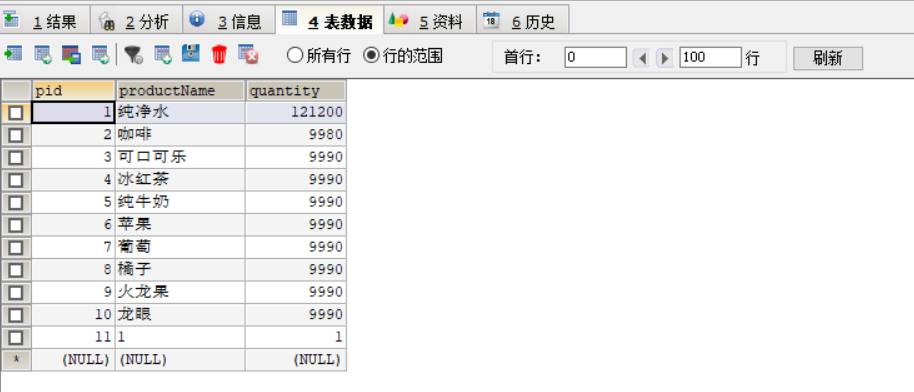
数据库名称为Product;
创建api子工程,项目名为springcloud_api
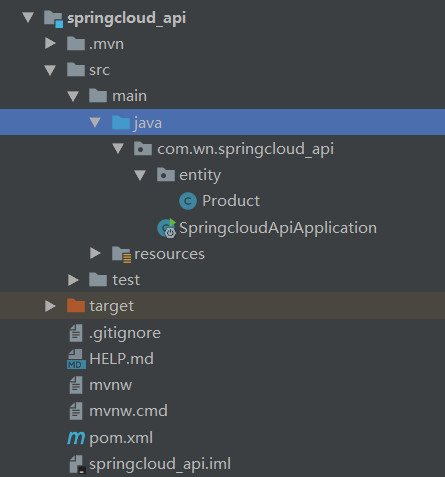
Product实体类
public class Product implements Serializable {

    private Integer pid;

    private String productName;

    private Integer quantity;

    public Product(Integer pid, String productname, Integer quantity) {

        this.pid = pid;

        this.productName = productname;

        this.quantity = quantity;

    }

    public Product() {

        super();

    }

    public Integer getPid() {

        return pid;

    }

    public void setPid(Integer pid) {

        this.pid = pid;

    }

    public String getProductName() {

        return productName;

    }

    public void setProductName(String productName) {

        this.productName = productName;

    }

    public Integer getQuantity() {

        return quantity;

    }

    public void setQuantity(Integer quantity) {

        this.quantity = quantity;

    }

}
公共模块可以达到通用目的,也即需要用到部门实体的话,不用每个工程都定义一份,直接引用本模块即可。
创建生产者,名称为springcloud_provider
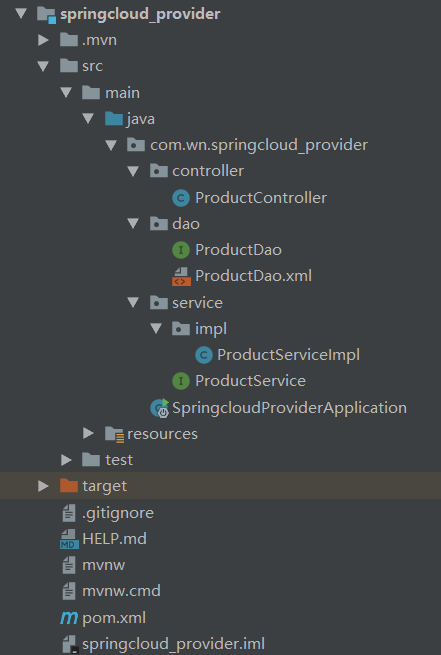
导入依赖
<dependencies>

        <!-- mybatis-spring -->

        <dependency>

            <groupId>org.mybatis.spring.boot</groupId>

            <artifactId>mybatis-spring-boot-starter</artifactId>

            <version>2.0.</version>

        </dependency>

        <dependency>

            <groupId>org.springframework.boot</groupId>

            <artifactId>spring-boot-starter-web</artifactId>

        </dependency>

        <dependency>

            <groupId>org.springframework.cloud</groupId>

            <artifactId>spring-cloud-config-server</artifactId>

        </dependency>

        <dependency>

            <groupId>org.springframework.boot</groupId>

            <artifactId>spring-boot-starter-test</artifactId>

            <scope>test</scope>

            <exclusions>

                <exclusion>

                    <groupId>org.junit.vintage</groupId>

                    <artifactId>junit-vintage-engine</artifactId>

                </exclusion>

            </exclusions>

        </dependency>

        <dependency>

            <groupId>com.wn</groupId>

            <artifactId>springcloud_api</artifactId>

            <version>0.0.-SNAPSHOT</version>

            <scope>compile</scope>

        </dependency>

        <dependency>

            <groupId>org.springframework.cloud</groupId>

            <artifactId>spring-cloud-config-server</artifactId>

        </dependency>

        <!-- mysql -->

        <dependency>

            <groupId>mysql</groupId>

            <artifactId>mysql-connector-java</artifactId>

            <version>5.1.</version>

        </dependency>

        <dependency>

            <groupId>org.springframework.boot</groupId>

            <artifactId>spring-boot-starter-jetty</artifactId>

        </dependency>

    </dependencies>
application.properties文件
spring.datasource.driver-class-name=com.mysql.jdbc.Driver

spring.datasource.url=jdbc:mysql:///invoicingsystem

spring.datasource.username=root

spring.datasource.password=

spring.jpa.show-sql=true

mybatis.mapper-locations=classpath:mybatis/mapper/*.xml
dao接口层
@Repository("productDao")

public interface ProductDao {

    //查询全部

    public List<Product> getAll();

    //根据id查询列表

    public Product getid(@Param("pid") Integer pid);

}
dao.xml文件
<?xml version="1.0" encoding="UTF-8"?>

<!DOCTYPE mapper

        PUBLIC "-//mybatis.org//DTD mapper 3.0//EN"

        "http://mybatis.org/dtd/mybatis-3-mapper.dtd">

<!-- mapper为映射的根节点,namespace指定Dao接口的完整类名

mybatis会依据这个接口动态创建一个实现类去实现这个接口,

而这个实现类是一个Mapper对象-->

<mapper namespace="com.wn.springcloud_provider.dao.ProductDao">

    <resultMap id="MapList" type="com.wn.springcloud_api.entity.Product">

        <id property="pid" column="pid"></id>

        <result property="productName" column="productName"></result>

        <result property="quantity" column="quantity"></result>

    </resultMap>

    <!--绑定商品名称下拉框-->

    <select id="getAll" resultType="com.wn.springcloud_api.entity.Product">

        SELECT * FROM product

    </select>

    <select id="getid" resultType="com.wn.springcloud_api.entity.Product">

        SELECT * FROM product WHERE pid=#{pid}

    </select>

</mapper>
service接口层
public interface ProductService {

    //查询全部

    public List<Product> getAll();

    //根据id查询列表

    public Product getid(Integer pid);

}
service接口实现层
@Service("productServices")

public class ProductServiceImpl implements ProductService {

    @Resource(name = "productDao")

    private ProductDao dao;

    @Override

    public List<Product> getAll() {

        return dao.getAll();

    }

    @Override

    public Product getid(Integer pid) {

        return dao.getid(pid);

    }

}
controller层
@Controller

@RequestMapping("/product")

public class ProductController {

    @Resource(name = "productServices")

    private ProductService service;

    //查询全部

    @RequestMapping(value = "/getAll",method = RequestMethod.GET)

    @ResponseBody

    public List<Product> getAll() {

        List<Product> all = service.getAll();

        for (Product product:all){

            System.out.println(product.getProductName());

        }

        return all;

    }

    @RequestMapping(value = "/getid/{pid}",method = RequestMethod.GET)

    @ResponseBody

    public Product getid(@PathVariable("pid") Integer pid){

        Product getid = service.getid(pid);

        return getid;

    }

}
启动类
@SpringBootApplication

@MapperScan("com.wn.springcloud_provider.*")

public class SpringcloudProviderApplication {

    public static void main(String[] args) {

        SpringApplication.run(SpringcloudProviderApplication.class, args);

    }

}
实现结果


创建消费者,名称为springcloud_consumer
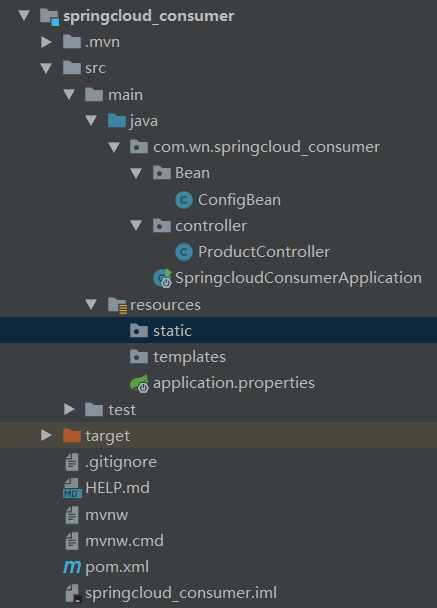
导入依赖
<dependencies>

        <dependency>

            <groupId>org.springframework.boot</groupId>

            <artifactId>spring-boot-starter-web</artifactId>

        </dependency>

        <dependency>

            <groupId>org.springframework.cloud</groupId>

            <artifactId>spring-cloud-config-server</artifactId>

        </dependency>

        <dependency>

            <groupId>org.springframework.boot</groupId>

            <artifactId>spring-boot-starter-test</artifactId>

            <scope>test</scope>

            <exclusions>

                <exclusion>

                    <groupId>org.junit.vintage</groupId>

                    <artifactId>junit-vintage-engine</artifactId>

                </exclusion>

            </exclusions>

        </dependency>

        <dependency>

            <groupId>com.wn</groupId>

            <artifactId>springcloud_api</artifactId>

            <version>0.0.-SNAPSHOT</version>

            <scope>compile</scope>

        </dependency>

    </dependencies>
application.properties文件
server.port=
配置类
package com.wn.springcloud_consumer.Bean;

import org.springframework.context.annotation.Bean;

import org.springframework.context.annotation.Configuration;

import org.springframework.web.client.RestTemplate;

@Configuration

public class ConfigBean {

    @Bean

    public RestTemplate getRestTemplate(){

        return new RestTemplate();

    }

}
RestTemplate提供了多种便捷访问远程Http服务的方法, 是一种简单便捷的访问restful服务模板类,是Spring提供的用于访问Rest服务的客户端模板工具集
消费者的controller
package com.wn.springcloud_consumer.controller;

import com.wn.springcloud_api.entity.Product;

import org.springframework.beans.factory.annotation.Autowired;

import org.springframework.web.bind.annotation.PathVariable;

import org.springframework.web.bind.annotation.RequestMapping;

import org.springframework.web.bind.annotation.RestController;

import org.springframework.web.client.RestTemplate;

import java.util.List;

@RestController

public class ProductController {

    private static final String REST_URL_PREFIX="http://localhost:8080";

    @Autowired

    private RestTemplate restTemplate;

    //查询全部

    @SuppressWarnings("unckecked")

    @RequestMapping("/controller/product/getAll")

    public List<Product> getAll(){

        System.out.println("--------------------");

        return restTemplate.getForObject(REST_URL_PREFIX+"/product/getAll",List.class);

    }

    //根据id查询列表

    @RequestMapping("/controller/product/getid/{pid}")

    public Product getid(@PathVariable("pid") Integer pid){

        return restTemplate.getForObject(REST_URL_PREFIX+"/product/getid/"+pid,Product.class);

    }

}
启动类
@SpringBootApplication

public class SpringcloudConsumerApplication {

    public static void main(String[] args) {

        SpringApplication.run(SpringcloudConsumerApplication.class, args);

    }

}
实现结果


Rest微服务案例的更多相关文章
- 基于Kubernates微服务案例
企业业务上云的三种架构 容器的三个视角 从运维角度 数据工程师角度 开发角度微服务化 12 Factor Related Reference: https://kubernetes.io/https: ...
- java框架之SpringCloud(2)-Rest微服务案例
在上一章节已经对微服务与 SpringCloud 做了介绍,为方便后面学习,下面以 Dept 部门模块为例做一个微服务通用 Demo —— Consumer 消费者(Client) 通过 REST 调 ...
- Rest微服务案例(二)
1. 创建父工程 Maven Project 新建父工程microservicecloud,packaging是pom模式,pom.xml内容如下: <!-- SpringBoot父依赖 --& ...
- SpringCloud学习(2)——Rest微服务案例
创建父工程: microservicecloud 创建公共模块api:microservicecloudapi SQL脚本: 此学习路线总共创建3个库, 分别为clouddb01, clouddb0 ...
- 从Uber微服务看最佳实践如何炼成?
导读:Uber成长非常迅速,工程师团队快速扩充,据说Uber有2000名工程师,8000个代码仓库,部署了1000多个微服务.微服务架构是Uber应对技术团队快速增长,功能快速上线很出色的解决方案.本 ...
- 看完这篇微服务架构设计思想,90%的Java程序员都收藏了
本博客强烈推荐: Java电子书高清PDF集合免费下载 https://www.cnblogs.com/yuxiang1/p/12099324.html 微服务 软件架构是一个包含各种组织的系统组织, ...
- 【DDD/CQRS/微服务架构案例】在Ubuntu 14.04.4 LTS中运行WeText项目的服务端
在<WeText项目:一个基于.NET实现的DDD.CQRS与微服务架构的演示案例>文章中,我介绍了自己用Visual Studio 2015(C# 6.0 with .NET Frame ...
- WeText项目:一个基于.NET实现的DDD、CQRS与微服务架构的演示案例
最近出于工作需要,了解了一下微服务架构(Microservice Architecture,MSA).我经过两周业余时间的努力,凭着自己对微服务架构的理解,从无到有,基于.NET打造了一个演示微服务架 ...
- SpringCloud(1)---基于RestTemplate微服务项目案例
基于RestTemplate微服务项目 在写SpringCloud搭建微服务之前,我想先搭建一个不通过springcloud只通过SpringBoot和Mybatis进行模块之间额通讯.然后在此基础上 ...
随机推荐
- python模块——socket
实例一. server: #socket套接字(IP + 端口号)(qq,wechat 发送接收消息依靠socket模块),cs架构import socketserver = socket.socke ...
- 【html css js】实现一个简易日历
——[效果预览] 实现了日历最基础的功能,当前日期红色显示,可通过上方的左右按钮查看上一月或下一月的日期. ——[代码部分] 1. HTML <body> <div class=&q ...
- Geometry 判断几何是否被另一个几何/线段分割成多段
如下图,如何判断几何多边形A被多边形B,切割为多段几何? 几何A被几何B切割 1. 获取几何A与几何B的交集C var intersectGeometry = new CombinedGeometry ...
- [笔记] HOW2J.CN网站记录的java笔记_第四部分_HTML
1.写一个显示Hello World的网页, <html> <body> <p>Hello World</p> </body> </h ...
- spark安装配置
一.下载解压 二.配置 (假设已经配置了Java.Hadoop) 1.环境变量 2.spark配置 进入spark安装目录,复制文件 编辑spark-env.sh文件,在文件中添加如下信息(括号中路径 ...
- nyoj 27-水池数目(BFS, DFS)
27-水池数目 内存限制:64MB 时间限制:3000ms Special Judge: No accepted:17 submit:22 题目描述: 南阳理工学院校园里有一些小河和一些湖泊,现在,我 ...
- Ubuntu 16.04 安装Maven3.3.9
1 下载地址 http://maven.apache.org/download.cgi 2 将下载到的apache-maven-3.3.9-bin.tar.gz文件上传到/temp目录下,然后切换到r ...
- JavaScript笔记八
1.原型(prototype) - 创建一个函数以后,解析器都会默认在函数中添加一个数prototype prototype属性指向的是一个对象,这个对象我们称为原型对象. - 当函数作为构造函数使用 ...
- Fortran输入输出与声明--xdd
1.建议程序总体格式: program ex1. ... end progr 2.想要打出 My name is "xdd". write(*,*)" My name i ...
- React Native从零开始构建项目(2019)
环境搭建,参考官网 https://reactnative.cn/ 安装 Xcode Android Studio 目的,实现本地热重载开发,使用vsCode 运行失败,重新执行react-nativ ...