
[TimLinux] myblog 数据表格显示
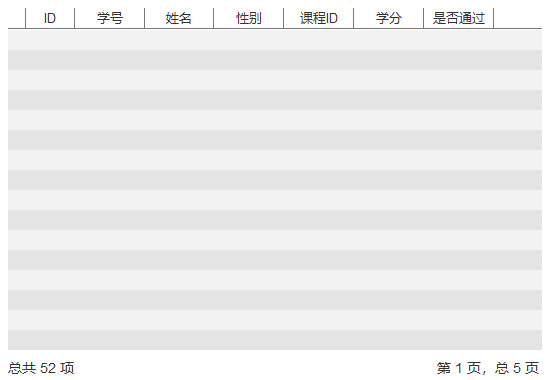
1. 设计
2. 数据
创建数据库用户:
CREATE USER IF NOT EXISTS 'user1'@'MyBlogPwd123';

GRANT ALL ON d1.* TO 'user1'@'%';
创建数据库d1:
CREATE DATABASE IF NOT EXISTS d1 DEFAULT CHARSET = utf8;
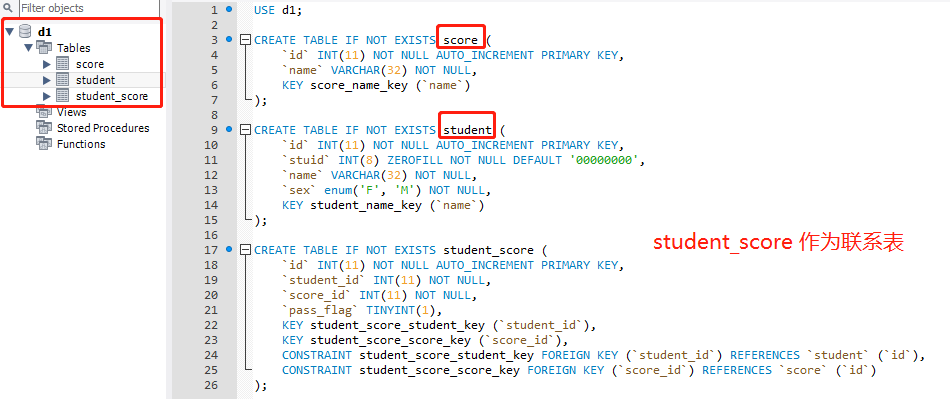
创建数据表:
USE d1;

CREATE TABLE IF NOT EXISTS score (

    `id` INT(11) NOT NULL AUTO_INCREMENT PRIMARY KEY,

    `name` VARCHAR(32) NOT NULL,

    KEY score_name_key (`name`),

    UNIQUE (`name`)

);

CREATE TABLE IF NOT EXISTS student (

    `id` INT(11) NOT NULL AUTO_INCREMENT PRIMARY KEY,

    `stuid` INT(8) ZEROFILL NOT NULL DEFAULT '',

    `name` VARCHAR(32) NOT NULL,

    `sex` BOOLEAN NOT NULL,

    KEY student_name_key (`name`),

    UNIQUE (`stuid`)

);

CREATE TABLE IF NOT EXISTS student_score (

    `id` INT(11) NOT NULL AUTO_INCREMENT PRIMARY KEY,

    `student_id` INT(11) NOT NULL,

    `score_id` INT(11) NOT NULL,

    `pass_flag` BOOLEAN,

    KEY student_score_student_key (`student_id`),

    KEY student_score_score_key (`score_id`),

    CONSTRAINT student_score_student_key FOREIGN KEY (`student_id`) REFERENCES `student` (`id`),

    CONSTRAINT student_score_score_key FOREIGN KEY (`score_id`) REFERENCES `score` (`id`)

);
导入数据:
INSERT INTO score VALUES

    (1, '高等数学'),

    (2, '军事理论'),

    (3, '大学英语'),

    (4, '离散数学'),

    (5, '数据库导论');

INSERT INTO student VALUES

    (1, '', '赵敏', 0),

    (2, '', '周芷若', 0),

    (3, '', '小昭', 0),

    (4, '', '殷离', 1),

    (5, '', '张翠山', 1),

    (6, '', '谢逊', 1),

    (7, '', '灭绝师太', 0),

    (8, '', '张无忌', 1),

    (9, '', '殷素素', 0),

    (10, '', '陈友谅', 1);

INSERT INTO student_score (student_id, score_id, pass_flag) VALUES

    (1, 1, 1), (1, 2, 0), (1, 3, 1), (1, 4, 1), (1, 5, 0),

    (2, 1, 1), (2, 2, 1), (2, 3, 1), (2, 4, 1), (2, 5, 1),

    (3, 1, 0), (3, 2, 1), (3, 3, 1), (3, 4, 1), (3, 5, 0),

    (4, 1, 1), (4, 2, 0), (4, 3, 1), (4, 4, 1), (4, 5, 0),

    (5, 1, 1), (5, 2, 0), (5, 3, 1), (5, 4, 1), (5, 5, 0),

    (6, 1, 1), (6, 2, 0), (6, 3, 1), (6, 4, 1), (6, 5, 0),

    (7, 1, 1), (7, 2, 0), (7, 3, 1), (7, 4, 1), (7, 5, 0),

    (8, 1, 1), (8, 2, 0), (8, 3, 1), (8, 4, 1), (8, 5, 0),

    (9, 1, 1), (9, 2, 0), (9, 3, 1), (9, 4, 1), (9, 5, 0),

    (10, 1, 1), (10, 2, 0), (10, 3, 1), (10, 4, 1), (10, 5, 0);
3. 结构
ttt
4. 实现
polls/models/__init__.py:
from .student import Score, Student, StudentScore
polls/models/student.py
from django.db import models

class Score(models.Model):

    name = models.CharField(max_length=32, null=False, blank=False, unique=True)

    def __str__(self):

        return self.name

    class Meta:

        db_table = 'score'

class Student(models.Model):

    stu_id = models.IntegerField(null=False, blank=False, default='')

    name = models.CharField(max_length=32, null=False, blank=False, unique=True)

    sex = models.BooleanField()  # True: 男, False: 女

    score = models.ManyToManyField(Score, through="StudentScore")

    def __str__(self):

        return self.name

    class Meta:

        db_table = "student"

class StudentScore(models.Model):

    student = models.ForeignKey(Student, on_delete=models.CASCADE)

    score = models.ForeignKey(Score, on_delete=models.CASCADE)

    pass_flag = models.BooleanField()  # True: pass, False: fail

    def __str__(self):

        return "%s %s" % (self.student.name, self.score.name)

    class Meta:

        db_table = "student_score"
开始迁移数据:
D:\pycharm\myblog>python manage.py makemigrations

Migrations for 'polls':

  polls\migrations\0001_initial.py

    - Create model Score

    - Create model Student

    - Create model StudentScore

    - Add field score to student

D:\pycharm\myblog>python manage.py migrate

Operations to perform:

  Apply all migrations: admin, auth, contenttypes, polls, sessions

Running migrations:

  Applying contenttypes.0001_initial... OK

  Applying auth.0001_initial... OK

  Applying admin.0001_initial... OK

  Applying admin.0002_logentry_remove_auto_add... OK

  Applying contenttypes.0002_remove_content_type_name... OK

  Applying auth.0002_alter_permission_name_max_length... OK

  Applying auth.0003_alter_user_email_max_length... OK

  Applying auth.0004_alter_user_username_opts... OK

  Applying auth.0005_alter_user_last_login_null... OK

  Applying auth.0006_require_contenttypes_0002... OK

  Applying auth.0007_alter_validators_add_error_messages... OK

  Applying auth.0008_alter_user_username_max_length... OK

  Applying auth.0009_alter_user_last_name_max_length... OK

  Applying polls.0001_initial... OK

  Applying sessions.0001_initial... OK
进入MySQL导入默认数据:python manange.py dbshell,执行上面提到的INSERT INTO 语句
更新polls/views.py:
ttt
5. 效果
ttt
[TimLinux] myblog 数据表格显示的更多相关文章
- [TimLinux] myblog 首页创建
1. 设计 2. 结构 3. 实现 templates/common/layout.html: <!DOCTYPE html> <html lang="zh"&g ...
- [TimLinux] myblog 创建第一个app
1. 项目结构 项目地址:https://github.com/timscm/myblog.git 2. 启动项目 通过pycharm启动项目,进入调试模式: "D:\Program Fil ...
- .net 数据表格显示控件
版权声明:本文为博主原创文章.未经博主同意不得转载. https://blog.csdn.net/chenjinge7/article/details/30470609 1. GridView 控件 ...
- [TimLinux] myblog 页面Axure设计
1. 导航 2. 首页主体 3. 侧边栏 4. 页尾 5. 使用工具 Axure RP 8.0.0.3312 Pro版本.
- layui之普通数据表格显示switch选择表单组件
先看效果: 一般这写什么switch组件,下拉框组件只在表单显示,如果要在其他地方显示就要注意一下细节 默默跳槽一下这个layui,真的蛋疼,每次用它东西都要各种设置东西,无语 接下来看下代码: HT ...
- 初学ExtJs 表格显示后台数据
最近开始接触ExtJs,贴出自己的代码,一个简单的表格显示 版本 3.4.1 需要json包 代码清单1.jsp引入的ExtJs文件 <!-- 资源文件 ExtJs --> <lin ...
- JQuery Easy Ui dataGrid 数据表格
数据表格 - DataGrid 英文文档:http://www.jeasyui.com/documentation/index.php# 继承$.fn.panel.defaults,使用$.fn.da ...
- TP数据访问
重点学习了: 1,ThinkPHP查询数据 2.ThinkPHP添加数据 LianXiController.class.php <?php namespace Home\Controller; ...
- JQuery Easy Ui dataGrid 数据表格 ---制作查询下拉菜单
JQuery Easy Ui dataGrid 数据表格 数据表格 - DataGrid 继承$.fn.panel.defaults,使用$.fn.datagrid.defaults重载默认值.. 数 ...
随机推荐
- Python OpenCV4趣味应用系列(四)---颜色物体实时检测
今天,我们来实现一个视频实时检测颜色物体的小实例,视频中主要有三个颜色物体,我们只检测红色和绿色的球状物体,如下图所示: 第一步需要打开视频(或者摄像头): cap = cv2.VideoCaptur ...
- ASP.NET Core 1.0: 指定Default Page
前不久写过一篇Blog<指定Static File中的文件作为Default Page>,详细参见链接. 然而,今天偶然发现了一个更加简洁的方法,直接使用Response的Redirect ...
- [javascript] Javascript的笔记
1.2019年10月20日12:28:16,学习HOW2J的Javascript, 2.一般见到的缩写js,就是javascript的意思: 3.javascript代码必须放在script标签中,s ...
- python:类3——魔法方法
一.魔法方法特点 被双上下滑线包围 魔法方法是面向对象的Python的一切,如果你不知道魔法方法,说明你还没能意识到面向对象的Python的强大(不是说Python脚本) 通过对制定方法的重写,完全可 ...
- 解构ffmpeg(二)
通过比较DirectShow和ffmpeg两者的FilterGraph,分析ffmpeg的FilterGraph运作. 首先FilterGraph是一个图,图由点和边构成.在FilterGraph中的 ...
- Windows使用Java执行cmd代码
话不多说,直入正题 今天给大家分享下,怎么在Windows上使用Java执行Cmd代码! 首先默认大家都熟悉cmd代码,以及cmd的命令行操作. 直接在main方法中写这一行(需要抛出异常),可以直接 ...
- 20191010-7 alpha week 1/2 Scrum立会报告+燃尽图 05
此作业要求参见:https://edu.cnblogs.com/campus/nenu/2019fall/homework/8750 一.小组情况 队名:扛把子 组长:迟俊文 组员:宋晓丽 梁梦瑶 韩 ...
- 使用Docker搭建maven私服 及常规使用方法
安装-登录-配置 下载镜像 docker pull sonatype/nexus3 运行 docker run -d -p 9998:8081 --name nexus --restart=alway ...
- 容器镜像服务联手 IDE 插件,实现一键部署、持续集成与交付
容器技术提供了一种标准化的交付方式,将应用的代码以及代码环境依赖都打包在一起,成为一个与环境无关的交付物,可以被用在软件生命周期的任何阶段,彻底改变了传统的软件交付方式. 甚至可以说,是在容器技术之后 ...
- 题解-洛谷P2010-回文日期
原题链接: https://www.luogu.org/problem/P2010 题目简述: 牛牛习惯用8位数字表示一个日期,其中,前4位代表年份,接下来2位代表月份,最后22位代表日期.显然:一个 ...