
一个简单的利用 WebClient 异步下载的示例(一)
继上一篇文章 一个简单的利用 HttpClient 异步下载的示例 ,我们知道不管是 HttpClient,还算 WebClient,都不建议每次调用都 new HttpClient,或 new WebClient,而应该尽量重复对象,可以把一个 WebClient(或 HttpClient)理解成一个浏览器,不能没打开一个页面以后,就销毁它,再重新创建一个,这样会有性能损失,而建议一个线程共用一个 WebClient(或 HttpClient)。这一次,我们利用 WebClient 来实现异步下载,这一次,我们增加一个进度条来显示进度。
直接提代码了:
1. TaskDemo101
优化后的 TaskDemo101 类:
     public static class TaskDemo101

    {

        public static string GetRandomUrl()

        {

            string url1 = "http://www.xxx.me/Uploads/image/20130129/2013012920080761761.jpg";

            string url2 = "http://www.xxx.me/Uploads/image/20121222/20121222230686278627.jpg";

            string url3 = "http://www.xxx.me/Uploads/image/20120606/20120606222018461846.jpg";

            string url4 = "http://www.xxx.me/Uploads/image/20121205/20121205224383848384.jpg";

            string url5 = "http://www.xxx.me/Uploads/image/20121205/20121205224251845184.jpg";

            string resultUrl;

            int randomNum = new Random().Next(, );

            switch (randomNum)

            {

                case : resultUrl = url1; break;

                case : resultUrl = url2; break;

                case : resultUrl = url3; break;

                case : resultUrl = url4; break;

                case : resultUrl = url5; break;

                default: throw new Exception("");

            }

            return resultUrl;

        }

        public static string GetSavedFileFullName()

        {

            string targetFolderDestination = Path.Combine(AppDomain.CurrentDomain.BaseDirectory, "downloads\\images\\");

            try

            {

                Directory.CreateDirectory(targetFolderDestination);

            }

            catch (Exception)

            {

                Console.WriteLine("创建文件夹失败!");

            }

            string targetFileDestination = Path.Combine(targetFolderDestination, string.Format("img_{0}.png", DateTime.Now.ToString("yyyy-MM-dd_HH-mm-ss")));

            return targetFileDestination;

        }

        public static async Task<bool> RunByHttpClient(SkyHttpClient skyHttpClient, int id)

        {

            var task = skyHttpClient.DownloadImage(GetRandomUrl());

            return await task.ContinueWith<bool>(t => {

                File.WriteAllBytes(GetSavedFileFullName(), t.Result);

                return true;

            });

        }

        public static void RunByWebClient(WebClient webClient, int id)

        {

            webClient.DownloadFileAsync(new Uri(GetRandomUrl()), GetSavedFileFullName());

        }

    }
2. Form1
这一次我们的 Form1 实现了 INotifyPropertyChanged 接口
    public partial class Form1 : Form, INotifyPropertyChanged

    {

        #region 字段、属性

        public event PropertyChangedEventHandler PropertyChanged;

        private void OnPropertyChanged(string prop)

        {

            if (PropertyChanged != null)

            {

                PropertyChanged(this, new PropertyChangedEventArgs(prop));

            }

        }

        WebClient webc = new WebClient();

        bool _canChange = true;

        public bool CanChange

        {

            get

            {

                return _canChange;

            }

            set

            {

                _canChange = value;

                OnPropertyChanged("CanChange");

            }

        }

        #endregion

        public Form1()

        {

            InitializeComponent();

            webc.DownloadFileCompleted += Webc_DownloadFileCompleted; //注册下载完成事件

            webc.DownloadProgressChanged += Webc_DownloadProgressChanged; //注册下载进度改变事件

        }

        private List<int> GetDownloadIds()

        {

            List<int> ids = new List<int>();

            for (int i = ; i <= ; i++)

            {

                ids.Add(i);

            }

            return ids;

        }

        private void WhenAllDownloading()

        {

            this.listBoxLog.Items.Insert(, string.Format("当前时间:{0},准备开始下载...", DateTime.Now.ToString("yyyy-MM-dd HH:mm:ss")));

            //禁用按钮

            EnableOrDisableButtons(false);

        }

        private void EnableOrDisableButtons(bool enabled)

        {

            this.btnRunByHttpClient.Enabled = enabled;

            this.btnRunByWebClient.Enabled = enabled;

        }

        private void WhenSingleDownloaded(int id, bool singleDownloadSuccess)

        {

            this.listBoxLog.Items.Insert(, string.Format("当前时间:{0},编号 {1} 下载 {2}!", DateTime.Now.ToString("yyyy-MM-dd HH:mm:ss"), id, singleDownloadSuccess));

        }

        private void WhenAllDownloaded()

        {

            this.listBoxLog.Items.Insert(, string.Format("当前时间:{0},下载完毕!", DateTime.Now.ToString("yyyy-MM-dd HH:mm:ss")));

            //启用按钮

            EnableOrDisableButtons(true);

        }

        private async void btnRunByHttpClient_Click(object sender, EventArgs e)

        {

            SkyHttpClient skyHttpClient = new SkyHttpClient();

            try

            {

                WhenAllDownloading();

                foreach (var id in GetDownloadIds())

                {

                    bool singleDownloadSuccess = await TaskDemo101.RunByHttpClient(skyHttpClient, id);

                    WhenSingleDownloaded(id, singleDownloadSuccess);

                }

                WhenAllDownloaded();

            }

            catch (Exception ex)

            {

                MessageBox.Show(ex.Message, "Download Error!");

            }

        }

        private void btnRunByWebClient_Click(object sender, EventArgs e)

        {

            if (CanChange)

            {

                WhenAllDownloading();

                CanChange = false;

                ToDownload.Clear();

                foreach (var id in GetDownloadIds())

                {

                    ToDownload.Enqueue(id);

                }

                progressBar1.Maximum = ToDownload.Count * ;

                btnRunByWebClient.Text = "用 WebClient 暂停下载";

                int firstId = ToDownload.Dequeue();

                TaskDemo101.RunByWebClient(webc, firstId);

                WhenSingleDownloaded(firstId, true);

            }

            else

            {

                ToDownload.Clear();

                webc.CancelAsync();

                CanChange = true;

                progressBar1.Value = ;

                btnRunByWebClient.Text = "用 WebClient 开始下载";

            }

        }

        private void Webc_DownloadFileCompleted(object sender, AsyncCompletedEventArgs e)

        {

            if (e.Error != null && !e.Cancelled)

            {

                MessageBox.Show("下载时出现错误: " + e.Error.Message);

                CanChange = true;

                progressBar1.Value = ;

            }

            else

            {

                DownloadNext();

            }

        }

        private void Webc_DownloadProgressChanged(object sender, DownloadProgressChangedEventArgs e)

        {

            progressBar1.Value = progressBar1.Maximum - ((ToDownload.Count + ) * ) + e.ProgressPercentage;

        }

        Queue<int> ToDownload = new Queue<int>();

        private void DownloadNext()

        {

            if (ToDownload.Any())

            {

                int nextId = ToDownload.Dequeue();

                TaskDemo101.RunByWebClient(webc, nextId);

                WhenSingleDownloaded(nextId, true);

                progressBar1.Value = progressBar1.Maximum - ((ToDownload.Count + ) * );

            }

            else

            {

                MessageBox.Show("全部下载完成");

                CanChange = true;

                progressBar1.Value = ;

                btnRunByWebClient.Text = "用 WebClient 开始下载";

                WhenAllDownloaded();

            }

        }

    }
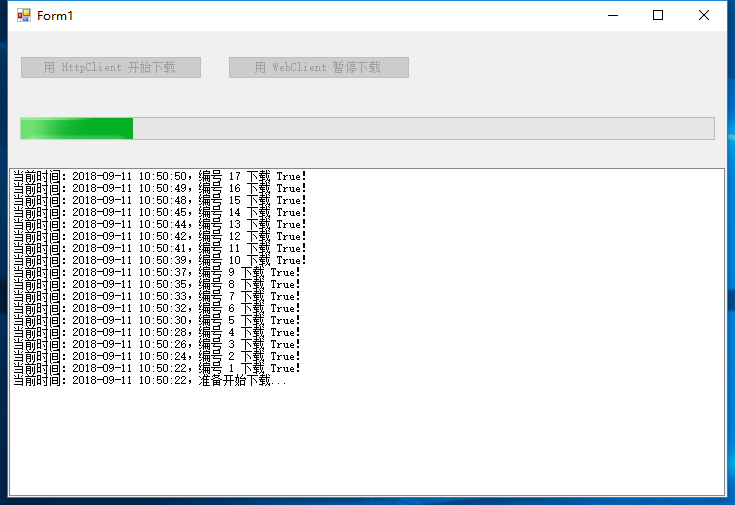
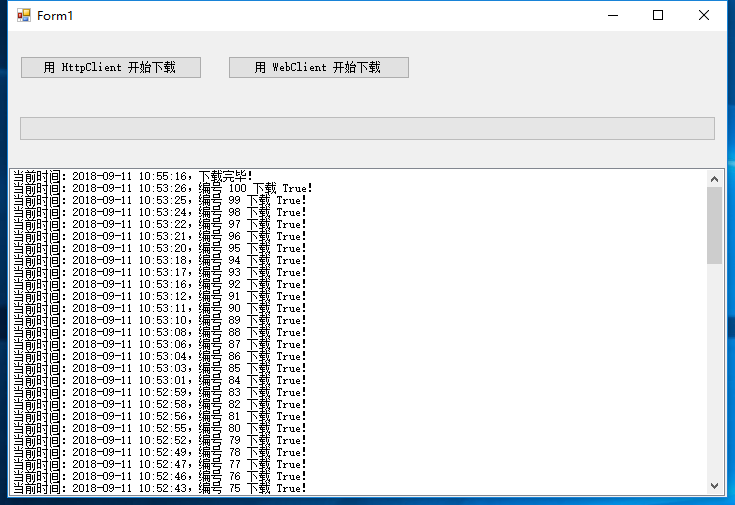
3. 运行截图
如图:
下载完成以后:
谢谢浏览!
一个简单的利用 WebClient 异步下载的示例(一)的更多相关文章
- 一个简单的利用 WebClient 异步下载的示例(三)
继续上一篇 一个简单的利用 WebClient 异步下载的示例(二) 后,继续优化它. 1. 直接贴代码了: DownloadEntry: public class DownloadEntry { p ...
- 一个简单的利用 WebClient 异步下载的示例(二)
继上一篇 一个简单的利用 WebClient 异步下载的示例(一) 后,我想把核心的处理提取出来,成 SkyWebClient,如下: 1. SkyWebClient 该构造函数中 downloadC ...
- 一个简单的利用 WebClient 异步下载的示例(五)(完结篇)
接着上一篇,我们继续来优化.我们的 SkyParallelWebClient 可否支持切换“同步下载模式”和“异步下载模式”呢,好处是大量的代码不用改,只需要调用 skyParallelWebClie ...
- 一个简单的利用 WebClient 异步下载的示例(四)
接上一篇,我们继续优化它. 1. DownloadEntry 类 public class DownloadEntry { public string Url { get; set; } public ...
- 一个简单的利用 HttpClient 异步下载的示例
可能你还会喜欢 一个简单的利用 WebClient 异步下载的示例 ,且代码更加新. 1. 定义自己的 HttpClient 类. using System; using System.Collec ...
- VC6下OpenGL 开发环境的构建外加一个简单的二维网络棋盘绘制示例
一.安装GLUT 工具包 GLUT 不是OpenGL 所必须的,但它会给我们的学习带来一定的方便,推荐安装. Windows 环境下的GLUT 本地下载地址:glut-install.zip(大小约为 ...
- 一个简单的AXIS远程调用Web Service示例
我们通常都将编写好的Web Service发布在Tomcat或者其他应用服务器上,然后通过浏览器调用该Web Service,返回规范的XML文件.但是如果我们不通过浏览器调用,而是通过客户端程序调用 ...
- [c#]WebClient异步下载文件并显示进度
摘要 在项目开发中经常会用到下载文件,这里使用winform实现了一个带进度条的例子. 一个例子 using System; using System.Collections.Generic; usi ...
- WebClient异步下载文件
namespace ConsoleAppSyncDownload{ class Program { static void Main(string[] args) { ...
随机推荐
- WPF 使用XML作为绑定源时Xaml注意事项
直接在xaml定义时xml时应该注意的! xml数据 <?xml version="1.0" encoding="utf-8"?> <Stri ...
- Nginx 极简教程(快速入门)
作者:dunwu github.com/dunwu/nginx-tutorial 推荐阅读(点击即可跳转阅读) 1. SpringBoot内容聚合 2. 面试题内容聚合 3. 设计模式内容聚合 4. ...
- 模型可视化工具netron
https://github.com/lutzroeder/Netron 支持各种格式的模型 caffe模型实测效果: 右侧可以看到卷积核的具体的值.
- go开发注意事项和dos的一些操作
不需要加分号 写法 go编译器一行一行编译,所以多条语句不能写在同一行,否则会报错 go语言定义的变量或者import的包如果没有使用到,代码不能通过编译 func main() { ... } 只能 ...
- MySqlBulkLoader 中文乱码
MySQL驱动:MySqlConnector GitHub地址:https://github.com/mysql-net/MySqlConnector.git 文档地址:https://mysql-n ...
- Java性能之优化RPC网络通信
服务框架的核心 大型服务框架的核心:RPC通信 微服务的核心是远程通信和服务治理 远程通信提供了服务之间通信的桥梁,服务治理提供了服务的后勤保障 服务的拆分增加了通信的成本,因此远程通信很容易成为系统 ...
- WeTest全球化服务,为使命召唤手游质量保驾护航
导读 使命召唤系列作为经典FPS游戏,以良好的表现与出色的射击手感,颠覆了玩家对传统第一人称射击的传统观念.同名手游(CODM)10月份在海外上线,仅一周内下载量就已突破一亿次,更是横扫139个国家及 ...
- PeriscopeHeartAnimation
// // ViewController.m // PeriscopeHeartAnimation // // Created by ldj on 4/28/15. // Copyright (c) ...
- javascript 生成指定范围内的随机数
js 生成任意2个区间内的随机整数,js 生成两个数之间的随机数 function random(m,n) { return Math.floor(Math.random() * (n - m)) + ...
- 2019牛客多校(第一场)F-Random Point in Triangle
#include <bits/stdc++.h> using namespace std; typedef long long ll; struct Point{ ll x, y; Poi ...