
一个简单的利用 WebClient 异步下载的示例(一)
继上一篇文章 一个简单的利用 HttpClient 异步下载的示例 ,我们知道不管是 HttpClient,还算 WebClient,都不建议每次调用都 new HttpClient,或 new WebClient,而应该尽量重复对象,可以把一个 WebClient(或 HttpClient)理解成一个浏览器,不能没打开一个页面以后,就销毁它,再重新创建一个,这样会有性能损失,而建议一个线程共用一个 WebClient(或 HttpClient)。这一次,我们利用 WebClient 来实现异步下载,这一次,我们增加一个进度条来显示进度。
直接提代码了:
1. TaskDemo101
优化后的 TaskDemo101 类:
     public static class TaskDemo101

    {

        public static string GetRandomUrl()

        {

            string url1 = "http://www.xxx.me/Uploads/image/20130129/2013012920080761761.jpg";

            string url2 = "http://www.xxx.me/Uploads/image/20121222/20121222230686278627.jpg";

            string url3 = "http://www.xxx.me/Uploads/image/20120606/20120606222018461846.jpg";

            string url4 = "http://www.xxx.me/Uploads/image/20121205/20121205224383848384.jpg";

            string url5 = "http://www.xxx.me/Uploads/image/20121205/20121205224251845184.jpg";

            string resultUrl;

            int randomNum = new Random().Next(, );

            switch (randomNum)

            {

                case : resultUrl = url1; break;

                case : resultUrl = url2; break;

                case : resultUrl = url3; break;

                case : resultUrl = url4; break;

                case : resultUrl = url5; break;

                default: throw new Exception("");

            }

            return resultUrl;

        }

        public static string GetSavedFileFullName()

        {

            string targetFolderDestination = Path.Combine(AppDomain.CurrentDomain.BaseDirectory, "downloads\\images\\");

            try

            {

                Directory.CreateDirectory(targetFolderDestination);

            }

            catch (Exception)

            {

                Console.WriteLine("创建文件夹失败!");

            }

            string targetFileDestination = Path.Combine(targetFolderDestination, string.Format("img_{0}.png", DateTime.Now.ToString("yyyy-MM-dd_HH-mm-ss")));

            return targetFileDestination;

        }

        public static async Task<bool> RunByHttpClient(SkyHttpClient skyHttpClient, int id)

        {

            var task = skyHttpClient.DownloadImage(GetRandomUrl());

            return await task.ContinueWith<bool>(t => {

                File.WriteAllBytes(GetSavedFileFullName(), t.Result);

                return true;

            });

        }

        public static void RunByWebClient(WebClient webClient, int id)

        {

            webClient.DownloadFileAsync(new Uri(GetRandomUrl()), GetSavedFileFullName());

        }

    }
2. Form1
这一次我们的 Form1 实现了 INotifyPropertyChanged 接口
    public partial class Form1 : Form, INotifyPropertyChanged

    {

        #region 字段、属性

        public event PropertyChangedEventHandler PropertyChanged;

        private void OnPropertyChanged(string prop)

        {

            if (PropertyChanged != null)

            {

                PropertyChanged(this, new PropertyChangedEventArgs(prop));

            }

        }

        WebClient webc = new WebClient();

        bool _canChange = true;

        public bool CanChange

        {

            get

            {

                return _canChange;

            }

            set

            {

                _canChange = value;

                OnPropertyChanged("CanChange");

            }

        }

        #endregion

        public Form1()

        {

            InitializeComponent();

            webc.DownloadFileCompleted += Webc_DownloadFileCompleted; //注册下载完成事件

            webc.DownloadProgressChanged += Webc_DownloadProgressChanged; //注册下载进度改变事件

        }

        private List<int> GetDownloadIds()

        {

            List<int> ids = new List<int>();

            for (int i = ; i <= ; i++)

            {

                ids.Add(i);

            }

            return ids;

        }

        private void WhenAllDownloading()

        {

            this.listBoxLog.Items.Insert(, string.Format("当前时间:{0},准备开始下载...", DateTime.Now.ToString("yyyy-MM-dd HH:mm:ss")));

            //禁用按钮

            EnableOrDisableButtons(false);

        }

        private void EnableOrDisableButtons(bool enabled)

        {

            this.btnRunByHttpClient.Enabled = enabled;

            this.btnRunByWebClient.Enabled = enabled;

        }

        private void WhenSingleDownloaded(int id, bool singleDownloadSuccess)

        {

            this.listBoxLog.Items.Insert(, string.Format("当前时间:{0},编号 {1} 下载 {2}!", DateTime.Now.ToString("yyyy-MM-dd HH:mm:ss"), id, singleDownloadSuccess));

        }

        private void WhenAllDownloaded()

        {

            this.listBoxLog.Items.Insert(, string.Format("当前时间:{0},下载完毕!", DateTime.Now.ToString("yyyy-MM-dd HH:mm:ss")));

            //启用按钮

            EnableOrDisableButtons(true);

        }

        private async void btnRunByHttpClient_Click(object sender, EventArgs e)

        {

            SkyHttpClient skyHttpClient = new SkyHttpClient();

            try

            {

                WhenAllDownloading();

                foreach (var id in GetDownloadIds())

                {

                    bool singleDownloadSuccess = await TaskDemo101.RunByHttpClient(skyHttpClient, id);

                    WhenSingleDownloaded(id, singleDownloadSuccess);

                }

                WhenAllDownloaded();

            }

            catch (Exception ex)

            {

                MessageBox.Show(ex.Message, "Download Error!");

            }

        }

        private void btnRunByWebClient_Click(object sender, EventArgs e)

        {

            if (CanChange)

            {

                WhenAllDownloading();

                CanChange = false;

                ToDownload.Clear();

                foreach (var id in GetDownloadIds())

                {

                    ToDownload.Enqueue(id);

                }

                progressBar1.Maximum = ToDownload.Count * ;

                btnRunByWebClient.Text = "用 WebClient 暂停下载";

                int firstId = ToDownload.Dequeue();

                TaskDemo101.RunByWebClient(webc, firstId);

                WhenSingleDownloaded(firstId, true);

            }

            else

            {

                ToDownload.Clear();

                webc.CancelAsync();

                CanChange = true;

                progressBar1.Value = ;

                btnRunByWebClient.Text = "用 WebClient 开始下载";

            }

        }

        private void Webc_DownloadFileCompleted(object sender, AsyncCompletedEventArgs e)

        {

            if (e.Error != null && !e.Cancelled)

            {

                MessageBox.Show("下载时出现错误: " + e.Error.Message);

                CanChange = true;

                progressBar1.Value = ;

            }

            else

            {

                DownloadNext();

            }

        }

        private void Webc_DownloadProgressChanged(object sender, DownloadProgressChangedEventArgs e)

        {

            progressBar1.Value = progressBar1.Maximum - ((ToDownload.Count + ) * ) + e.ProgressPercentage;

        }

        Queue<int> ToDownload = new Queue<int>();

        private void DownloadNext()

        {

            if (ToDownload.Any())

            {

                int nextId = ToDownload.Dequeue();

                TaskDemo101.RunByWebClient(webc, nextId);

                WhenSingleDownloaded(nextId, true);

                progressBar1.Value = progressBar1.Maximum - ((ToDownload.Count + ) * );

            }

            else

            {

                MessageBox.Show("全部下载完成");

                CanChange = true;

                progressBar1.Value = ;

                btnRunByWebClient.Text = "用 WebClient 开始下载";

                WhenAllDownloaded();

            }

        }

    }
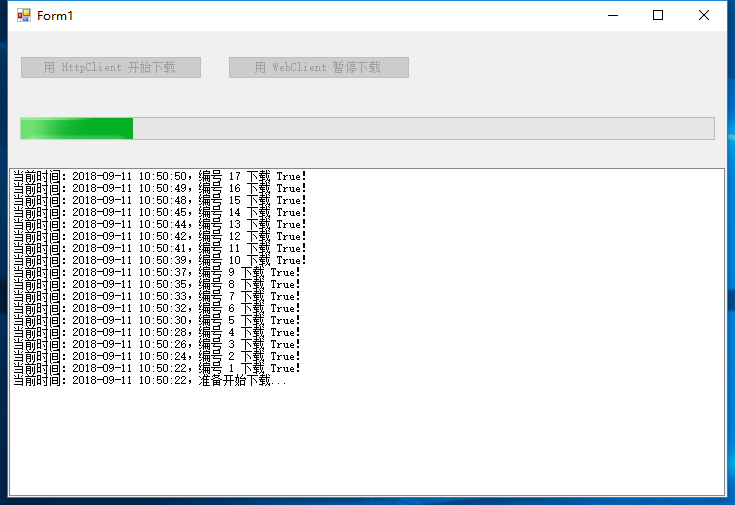
3. 运行截图
如图:
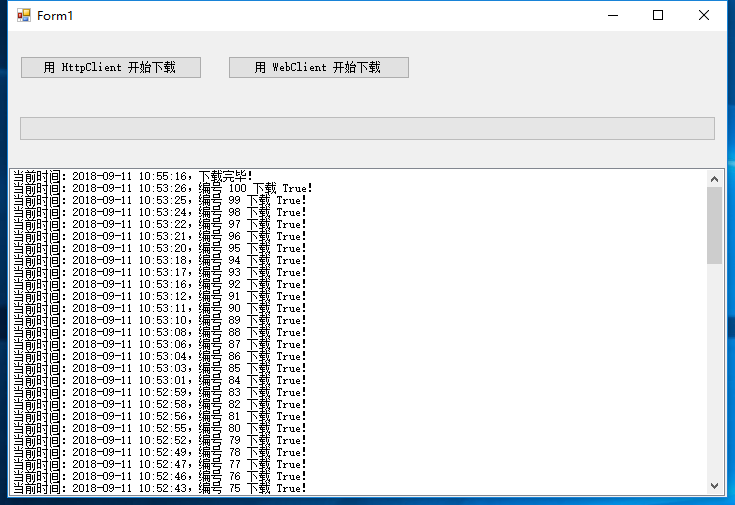
下载完成以后:
谢谢浏览!
一个简单的利用 WebClient 异步下载的示例(一)的更多相关文章
- 一个简单的利用 WebClient 异步下载的示例(三)
继续上一篇 一个简单的利用 WebClient 异步下载的示例(二) 后,继续优化它. 1. 直接贴代码了: DownloadEntry: public class DownloadEntry { p ...
- 一个简单的利用 WebClient 异步下载的示例(二)
继上一篇 一个简单的利用 WebClient 异步下载的示例(一) 后,我想把核心的处理提取出来,成 SkyWebClient,如下: 1. SkyWebClient 该构造函数中 downloadC ...
- 一个简单的利用 WebClient 异步下载的示例(五)(完结篇)
接着上一篇,我们继续来优化.我们的 SkyParallelWebClient 可否支持切换“同步下载模式”和“异步下载模式”呢,好处是大量的代码不用改,只需要调用 skyParallelWebClie ...
- 一个简单的利用 WebClient 异步下载的示例(四)
接上一篇,我们继续优化它. 1. DownloadEntry 类 public class DownloadEntry { public string Url { get; set; } public ...
- 一个简单的利用 HttpClient 异步下载的示例
可能你还会喜欢 一个简单的利用 WebClient 异步下载的示例 ,且代码更加新. 1. 定义自己的 HttpClient 类. using System; using System.Collec ...
- VC6下OpenGL 开发环境的构建外加一个简单的二维网络棋盘绘制示例
一.安装GLUT 工具包 GLUT 不是OpenGL 所必须的,但它会给我们的学习带来一定的方便,推荐安装. Windows 环境下的GLUT 本地下载地址:glut-install.zip(大小约为 ...
- 一个简单的AXIS远程调用Web Service示例
我们通常都将编写好的Web Service发布在Tomcat或者其他应用服务器上,然后通过浏览器调用该Web Service,返回规范的XML文件.但是如果我们不通过浏览器调用,而是通过客户端程序调用 ...
- [c#]WebClient异步下载文件并显示进度
摘要 在项目开发中经常会用到下载文件,这里使用winform实现了一个带进度条的例子. 一个例子 using System; using System.Collections.Generic; usi ...
- WebClient异步下载文件
namespace ConsoleAppSyncDownload{ class Program { static void Main(string[] args) { ...
随机推荐
- Elasticsearch 6.x版本全文检索学习之分布式特性介绍
1.Elasticsearch 6.x版本全文检索学习之分布式特性介绍. 1).Elasticsearch支持集群默认,是一个分布式系统,其好处主要有两个. a.增大系统容量,如内存.磁盘.使得es集 ...
- 前端之移动端库和框架bootstrap
学习移动端场景下的js事件:制作移动端特效常用的js库:介绍移动端常用开发框架Bootstrap:介绍动态样式语言less.sass.stylus的基本使用. 移动端js事件 移动端的操作方式和PC端 ...
- Zipkin客户端链路追踪源码解析
我们知道,Zipkin这个工具可以帮助我们收集分布式系统中各个系统之间的调用连关系,而且除了Servlet之外还能收集:MQ.线程池.WebSocket.Feign.Hystrix.RxJava.We ...
- FCC---Make a CSS Heartbeat using an Infinite Animation Count----超级好看的心跳,粉色的
Here's one more continuous animation example with the animation-iteration-count property that uses t ...
- 如何用charles进行https抓包
版权声明:本文为xing_star原创文章,转载请注明出处! 本文同步自http://javaexception.com/archives/138 如何用charles进行https抓包 晚上在家鼓捣 ...
- 解决webservice(Java)中dao层注入为null问题
首先在webservice指定发布的路径类中实现 ServletContextListener, 例如: import javax.servlet.ServletContextEvent; impor ...
- 剑指offer 13:数值的整数次方
题目描述 给定一个double类型的浮点数base和int类型的整数exponent.求base的exponent次方. 保证base和exponent不同时为0 问题分析 计算一个浮点数的整数次 ...
- linux用户管理-用户的基本操作
目录 linux用户管理-用户的基本操作 用户相关的命令 linux用户管理-用户的基本操作 什么是用户 用户指能够正常登录linux或windows系统 区别 本质都是登录系统的,只不过Linux支 ...
- [Go] gocron源码阅读-flag包实现命令行参数获取
调用flag包可以方便的获取到命令行中传递的参数,比如可以实现类似nginx执行程序获取命令行参数执行不同操作的目标 package main import ( "flag" &q ...
- [PHP] PDO对象与mysql的连接超时
在php中每一个new的PDO对象,都会去连接mysql,都会创建一条tcp连接.当pdo对象赋予的变量是一个的时候,那么他只会保持一个tcp连接,没有被引用的对象连接会直接断掉.如果不对这个对象进行 ...