
Consul作为SpringCloud配置中心
一、背景介绍
在分布式系统中动态配置中,可以避免重复重启服务,动态更改服务参数等。一句话非常重要。 另外一篇文章也是这样说的,哈哈。 Consul 作为Spring 推荐的分布式调度系统其也具备配置中心的功能, 我们也可以利用其作为配置中心,其client端主动定时发起与配置中心同步机制,实现动态配置的的更新。
环境依赖:
| 名称 | 值 | 备注 |
|---|---|---|
| JDK | 1.8 | |
| Consul | 1.5.2 | 注册中心,Consul安装及介绍 https://mp.csdn.net/mdeditor/95372805# |
| SpringCloud | Greenwich.SR1 |
二、项目实战
1) pom依赖(主要)
<properties>

		<java.version>1.8</java.version>

		<spring-cloud.version>Greenwich.SR1</spring-cloud.version>

</properties>

<dependencyManagement>


<dependencies>


<dependency>


<groupId>org.springframework.cloud</groupId>


<artifactId>spring-cloud-dependencies</artifactId>


<version>${spring-cloud.version}</version>


<type>pom</type>


<scope>import</scope>


</dependency>


</dependencies>


</dependencyManagement>

<dependency>


<groupId>org.springframework.boot</groupId>


<artifactId>spring-boot-starter-web</artifactId>


</dependency>


<dependency>


<groupId>org.springframework.cloud</groupId>


<artifactId>spring-cloud-starter-consul-discovery</artifactId>


</dependency>


<dependency>


<groupId>org.springframework.cloud</groupId>


<artifactId>spring-cloud-starter-consul-config</artifactId>


</dependency>
2)配置文件
application.properties
#0表示服务器随机端口

server.port=8090
本次演示的kv的默认值(老板默认给你0元)

company.pay.money=0
bootstrap.properties
#服务名称

spring.application.name=waiter-service

#consul  地址

spring.cloud.consul.host=localhost

#consul  端口

spring.cloud.consul.port=8500

spring.cloud.consul.discovery.prefer-ip-address=true

#consul配置中心功能,默认true

spring.cloud.consul.config.enabled=true

#consul配置中心值的格式

spring.cloud.consul.config.format=yaml
3)动态参数接收类
@ConfigurationProperties("company.pay")

@RefreshScope

@Data

@Component

public class PayMoneyProperties {

  //key结尾部分,以小数点为间隔

   Integer  money ;

}
备注:
ConfigurationProperties 表示这个类关联动态配置,“company.pay”表示key的前缀部分。
@RefreshScope 表示动态刷新config server 值
@Component 表示将该类加载到IOC容器中
在实战中尝试用@Value的方式获取动态,只能实现服务重启后获取动态的config server 的值,最终找到解决方案在相应的取值类上加@RefreshScope注解,完美解决。
4)对外接口(便于直观验证)
方式一:
@RestController

@RequestMapping("consul")

public class ConsulConfigController {

    @Autowired

    private PayMoneyProperties payMoneyProperties ;
@RequestMapping("/pay/money")

public  Object getConfig(HttpRequest request){

    String money ="项目顺利上线,老板开始发奖金:";

  return money + payMoneyProperties.getMoney();

}


}
方式二:
@RestController
@RequestMapping(“consul”)
//启用动态配置刷新
@RefreshScope
public class ConsulConfigController {
//获取配置的值
@Value("${company.pay.money}")
private String moneyConfig;
@RequestMapping("/pay/money")
public Object getConfig(HttpRequest request){
String money =“项目顺利上线,老板开始发奖金:”;
return money +moneyConfig;
}
}
5)启动项目

上图可以通过日志看出config server 的连接信息
6)consul config server 还没设置对应节点值时演示(获取的是本地配置文件值)
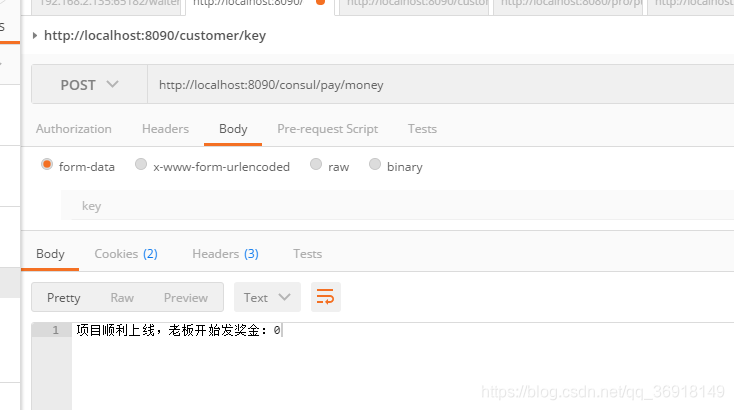
备注:Spring boot 在加载配置顺序:本地配置文件 --> Config Server -->application
7) consul 中创建数据节点
请求地址:http://localhost:8500
创建数据节点:config/waiter-service/data
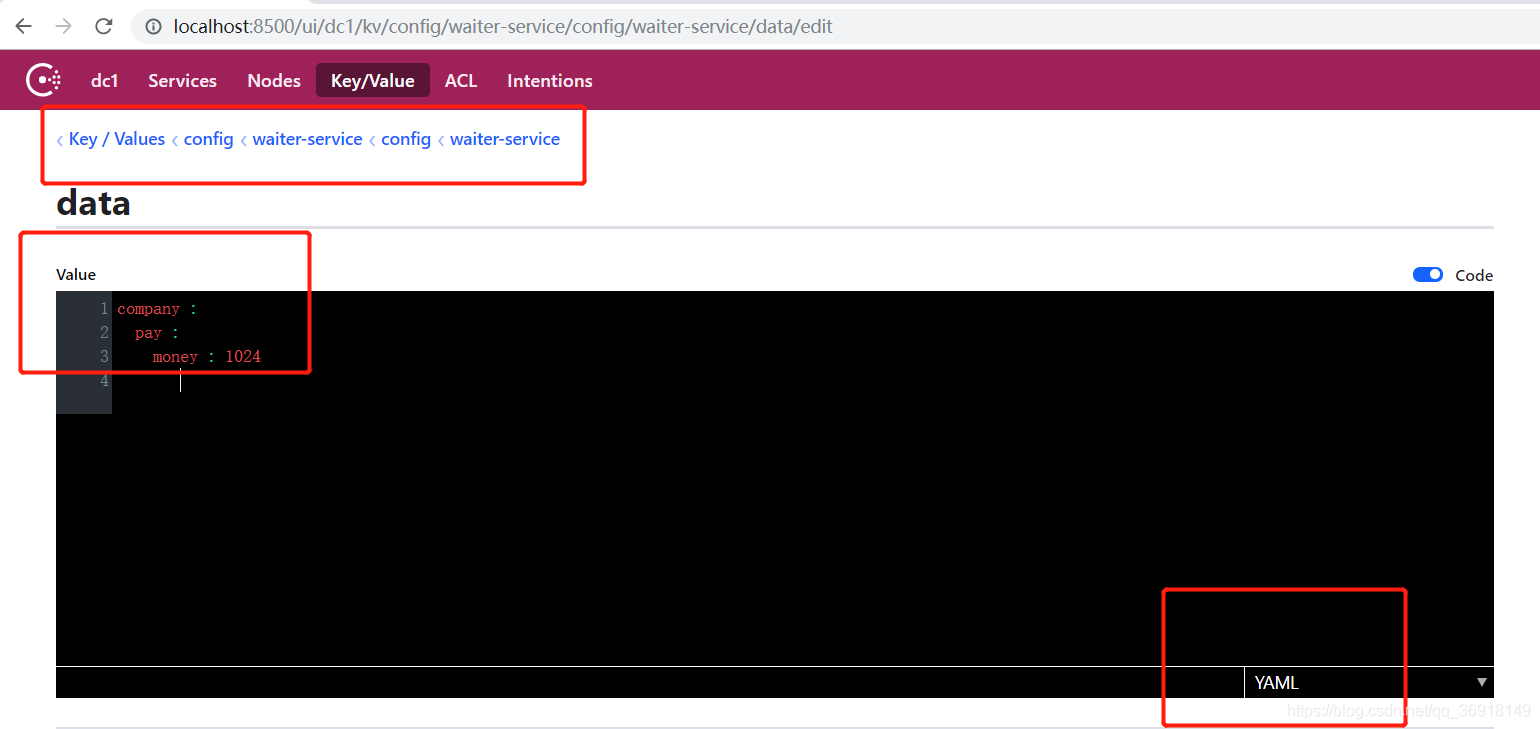
注意:YAML数据中,通过空格、“:” 表示数据层级关系, 在设置这个值前,可以在网上校验一下YAML内容的有效性;
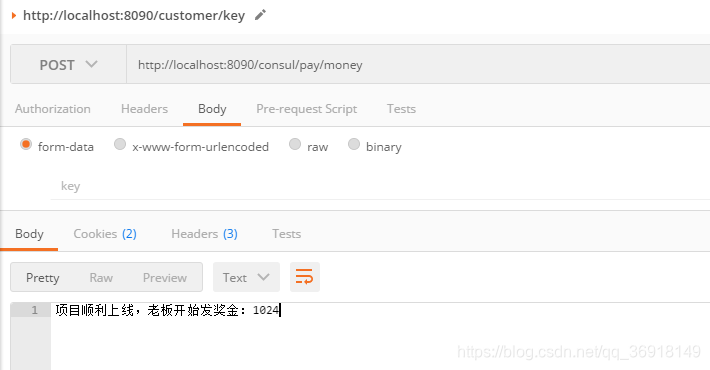
8)验证项目里是有有收到动态配置
如下图,表示已经通知到项目更新的值

在验证接口中请求一下对应接口,发现值已经和consul config server 中动态设置的值相同了
三、总结
1) 如果在你们的微服务中已经使用consul 作为注册中心, 那么推荐使用上文的方案, 毕竟可以少维护一套系统。
2) consul 作为注册中心、相比zookeeper 作为注册中心,有了更友好的web页面,如果有版本或回滚的一些操作就更完美了。
3)client 会定时拉取consul config server 值,与本地值对比
ConfigWatch 类核心代码
@Override

	public void start() {

		if (this.running.compareAndSet(false, true)) {

			this.watchFuture = this.taskScheduler.scheduleWithFixedDelay(

					this::watchConfigKeyValues, this.properties.getWatch().getDelay());

		}

	}
@Timed("consul.watch-config-keys")

	public void watchConfigKeyValues() {

		if (this.running.get()) {

			for (String context : this.consulIndexes.keySet()) {
			// turn the context into a Consul folder path (unless our config format

			// are FILES)

			if (this.properties.getFormat() != FILES && !context.endsWith("/")) {

				context = context + "/";

			}

			try {

				Long currentIndex = this.consulIndexes.get(context);

				if (currentIndex == null) {

					currentIndex = -1L;

				}

				log.trace("watching consul for context '" + context + "' with index "

						+ currentIndex);

				// use the consul ACL token if found

				String aclToken = this.properties.getAclToken();

				if (StringUtils.isEmpty(aclToken)) {

					aclToken = null;

				}

				Response<List<GetValue>> response = this.consul.getKVValues(context,

						aclToken,

						new QueryParams(this.properties.getWatch().getWaitTime(),

								currentIndex));

				// if response.value == null, response was a 404, otherwise it was a

				// 200

				// reducing churn if there wasn't anything

				if (response.getValue() != null && !response.getValue().isEmpty()) {

					Long newIndex = response.getConsulIndex();

					if (newIndex != null && !newIndex.equals(currentIndex)) {

						// don't publish the same index again, don't publish the first

						// time (-1) so index can be primed

						if (!this.consulIndexes.containsValue(newIndex)

								&& !currentIndex.equals(-1L)) {

							log.trace("Context " + context + " has new index "

									+ newIndex);

							RefreshEventData data = new RefreshEventData(context,

									currentIndex, newIndex);

							this.publisher.publishEvent(

									new RefreshEvent(this, data, data.toString()));

						}

						else if (log.isTraceEnabled()) {

							log.trace("Event for index already published for context "

									+ context);

						}

						this.consulIndexes.put(context, newIndex);

					}

					else if (log.isTraceEnabled()) {

						log.trace("Same index for context " + context);

					}

				}

				else if (log.isTraceEnabled()) {

					log.trace("No value for context " + context);

				}

			}

			catch (Exception e) {

				// only fail fast on the initial query, otherwise just log the error

				if (this.firstTime && this.properties.isFailFast()) {

					log.error(

							"Fail fast is set and there was an error reading configuration from consul.");

					ReflectionUtils.rethrowRuntimeException(e);

				}

				else if (log.isTraceEnabled()) {

					log.trace("Error querying consul Key/Values for context '"

							+ context + "'", e);

				}

				else if (log.isWarnEnabled()) {

					// simplified one line log message in the event of an agent

					// failure

					log.warn("Error querying consul Key/Values for context '"

							+ context + "'. Message: " + e.getMessage());

				}

			}

		}

	}

	this.firstTime = false;

}
原文地址:https://blog.csdn.net/qq_36918149/article/details/99709397
</div>Consul作为SpringCloud配置中心的更多相关文章
- SpringCloud配置中心实战
SpringCloud配置中心实战 1.统一配置中心(Config) 1.1 Spring项目配置加载顺序 1.2 配置规则详解 1.3 Git仓库配置 1.3.1 使用占位符 1.3.2 模式匹配 ...
- SpringCloud使用Consul作为分布式配置中心
版权声明:本文为博主原创文章,遵循CC 4.0 BY-SA版权协议,转载请附上原文出处链接和本声明. 本文链接:https://blog.csdn.net/qq_36027670/article/de ...
- springcloud~配置中心的使用
配置中心作为springcloud里最底层的框架,所发挥的意思是举足轻重的,所以的组件的配置信息都可以通过springcloud config来管理,它会把配置信息分布式的存储到git上,所以信息安全 ...
- springcloud配置中心
SpringCloud Config简介 Spring Cloud Config 是 Spring Cloud 团队创建的一个全新项目,用来为分布式系统中的基础设施和微服务应用提供集中化的外部配置支持 ...
- SpringCloud配置中心config
1,配置中心可以用zookeeper来实现,也可以用apllo 来实现,springcloud 也自带了配置中心config Apollo 实现分布式配置中心 zookeeper:实现分布式配置中心, ...
- springcloud~配置中心实例搭建
server端 build.gradle相关 dependencies { compile('org.springframework.cloud:spring-cloud-config-server' ...
- springcloud配置中心客户端配置遇到的坑
1. 出错信息如下: 在启动配置中心的客户端时,报以下错误信息: Caused by: java.lang.IllegalArgumentException: Could not resolve pl ...
- SpringCloud配置中心集成Gitlab(十五)
一 开始配置config服务 config-server pom.xml <dependency> <groupId>org.springframework.cloud< ...
- springcloud~配置中心~对敏感信息加密
简介 RSA非对称加密有着非常强大的安全性,HTTPS的SSL加密就是使用这种方法进行HTTPS请求加密传输的.因为RSA算法会涉及Private Key和Public Key分别用来加密和解密,所以 ...
随机推荐
- JMS与消息队列
JMS,Java Message Service,即Java消息服务. MOM,Message Oriented Miiddleware的英文缩写,指的是利用高效可靠的消息传递机制进行平台无关的数据交 ...
- Java对象为啥要实现Serializable接口
Serializable接口概述 Serializable是java.io包中定义的.用于实现Java类的序列化操作而提供的一个语义级别的接口.Serializable序列化接口没有任何方法或者字段, ...
- flutter Checkbox 复选框组件
import 'package:flutter/material.dart'; class CheckboxDemo extends StatefulWidget { @override _Check ...
- shell编程系列19--文本处理三剑客之awk中的字符串函数
shell编程系列19--文本处理三剑客之awk中的字符串函数 字符串函数对照表(上) 函数名 解释 函数返回值 length(str) 计算字符串长度 整数长度值 index(str1,str2) ...
- libfacedetection环境配置
E:\Opencv\libfacedetection_install1\include E:\Opencv\libfacedetection_install1\lib libfacedetect-x6 ...
- Spring cloud微服务安全实战-6-5jwt改造之日志及错误处理(1)
在代码里,我们没有认证或者授权的filter.认证和授权的工作现在基本上完全由Spring Security的过滤器接管了. 本节就来看下 如何在Spring Security的过滤器链上加入我们自己 ...
- idea中报Can't start Git: git.exe The path to Git executable is probably not valid. Fix it
解决办法,点解Fix it,或者File ----setting------version control-------git,设置git的可执行文件路径就可以了 设置好了git的安装路径的可运行文件 ...
- mysql的驱动类com.mysql.jdbc.Driver过时了,需要用com.mysql.cj.jdbc.Driver代替
springboot项目整合mybatis,配置文件如下: server: port: 8081 mybatis: config-location: classpath:mybatis/mybatis ...
- Django:使用模态框新增数据,成功后提示“提交成功”,并刷新表格bootstrap-table数据
废话不说先看图: 代码实现: 前台代码: {% load staticfiles %} <!DOCTYPE html> <html lang="en"> ...
- openfoam耦合liggghts安装
本次安装基于新安装的ubuntu18.04LTS桌面版系统,用户名为ubuntu,此前未安装其他软件(进行了系统提醒的更新),安装时间为2019年9月. 安装前需确认需要安装的OpenFOAM版本,C ...