
SpringCloud2.0 Eureka Server 服务中心 基础教程(二)
1、创建【服务中心】,即 Eureka Server
1.1、新建 Spring Boot 工程,工程名称: springcloud-eureka-server
1.2、工程 pom.xml 文件添加如下依赖:
<dependency>

	<groupId>org.springframework.boot</groupId>

	<artifactId>spring-boot-starter-web</artifactId>

</dependency>

<dependency>

	<groupId>org.springframework.cloud</groupId>

	<artifactId>spring-cloud-starter-netflix-eureka-server</artifactId>

</dependency>
1.3、在工程启动类中,添加注解 @EnableEurekaServer
package com.miniooc.eurekaserver;

import org.springframework.boot.SpringApplication;

import org.springframework.boot.autoconfigure.SpringBootApplication;

import org.springframework.cloud.netflix.eureka.server.EnableEurekaServer;

/**

 * EurekaServerApplication

 *

 * @author 宋陆

 * @version 1.0.0

 */

@EnableEurekaServer // 启用 eureka server 相关默认配置

@SpringBootApplication // 等价于 @Configuration、@EnableAutoConfiguration、@ComponentScan

public class EurekaServerApplication {

    public static void main(String[] args) {

        SpringApplication.run(EurekaServerApplication.class, args);

    }

}
1.4、新建工程配置文件 application.yml ,配置内容:
server:

  port: 9527

spring:

  application:

    name: eureka-server

eureka:

  instance:

    hostname: localhost

  client:

    serviceUrl:

      defaultZone: http://${eureka.instance.hostname}:${server.port}/eureka/

    register-with-eureka: false #  默认为 true。设为 false,仅作为服务中心,不作为服务客户端。

    fetch-registry: false # 默认为true。设为false,不从服务中心检索注册的服务。

  server:

    eviction-interval-timer-in-ms: 5000 #清理间隔(单位毫秒,默认是60*1000)

    enable-self-preservation: true # 默认为true。设为false,关闭自我保护。

    # Eureka Server 在运行期间会去统计心跳失败比例在 15 分钟之内是否低于 85%

    renewal-percent-threshold: 0.1 # 默认是0.85
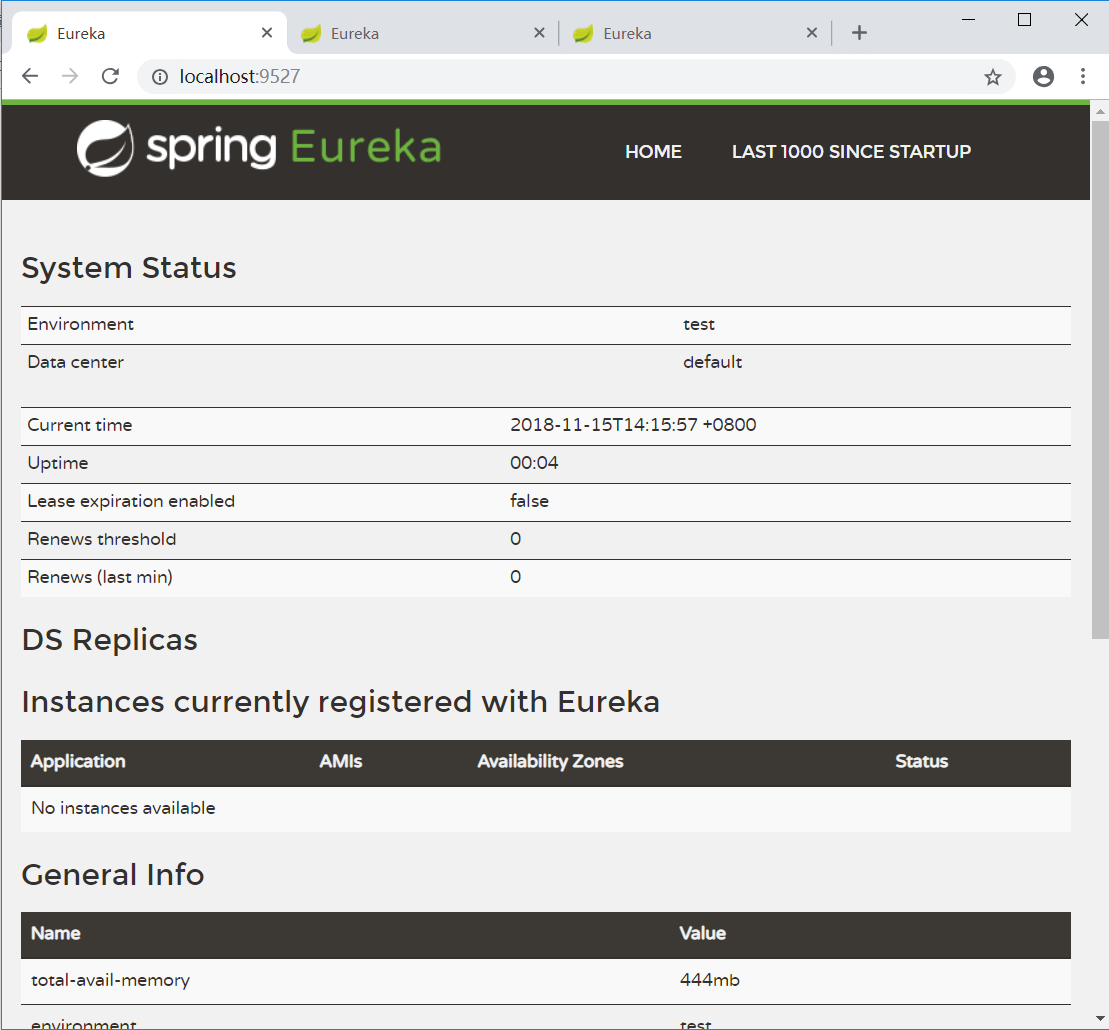
1.5、启动 服务中心 工程,打开浏览器,访问 服务中心 前台页面:http://localhost:9527

红框处 No instances available :没有可用的实例。目前还任何服务注册到服务中心。
至此,一个简单的单点服务中心搭建完成。
为了保证服务的高可用,我们需要把单点应用改成集群应用。
接下来,我们对服务中心工程做些配置修改,来完成集群部署。
2、搭建【服务中心】集群
2.1、创建工程配置文件 application-server1.yml ,配置内容:
server:

  port: 9527

spring:

  application:

    name: eureka-server

eureka:

  instance:

    hostname: localhost

  client:

    serviceUrl:

      defaultZone: http://localhost:9527/eureka/,http://localhost:9528/eureka/,http://localhost:9529/eureka/

    register-with-eureka: false #  默认为 true。设为 false,仅作为服务中心,不作为服务客户端。

    fetch-registry: false # 默认为true。设为false,不从服务中心检索注册的服务。

  server:

    eviction-interval-timer-in-ms: 5000 #清理间隔(单位毫秒,默认是60*1000)

    enable-self-preservation: true # 默认为true,设为false,关闭自我保护

    # Eureka Server 在运行期间会去统计心跳失败比例在 15 分钟之内是否低于 85%

    renewal-percent-threshold: 0.49 # 默认是0.85,本地单机测试设为0.49
参照2.1,创建工程配置文件 application-server2.yml,并修改 server.port 为 9528
参照2.1,创建工程配置文件 application-server3.yml,并修改 server.port 为 9529
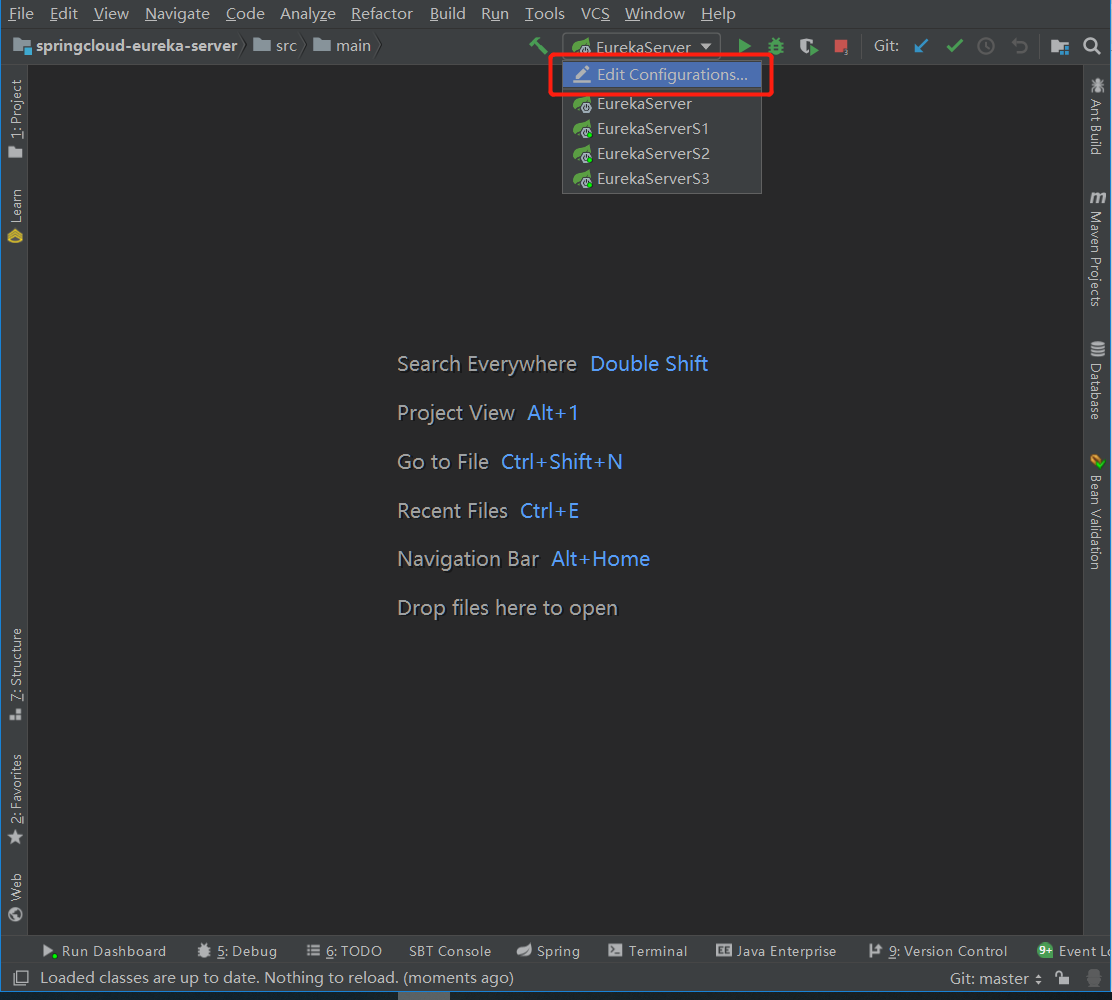
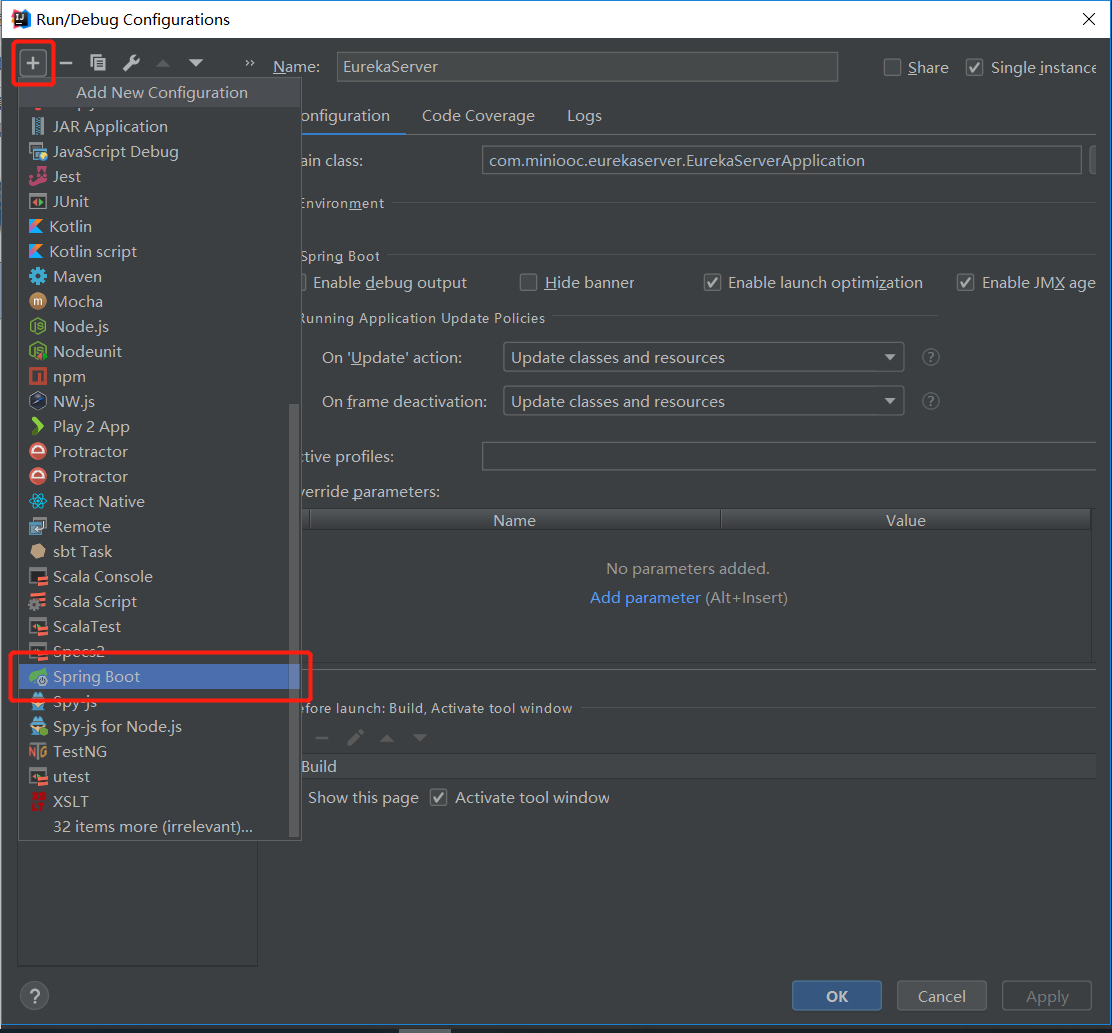
2.2、在 IntelliJ IDEA 集成开发环境中,添加 spring boot 启动配置 EurekaServerS1,修改 Active profiles 为 server1
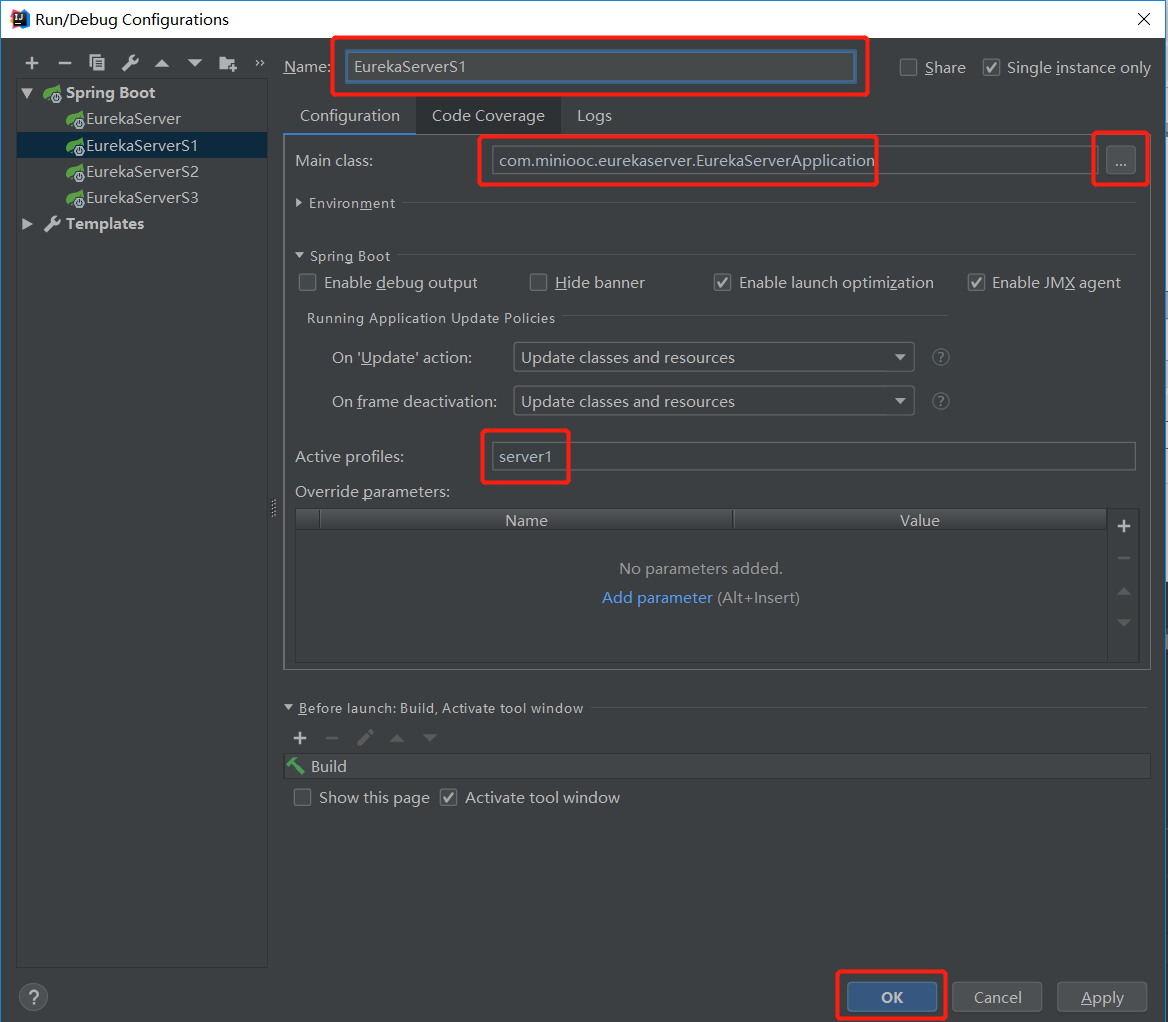
参照2.2, spring boot 启动配置 EurekaServerS2,修改 Active profiles 为 server2
参照2.2, spring boot 启动配置 EurekaServerS3,修改 Active profiles 为 server3
2.3、按照启动配置 EurekaServerS1、EurekaServerS2、EurekaServerS3 依次启动服务中心
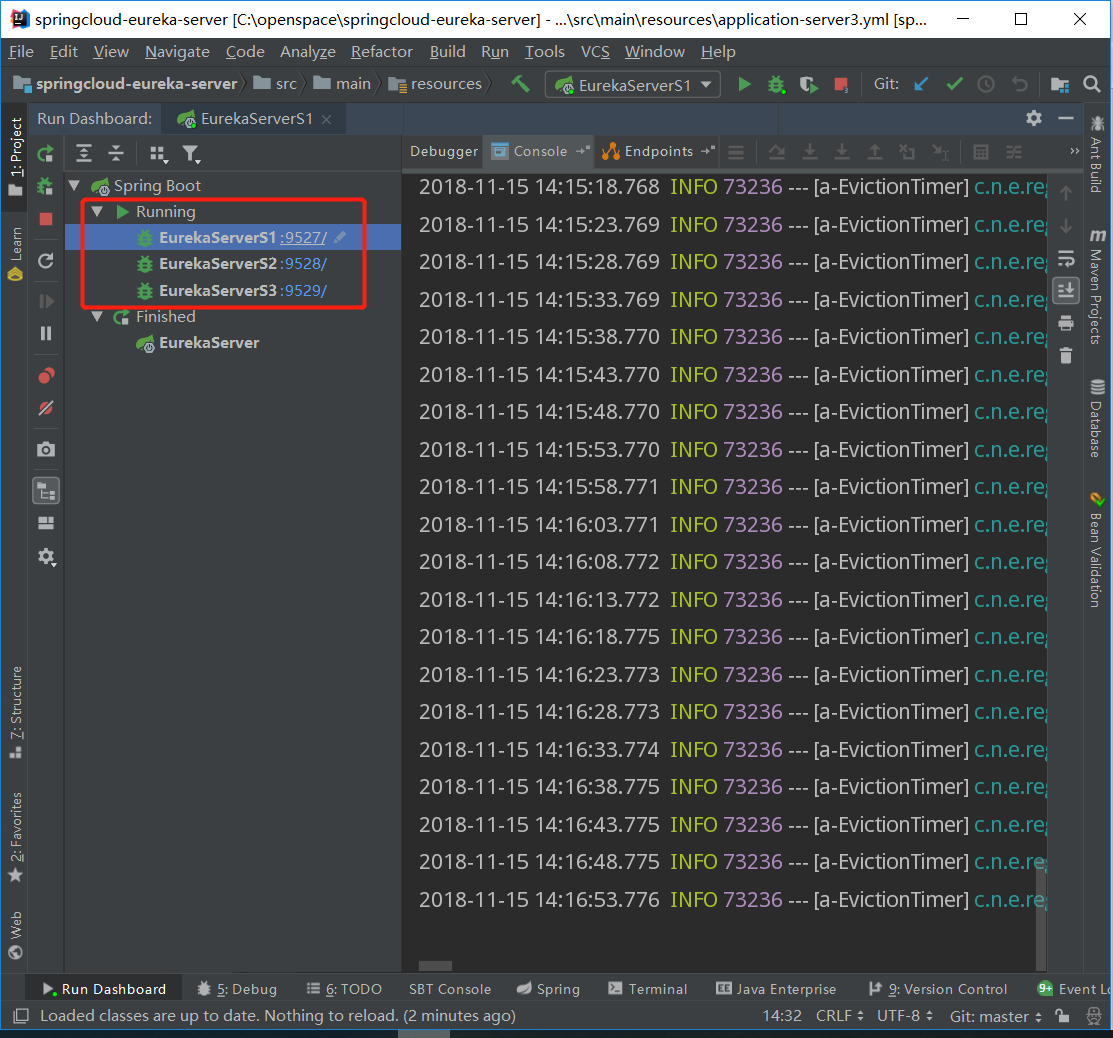
2.4、打开浏览器,访问 服务中心 前台页面:http://localhost:9527,http://localhost:9528,http://localhost:9529
如果三个服务都启动成功的话,三个页面都应该看到如上图所示。
至此,一个简单的服务中心集群搭建完成。
3、本章小结
本章主要讲解了 Eureka Server 服务中心的搭建,并讲解如果扩展为集群应用。但服务中心的使用以及集群的优点,本章并未讲解,因为这需要 Eureka Client 服务提供者和 Eureka Discovery Client 服务发现者配合使用,后续的章节我们会讲解后两者的使用。
下一章,我们将讲解,如何创建 Eureka Client 服务提供者,并把我们的服务注册到服务中心,以及如何搭建服务提供者集群。
SpringCloud2.0 Eureka Server 服务中心 基础教程(二)的更多相关文章
- SpringCloud2.0 Feign 服务发现 基础教程(五)
1.启动[服务中心]集群,即 Eureka Server 参考 SpringCloud2.0 Eureka Server 服务中心 基础教程(二) 2.启动[服务提供者]集群,即 Eureka Cli ...
- SpringCloud2.0 Ribbon 服务发现 基础教程(四)
1.启动[服务中心]集群,即 Eureka Server 参考 SpringCloud2.0 Eureka Server 服务中心 基础教程(二) 2.启动[服务提供者]集群,即 Eureka Cli ...
- SpringCloud2.0 Zuul 网关路由 基础教程(十)
1.启动基础工程 1.1.启动[服务注册中心],工程名称:springcloud-eureka-server 参考 SpringCloud2.0 Eureka Server 服务中心 基础教程(二) ...
- SpringCloud2.0 Eureka Client 服务注册 基础教程(三)
1.创建[服务提供者],即 Eureka Client 1.1.新建 Spring Boot 工程,工程名称:springcloud-eureka-client 1.2.工程 pom.xml 文件添加 ...
- 升级微服务架构1:搭建Eureka Server服务中心
Spring Cloud中使用Eureka来做服务注册和发现,来统一管理微服务实例. 1.使用IDEA创建一个空的Maven项目做父模块 (也可以不用父项目,所有模块都用平行结构) 删除父模块src文 ...
- MySQL8.0数据库基础教程(二)-理解"关系"
1 SQL 的哲学 形如 Linux 哲学一切都是文件,在 SQL 领域也有这样一条至理名言 一切都是关系 2 关系数据库 所谓关系数据库(Relational database)是创建在关系模型基础 ...
- Java基础教程——二维数组
二维数组 Java里的二维数组其实是数组的数组,即每个数组元素都是一个数组. 每个数组的长度不要求一致,但最好一致. // 同样有两种风格的定义方法 int[][] _arr21_推荐 = { { 1 ...
- numpy基础教程--二维数组的转置
使用numpy库可以快速将一个二维数组进行转置,方法有三种 1.使用numpy包里面的transpose()可以快速将一个二维数组转置 2.使用.T属性快速转置 3.使用swapaxes(1, 0)方 ...
- AngularJS 基础教程二:
5.过滤器 过滤器的主要功能是格式化数据 可以使用Angular提供的过滤器,也可以自定义过滤器 Angular过滤器: currency(货币).date(日期).filter(子串匹配).json ...
随机推荐
- es6 - spreed & rest 【... 扩展运算符】
扩展运算符:…运算符 好处:简化书写长度,提升开发效率. 具备两个功能: 1.展开功能 2.收集功能 所以…运算符又可以叫做展开收集运算符. 他的不同作用需要在不同场景中使用才会出现: a.读 - 展 ...
- docker 镜像加速,修改为阿里云镜像
首先访问 登录阿里云 https://cr.console.aliyun.com/cn-hangzhou/instances/mirrors,会获取专属的镜像地址 centos用户执行下列操作即可 s ...
- Prometheus部署各服务的Node监控
1.部署监控主机 部署主机监控,需要安装node_exporter 1.1 下载node exporter wget https://github.com/prometheus/node_export ...
- C运算符优先级和结合性
C中运算符优先级和结合性一览表: 在上表中能总结出一下规律: (1)结合方向只有三个是从右往左,其余都是从左往右: (2)逗号运算符的优先级最低: (3)对于优先级,有一个普遍规律:算术运算符 > ...
- 第十五节:Asp.Net Core中的各种过滤器(授权、资源、操作、结果、异常)
一. 简介 1. 说明 提到过滤器,通常是指请求处理管道中特定阶段之前或之后的代码,可以处理:授权.响应缓存(对请求管道进行短路,以便返回缓存的响应). 防盗链.本地化国际化等,过滤器用于横向处理业务 ...
- drf面试题及总结
drf面试题及总结 1.什么是前后端分离 2.什么是restful规范 3.模拟浏览器进行发送请求的工具 4.查找模板的顺序 5.什么是drf组件 6.drf组件提供的功能 7.drf继承过哪些视图类 ...
- golang输出双精度浮点例子(Printf)
1 package main import "fmt" func main() { var sum int = 17 var count int = 5 var mean floa ...
- Ubuntu 18 Kubernetes集群的安装和部署 以及Helm的安装
首先说一下我的环境, 我是在windows 10 上面建了一个ubuntu18的虚拟机,同时由于某些原因 不受网络限制, 所以安装比较顺利. Install 1.安装并启用 Docker sudo ...
- kubernetes 1.15 有哪些让人眼前一亮的新特性?
原文链接:kubernetes 1.15 有哪些让人眼前一亮的新特性? 2019 年 6 月 20 日,Kubernetes 重磅发布了 1.15 版本,不过笔者忙到现在才有空认真来看一下到底更新了哪 ...
- LOJ2874 JOISC2014 历史研究 分块、莫队
传送门 看到出现次数自然地考虑莫队. 但是发现如果需要删除并动态维护答案的话,则要用一个堆来维护答案,增加了一个\(log\).但是加入操作却没有这个\(log\),所以我们考虑避免删除操作. 分块, ...