
WPF 时间编辑控件的实现(TimeEditer)
一、前言
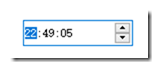
有个项目需要用到时间编辑控件,在大量搜索无果后只能自己自定义一个了。MFC中倒是有这个控件,叫CDateTimeCtrl。大概是这个样子:
二、要实现的功能
- 要实现的功能包含:
- 编辑时、分、秒(可按数字键输入编辑)
- 获取焦点后可实现递增或递减
三、WFP实现原理
四个TextBox和两个TextBlock组和,再加两个按钮应该就能组成这个控件的基本结构了。再设置焦点事件及按键事件可以实现编辑。
Xaml代码如下:
 <Style TargetType="{x:Type controls:TimeEditer}">

         <Setter Property="BorderThickness" Value="1"/>

         <Setter Property="BorderBrush" Value="#ececec"/>

         <Setter Property="Hour" Value="00"/>

         <Setter Property="Minute" Value="00"/>

         <Setter Property="Second" Value="00"/>

         <Setter Property="Template">

             <Setter.Value>

                 <ControlTemplate TargetType="{x:Type controls:TimeEditer}">

                     <Border Background="{TemplateBinding Background}"

                             BorderBrush="{TemplateBinding BorderBrush}"

                             BorderThickness="{TemplateBinding BorderThickness}">

                         <Grid Margin="3 0">

                             <Grid.ColumnDefinitions>

                                 <ColumnDefinition Width="18"/>

                                 <ColumnDefinition Width="auto"/>

                                 <ColumnDefinition Width="18"/>

                                 <ColumnDefinition Width="auto"/>

                                 <ColumnDefinition Width="18"/>

                                 <ColumnDefinition Width="*"/>

                             </Grid.ColumnDefinitions>

                             <TextBox x:Name="PART_TXTHOUR" HorizontalContentAlignment="Center" Cursor="Arrow" BorderThickness="0" SelectionBrush="White" AutoWordSelection="False" Text="{Binding Hour,RelativeSource={RelativeSource TemplatedParent},StringFormat={}{0:00},UpdateSourceTrigger=PropertyChanged}" Foreground="Black" Focusable="True" IsReadOnly="True" IsReadOnlyCaretVisible="False"  VerticalAlignment="Center"/>

                             <TextBlock Text=":" VerticalAlignment="Center" Grid.Column="1"/>

                             <TextBox x:Name="PART_TXTMINUTE" HorizontalContentAlignment="Center" Cursor="Arrow" Grid.Column="2" BorderThickness="0" AutoWordSelection="False" Text="{Binding Minute,RelativeSource={RelativeSource TemplatedParent},StringFormat={}{0:00},UpdateSourceTrigger=PropertyChanged}" Foreground="Black" Focusable="True" IsReadOnly="True" IsReadOnlyCaretVisible="False" VerticalAlignment="Center"/>

                             <TextBlock Text=":" VerticalAlignment="Center" Grid.Column="3"/>

                             <TextBox x:Name="PART_TXTSECOND" HorizontalContentAlignment="Center" Cursor="Arrow" Grid.Column="4" BorderThickness="0" AutoWordSelection="False" Text="{Binding Second,RelativeSource={RelativeSource TemplatedParent},StringFormat={}{0:00},UpdateSourceTrigger=PropertyChanged}" Foreground="Black" Focusable="True" IsReadOnly="True" IsReadOnlyCaretVisible="False"  VerticalAlignment="Center"/>

                             <TextBox x:Name="PART_TXT4" Grid.Column="5" Background="Transparent" BorderThickness="0" IsReadOnly="True" AutoWordSelection="False" IsReadOnlyCaretVisible="False" Cursor="Arrow" />

                             <Grid Grid.Column="5" HorizontalAlignment="Right" x:Name="numIncrease" Visibility="{TemplateBinding NumIncreaseVisible}">

                                 <Grid.RowDefinitions>

                                     <RowDefinition/>

                                     <RowDefinition/>

                                 </Grid.RowDefinitions>

                                 <controls:ButtonEx x:Name="PART_UP" Focusable="False"  ButtonType="Icon" Icon="/BaseControl;component/Images/arrowTop.png" Width="17" Height="11" VerticalAlignment="Bottom"/>

                                 <controls:ButtonEx x:Name="PART_DOWN" Focusable="False" ButtonType="Icon" Icon="/BaseControl;component/Images/arrowBottom.png"  Width="17" Height="11" VerticalAlignment="Top" Grid.Row="1"/>

                             </Grid>

                         </Grid>

                     </Border>

                 </ControlTemplate>

            </Setter.Value>

       </Setter>

 </Style>
XAML
cs代码如下:
 public class TimeEditer : Control

     {

         static TimeEditer()

         {

             DefaultStyleKeyProperty.OverrideMetadata(typeof(TimeEditer), new FrameworkPropertyMetadata(typeof(TimeEditer)));

         }

         private TextBox currentTextBox;

         private Button btnUp;

         private Button btnDown;

         private TextBox txt1;

         private TextBox txt2;

         private TextBox txt3;

         private TextBox txt4;

         public TimeEditer()

         {

             var newTime = DateTime.Now.AddMinutes();

             Hour = newTime.Hour;

             Minute= newTime.Minute;

             Second= newTime.Second;

         }

         public override void OnApplyTemplate()

         {

             base.OnApplyTemplate();

             btnUp =Template.FindName("PART_UP",this) as Button;

             btnDown = Template.FindName("PART_DOWN", this) as Button;

             txt1 = Template.FindName("PART_TXTHOUR", this) as TextBox;

             txt2 = Template.FindName("PART_TXTMINUTE", this) as TextBox;

             txt3 = Template.FindName("PART_TXTSECOND", this) as TextBox;

             txt4 = Template.FindName("PART_TXT4", this) as TextBox;

             txt1.GotFocus += TextBox_GotFocus;

             txt2.GotFocus += TextBox_GotFocus;

             txt3.GotFocus += TextBox_GotFocus;

             txt1.LostFocus += TextBox_LostFocus;

             txt2.LostFocus += TextBox_LostFocus;

             txt3.LostFocus += TextBox_LostFocus;

             txt1.KeyDown += Txt1_KeyDown;

             txt2.KeyDown += Txt1_KeyDown;

             txt3.KeyDown += Txt1_KeyDown;

             txt4.GotFocus += TextBox2_GotFocus;

             txt4.LostFocus += TextBox2_LostFocus;

             this.GotFocus += UserControl_GotFocus;

             this.LostFocus += UserControl_LostFocus;

             this.Repeater(btnUp, (t, num, reset) =>

             {

                 if (reset && t.Interval == )

                     t.Interval = ;

                 Dispatcher.Invoke(new Action(() =>

                 {

                     if (currentTextBox.Name == "PART_TXTHOUR")

                     {

                         int.TryParse(currentTextBox.Text, out int numResult);

                         numResult += num;

                         if (numResult >= )

                             numResult = ;

                         if (numResult < )

                             numResult = ;

                         currentTextBox.Text = numResult.ToString("");

                     }

                     else if (currentTextBox.Name == "PART_TXTMINUTE")

                     {

                         int.TryParse(currentTextBox.Text, out int numResult);

                         numResult += num;

                         if (numResult >= )

                             numResult = ;

                         if (numResult < )

                             numResult = ;

                         currentTextBox.Text = numResult.ToString("");

                     }

                     else if (currentTextBox.Name == "PART_TXTSECOND")

                     {

                         int.TryParse(currentTextBox.Text, out int numResult);

                         numResult += num;

                         if (numResult >= )

                             numResult = ;

                         if (numResult < )

                             numResult = ;

                         currentTextBox.Text = numResult.ToString("");

                     }

                 }));

             }, );

             this.Repeater(btnDown, (t, num, reset) =>

             {

                 if (reset && t.Interval == )

                     t.Interval = ;

                 Dispatcher.Invoke(new Action(() =>

                 {

                     if (currentTextBox.Name == "PART_TXTHOUR")

                     {

                         int.TryParse(currentTextBox.Text, out int numResult);

                         numResult += num;

                         if (numResult >= )

                             numResult = ;

                         if (numResult < )

                             numResult = ;

                         currentTextBox.Text = numResult.ToString("");

                     }

                     else if (currentTextBox.Name == "PART_TXTMINUTE")

                     {

                         int.TryParse(currentTextBox.Text, out int numResult);

                         numResult += num;

                         if (numResult >= )

                             numResult = ;

                         if (numResult < )

                             numResult = ;

                         currentTextBox.Text = numResult.ToString("");

                     }

                     else if (currentTextBox.Name == "PART_TXTSECOND")

                     {

                         int.TryParse(currentTextBox.Text, out int numResult);

                         numResult += num;

                         if (numResult >= )

                             numResult = ;

                         if (numResult < )

                             numResult = ;

                         currentTextBox.Text = numResult.ToString("");

                     }

                 }));

             }, -);

         }

         private void TextBox_GotFocus(object sender, RoutedEventArgs e)

         {

             var textBox = sender as TextBox;

             textBox.Background = new SolidColorBrush((Color)ColorConverter.ConvertFromString("#0078d7"));

             textBox.Foreground = new SolidColorBrush(Colors.White);

             currentTextBox = textBox;

         }

         private void TextBox_LostFocus(object sender, RoutedEventArgs e)

         {

             var textBox = sender as TextBox;

             textBox.Background = new SolidColorBrush(Colors.Transparent);

             textBox.Foreground = new SolidColorBrush(Colors.Black);

             int.TryParse(currentTextBox.Text, out int numResult);

             currentTextBox.Text = numResult.ToString("");

         }

         private void UserControl_LostFocus(object sender, RoutedEventArgs e)

         {

             this.BorderBrush = new SolidColorBrush(Color.FromArgb(, , , ));

             NumIncreaseVisible = Visibility.Collapsed;

         }

         private void UserControl_GotFocus(object sender, RoutedEventArgs e)

         {

             this.BorderBrush = new SolidColorBrush(Color.FromArgb(, , , ));

             NumIncreaseVisible = Visibility.Visible;

         }

         private void TextBox2_GotFocus(object sender, RoutedEventArgs e)

         {

             txt3.Focus();

         }

         private void TextBox2_LostFocus(object sender, RoutedEventArgs e)

         {

         }

         public void Repeater(Button btn, Action<Timer, int, bool> callBack, int num, int interval = )

         {

             var timer = new Timer { Interval = interval };

             timer.Elapsed += (sender, e) =>

             {

                 callBack?.Invoke(timer, num, true);

             };

             btn.PreviewMouseLeftButtonDown += (sender, e) =>

             {

                 callBack?.Invoke(timer, num, false);

                 timer.Start();

             };

             btn.PreviewMouseLeftButtonUp += (sender, e) =>

             {

                 timer.Interval = ;

                 timer.Stop();

             };

         }

         private void Txt1_KeyDown(object sender, KeyEventArgs e)

         {

             int.TryParse(currentTextBox.Text, out int numResult);

             if ((int)e.Key >=  && (int)e.Key <= )

             {

                 if (currentTextBox.Text.Length == )

                 {

                     int.TryParse(currentTextBox.Text + ((int)e.Key - ).ToString(), out int preNumResult);

                     if (currentTextBox.Name == "PART_TXTHOUR")

                     {

                         if (preNumResult >= )

                         {

                             return;

                         }

                     }

                     else if (currentTextBox.Name == "PART_TXTMINUTE")

                     {

                         if (preNumResult >= )

                         {

                             return;

                         }

                     }

                     else if (currentTextBox.Name == "PART_TXTSECOND")

                     {

                         if (preNumResult >= )

                         {

                             return;

                         }

                     }

                     currentTextBox.Text += ((int)e.Key - ).ToString();

                 }

                 else

                 {

                     currentTextBox.Text = ((int)e.Key - ).ToString();

                 }

             }

             if ((int)e.Key >=  && (int)e.Key <= )

             {

                 if (currentTextBox.Text.Length == )

                 {

                     int.TryParse(currentTextBox.Text + ((int)e.Key - ).ToString(), out int preNumResult);

                     if (currentTextBox.Name == "PART_TXTHOUR")

                     {

                         if (preNumResult >= )

                         {

                             return;

                         }

                     }

                     else if (currentTextBox.Name == "PART_TXTMINUTE")

                     {

                         if (preNumResult >= )

                         {

                             return;

                         }

                     }

                     else if (currentTextBox.Name == "PART_TXTSECOND")

                     {

                         if (preNumResult >= )

                         {

                             return;

                         }

                     }

                     currentTextBox.Text += ((int)e.Key - ).ToString();

                 }

                 else

                 {

                     currentTextBox.Text = ((int)e.Key - ).ToString();

                 }

             }

         }

         public int Hour

         {

             get { return (int)GetValue(HourProperty); }

             set { SetValue(HourProperty, value); }

         }

         // Using a DependencyProperty as the backing store for Hour.  This enables animation, styling, binding, etc...

         public static readonly DependencyProperty HourProperty =

             DependencyProperty.Register("Hour", typeof(int), typeof(TimeEditer), new PropertyMetadata(DateTime.Now.Hour));

         public int Minute

         {

             get { return (int)GetValue(MinuteProperty); }

             set { SetValue(MinuteProperty, value); }

         }

         // Using a DependencyProperty as the backing store for Minute.  This enables animation, styling, binding, etc...

         public static readonly DependencyProperty MinuteProperty =

             DependencyProperty.Register("Minute", typeof(int), typeof(TimeEditer), new PropertyMetadata(DateTime.Now.Minute));

         public int Second

         {

             get { return (int)GetValue(SecondProperty); }

             set { SetValue(SecondProperty, value); }

         }

         // Using a DependencyProperty as the backing store for Second.  This enables animation, styling, binding, etc...

         public static readonly DependencyProperty SecondProperty =

             DependencyProperty.Register("Second", typeof(int), typeof(TimeEditer), new PropertyMetadata(DateTime.Now.Second));

         public Visibility NumIncreaseVisible

         {

             get { return (Visibility)GetValue(NumIncreaseVisibleProperty); }

             set { SetValue(NumIncreaseVisibleProperty, value); }

         }

         // Using a DependencyProperty as the backing store for NumIncreaseVisible.  This enables animation, styling, binding, etc...

         public static readonly DependencyProperty NumIncreaseVisibleProperty =

             DependencyProperty.Register("NumIncreaseVisible", typeof(Visibility), typeof(TimeEditer), new PropertyMetadata(Visibility.Collapsed));

 }
查看代码
四、实现效果(可双向绑定)

五、小结
实现的过程还是比较曲折的,需要了解TextBox相关属性,刚开始不清楚走了很多弯路,相关属性可以在这里查看https://docs.microsoft.com/zh-cn/dotnet/api/system.windows.controls.textbox?view=netframework-4.8 。另外一个就是实现数字递增递减的方案,刚开始始终没法实现快速递增和递减,只能开线程匀速增减,还很慢,太快的话又会影响单次点击的效果。最后是使用Timmer控件,通过修改Interval实现了,哈哈。
源码放git了:
https://github.com/cmfGit/TimeEditer.git
WPF 时间编辑控件的实现(TimeEditer)的更多相关文章
- WPF Timeline简易时间轴控件的实现
原文:WPF Timeline简易时间轴控件的实现 效果图: 由于整个控件是实现之后才写的教程,因此这里记录的代码是最终实现后的,前后会引用到其他的一些依赖属性或者代码,需要阅读整篇文章. 1.确定T ...
- [转载]ExtJs4 笔记(8) Ext.slider 滚轴控件、 Ext.ProgressBar 进度条控件、 Ext.Editor 编辑控件
作者:李盼(Lipan)出处:[Lipan] (http://www.cnblogs.com/lipan/)版权声明:本文的版权归作者与博客园共有.转载时须注明本文的详细链接,否则作者将保留追究其法律 ...
- ExtJs4 笔记(8) Ext.slider 滚轴控件、 Ext.ProgressBar 进度条控件、 Ext.Editor 编辑控件
本篇要登场的有三个控件,分别是滚轴控件.进度条控件和编辑控件. 一.滚轴控件 Ext.slider 1.滚轴控件的定义 下面我们定义三个具有代表意义滚轴控件,分别展示滚轴横向.纵向,以及单值.多值选择 ...
- SNF开发平台WinForm之十五-时间轴控件使用-SNF快速开发平台3.3-Spring.Net.Framework
一.显示效果如下: 二.在控件库里选择UCTimeAxis 拖拽到窗体里. 三.加入以下代码,在load事件里进行调用就可以运行了. #region 给时间轴控件加载数据 private void U ...
- Wpf使用Winform控件后Wpf元素被Winform控件遮盖问题的解决
有人会说不建议Wpf中使用Winform控件,有人会说建议使用Winform控件在Wpf下的替代方案,然而在实际工作中由于项目的特殊需求,考虑到时间.成本等因素,往往难免会碰到在WPF中使用Winfr ...
- 深入理解MVC C#+HtmlAgilityPack+Dapper走一波爬虫 StackExchange.Redis 二次封装 C# WPF 用MediaElement控件实现视频循环播放 net 异步与同步
深入理解MVC MVC无人不知,可很多程序员对MVC的概念的理解似乎有误,换言之他们一直在错用MVC,尽管即使如此软件也能被写出来,然而软件内部代码的组织方式却是不科学的,这会影响到软件的可维护性 ...
- WPF范围选择控件(RangeSelector)
原文:WPF范围选择控件(RangeSelector) 版权声明:本文为博主原创文章,转载请注明作者和出处 https://blog.csdn.net/ZZZWWWPPP11199988899/art ...
- WPF的Timer控件的使用
原文:WPF的Timer控件的使用 通过System.Threaing.Timer控件来实现“初始加载页面时为DataGrid的模版列赋初始值” System.Threaing.Timer的用法: 步 ...
- 潜移默化学会WPF(难点控件treeview)--改造TreeView(CheckBox多选择版本),递归绑定数据
原文:潜移默化学会WPF(难点控件treeview)--改造TreeView(CheckBox多选择版本),递归绑定数据 目前自己对treeview的感慨很多 今天先讲 面对这种 表结构的数据 的其中 ...
随机推荐
- MySql学习笔记四
MySql学习笔记四 5.3.数据类型 数值型 整型 小数 定点数 浮点数 字符型 较短的文本:char, varchar 较长的文本:text, blob(较长的二进制数据) 日期型 原则:所选择类 ...
- 4-7 3D绘图
In [1]: import matplotlib.pyplot as plt import numpy as np from mpl_toolkits.mplot3d import Axes3D % ...
- 201871010117-石欣钰《面向对象程序设计(java)》第十五周学习总结
项目 内容 这个作业属于哪个课程 <任课教师博客主页链接>https://www.cnblogs.com/nwnu-daizh/ 这个作业的要求在哪里 <作业链接地址>http ...
- Sentinel 学习资料
Sentinel 学习资料 网址 官方github https://github.com/alibaba/Sentinel 官方中文文档 https://github.com/alibaba/Sent ...
- zzPony.ai 的基础架构挑战与实践
本次分享将从以下几个方面介绍: Pony.ai 基础架构做什么 车载系统 仿真平台 数据基础架构 其他基础架构 1. Pony.ai 基础架构 首先给大家介绍一下 Pony.ai 的基础架构团队做什么 ...
- JavaScript中的回调函数(callback)
什么是回调函数 In computer programming, a callback is a piece of executable code that is passed as an argum ...
- HTTP协议COOKIE和SESSION有什么区别
1.为什么会有COOKIE这种机制 首先一种场景, 在一个网站上面, 我发起一次请求,那服务器怎么知道我是谁?是谁发起的这次请求呢, HTTP协议是无状态的协议, 浏览器的每一次请求,服务器都当做一 ...
- ASP.NET开发实战——(三)第一个ASP.NET应用《MyBlog》
本文开始通过ASP.NET MVC创建一个博客应用,该应用是通过默认的MVC模板修改而来,所以创建的过程和代码都与默认模板一致,然后通过修改的方式将默认模板改为博客的主页,并添加博客列表.内容等页面. ...
- SpringBootThymeleaf案例
一.添加依赖 <!-- 添加thymeleaf模版的依赖 --> <dependency> <groupId>org.springframework.boot< ...
- windows远程复制中断无法复制
关掉对应的rdpclip进程,再创建一个