
maven项目新检出后不编译爬坑记 及 mvn clean package报错 WagonTransporterFactory: java.util.NoSuchElementException 异常【我】
从SVN新检出一个maven项目,配置好后,发现项目无法编译(只有一个test包中的代码显示编译报错,其他所有包中的代码都不编译,也不报错),
先注释掉报错的test包中的所有内容,
用Eclipse自带的 maven执行clean命令,失败,异常信息为:
Plugin org.apache.maven.plugins:maven-clean-plugin:2.5 or one of its dependencies could not be resolved: Failed to read artifact descriptor for org.apache.maven.plugins:maven-clean-plugin:jar:2.5: Could not transfer artifact org.apache.maven.plugins:maven-clean-plugin:pom:2.5 from/to alimaven (http://maven.aliyun.com/nexus/content/groups/public/): Cannot access http://maven.aliyun.com/nexus/content/groups/public/ with type default using the available connector factories: BasicRepositoryConnectorFactory: Cannot access http://maven.aliyun.com/nexus/content/groups/public/ using the registered transporter factories: WagonTransporterFactory: java.util.NoSuchElementException
[ERROR] role: org.apache.maven.wagon.Wagon
参考了如下文章:
------------------转载开始---------------
mvn clean package报错 WagonTransporterFactory: java.util.NoSuchElementException
在eclipse中执行clean package指令报错,错误信息如下:
- [INFO] Scanning for projects...
- [INFO]
- [INFO] --------------------------< com.demo:ws-demo >--------------------------
- [INFO] Building ws-demo 0.0.1-SNAPSHOT
- [INFO] -------------------------------[ bundle ]-------------------------------
- [INFO] ------------------------------------------------------------------------
- [INFO] BUILD FAILURE
- [INFO] ------------------------------------------------------------------------
- [INFO] Total time: 0.668 s
- [INFO] Finished at: 2019-07-25T16:04:20+08:00
- [INFO] ------------------------------------------------------------------------
- [ERROR] Plugin org.apache.maven.plugins:maven-clean-plugin:3.1.0 or one of its dependencies could not be resolved: Failed to read artifact descriptor for org.apache.maven.plugins:maven-clean-plugin:jar:3.1.0: Could not transfer artifact org.apache.maven.plugins:maven-clean-plugin:pom:3.1.0 from/to public (http://******************.com/nexus/content/groups/public/): Cannot access http://******************.com/nexus/content/groups/public/ with type default using the available connector factories: BasicRepositoryConnectorFactory: Cannot access http://******************.com/nexus/content/groups/public/ using the registered transporter factories: WagonTransporterFactory: java.util.NoSuchElementException
- [ERROR] role: org.apache.maven.wagon.Wagon
- [ERROR] roleHint: http
- [ERROR] -> [Help 1]
- [ERROR]
- [ERROR] To see the full stack trace of the errors, re-run Maven with the -e switch.
- [ERROR] Re-run Maven using the -X switch to enable full debug logging.
- [ERROR]
- [ERROR] For more information about the errors and possible solutions, please read the following articles:
- [ERROR] [Help 1] http://cwiki.apache.org/confluence/display/MAVEN/PluginResolutionException
网上有很多解决办法,分别如下:
- 由于maven默认的下载服务器在国外,网络不好下载不好jar包,让修改maven_home/conf目录下的setting文件,增加阿里的下载镜像地址,然后重新下载插件;
- 删除插件在本地仓库中的目录,重新下载,不停的尝试,直到可行为止
- 等等等。。。。。。
小编在尝试上面的两种方式之后,最终的解决办法:
在cmd窗口进入到项目目录下,执行指令mvn clean package,然后就BUILD SUCCESS,试100次成功100次,回头再到eclipse中执行,也BUILD SUCCESS了
个种原因我就不是很清楚,只是不再相信eclipse的这些插件了。还是老老实实在cmd窗口敲命令
------------------转载结束--------------
想到可能是Eclipse自带的maven插件不太好用,于是,用本地安装的 maven,在项目目录下,打开黑窗口,执行 clean ,成功了,没有报错,进而想到,可以在Eclipse中使用本地的maven,方法如下:
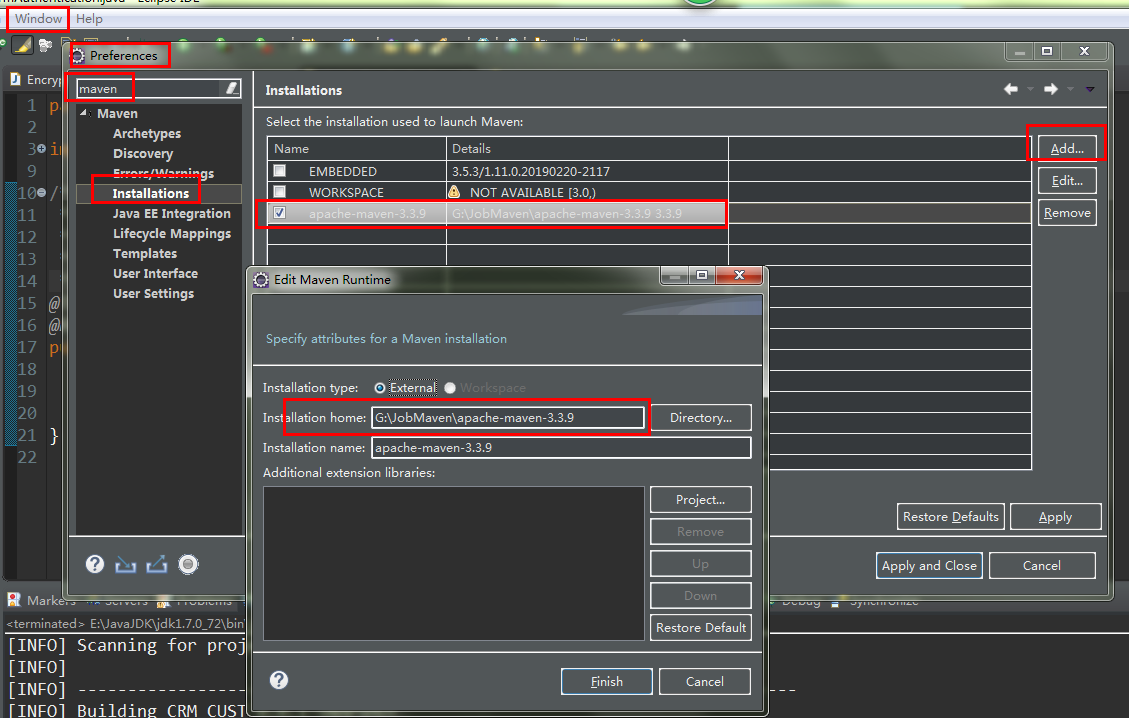
本地安装的 maven目录:
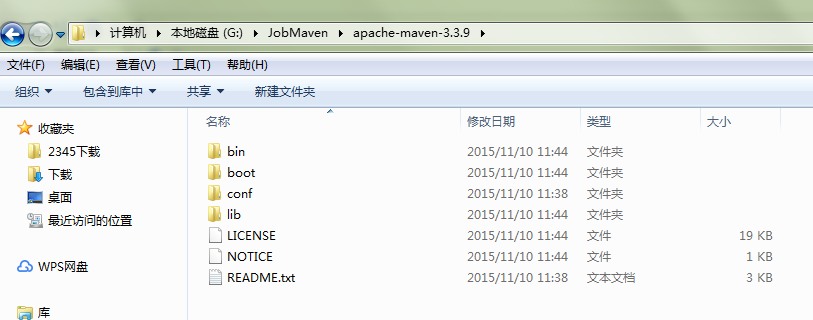
也就是填到 bin的上级目录即可。
再次用Eclipse 执行 clean ,通过了,没有报错。
-------------------------------------------------
但是项目中的其他包中的代码还是不编译,而且在Eclipse中的执行 maven 的compile 指令
方法为,在项目上右键,run as ——maven build ...
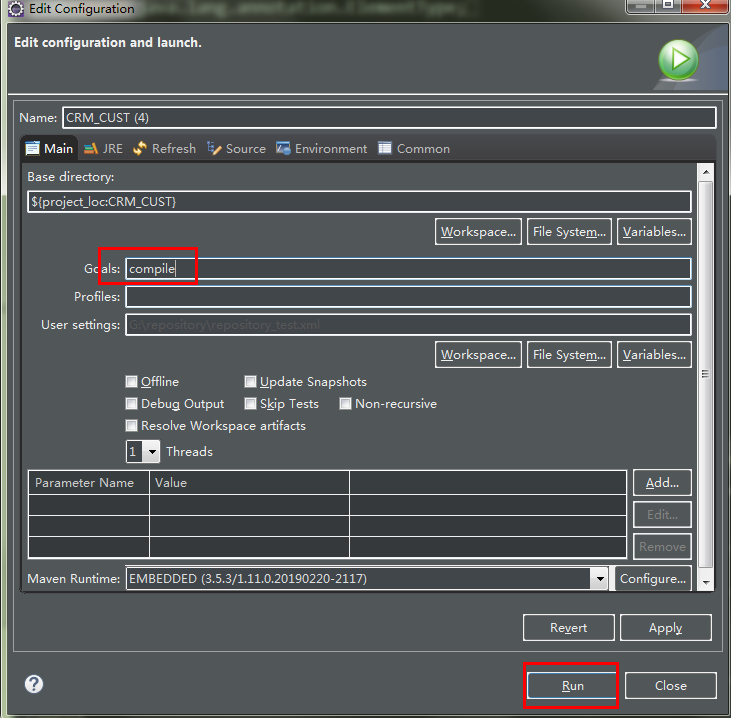
虽然执行成功,但是 日志显示 没有可编译的文件。
。。。
各种百度、测试,最终把目标转移到项目下的 .classpath 文件
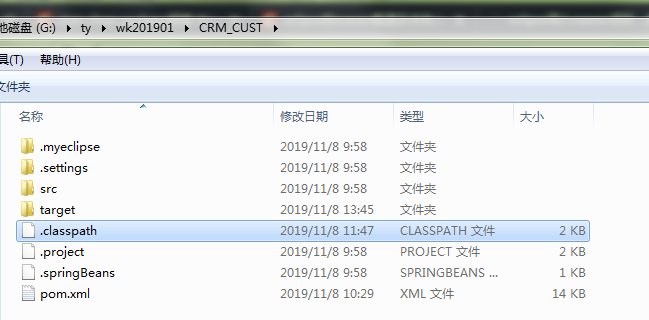
此文件需要在Eclipse的 Navigator 视图中才能看到,或者直接到项目目录中去找:

经过和一个本地正常的maven 项目的 .classpath文件比较
正常项目的 .classpath 文件:
<?xml version="1.0" encoding="UTF-8"?>

<classpath>

    <classpathentry kind="src" output="target/classes" path="src/main/java">

        <attributes>

            <attribute name="optional" value="true"/>

            <attribute name="maven.pomderived" value="true"/>

        </attributes>

    </classpathentry>

    <classpathentry excluding="**" kind="src" output="target/classes" path="src/main/resources">

        <attributes>

            <attribute name="maven.pomderived" value="true"/>

        </attributes>

    </classpathentry>

    <classpathentry kind="src" output="target/test-classes" path="src/test/java">

        <attributes>

            <attribute name="optional" value="true"/>

            <attribute name="maven.pomderived" value="true"/>

            <attribute name="test" value="true"/>

        </attributes>

    </classpathentry>

    <classpathentry excluding="**" kind="src" output="target/test-classes" path="src/test/resources">

        <attributes>

            <attribute name="maven.pomderived" value="true"/>

            <attribute name="test" value="true"/>

        </attributes>

    </classpathentry>

    <classpathentry kind="con" path="org.eclipse.jdt.launching.JRE_CONTAINER/org.eclipse.jdt.internal.debug.ui.launcher.StandardVMType/J2SE-1.5">

        <attributes>

            <attribute name="maven.pomderived" value="true"/>

        </attributes>

    </classpathentry>

    <classpathentry kind="con" path="org.eclipse.m2e.MAVEN2_CLASSPATH_CONTAINER">

        <attributes>

            <attribute name="maven.pomderived" value="true"/>

            <attribute name="org.eclipse.jst.component.dependency" value="/WEB-INF/lib"/>

        </attributes>

    </classpathentry>

    <classpathentry kind="output" path="target/classes"/>

</classpath>
异常项目的 文件:
<?xml version="1.0" encoding="UTF-8"?>

<classpath>

    <classpathentry excluding="**/test/" kind="src" output="target/classes" path="src/main/java">

        <attributes>

            <attribute name="optional" value="true"/>

            <attribute name="maven.pomderived" value="true"/>

        </attributes>

    </classpathentry>

    <classpathentry excluding="**" kind="src" output="target/classes" path="src/main/resources">

        <attributes>

            <attribute name="maven.pomderived" value="true"/>

        </attributes>

    </classpathentry>

    <classpathentry exported="true" kind="con" path="org.eclipse.m2e.MAVEN2_CLASSPATH_CONTAINER">

        <attributes>

            <attribute name="maven.pomderived" value="true"/>

            <attribute name="org.eclipse.jst.component.dependency" value="/WEB-INF/lib"/>

        </attributes>

    </classpathentry>

    <classpathentry exported="true" kind="con" path="org.eclipse.jdt.launching.JRE_CONTAINER/org.eclipse.jdt.internal.debug.ui.launcher.StandardVMType/JavaSE-1.7">

        <attributes>

            <attribute name="maven.pomderived" value="true"/>

        </attributes>

    </classpathentry>

    <classpathentry exported="true" kind="lib" path="G:/ty/oracle/jdbc_qudong/ojdbc14-10.2.0.4.0.jar">

        <attributes>

            <attribute name="org.eclipse.jst.component.dependency" value="/WEB-INF/lib"/>

        </attributes>

    </classpathentry>

    <classpathentry kind="src" output="target/test-classes" path="src/test/java">

        <attributes>

            <attribute name="test" value="true"/>

            <attribute name="optional" value="true"/>

            <attribute name="maven.pomderived" value="true"/>

        </attributes>

    </classpathentry>

    <classpathentry kind="output" path="target/classes"/>

</classpath>
发现,其在 主要源文件目录 src/main/java的相关配置中,前面多了一个 excluding="**/test/"
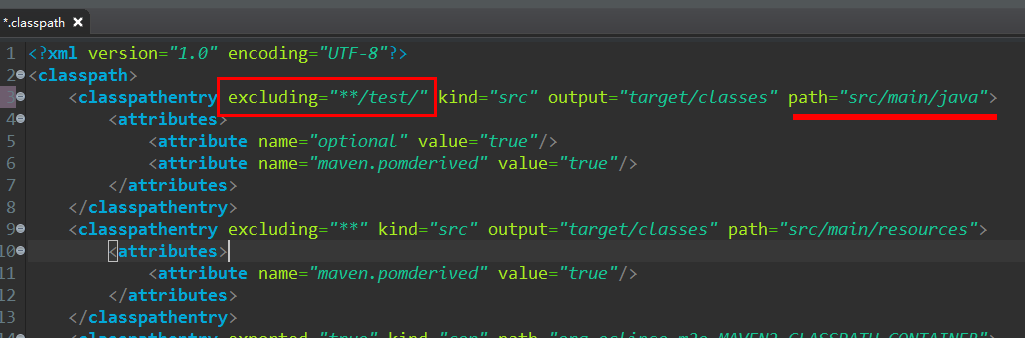
我靠,这个不正是项目中唯一被会被编译的 包的路径嘛,
想到这,直接把 excluding="**/test/" 这个 删除,保存,然后重启 Eclipse,所有包都编译了,故障排除。
---------------
启发:
刚从svn检出的项目,如果经过各种排查后还是有问题,尤其是 不编译 类 问题,可以查看一下项目下的 .classpath 文件,这个文件第一次检出项目时,会从 svn 上更新下来,然后随着本地的操作会发生变化。
如果svn上被提交的源 .classpath 文件就有问题,或者由于检出后本地的某些操作,也可能导致 这个文件出现异常,最终结果就是导致项目的构建发生各种问题。
排查其是否有问题的方法
1、可以在本地新建一个好用的maven项目,然后用其自动生成的 .classpath 文件,和故障项目的 文件比对。
2、可以直接使用上面文章中的例子
3、可以和同事好用的项目中的文件比对。
maven项目新检出后不编译爬坑记 及 mvn clean package报错 WagonTransporterFactory: java.util.NoSuchElementException 异常【我】的更多相关文章
- Maven项目添加阿里云HBase依赖之后第一行才出现红叉报错“Missing artifact jdk.tools:jdk.tools:jar:1.6”的解决办法
首先是从阿里云上下载了一个样例项目"hbase-demo",然后用eclipse打开,此时eclipse会去下载aliyun.hbase依赖. 等待一段时间后,pom.xml却报错 ...
- AS项目报错 Error:java.util.concurrent.ExecutionException: com.android.tools.aapt2.Aapt2Exception: AAPT2 error: check logs for details
1 修改gradle的缓存目录 这个可以通过android studio的设置中找到gradle,配置另一个非中文目录来缓存. File -> Settings -> Build, Exe ...
- react爬坑之路(一)--报错output.path不是绝对路径
之前,一直在纠结是学习angular好,学习vue好,还是学习react好,网上一搜索,也是各种对比,各种互喷,看过之后更纠结.就跟小时候一样纠结长大了是上清华好,还是上北大好,最后证明我想多了.总之 ...
- 部署Maven项目到tomcat报错:java.lang.ClassNotFoundException: org.springframework.web.context.ContextLoaderListener【转】
部署Maven项目到tomcat报错:java.lang.ClassNotFoundException: org.springframework.web.context.ContextLoaderLi ...
- 部署Maven项目到tomcat报错:java.lang.ClassNotFoundException: org.springframework.web.context.ContextLoaderLi
Maven项目下update maven后Eclipse报错:java.lang.ClassNotFoundException: ContextLoaderL 严重: Error config ...
- Maven package 报错解决记录以及编译scala的pom.xml
可以打包的pom.xml: <project xmlns="http://maven.apache.org/POM/4.0.0" xmlns:xsi="http:/ ...
- Maven命令行使用:mvn clean package(打包)
先把命令行切换到Maven项目的根目录,比如:/d/xxxwork/java/maven-test,然后执行命令: mvn clean package 执行结果如下: [INFO] Scanning ...
- eclipse java项目中明明引入了jar包 为什么项目启动的时候不能找到jar包 项目中已经 引入了 com.branchitech.app 包 ,但时tomcat启动的时候还是报错? java.lang.ClassNotFoundException: com.branchitech.app.startup.AppStartupContextListener java.lang.ClassN
eclipse java项目中明明引入了jar包 为什么项目启动的时候不能找到jar包 项目中已经 引入了 com.branchitech.app 包 ,但时tomcat启动的时候还是报错?java. ...
- Maven命令行使用 mvn clean package
先把命令行切换到Maven项目的根目录,比如:/d/xxxwork/java/maven-test,然后执行命令: mvn clean package 执行结果如下: [INFO] Scanning ...
随机推荐
- python使用二分法实现在一个有序列表中查找指定的元素
二分法是一种快速查找的方法,时间复杂度低,逻辑简单易懂,总的来说就是不断的除以2除以2... 例如需要查找有序list里面的某个关键字key的位置,那么首先确认list的中位数mid,下面分为三种情况 ...
- SourceTree&Git -01 -代码拉取推送流程 -提交时的相关注意事项
1.进行文件的暂存,忽略不提交的文件 防止自己的文件从仓库拉取时被覆盖掉 2.获取,然后从仓库拉取内容 (勾选被合并提交的内容) 先获取,可以防止冲突的发生 3.推送自己暂存的文件 推送失败,请再次进 ...
- P1392 取数[堆]
题目描述 在一个n行m列的数阵中,你须在每一行取一个数(共n个数),并将它们相加得到一个和.对于给定的数阵,请你输出和前k小的取数方法. 解析 写这题完全自闭. 根本没联想起远古时期做的 P1631 ...
- 十.Protobuf3 JSON映射
Protobuf3 JSON映射 proto 3支持JSON中的规范编码,使得系统之间更容易共享数据.下表按类型对编码进行了描述. 如果JSON编码的数据中缺少一个值,或者如果它的值为null,那么当 ...
- Spring框架 IOC注解
Spring框架的IOC之注解方式的快速入门 1. 步骤一:导入注解开发所有需要的jar包 * 引入IOC容器必须的6个jar包 * 多引入一个:Spring ...
- 域渗透:LSA Protection
简介:微软在 2014 年 3 月 12 日添加了 LSA 保护策略,用来防止对进程 lsass.exe 的代码注入,这样一来就无法使用 mimikatz 对 lsass.exe 进行注入,相关操作也 ...
- mui 点击长按复制文本
项目需要长按复制文本内容,由于也没仔细研究过 mui 所以就直接百度.看到了 花落乱了流年 这篇博客 我就把这个博客的代码融合到自己的项目里,实现了复制的需求 直接上代码 单独写到了一个 js 文件. ...
- JAVA中使用Dom解析XML
在G盘下新建XML文档:person.xml,XML代码: <?xml version="1.0" encoding="utf-8"?> <s ...
- SpringMVC的文件上传与下载
1. 单文件上传 配置jsp页面 <%@ page contentType="text/html;charset=UTF-8" language="java&quo ...
- jsp文件上传下载组件
我们平时经常做的是上传文件,上传文件夹与上传文件类似,但也有一些不同之处,这次做了上传文件夹就记录下以备后用. 首先我们需要了解的是上传文件三要素: 1.表单提交方式:post (get方式提交有大小 ...