
centos7和centos6安装httpd
编译安装httpd
http://apr.apache.org/download.cgi
下载 apr-util-1.6.1.tar.bz2 apr-1.6.5.tar.bz2
http://httpd.apache.org/download.cgi#apache24
下载Source: httpd-2.4.39.tar.bz2
- 按装依赖
yum install pcre-devel openssl-devel expat-devel
- 安装apr
[172.168.2.8-root@lvsapr-1.6.]#cd apr-1.6./

./configure --prefix=/usr/local/apr

 make && make install
- 安装arp-util
cd apr-util-1.6.

./configure --prefix=/usr/local/apr-util \

--with-apr=/usr/local/apr

make && make install
- 安装httpd
cd httpd-2.4.

./configure --prefix=/usr/local/httpd2.4.39 \

--sysconfdir=/etc/httpd2.4.39 \

--enable-so \

--enable-ssl \

--enable-cgi \

--enable-rewrite \

--with-zlib \

--with-pcre \

--with-apr=/usr/local/apr \

--with-apr-util=/usr/local/apr-util \

--enable-modules=most \

--enable-mpms-shared=all \

--with-mpms=prefork

make && make  install
- 设置环境变量
cat >> /etc/profile.d/httpd.ssh << 'EOF'

export PATH=/usr/local/httpd2.4.39/bin:$PATH

EOF
- 连接
ln -s /usr/local/httpd2.4.39/ /usr/local/httpd
- centos6.9安装apache2.4.39
- 把 apr 和apr-util 移动到http2.4.39源码包srclib/下重命名
[root@node2 /usr/local/src]# mv apr-1.6. httpd-2.4./srclib/apr

[root@node2 /usr/local/src]# mv apr-util-1.6. httpd-2.4./srclib/apr-util
yum install pcre-devel openssl-devel expat-devel
./configure --prefix=/usr/local/httpd2.4.39 \

--enable-so \

--enable-ssl \

--enable-cgi \

--with-include-apr \

--enable-rewrite \

--with-zlib \

--with-pcre \

--enable-modules=most \

--enable-mpms-shared=all \

--with-mpms=prefork
cat >> /etc/profile.d/httpd.ssh << 'EOF'

export PATH=/usr/local/httpd2.4.39/bin:$PATH

EOF
ln -s /usr/local/httpd2.4.39/ /usr/local/httpd
- 修改启动脚本
[root@node2 ~]# cp /etc/init.d/http /etc/init.d/http2.4.39

apachectl=/usr/local/httpd2.4.39/bin/apachectl

httpd=${HTTPD-/usr/local/httpd2.4.39/bin/httpd}

prog=httpd

pidfile=${PIDFILE-/usr/local/httpd2.4.39/logs/httpd.pid}

lockfile=${LOCKFILE-/var/lock/subsys/httpd2.4.39}
- 加入服务管理
[root@node2 /etc/init.d]# chkconfig --add httpd2.4.39

[root@node2 /etc/init.d]# chkconfig --list | grep httpd2.4.39

httpd2.4.39    :off :off :off :off :off :off :off
- 启动
[root@node2 /etc/init.d]# /etc/init.d/httpd2.4.39 start
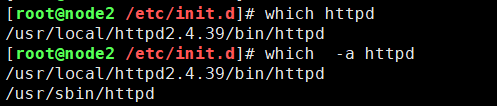
- 检验环境变量
[root@node2 /etc/init.d]# which httpd

/usr/local/httpd2.4.39/bin/httpd

[root@node2 /etc/init.d]# which  -a httpd

/usr/local/httpd2.4.39/bin/httpd

/usr/sbin/httpd
centos7和centos6安装httpd的更多相关文章
- Centos7.4 离线安装httpd(解决rpm依赖)
1.直接下载httpd的rpm安装包,安装失败需要先解决依赖. [root@node06 ~]# rpm -ivh httpd--.el7.centos.x86_64.rpm warning: htt ...
- Centos7.4下安装Jumpserver 1.0.0(支持windows组件)
0)系统环境CentOS 7.4 IP: 192.168.100.10 [root@jumpserver-server ~]# cat /etc/redhat-release CentOS Linux ...
- Centos7.3下安装Jumpserver 1.0.0(支持windows组件)
Jumpserver最新版本支持windows组件,废话不多介绍了,下面直接介绍下部署过程: 0)系统环境 CentOS 7.3 IP: 192.168.10.210 [root@jumpserver ...
- CentOS 7 安装Httpd(转)
实验环境:CentOS7 实验步骤: 安装httpd服务:yum -y install httpd 关闭SELinux:setenforce 0 禁用防火墙策略:iptables -F 启动httpd ...
- centos7和centos6通过yum安装JDK1.8
centos7和centos6通过yum安装JDK1.8 查看JDK的安装路径# java -version============================查看Linux系统版本信息# cat ...
- CentOS7.3环境下源码安装httpd
CentOS7.3环境下源码安装httpd 本文在CentOS7.3下,源码安装apache服务httpd2.4. 1.下载好源码安装包 [root@localhost ~]#ll total 625 ...
- Centos7 apache2.4.29(httpd) 安装
重点参考文章:https://blog.csdn.net/MrDing991124/article/details/78829184 写的很详细了,自己按着改博文走了不遍,不错! 一.配置安装环境 ...
- CentOS6.9安装httpd并正确配置静态IP地址
题目要求 在vmware中安装一台虚拟机,操作系统为centos6.9 ip地址为 192.168.56.11 要求: 1.xshell能够连接上此虚拟机 2.此虚拟机必须可以上网 3.使用yum安装 ...
- CentOS-7.0.中安装与配置Tomcat-7的方法
安装说明 安装环境:CentOS-7.0.1406安装方式:源码安装 软件:apache-tomcat-7.0.29.tar.gz 下载地址:http://tomcat.apache.org/down ...
随机推荐
- 【LeetCode算法-53】Maximum Subarray
Given an integer array nums, find the contiguous subarray (containing at least one number) which has ...
- springboot 读取配置文件
读取配置文件 在以前的项目中我们主要在 XML 文件中进行框架配置,业务的相关配置会放在属性文件中,然后通过一个属性读取的工具类来读取配置信息. 在 Spring Boot 中我们不再需要使用这种方式 ...
- maven更改本地的maven私服
1.今天想升级一个服务的jar包,更改后 使用命令 mvn deploy -e 一直报错, 看错误信息是 私服地址不是公司现在的地址. 想了半天,原来是电脑一直配置的上家公司的私服地址.. 但是在哪 ...
- [ERROR ]Failed to execute goal org.codehaus.mojo:flatten-maven-plugin:1.1.0:flatten (flatten) on project
今天在启动项目的时候,莫名的Maven install命令的时候出现错误 错误提示:Failed to execute goal org.codehaus.mojo:flatten-maven-plu ...
- dell服务器在bios中指定raid5的热备盘
一.创建raid5 二.指定热备盘 选择第15块磁盘作为上面创建的raid5的热备盘 选中 选中我们刚创建的raid5,点击OK
- Navicat 创建oracle表空间、新建用户、授权
1.利用数据库管理员账号:SYSTEM,再配合数据库管理口令,连接Oracle数据库. 登录界面: 2.创建表空间文件 进入如下界面 进入如下界面 弹出如下界面,输入表空间名称 最终结果: 2 .新 ...
- Spark学习(4) Spark Streaming
什么是Spark Streaming Spark Streaming类似于Apache Storm,用于流式数据的处理 Spark Streaming有高吞吐量和容错能力强等特点.Spark Stre ...
- C++工程师养成 每日一题(string使用)
题目: 题目来源牛客网:https://www.nowcoder.com/practice/f0db4c36573d459cae44ac90b90c6212?tpId 输入两个字符串,从第一字符串中删 ...
- 去除Chrome“请停用以开发者模式运行的扩展程序”提示
将version.dll放在chrome同级目录,重启浏览器( 79.0.3945.79版本后已失效)
- C++实现 企业信息管理系统
2.1总体需求 2.2管理需求 3.总体架构 由于代码量比较大,请移步GitHub或码云 码云:传送门 , GitHub:传送门 话不多说,直接上效果 我是在Linux Ubuntu1 ...