
035 Android 广播(BroadCastReceiver)
1.介绍
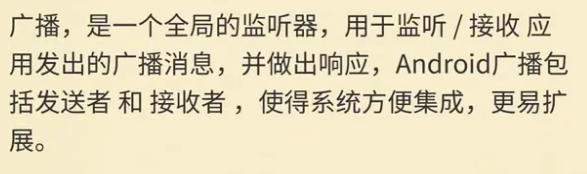
2.实现方法

3.注册广播
(1)静态广播
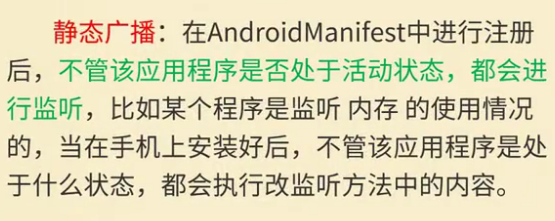
在AndroidManifest.xml文件中注册广播
<intent-filter>为过滤器
<receiver android:name=".MyBroadCast1"></receiver>

        <receiver android:name=".MyBroadCast2">

            <intent-filter>

                <action android:name="com.lucky"></action>

            </intent-filter>

        </receiver>
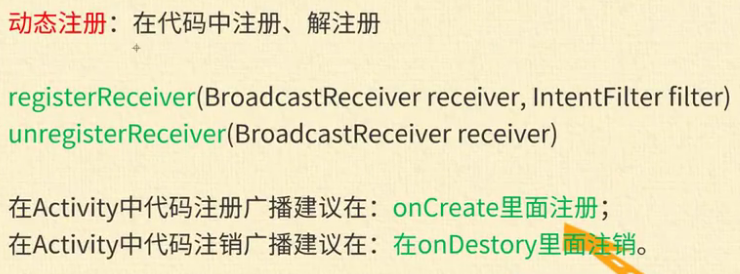
(2)动态广播

4.静态广播代码
(1)主界面
package com.lucky.test40broadcastreceiver;

import android.content.Intent;

import android.support.v7.app.AppCompatActivity;

import android.os.Bundle;

import android.view.View;

import android.widget.Button;

public class MainActivity extends AppCompatActivity {

    Button button1;

    Button button2;

    @Override

    protected void onCreate(Bundle savedInstanceState) {

        super.onCreate(savedInstanceState);

        setContentView(R.layout.activity_main);

        button1=findViewById(R.id.button);

        button2=findViewById(R.id.button2);

        button1.setOnClickListener(new View.OnClickListener() {

            @Override

            public void onClick(View v) {

                Intent intent=new Intent(MainActivity.this,MyBroadCast1.class);

                sendBroadcast(intent); //发送广播

            }

        });

        button2.setOnClickListener(new View.OnClickListener() {

            @Override

            public void onClick(View v) {

                //设置Action为com.lucky,会在AndroidManifest.xml中的receiver中启动action为com.lucky的广播

                Intent intent=new Intent();

                intent.setAction("com.lucky");

                sendBroadcast(intent);

            }

        });

    }

}
(2)广播接收器1(采用Toast语句进行提示)
package com.lucky.test40broadcastreceiver;

import android.content.BroadcastReceiver;

import android.content.Context;

import android.content.Intent;

import android.widget.Toast;

//MyBroadCast1广播接收器

public class MyBroadCast1 extends BroadcastReceiver {

    @Override

    public void onReceive(Context context, Intent intent) {

        Toast.makeText(context,"接收到广播",Toast.LENGTH_SHORT).show();

    }

}
(3)广播接收器2(采用通知的方式进行提示)
package com.lucky.test40broadcastreceiver;

import android.app.Notification;

import android.app.NotificationManager;

import android.content.BroadcastReceiver;

import android.content.Context;

import android.content.Intent;

import android.os.Build;

import android.support.annotation.RequiresApi;

public class MyBroadCast2 extends BroadcastReceiver {

    @RequiresApi(api = Build.VERSION_CODES.JELLY_BEAN)

    @Override

    public void onReceive(Context context, Intent intent) {

        //采用通知的形式

        NotificationManager manager= (NotificationManager) context.getSystemService(Context.NOTIFICATION_SERVICE);

        Notification.Builder builder=new Notification.Builder(context);

        builder.setSmallIcon(R.mipmap.ic_launcher); //给通知设置图标

        builder.setTicker("广播消息"); //设置提示消息

        builder.setContentTitle("您有一条广播消息");//设置内容标题

        builder.setContentText("hello lucky");    //设置通知内容

        manager.notify(0x01,builder.build()); //让通知显示

    }

}
5.动态广播
(1)主界面
package com.lucky.test41broadcastreceiver2;

import android.content.Intent;

import android.content.IntentFilter;

import android.support.v7.app.AppCompatActivity;

import android.os.Bundle;

import android.view.View;

import android.widget.Button;

public class MainActivity extends AppCompatActivity {

    Button button1;

    MyBroadCast myBroadCast;

    @Override

    protected void onCreate(Bundle savedInstanceState) {

        super.onCreate(savedInstanceState);

        setContentView(R.layout.activity_main);

        button1=findViewById(R.id.button);

        //注册广播

        myBroadCast=new MyBroadCast(); //实例化广播接收器

        IntentFilter intentFilter=new IntentFilter();//实例化一个过滤器

        intentFilter.addAction("com.lucky"); //添加action来明确接收哪种类型的广播

        registerReceiver(myBroadCast,intentFilter);//注册广播

        button1.setOnClickListener(new View.OnClickListener() {

            @Override

            public void onClick(View v) {

                //发送广播

                Intent intent=new Intent();

                intent.setAction("com.lucky");

                sendBroadcast(intent);

            }

        });

    }

}
(2)广播接收器
package com.lucky.test41broadcastreceiver2;

import android.content.BroadcastReceiver;

import android.content.Context;

import android.content.Intent;

import android.widget.Toast;

public class MyBroadCast extends BroadcastReceiver {

    @Override

    public void onReceive(Context context, Intent intent) {

        Toast.makeText(context,"hello lucky",Toast.LENGTH_SHORT).show();

    }

}
035 Android 广播(BroadCastReceiver)的更多相关文章
- Android 广播 BroadcastReceiver
Android 系统里定义了各种各样的广播,如电池的使用状态,电话的接收和短信的接收,开机启动都会产生一个广播.当然用户也可以自定义自己的广播. 既然说到广播,那么必定有一个广播发送者,以及广播接收器 ...
- Android广播BroadcastReceiver 二
BroadcastReceiver: 在Android中,Broadcast是一种广泛运用的在应用程序之间传输信息的机制.而BroadcastReceiver是对发送出来的 Broadcast进行过滤 ...
- Android广播BroadcastReceiver 一
Android 系统里定义了各种各样的广播,如电池的使用状态,电话的接收和短信的接收,开机启动都会产生一个广播.当然用户也可以自定义自己的广播. 既然说到广播,那么必定有一个广播发送者,以及广播接收器 ...
- Android广播BroadcastReceiver
Android 系统里定义了各种各样的广播,如电池的使用状态,电话的接收和短信的接收,开机启动都会产生一个广播.当然用户也可以自定义自己的广播. 既然说到广播,那么必定有一个广播发送者,以及广播接收器 ...
- Android中BroadcastReceiver广播
BroadCastReceiver 简介 广播接收者( BroadcastReceiver )用于接收广播 Intent ,广播 Intent 的发送是通过调用 Context.sendBroadca ...
- Android - 广播接收者 - BroadcastReceiver
BroadcastReceiver 介绍: 广播是一种广泛运用的在应用程序之间传输信息的机制 .而 BroadcastReceiver 是对发送出来的广播 进行过滤接收并响应的一类组件 接受一种或者多 ...
- Android笔记(二十六) Android中的广播——BroadcastReceiver
为了方便进行系统级别的消息通知,Android有一套类似广播的消息机制,每个应用程序都可以对自己感兴趣的广播进行注册,这样该程序就只会接收自己所关心的广播内容,这些广播可能是来自于系统,也可能是来自于 ...
- Android(java)学习笔记172:BroadcastReceiver之 Android广播机制
Android广播机制 android系统中有各式各样的广播,各种广播在Android系统中运行,当"系统/应用"程序运行时便会向Android注册各种广播.Android接收到广 ...
- (八)Android广播接收器BroadcastReceiver
一.使用Broadcast Reciver 1.右击java文件夹,new->other->Broadcast Receiver后会在AndroidManifest.xml文件中生成一个r ...
随机推荐
- web容量规划
容量和性能 容量规划是基于当前性能判断系统需要什么及什么时候需要,它既是资本支出合理化证明过程也是一个技术变更; 性能调优是优化已存在的系统性能; 一般服务的升级步骤是:性能调优 -> ...
- Kafka(二) —— Server端设计原理
整理架构 kafka confluence kafka官方文档中文翻译-设计 消息设计 /** * 消息类 * * @author Michael Fang * @since 2019-11-14 * ...
- laravel文件存储、删除、移动等操作
laravel文件存储.删除.移动等操作 一.总结 一句话总结: 启示:可以在操作遇到问题的时候,找文档找实例好好实验一下,也就是学习巩固一下,不必一定要死纠排错 1.laravel文件删除注意? 1 ...
- argmin ,argmax函数
在数学中,ARG MAX(或ARGMAX)代表最大值,即给定参数的点集,给定表达式的值达到其最大值: 换一种说法, 是f(x)具有最大值M的x的值的集合.例如,如果f(x)是1- | x |,那么它在 ...
- longitudinal models | 纵向研究 | mixed model
A longitudinal study refers to an investigation where participant outcomes and possibly treatments o ...
- chrome 等浏览器不支持本地ajax请求,的问题
XMLHttpRequest cannot load file:///D:/WWW/angularlx/ui-router-test/template/content.html. Cross orig ...
- java/spring boot/dubbo/spring cloud/微服务/SOA/分布式经典电子书籍pdf下载
微服务系列 官方文档是最好的资料了. spring cloud官方文档:https://cloud.spring.io/spring-cloud-static/Greenwich.RELEASE/si ...
- ActiveMQ处理模式
一.PTP处理模式(Queue) 消息生产者生产消息发送到queue中,然后消息消费者从queue中取出并且消费消息. 消息被消费以后,queue中不再有存储,所以消息消费者不可能消费到已经被消费的消 ...
- System.Runtime.Serialization.cs
ylbtech-System.Runtime.Serialization.cs 允许对象控制其自己的序列化和反序列化过程. 1.返回顶部 1. #region 程序集 mscorlib, Versio ...
- 004-行为型-07-备忘录模式(Memento)
一.概述 又叫做快照模式(Snapshot Pattern)或Token模式 保存对象的内部状态,并在需要的时候(undo/rollback)恢复对象以前的状态. 意图:在不破坏封装性的前提下,捕获一 ...