
C++ std::map 屏蔽排序
转载:https://blog.csdn.net/sendinn/article/details/96286849
最近在项目中用标准库中的关联性容器map,但知道map默认升序的,但在一个需求时又不想让它排序,保持元素原始位置。原先查了资料发现,标注库中有不排序的map,可以重写map的第三个比较函数,但实际使用中发现,用了自定义的比较函数,map的find函数没法用。
unordered_map:
包含头文件 #include<unordered_map>
关联性:std::unorederd_map 是一个关联容器,其中的元素根据键来引用,而不是根据索引来引用。
无序性:在内部,std::unordered_map中的元素不会根据其键值或映射值按任何特定顺序排序,而是根据其哈希值组织到桶中,以允许通过键值直接快速访问各个元素(常量的平均时间复杂度)。
唯一性:std::unorederd_map中的元素的键是唯一的。
void testUnordermap()

{

    std::unordered_map<std::string, int> unm;

    unm["d"] = ;

    unm["c"] = ;

    unm["b"] = ;

    unm["a"] = ;

    unm["a"] = ;

    std::unordered_map<std::string, int>::iterator iter1 = unm.begin();

    for (; iter1 != unm.end(); iter1++)

    {

        std::cout << "unordered_map:   " << iter1->first.c_str() << std::endl;

    }

    unm["j"] = ;

}
运行结果:
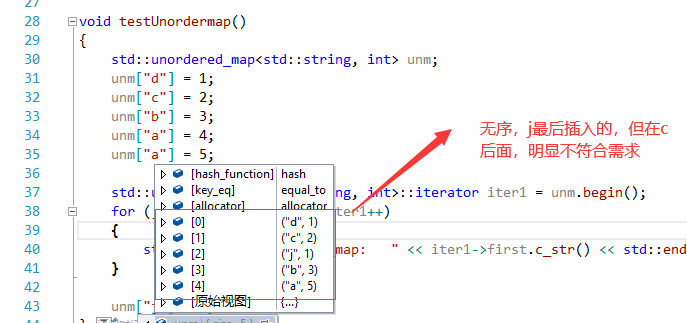
map:
在网上查资料说,map容器有4个参数,其中影响自动排序的是第三个参数,只要保证为true即可。
上给出的多是直接返回true或是if (lhs == rhs) return false; return true;(加了相同的key则默认处理返回false的条件)
但是其实map如果想第三个参数返回true需要经过两次比较,如果第一次返回true那么会把左右参数对调再判断一次,这一次则要返回false,才能无序排列,所以要多加些条件。
#include <iostream>

#include <unordered_map>

#include <map>

template<class T>

struct DisableCompare : public std::binary_function<T,T,bool>

{

    bool operator()(T lhs,T rhs)const

    {

        static bool disblecompare = false;

        if (lhs == rhs)

        {

            return false;

        }

        if (disblecompare)

        {

            disblecompare = false;

            return false;

        }

        else

        {

            disblecompare = true;

            return true;

        }

    }

};

void test()

{

    std::map<std::string, int, DisableCompare<std::string>> m;

    m["d"] = ;

    m["c"] = ;

    m["b"] = ;

    m["a"] = ;

    m["a"] = ;

    std::map<std::string, int>::iterator iter = m.begin();

    for (; iter != m.end();iter++)

    {

        std::cout << "map:   " << iter->first.c_str() << std::endl;

    }
   std::map<std::string, int>::iterator iter1 = m.find("d");

}

int main()

{

    test();

    getchar();

    return ;

}
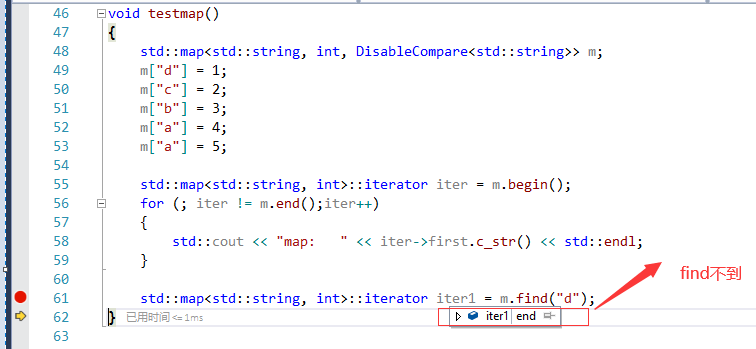
如果只想不排序,不用find的话,可以采用这种方法,但实际需求,一般都会使用map的find函数,所以在此还需要想其他办法。
也许不是这种特殊需求,我们只知道用map,并利用它的默认排序,知识的积累真是一点一滴的,没有捷径。
C++ std::map 屏蔽排序的更多相关文章
- 对std::map进行排序
1.对Key排序. std::map的第三个参数即为对key进行排序的比较函数.默认为less,表示升序.如果要降序,可以改为greater. 2.对Value排序 不支持,因为map不是一个序列的容 ...
- std::map 自定义排序
PS:开发中难免会用到快速检索的数据结构-map , 很多时候map自身提供的排序不能满足我们的需要或者不支持我们自定的数据结构的排序,解决办法就是自己实现排序. 这里的小案例是:我们要经用户的has ...
- STL之std::set、std::map的lower_bound和upper_bound函数使用说明
由于在使用std::map时感觉lower_bound和upper_bound函数了解不多,这里整理并记录下相关用法及功能. STL的map.multimap.set.multiset都有三个比较特殊 ...
- C++中vector,set,map自定义排序
一.vector排序 vector支持cmp,就类似数组,可以直接sort. #include <iostream> #include <algorithm> #include ...
- std::map使用结构体自定义键值
使用STL中的map时候,有时候需要使用结构题自定义键值,比如想统计点的坐标出现的次数 struct Node{ int x,y; }; ...... map<Node,int>mp; m ...
- C++ std::map
std::map template < class Key, // map::key_type class T, // map::mapped_type class Compare = less ...
- std::map用法
STL是标准C++系统的一组模板类,使用STL模板类最大的好处就是在各种C++编译器上都通用. 在STL模板类中,用于线性数据存储管理的类主要有vector, list, map 等等.本文主要 ...
- C++ std::map::erase用法及其陷阱
1.引入: STL的map中有一个erase方法用来从一个map中删除制定的节点 eg: map<string,string> mapTest; typedef map<string ...
- std::map
1.例: map<int,string> m_mapTest; m_mapTest.insert(make_pair(1,"kong")); m_mapTest.ins ...
随机推荐
- 【爬虫】使用selenium设置cookie
https://segmentfault.com/a/1190000015826749
- JAVA构造器,重载与重写
1. java构造器 构造器也叫构造方法(constructor), 用于对象初始化. 构造器是一个创建对象时被自动创建的特殊方法,目的是对象的初始化. 构造器 的名称与类的名称一致. JAVA通过n ...
- 如果wordpress分类只有一篇文章则直接跳转到文章页
每个项目的需求都不一样,比如最近ytkah的客户提出如果wordpress分类只有一篇文章则直接跳转到文章页,这个实现起来不会很麻烦,几行代码就能搞定,下面就来一起看看吧.打开主题的function. ...
- js的类型系统--js基于原型的基石是所有对象最终都能够类型自证
一.动态类型 变量能够类型自证的类型即为动态类型 二.基础与内置类型 三.对象与类型的关系 1.对象本身能够自证为基本类型: 2.元原型可能为一个空的集合: 3.复合对象的成员能够自证为基本类型: 4 ...
- 从Swift桥接文件到Clang-LLVM
http://blog.csdn.net/u014795020/article/details/72514109 前言 今天在Swift工程中不小心创建了一个OC文件,于是乎提示我创建一个桥接文件,那 ...
- [Javascript] Private Variables with IIFEs
An IIFE (immediately invoked function expression) is when a function is called immediately after it ...
- 参数化CSV Data Set config元件
参数化CSV Data Set config元件 CSV Data Set config可以从指定的文件(一般是文本文件)中一行一行地提取文本内容,根据分隔符拆解这一行内容并把内容与变量名对应上,然后 ...
- java的多线程之入门
一.java多线程基本概念 调用run():在主线程调用子线程的run()方法会中断主线程等到子线程执行完毕之后再执行主线程. 调用start():在主线程中执行子线程的start()后会与主线程同步 ...
- 【LG2154】[SDOI2009]虔诚的墓主人
[LG2154][SDOI2009]虔诚的墓主人 题面 洛谷 题解 如果您没有看懂题,请反复阅读题面及样例 可以发现,对于某一个点,它的答案就是上下左右几个组合数乘起来. 这样直接做复杂度显然爆炸,考 ...
- 【BZOJ2095】[Poi2010]Bridges
[BZOJ2095][Poi2010]Bridges 题面 darkbzoj 题解 首先可以想到二分答案,那么我们就是要求我们新图中给所有边定向是否存在欧拉回路. 而有向图存在欧拉回路的充要条件为所有 ...