
Call to undefined function imagecreatefromjpeg() 让GD支持JPEG格式的图片扩展
安装扩展支持jpeg格式:
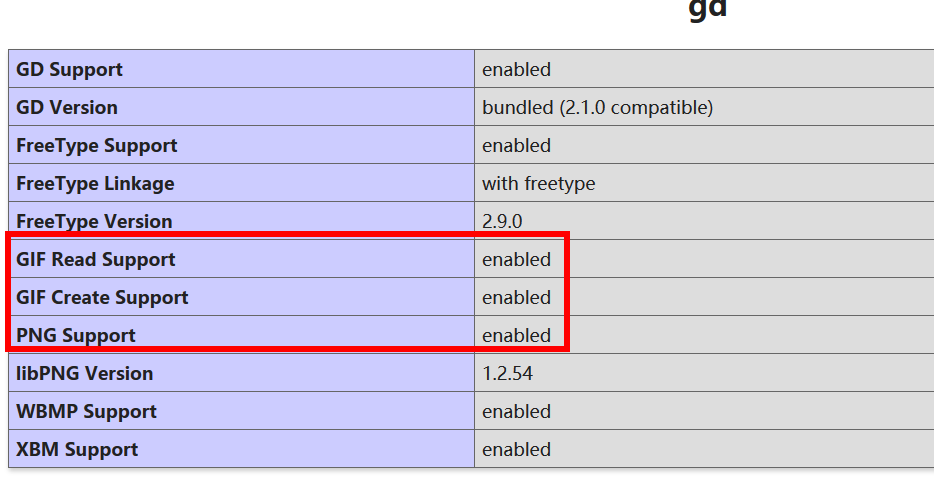
第一步:首先下载文件:

版本v8:

wget http://www.ijg.org/files/jpegsrc.v8b.tar.gz

版本v9:

wget http://www.ijg.org/files/jpegsrc.v9c.tar.gz

把jpeg安装到home目录:

./configure --prefix=/home/jpeg --enable-shared --enable-static

make && make install

第二步:安装到配置文件中

、找到php 源码目录

cd /home/ubuntu/downphp/php-7.0.

、进入 ext/gd 目录

cd /home/ubuntu/downphp/php-7.0./ext/gd

、执行命令:/home/php/bin/phpize

[root@daokr gd]#/home/php/bin/phpize

Configuring for:

PHP Api Version:

Zend Module Api No:

Zend Extension Api No:

、注意 with-freetype-dir 路径必须加载否则报错

./configure --with-php-config=/home/php/bin/php-config --with-jpeg-dir=/home/jpeg --with-freetype-dir=/usr/local/include/freetype2

、make && make install

、重启 httpd

如果上面的步骤解决不了那就重新安装php吧:

记得把
--with-jpeg-dir=/home/jpeg 加上
重新安装phpconfig
./configure --prefix=/home/php --with-config-file-path=/home/php/etc --with-fpm-user=ubuntu --with-fpm-group=ubuntu --with-pdo-mysql --with-openssl --with-pear --with-mhash --with-xmlrpc --with-zlib --with-mcrypt --with-curl --with-jpeg-dir=/home/jpeg --with-gd --with-freetype-dir=/usr/local/include/freetype2 --without-sqlite3 --without-pdo-sqlite --disable-rpath --without-pear --enable-fpm --enable-maintainer-zts --enable-pcntl --with-tsrm-pthreads --enable-mbstring --enable-mbregex --enable-bcmath --enable-zip --enable-sockets --enable-soap --enable-gd-native-ttf --enable-xml --enable-inline-optimization --enable-mysqlnd --with-mysqli=mysqlnd --with-pdo-mysql=mysqlnd
liconv close 错误解决:vim MakeFile
EXTRA_LIBS = -lcrypt -lz -lresolv -lcrypt -lmcrypt -lltdl -lpng -lz -ljpeg -lcurl -lz -lrt -lm -ldl -lnsl -lxml2 -lssl -lcrypto -lcurl -lxml2 -lssl -lcrypto -lfreetype -lxml2 -lxml2 -lcrypt -lxml2 -lxml2 -lxml2 -lxml2 -lssl -lcrypto -lcrypt -liconv

这个版本不能用imagecreatefromjpeg:
Warning: imagecreatefromjpeg(): gd-jpeg: JPEG library reports unrecoverable
为啥呢;百度了半天没解决最后还是重新编译php安装了。
最终还是重新编译了PHP配置
./configure --prefix=/home/php --with-config-file-path=/home/php/etc --with-fpm-user=ubuntu --with-fpm-group=ubuntu --with-pdo-mysql --with-openssl --with-pear --with-mhash --with-xmlrpc --with-zlib --with-mcrypt --with-curl --with-jpeg-dir --with-png-dir --with-gd --with-freetype-dir=/usr/local/include/freetype2 --without-sqlite3 --without-pdo-sqlite --disable-rpath --without-pear --enable-fpm --enable-maintainer-zts --enable-pcntl --with-tsrm-pthreads --enable-mbstring --enable-mbregex --enable-bcmath --enable-zip --enable-sockets --enable-soap --enable-gd-native-ttf --enable-xml --enable-inline-optimization --enable-mysqlnd --with-mysqli=mysqlnd --with-pdo-mysql=mysqlnd --enable-ftp --with-gettext --enable-opcache
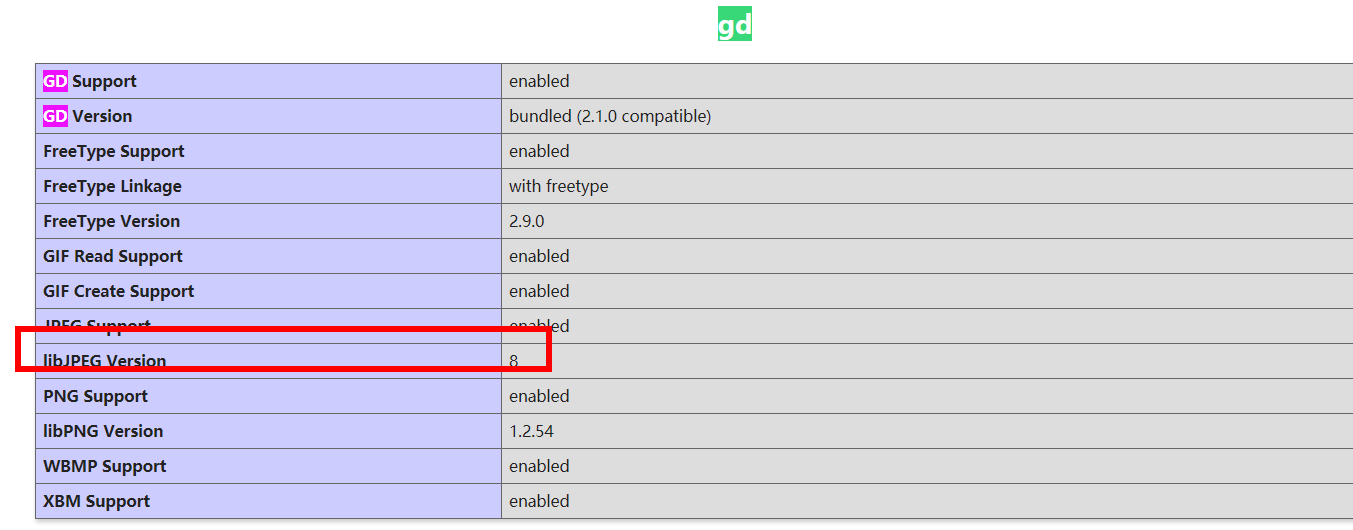
$f = 'uploads/face/010/00/00/2296f8b53a3324e528ff37cba61cb14f_240_240.jpg';

var_dump(getImageSize($f));

$a = imagecreatefromjpeg($f);

var_dump($a);die;
成功输出:

Call to undefined function imagecreatefromjpeg() 让GD支持JPEG格式的图片扩展的更多相关文章
- 一般源码安装添加的GD库 是不支持 jpeg 格式的图片的
一般源码安装添加的GD库 是不支持 jpeg 格式的图片的,只支持如下格式 GD Support enabled GD Version bundled (2.0.34 compatible) GIF ...
- 火狐不支持webp格式的图片
<!DOCTYPE html> <html lang="en"> <style> ul{list-style: none;} li{float: ...
- 超图不支持JPEG格式的WMTS服务
就目前面而言,超图不支持JPEG格式的WMTS服务,只支持PNG格式的. <本篇完>
- Linux下php+imagemagick支持webp格式的图片
摘要 ImageMagick是一款功能强大的图片处理工具包,很多互联网应用中都会涉及到图片处理工作,比如切割.缩放.水印.格式转换等.ImageMagick就是一个理想的工具包. 安装基础依赖 先检查 ...
- gd库不支持jpeg的解决方法
杜工就不在这里啰嗦怎么遇到这个问题的了,如果你确实安装了的gd库,却发现无法支持jpeg格式的图片,可从下面找到答案. 原因是在编译gd库前,配置时未声明jpeg库路径.解决方法如下: 32位系统: ...
- 在已经编译安装好php7场景下,install gd库 with free-type (解决Call to undefined function imagettftext())
在已经编译安装好php7场景下,install gd库 with free-type (解决Call to undefined function imagettftext()) install g ...
- php重新编译,gd扩展支持jpeg文件
晚上写东西的时候,报了一个错误: Call to undefined function imagecreatefromjpeg() 没有开启 jpeg 支持?原来是默认安装的 gd 扩展默认不支持 j ...
- php命令行运行出现错误Call to undefined function curl_init()
在windows命令行窗口下运行php命令,需要将php.exe所在的路径添加到Path环境变量,例如C:\wamp\bin\php\php5.4.3 启动Apache服务 在命令行中输入php te ...
- Call to undefined function think\finfo_open() 报错 解决方法
Call to undefined function think\finfo_open() 经过各方面排查,是fileinfo扩展没有安装 安装即可
随机推荐
- vscode入门使用教程(页面调试)
初次使用vscode时各种不适应,所有需要用到的功能貌似都需要单独安装插件才能用.这让很多初次使用vscode的朋友有点无所适从. 下面本人就带各位朋友学习下如何使用vscode来进行最基本的工作—— ...
- EF DBFirst 实体生成命令
dbfirst Entity生成命令行: Scaffold-DbContext "PORT=5435;DATABASE=DocumentDB;HOST=localhost;PASSWORD= ...
- Java自学-数组 排序
Java 数组选择法,冒泡法排序 步骤 1 : 选择法排序 选择法排序的思路: 把第一位和其他所有的进行比较,只要比第一位小的,就换到第一个位置来 比较完后,第一位就是最小的 然后再从第二位和剩余的其 ...
- Linux系统新手入门学习的四点建议
随着计算机的普及.互联网的发展,原本黑客手中的攻城利器---Linux,渐渐进入到普通群众的视线里,让越来越多的人接触到Linux,并学习Linux进而投身到Linux运维工作中去.如果大家对Linu ...
- Java8新特性:接口
Java接口本身没有任何实现,因为Java接口不涉及表象,而只描述public行为,所以Java接口比Java抽象类更抽象化. 以上是百度百科中对接口的定义,这个定义已经不准确. Java8对接口做了 ...
- 《区块链DAPP开发入门、代码实现、场景应用》笔记4——Ethereum Wallet中部署合约
账号创建完成之后,账号余额是0,但是部署合约是需要消耗GAS的,因此需要获取一定的以太币才能够继续本次实现.在测试网中获取以太币可以通过挖矿的方式,在开发菜单中可以选择打开挖矿模式,但是这需要将Syn ...
- 技术圈术语之LDAP
导语:阅读一些程序的文档时经常看到支持ldap,由于对这个协议不太熟悉,平时也没有用过,所以一直也没怎么留意,今天看rabbitmq的文档又发现了ldap相关的介绍,于是想把这个问题搞清楚. 一.LD ...
- android studio中为gradle指定cmake版本
Android Studio相当于是Intellij基础上写了一个AS插件,这个插件使用gradle作为构建系统,因此构建出现问题先考虑gradle的文档. gradle可以使用native buil ...
- 使用 chroot 建立沙盒环境
使用 chroot 建立沙盒环境 chroot 提供了更改当前进程及其子进程的可见根目录的操作,运行在此隔离环境中的应用程序无法访问新的目录树之外的文件和命令.这样的隔离环境称作 chroot 监狱( ...
- Linux命令——parted
参考:8 Linux ‘Parted’ Commands to Create, Resize and Rescue Disk Partitions 简介 parted是磁盘分区操作工具,支持多种磁盘分 ...