
Call to undefined function imagecreatefromjpeg() 让GD支持JPEG格式的图片扩展
安装扩展支持jpeg格式:
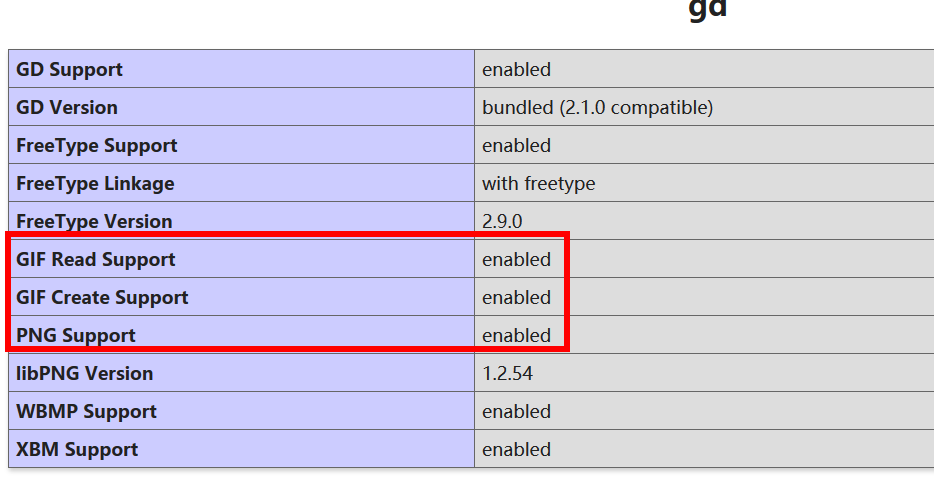
第一步:首先下载文件:

版本v8:

wget http://www.ijg.org/files/jpegsrc.v8b.tar.gz

版本v9:

wget http://www.ijg.org/files/jpegsrc.v9c.tar.gz

把jpeg安装到home目录:

./configure --prefix=/home/jpeg --enable-shared --enable-static

make && make install

第二步:安装到配置文件中

、找到php 源码目录

cd /home/ubuntu/downphp/php-7.0.

、进入 ext/gd 目录

cd /home/ubuntu/downphp/php-7.0./ext/gd

、执行命令:/home/php/bin/phpize

[root@daokr gd]#/home/php/bin/phpize

Configuring for:

PHP Api Version:

Zend Module Api No:

Zend Extension Api No:

、注意 with-freetype-dir 路径必须加载否则报错

./configure --with-php-config=/home/php/bin/php-config --with-jpeg-dir=/home/jpeg --with-freetype-dir=/usr/local/include/freetype2

、make && make install

、重启 httpd

如果上面的步骤解决不了那就重新安装php吧:

记得把
--with-jpeg-dir=/home/jpeg 加上
重新安装phpconfig
./configure --prefix=/home/php --with-config-file-path=/home/php/etc --with-fpm-user=ubuntu --with-fpm-group=ubuntu --with-pdo-mysql --with-openssl --with-pear --with-mhash --with-xmlrpc --with-zlib --with-mcrypt --with-curl --with-jpeg-dir=/home/jpeg --with-gd --with-freetype-dir=/usr/local/include/freetype2 --without-sqlite3 --without-pdo-sqlite --disable-rpath --without-pear --enable-fpm --enable-maintainer-zts --enable-pcntl --with-tsrm-pthreads --enable-mbstring --enable-mbregex --enable-bcmath --enable-zip --enable-sockets --enable-soap --enable-gd-native-ttf --enable-xml --enable-inline-optimization --enable-mysqlnd --with-mysqli=mysqlnd --with-pdo-mysql=mysqlnd
liconv close 错误解决:vim MakeFile
EXTRA_LIBS = -lcrypt -lz -lresolv -lcrypt -lmcrypt -lltdl -lpng -lz -ljpeg -lcurl -lz -lrt -lm -ldl -lnsl -lxml2 -lssl -lcrypto -lcurl -lxml2 -lssl -lcrypto -lfreetype -lxml2 -lxml2 -lcrypt -lxml2 -lxml2 -lxml2 -lxml2 -lssl -lcrypto -lcrypt -liconv

这个版本不能用imagecreatefromjpeg:
Warning: imagecreatefromjpeg(): gd-jpeg: JPEG library reports unrecoverable
为啥呢;百度了半天没解决最后还是重新编译php安装了。
最终还是重新编译了PHP配置
./configure --prefix=/home/php --with-config-file-path=/home/php/etc --with-fpm-user=ubuntu --with-fpm-group=ubuntu --with-pdo-mysql --with-openssl --with-pear --with-mhash --with-xmlrpc --with-zlib --with-mcrypt --with-curl --with-jpeg-dir --with-png-dir --with-gd --with-freetype-dir=/usr/local/include/freetype2 --without-sqlite3 --without-pdo-sqlite --disable-rpath --without-pear --enable-fpm --enable-maintainer-zts --enable-pcntl --with-tsrm-pthreads --enable-mbstring --enable-mbregex --enable-bcmath --enable-zip --enable-sockets --enable-soap --enable-gd-native-ttf --enable-xml --enable-inline-optimization --enable-mysqlnd --with-mysqli=mysqlnd --with-pdo-mysql=mysqlnd --enable-ftp --with-gettext --enable-opcache
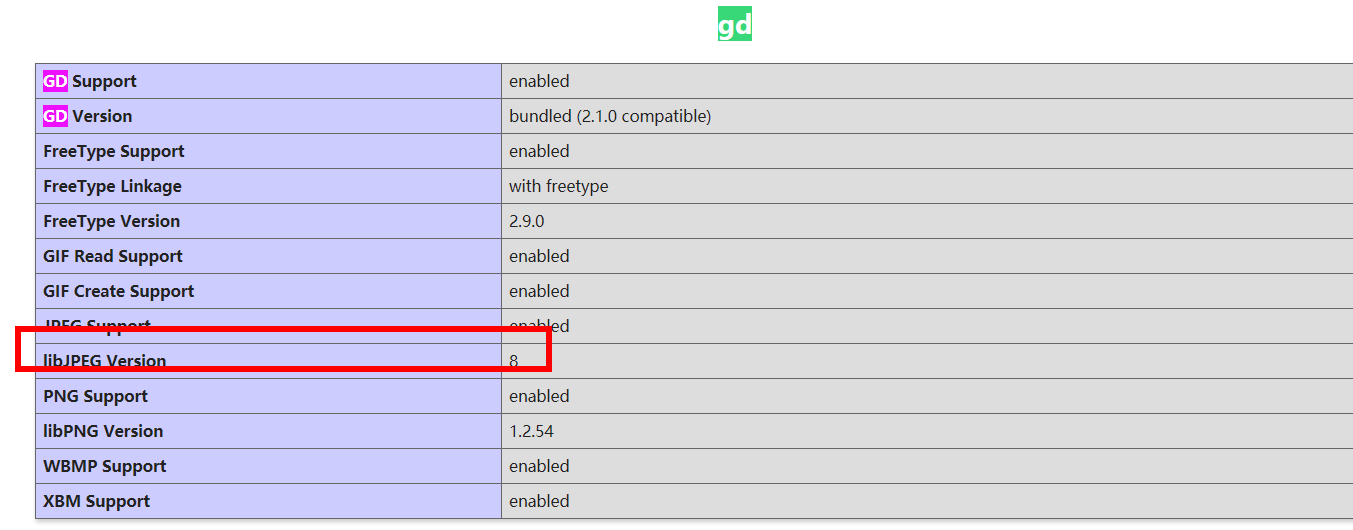
$f = 'uploads/face/010/00/00/2296f8b53a3324e528ff37cba61cb14f_240_240.jpg';

var_dump(getImageSize($f));

$a = imagecreatefromjpeg($f);

var_dump($a);die;
成功输出:

Call to undefined function imagecreatefromjpeg() 让GD支持JPEG格式的图片扩展的更多相关文章
- 一般源码安装添加的GD库 是不支持 jpeg 格式的图片的
一般源码安装添加的GD库 是不支持 jpeg 格式的图片的,只支持如下格式 GD Support enabled GD Version bundled (2.0.34 compatible) GIF ...
- 火狐不支持webp格式的图片
<!DOCTYPE html> <html lang="en"> <style> ul{list-style: none;} li{float: ...
- 超图不支持JPEG格式的WMTS服务
就目前面而言,超图不支持JPEG格式的WMTS服务,只支持PNG格式的. <本篇完>
- Linux下php+imagemagick支持webp格式的图片
摘要 ImageMagick是一款功能强大的图片处理工具包,很多互联网应用中都会涉及到图片处理工作,比如切割.缩放.水印.格式转换等.ImageMagick就是一个理想的工具包. 安装基础依赖 先检查 ...
- gd库不支持jpeg的解决方法
杜工就不在这里啰嗦怎么遇到这个问题的了,如果你确实安装了的gd库,却发现无法支持jpeg格式的图片,可从下面找到答案. 原因是在编译gd库前,配置时未声明jpeg库路径.解决方法如下: 32位系统: ...
- 在已经编译安装好php7场景下,install gd库 with free-type (解决Call to undefined function imagettftext())
在已经编译安装好php7场景下,install gd库 with free-type (解决Call to undefined function imagettftext()) install g ...
- php重新编译,gd扩展支持jpeg文件
晚上写东西的时候,报了一个错误: Call to undefined function imagecreatefromjpeg() 没有开启 jpeg 支持?原来是默认安装的 gd 扩展默认不支持 j ...
- php命令行运行出现错误Call to undefined function curl_init()
在windows命令行窗口下运行php命令,需要将php.exe所在的路径添加到Path环境变量,例如C:\wamp\bin\php\php5.4.3 启动Apache服务 在命令行中输入php te ...
- Call to undefined function think\finfo_open() 报错 解决方法
Call to undefined function think\finfo_open() 经过各方面排查,是fileinfo扩展没有安装 安装即可
随机推荐
- python 打包前三天日志
日志格式 app-2019-07-24.log app-2019-07-24.1.log 该脚本适合一天之内有多个日志文件 # /usr/bin/python #-*- coding: utf-8 - ...
- 关于.Net使用企业库访问MySql数据库
关于.Net使用企业库访问MySql数据库 在网上看了很多又重写又加WebConfig中的内容,其实不用那么麻烦 企业库5.0访问MySql数据库只需要在Web服务器安装mysql-connector ...
- Tomcat组件梳理--Server
Tomcat组件梳理--Server 1.Server组件的定义和功能概述 定义: Server组件用于描述一个启动的Tomcat实例,一个Tocmat被启动,在操作系统中占用一个进程号,提供web服 ...
- Kubernetes Storage Persistent Volumes
链接:https://kubernetes.io/docs/concepts/storage/persistent-volumes/ 支持的参数,比如mountOptions在这里可以找到 删除正在被 ...
- map小列
// 有关学生信息的头文件student.h代码如下 #include #include using namespace std; struct Student ...
- Kafka 生产者、消费者与分区的关系
背景 最近和海康整数据对接, 需要将海康产生的结构化数据拿过来做二次识别. 基本的流程: 海康大数据 --> kafka server --> 平台 Kafka 的 topic 正常过车 ...
- 一文读懂内网、公网和NAT
我们做弱电监控系统的时候,都避免不了要跟IP地址打交道,比如摄像头.NVR.服务器等这些设备安装好之后,就需要给它们配上IP,那这个IP地址你了解嘛?今天我们就一起来聊聊什么是内网.公网和NAT地址转 ...
- 关于jupyter notebook密码设置
对于一个jupyter编辑器使用的新手,更换浏览器或者Logout后,需要输入密码进行登陆时 按照网上的教程怎么设置都不行,那么自己整理了一个适用于初学者的操作. 1.windows下,打开命令行,重 ...
- mongodb移除分片和添加分片(转)
首先我们要移除的分片之后再次添加此分片时会出现添加失败的情况,需要在添加的分片上登录进行删除此分片之前数据库的历史数据比如testdb,删除分片上的数据库之后就可重新添加此分片到mongos中 1.执 ...
- MYSQL中常见的时间处理
use test; select getdate() select sysdate(); select now(); select current_timestamp select current_t ...