
Xml解析作业与Xml建模andXml建模作业
作业:config.xml解析
1、获取所有action中的type的值
public static void main(String[] args) throws Exception {

        InputStream in=XmlDemo.class.getResourceAsStream("config.xml");

        SAXReader sax= new SAXReader();

        Document doc=sax.read(in);

                            //获取所有action中的type的值

        List<Element> stuEles= doc.selectNodes("/config/action");

        for (Element stuEle : stuEles) {

            String type=stuEle.attributeValue("type");

            System.out.println(type);

        }
2、获取第二个action中的type的值
List<Element> stuEles= doc.selectNodes("/config/action");

        for (Element stuEle : stuEles) {

            if("/loginAction".equals(stuEle.attributeValue("path"))) {

                String type=stuEle.attributeValue("type");

                System.out.println(type);

            }

        }
3、获取第二个action的所有forward的path
List<Element> stuEles= doc.selectNodes("/config/action");

        for (Element stuEle : stuEles) {

            if("/loginAction".equals(stuEle.attributeValue("path"))) {

                List<Element> ford=(List<Element>) stuEle.selectNodes("forward");

                for (Element element : ford) {

                    String path=element.attributeValue("path");

                    System.out.println(path);

                }

            }

        }
4、获取第二个action的第二个forward的path
List<Element> stuEles= doc.selectNodes("/config/action");

        for (Element stuEle : stuEles) {

            if("/loginAction".equals(stuEle.attributeValue("path"))) {

                List<Element> ford=(List<Element>) stuEle.selectNodes("forward");

                for (Element element : ford) {

                    if("success".equals(element.attributeValue("name"))) {

                    String path=element.attributeValue("path");

                    System.out.println(path);

                    }

                }

            }

        }
Xml建模
1.什么是Xml建模
将XML配置文件中的元素,属性,文本信息 转换成对象的过程叫XML建模
2.XML建模
1.根据XML配置文件元素节点创建元素,节点,实体类
ConfigModel ActionModel ForwardModel
2.利用dom4j+xpath技术实现XML建模ConfigModelFactory
2. XML建模类
ConfigModel
ActionModel
ForwardModel
ConfigModelFactory
建模的思路
1、分析需要被建模的文件中有那几个对象
2、每个对象拥有的行为以及属性
3、定义对象从小到大(从里到外)
4、通过23种的设计模式中的工厂模式,解析xml生产出指定对象
好处:
提高代码的复用性
4.利用工程模式+dom4j+xpath解析XML配置文件
Config.xml文件
<?xml version="1.0" encoding="UTF-8"?>

<config>

    <!-- action标签:可以饱含0~N个forward标签 path:以/开头的字符串,并且值必须唯一 非空 type:字符串,非空 -->

    <action path="/regAction" type="test.RegAction">

        <!-- forward标签:没有子标签; name:字符串,同一action标签下的forward标签name值不能相同 ; path:以/开头的字符串

            redirect:只能是false|true,允许空,默认值为false -->

        <forward name="failed" path="/reg.jsp" redirect="false" />

        <forward name="success" path="/login.jsp" redirect="true" />

    </action>

    <action path="/loginAction" type="test.LoginAction">

        <forward name="failed" path="/login.jsp" redirect="false" />

        <forward name="success" path="/main.jsp" redirect="true" />

    </action>

</config>
3.使用Map集合存放子节点元素,其中Key为子节点的唯一属性,Value为整个子节点对象。
定义对象实体类
package com.zking.model;

public class FowardModel {

/*

 * 添加节点属性

 */

    private String name;

    private String path;

    private Boolean reairect;

    public String getName() {

        return name;

    }

    public void setName(String name) {

        this.name = name;

    }

    public String getPath() {

        return path;

    }

    public void setPath(String path) {

        this.path = path;

    }

    public Boolean getReairect() {

        return reairect;

    }

    public void setReairect(Boolean reairect) {

        this.reairect = reairect;

    }

}
行为及属性
package com.zking.model;

import java.util.HashMap;

import java.util.Map;

public class ActionModel {

    private String path;

    private String type;

    private Map<String, FowardModel> fmap=new HashMap<>();

    public String getPath() {

        return path;

    }

    public void setPath(String path) {

        this.path = path;

    }

    public String getType() {

        return type;

    }

    public void setType(String type) {

        this.type = type;

    }

    //存放到Map集合

    public void push(FowardModel fowardModel) {

        fmap.put(fowardModel.getName(), fowardModel);

    }

    //获取 返回FowardModel

    public FowardModel pop(String name) {

    return    fmap.get(name);

    }

}
package com.zking.model;

import java.util.HashMap;

import java.util.Map;

public class ConfigModel {

    private Map<String, ActionModel> amap=new HashMap<>();

    public void push(ActionModel actionModel) {

        amap.put(actionModel.getPath(), actionModel);

    }

    public ActionModel pop(String path) {

        return amap.get(path);

    }

}
4.利用工程模式+dom4j+xpath解析XML配置文件
导入dom4j包
package com.zking.model;

import java.io.InputStream;

import java.util.List;

import org.dom4j.Document;

import org.dom4j.DocumentException;

import org.dom4j.Element;

import org.dom4j.io.SAXReader;

/*

 *

 * 23设计模式之一:工厂模式   用来将资源文件生产指定的实体类

 * 处理Java中所遇到的一些特定的一些问题

 *

 * 好处:

 *     提高代码复用性

 */

public class ConfigModelFactory {

    public static ConfigModel build() throws DocumentException {

        return ConfigModel("config.xml");

    }

/*

 * 生产出有类容的实体类ConfigModel

 */

    private static ConfigModel ConfigModel(String xmlPath) throws DocumentException {

        // TODO Auto-generated method stub

        // 创建ConfigModel对象

        ConfigModel    configModel=new ConfigModel();

        ActionModel actionModel=null;

        FowardModel fowardModel=null;

        InputStream in = ConfigModelFactory.class.getResourceAsStream(xmlPath);

        SAXReader saxRead=new SAXReader();

        Document doc = saxRead.read(in);

        List<Element> actionEles = doc.selectNodes("/config/action");

        for (Element actionEle : actionEles) {

            actionModel=new ActionModel();

            //给actionModel对象填充Xml中的action标签的类容

            actionModel.setPath(actionEle.attributeValue("path"));

            actionModel.setType(actionEle.attributeValue("type"));

            List<Element> fowardEles = actionEle.selectNodes("foward");

            for (Element fowardEle : fowardEles) {

                fowardModel=new FowardModel();

                //给fowardModel对象填充Xml中的foward标签的类容

                fowardModel.setName(fowardEle.attributeValue("name"));

                fowardModel.setPath(fowardEle.attributeValue("path"));

                fowardModel.setReairect(!"false".equals(fowardEle.attributeValue("redirect")));

                //<forward name="failed" path="/login.jsp" redirect="false" />

//               redirect默认true 重定向

                //只有false才是转发

                //fowardEle.attributeValue("redirect")拿到是xml中你所填的值

                //不填  重定向  !"false".equals(fowardEle.attributeValue("redirect")) false

                //填 true 重定向   !"false".equals(fowardEle.attributeValue("redirect")) false

                //填false 转发   !"false".equals(fowardEle.attributeValue("redirect")) true

                actionModel.push(fowardModel);

            }

            configModel.push(actionModel);

        }

        return configModel;

    }

    public static void main(String[] args) throws DocumentException {

        ConfigModel configModel=ConfigModelFactory.build();

        ActionModel actionModel= configModel.pop("/loginAction");

        System.out.println(actionModel.getType());

    }

}
控制台输入结果:
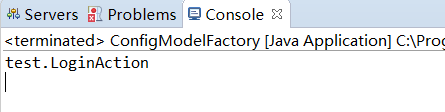
Xml建模作业
ServletClassModel
package com.zking.xml.webModel;

public class ServletClassModel {

    private String context;

    public String getContext() {

        return context;

    }

    public void setContext(String context) {

        this.context = context;

    }

}
ServletMappingModel
package com.zking.xml.webModel;

import java.util.ArrayList;

import java.util.List;

public class ServletMappingModel {

    private ServletNameModel servletNameModel;

    private List<UrlPatternModel> urlPatternModels = new ArrayList<>();

    public ServletNameModel getServletNameModel() {

        return servletNameModel;

    }

    public void setServletNameModel(ServletNameModel servletNameModel) {

        this.servletNameModel = servletNameModel;

    }

    public void pushUrlPatternModel(UrlPatternModel urlPatternModel) {

        urlPatternModels.add(urlPatternModel);

    }

    public List<UrlPatternModel> getUrlPatternModels() {

        return urlPatternModels;

    }

}
ServletModel
package com.zking.xml.webModel;

public class ServletModel {

    private ServletNameModel servletNameModel;

    private ServletClassModel servletClassModel;

    public ServletNameModel getServletNameModel() {

        return servletNameModel;

    }

    public void setServletNameModel(ServletNameModel servletNameModel) {

        this.servletNameModel = servletNameModel;

    }

    public ServletClassModel getServletClassModel() {

        return servletClassModel;

    }

    public void setServletClassModel(ServletClassModel servletClassModel) {

        this.servletClassModel = servletClassModel;

    }

}
ServletNameModel
package com.zking.xml.webModel;

public class ServletNameModel {

    private String context;

    public String getContext() {

        return context;

    }

    public void setContext(String context) {

        this.context = context;

    }

}
UrlPatternModel
package com.zking.xml.webModel;

public class UrlPatternModel {

    private String context;

    public String getContext() {

        return context;

    }

    public void setContext(String context) {

        this.context = context;

    }

}
WebAppModel
package com.zking.xml.webModel;

import java.util.ArrayList;

import java.util.List;

public class WebAppModel {

    private List<ServletModel> servletModels = new ArrayList<>();

    private List<ServletMappingModel> servletMappingModels = new ArrayList<>();

    public void pushServletModel(ServletModel servletModel) {

        servletModels.add(servletModel);

    }

    public List<ServletModel> getServletModels() {

        return servletModels;

    }

    public void pushServletMappingModel(ServletMappingModel servletMappingModel) {

        servletMappingModels.add(servletMappingModel);

    }

    public List<ServletMappingModel> getServletMappingModels() {

        return servletMappingModels;

    }

}
WebAppModelFactory
package com.zking.xml.webModel;

import java.io.InputStream;

import java.util.List;

import org.dom4j.Document;

import org.dom4j.DocumentException;

import org.dom4j.Element;

import org.dom4j.Node;

import org.dom4j.io.SAXReader;

public class WebAppModelFactory {

    public static WebAppModel buildWebAppModel() {

        String xmlPath = "/web.xml";

        return buildWebAppModel(xmlPath);

    }

    public static WebAppModel buildWebAppModel(String xmlPath) {

        InputStream in = WebAppModelFactory.class.getResourceAsStream(xmlPath);

        SAXReader saxReader = new SAXReader();

        WebAppModel webAppModel = new WebAppModel();

        try {

            Document doc = saxReader.read(in);

            List<Element> servletEles = doc.selectNodes("/web-app/servlet");

            for (Element servletEle : servletEles) {

                ServletModel servletModel = new ServletModel();

                Element servletNameEle = (Element) servletEle.selectSingleNode("servlet-name");

                Element servletClassEle = (Element) servletEle.selectSingleNode("servlet-class");

                ServletNameModel servletNameModel = new ServletNameModel();

                ServletClassModel servletClassModel = new ServletClassModel();

                servletNameModel.setContext(servletNameEle.getText());

                servletClassModel.setContext(servletClassEle.getText());

                servletModel.setServletNameModel(servletNameModel);

                servletModel.setServletClassModel(servletClassModel);

                webAppModel.pushServletModel(servletModel);

            }

            List<Element> servletMappingEles = doc.selectNodes("/web-app/servlet-mapping");

            for (Element servletMappingEle : servletMappingEles) {

                ServletMappingModel servletMappingModel = new ServletMappingModel();

                Element servletNameEle = (Element) servletMappingEle.selectSingleNode("servlet-name");

                ServletNameModel servletNameModel = new ServletNameModel();

                servletNameModel.setContext(servletNameEle.getText());

                servletMappingModel.setServletNameModel(servletNameModel);

                List<Element> urlPatternEles = servletMappingEle.selectNodes("url-pattern");

                for (Element urlPatternEle : urlPatternEles) {

                    UrlPatternModel urlPatternModel = new UrlPatternModel();

                    urlPatternModel.setContext(urlPatternEle.getText());

                    servletMappingModel.pushUrlPatternModel(urlPatternModel);

                }

                webAppModel.pushServletMappingModel(servletMappingModel);

            }

        } catch (Exception e) {

            // TODO Auto-generated catch block

            e.printStackTrace();

        }

        return webAppModel;

    }

    public static String getServletClassByUrl(WebAppModel webAppModel, String url) {

        String servletClass = "";

        String servletName = "";

        List<ServletMappingModel> servletMappingModels = webAppModel.getServletMappingModels();

        for (ServletMappingModel servletMappingModel : servletMappingModels) {

            List<UrlPatternModel> urlPatternModels = servletMappingModel.getUrlPatternModels();

            for (UrlPatternModel urlPatternModel : urlPatternModels) {

                if(url.equals(urlPatternModel.getContext())) {

                    ServletNameModel servletNameModel = servletMappingModel.getServletNameModel();

                    servletName = servletNameModel.getContext();

                }

            }

        }

        List<ServletModel> servletModels = webAppModel.getServletModels();

        for (ServletModel servletModel : servletModels) {

            ServletNameModel servletNameModel = servletModel.getServletNameModel();

            if(servletName.equals(servletNameModel.getContext())) {

                ServletClassModel servletClassModel = servletModel.getServletClassModel();

                servletClass = servletClassModel.getContext();

            }

        }

        return servletClass;

    }

    public static void main(String[] args) {

        WebAppModel webAppModel = WebAppModelFactory.buildWebAppModel();

        String res = getServletClassByUrl(webAppModel, "/jrebelServlet");

        String res2 = getServletClassByUrl(webAppModel, "/jrebelServlet2");

        String res3 = getServletClassByUrl(webAppModel, "/jrebelServlet3");

        System.out.println(res);

        System.out.println(res2);

        System.out.println(res3);

    }

}
2019-06-1119:22:01
Xml解析作业与Xml建模andXml建模作业的更多相关文章
- XML解析——Java中XML的四种解析方式
XML是一种通用的数据交换格式,它的平台无关性.语言无关性.系统无关性.给数据集成与交互带来了极大的方便.XML在不同的语言环境中解析方式都是一样的,只不过实现的语法不同而已. XML的解析方式分为四 ...
- XML解析——Java中XML的四种解析方式(转载 by 龍清扬)
XML是一种通用的数据交换格式,它的平台无关性.语言无关性.系统无关性.给数据集成与交互带来了极大的方便.XML在不同的语言环境中解析方式都是一样的,只不过实现的语法不同而已. XML的解析方式分为四 ...
- 【Python】 xml解析与生成 xml
xml *之前用的时候也没想到..其实用BeautifulSoup就可以解析xml啊..因为html只是xml的一种实现方式吧.但是很蛋疼的一点就是,bs不提供获取对象的方法,其find大多获取的都是 ...
- XML解析技术研究(一)
摘要:XML作为过去十年中出现的最流行的技术之一,得到了广泛的应用,而其中XML解析技术是XML应用的关键.本文介绍了XML解析技术的研究动向,分析和比较了4种XML解析技术的优劣,并归纳总结了应 ...
- Python XML解析(转载)
Python XML解析 什么是XML? XML 指可扩展标记语言(eXtensible Markup Language). 你可以通过本站学习XML教程 XML 被设计用来传输和存储数据. XML是 ...
- JAVA基础学习之XMLCDATA区、XML处理指令、XML约束概述、JavaBean、XML解析(8)
1.CDATA区在编写XML文件时,有些内容可能不想让解析引擎解析执行,而是当作原始内容处理.遇到此种情况,可以把这些内容放在CDATA区里,对于CDATA区域内的内容,XML解析程序不会处理,而是直 ...
- 网络数据的XML解析
网络应用中的数据解析,因为最近的应用,无论是Android的和ios平台的,一直用也是建议用的都是Json解析, xml解析都有点被遗忘了. 然后最近自己在做着玩一个ios的小应用,涉及网络数据的抓取 ...
- XML解析【介绍、DOM、SAX详细说明、jaxp、dom4j、XPATH】
什么是XML解析 前面XML章节已经说了,XML被设计为"什么都不做",XML只用于组织.存储数据,除此之外的数据生成.读取.传送等等的操作都与XML本身无关! XML解析就是读取 ...
- xml解析方式之JAXP解析入门
XML解析 1 引入 xml文件除了给开发者看,更多的情况使用[程序读取xml文件]的内容.这叫做xml解析 2 XML解析方式(原理不同) DOM解析 SAX解析 3 XML解析工具 DOM解析原理 ...
随机推荐
- 这台计算机上缺少此项目引用的Nuget程序包,请参考链接 不给出缺什么包的提示。
这台计算机上缺少此项目引用的Nuget程序包,请参考链接 不给出缺什么包的提示. 解决办法: 1.卸载当前解决类库. 2.编辑当前项目类库文件. 3.删除节点 <Target Name=&q ...
- WPF矢量字体图标(iconfont)
原文:WPF矢量字体图标(iconfont) 转载:点击打开链接 步骤: 一.下载添加iconfont文件 二.添加到资源文件夹,并设置不复制,且为资源文件 三.增加FIcon.xaml文件 < ...
- centos lnmp一键安装
安装 系统需求: 需要2 GB硬盘剩余空间 128M以上内存,OpenVZ的建议192MB以上(小内存请勿使用64位系统) Linux下区分大小写,输入命令时请注意! 安装步骤: 1.使用putty或 ...
- Windwos利用批处理文件自动清理归档日志,计划任务
首先在X盘根目录建立一个文档 cmd.txt 打开cmd.txt这个文本文件,在里面第一行写入 DELETE ARCHIVELOG ALL COMPLETED BEFORE 'SYSDATE-3'; ...
- C#生成/调用动态链接库
参考地址:https://www.cnblogs.com/qq4004229/archive/2013/01/30/2882409.html 一.需求描述 (1)用代码生成动态链接库 (2)用C#代码 ...
- vue/react/angular开发的css架构思考
前端开发现在已经从传统的后端web多页面开发模式转向前端单页SPA开发模式,而vuejs/react/angular则是开发SPA非常优秀的前端框架.组件化开发由react最早提出,vuejs后发优势 ...
- 异常---Day21(写得有错请指出,感谢)
异常的概念 异常,就是不正常的意思.在生活中:医生说,你的身体某个部位有异常,该部位和正常相比有点不同,该部位的功能将受影响.在程序中的意思就是:指的是程序在执行过程中,出现的非正常的情况,终会导致J ...
- Java自学-基本变量类型
Java中的基本变量类型 一个变量的类型,决定了该变量可以包含什么样的值. Java中有八种基本类型,都是Java语言预先定义好的,并且是关键字. 这八种基本类型分别是: 整型 (4种) 字符型 (1 ...
- EXT.NET Combox下拉Grid
<ext:ComboBox ID="cmbCategory" runat="server" TypeAhead="true" Forc ...
- 1. vue.js介绍
1. 什么是vue.js Vue.js 是目前最火的一个前端框架,React是最流行的一个前端框架(React除了开发网站,还可以开发手机App, Vue语法也是可以用于进行手机App开发的,需要借助 ...