
Salesforce 开发整理(十一) 自定义放大镜查找效果
有时候在自定义的visualforce页面上,需要实现系统标准的查找样式,当不能使用标准的style的时候,我们只能选择自定义实现,下面分享一个demo,预览效果如下:
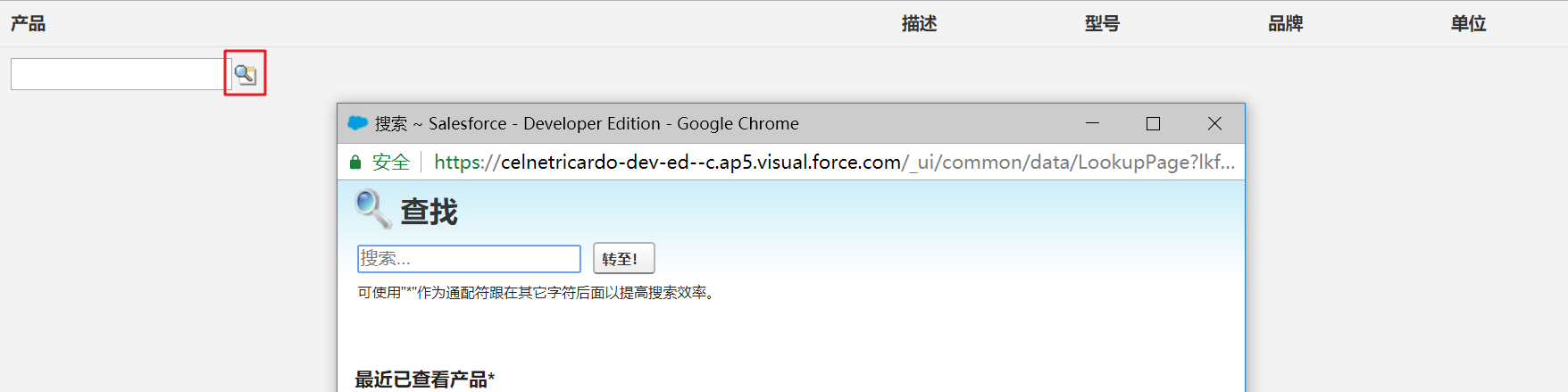
实现代码,Visualforce页面
 <!-- 自定义放大镜查找效果 -->
 <apex:page showHeader="false" controller="SelectSystem"  standardStylesheets="false"  sidebar="false" title="产品清单">
 <html>
 <head>
     <link rel="stylesheet" href="{!URLFOR($Resource.StaticResource,'css/animate.css')}"/>
     <link rel="stylesheet" href="{!URLFOR($Resource.StaticResource,'css/bootstrap.min.css')}"/>
     <link rel="stylesheet" href="{!URLFOR($Resource.StaticResource,'css/style.css')}"/>
 </head>
 <apex:form id="form_Id">
 <apex:actionFunction action="{!getProductWithId}" name="getProductWithId" reRender="form_Id">
    <apex:param name="myParam" value=""/>
 </apex:actionFunction>
 <body>
     <table class="footable table table-stripped toggle-arrow-tiny" data-page-size="10">
         <thead>
             <tr>
               <th data-hide="phone">产品</th>
               <th data-hide="phone">描述</th>
               <th data-hide="phone">型号</th>
               <th data-hide="phone">品牌</th>
               <th data-hide="phone">单位</th>
             </tr>
         </thead>
         <tbody>
             <apex:repeat value="{!CustomAddProduct}" var="p" >
               <tr>
                 <td>
                     <apex:inputField id="pro" value="{!p.getProduct__c}" styleClass="lookupInput"  onchange="f3(this);"/>
                 </td>
                 <td>{!p.Description__c}</td>
                 <td>{!p.Model__c}</td>
                 <td>{!p.Brand__c}</td>
                 <td>{!p.Unit__c}</td>
               </tr>
             </apex:repeat>
         </tbody>
     </table>
 </body>
 <script type="text/javascript">
      function f3(obj){
         var objVa = document.getElementById(obj.id+'_lkid').value;
         console.log('get到的产品id是:' + objVa);
         getProductWithId(objVa);
     }
 </script>
 <style type="text/css">
     .lookupInput
     {
         display: inline;
         vertical-align: middle;
         white-space: nowrap;
     }
     .lookupInput img
     {
         background-repeat: no-repeat;
         margin-right: .25em;
         vertical-align: middle;
     }
     .lookupInput .disabled{
         background-color: #ccc;
     }
     .lookupInput .emptyDependentLookup{
         font-style: italic;
     }
     .lookupInput input[readonly]{
         background-color: #e6e6e6;
         border: 2px solid #e6e6e6;
         color: #333;
         cursor: default;
     }
     .lookupInput a.readOnly{
         float: right;
     }
     .lookupInput span.readOnly
     {
         display: block;
         white-space: normal;
     }
     .lookupInput span.totalSummary{
         font-weight: bold;
     }
     .inlineEditRequiredDiv .lookupInput img,.inlineEditDiv .lookupInput img{
         vertical-align: middle;
     }
     .quickCreateModule .lookupInput input {
         max-width: 155px
     }
     .lookupIcon
     {
         background-image: url({!URLFOR($Resource.lookup,'lookup20.gif')});
         background-position: 0 0;
         width: 20px;
         height: 20px;
         background-position: top left
     }
     .lookupIconOn
     {
         background-image: url({!URLFOR($Resource.lookup,'lookup20.gif')});
         background-position: 0 0;
         width: 20px;
         height: 20px;
         background-position: top right
     }
 </style>
 </apex:form>
 </html>
 </apex:page>
后台控制类
 /********
     *
     *  @Author:Ricardo
     *  @Time: 2018-01-26
     *  @Function: 自定义放大镜
     *
     */
 public class SelectSystem{
     public Product__c CustomAddProduct{get;set;}//自定义添加产品

     public void GetProductWithId(){
         string ProductIdParam = Apexpages.currentPage().getParameters().get('myParam');
         System.debug('输出get到的产品id:' + ProductIdParam);
         if((ProductIdParam) != null || (ProductIdParam != '')){
             String sql_new = 'select getProduct__c,Unit__c,Description__c,Brand__c,Model__c,id,Name from Product__c where  id=\'' + ProductIdParam + '\' limit 1';
             System.debug('输出查询语句:' + sql_new);
             CustomAddProduct = Database.Query(sql_new);
             CustomAddProduct.getProduct__c = ProductIdParam;
             System.debug('查询结果:' + CustomAddProduct);
         }
     }
 }
附赠使用的css文件
链接: https://pan.baidu.com/s/1FbR8vSD6iER4ShbuYi_7qQ 密码: 29a3
Salesforce 开发整理(十一) 自定义放大镜查找效果的更多相关文章
- Salesforce 开发整理(八)PDF打印相关
一:基础设置 Salesforce中的PDF页面本质上还是Visualforce[简称VF]页面,所以只需要给VF页面加上一个属性[renderAs="pdf"] 即可生成一个PD ...
- Salesforce 开发整理(五)代码开发最佳实践
在Salesforce项目实施过程中,对项目代码的维护可以说占据极大的精力,无论是因为项目的迭代,还是需求的变更,甚至是项目组成员的变动,都不可避免的需要维护之前的老代码,而事实上,几乎没有任何一个项 ...
- Salesforce 开发整理(九) 开发中使用的一些小技巧汇总[持续更新]
1.查询一个对象下所有字段 当需要查询一个对象所有字段进行复制或其他操作,可以使用一段拼接的语句来查询 String query = 'select '; for(String fieldApi : ...
- Salesforce 开发整理(二)报表开发学习
Salesforce提供了强大的报表功能,支持表格.摘要.矩阵以及结合共四种形式,本文探讨在站在开发的角度要如何理解报表. 一:查询报表基本信息报表在Sales force中是Report对象,基本的 ...
- Salesforce 开发整理(一)测试类最佳实践
在Sales force开发中完善测试类是开发者必经的一个环节,代码的部署需要保证至少75%的覆盖率,那么该如何写好测试类呢. 测试类定义格式如下: @isTest private class MyT ...
- Salesforce 开发整理(十)项目部署总结
项目部署顺序 全局值集 小组 自定义字段-对象-设置(SF1 紧凑布局要和记录类型在这里要一起部署) 邮件模板-静态资源 角色 工作流-流定义(包含进程生成器) 批准过程 开发部署<Apex类, ...
- Salesforce 开发整理(七)配置审批流
salesforce提供了比较强大的可配置审批流功能,在系统中翻译为“批准过程”.所以需要配置审批时,选择创建 ——> 工作流和批准 ——> 批准过程,然后选择管理批准过程,选择需要配置 ...
- Salesforce 开发整理(六) Visualforce分页
分页的实现总体上分真分页和假分页. 所谓真分页指页面上列出来的数据就是实际查询的数据,假分页则是无论页面上一次显示多少条记录,实际上后台已经加载了所有的记录,分页只是为了展示给用户查看.今天分享一个V ...
- Salesforce 开发整理(四)记录锁定
如果一个对象的记录在满足某个条件的情况下,希望能对其进行锁定,即普通用户没有权限对其进行编辑操作,记录页面显示如下图 一般会在提交审批,或者项目进行到某个阶段的情况下,由后台进行判断要不要锁定记录,或 ...
随机推荐
- Kubernetes Deployment(部署无状态应用)
Kubernetes Deployment(部署无状态应用) Pod与controllers的关系 • controllers:在集群上管理和运行容器的对象 • 通过label-selector相关联 ...
- Vue基础框架
<!DOCTYPE html> <html> <head> <meta charset="utf-8"> <!-- 设置语言为 ...
- Out,ref,params修饰符,可选参数,命名参数
out输出,在调用函数中声明,在被调用函数中赋值: ref在调用函数中赋值,后调用: params修饰符,static double CalculateAverage(params[] values) ...
- 【机器学习笔记】ID3构建决策树
好多算法之类的,看理论描述,让人似懂非懂,代码走一走,现象就了然了. 引: from sklearn import tree names = ['size', 'scale', 'fruit', 'b ...
- C# WebAPI 文件在线预览
最近在写一个移动端API接口,其中有一个需求:接口返回附件url地址让手机端调用实现文件在线预览.大体实现思路:把doc.xls等文本格式文件转换为pdf,转换后的pdf文件存放在服务器上面,方便第二 ...
- 纯C语言实现顺序队列
#include <stdio.h> #include <stdlib.h> #define MAXSIZE 6 typedef int QElemType; typedef ...
- Linux用户和权限——管理文件权限的命令
Linux用户和权限——管理文件权限的命令 摘要:本文主要学习了Linux中修改文件权限的命令. chown命令 chown命令,主要用于修改文件(或目录)的所有者,除此之外,这个命令也可以修改文件( ...
- Eureka获取服务列表源码解析
在之前的文章:EurekaClient自动装配及启动流程解析中,我们提到了在类DiscoveryClient的构造方法中存在一个刷新线程和从服务端拉取注册信息的操作 这两个就是eureka获取服务列表 ...
- JavaScript深入浅出第4课:V8引擎是如何工作的?
摘要: 性能彪悍的V8引擎. <JavaScript深入浅出>系列: JavaScript深入浅出第1课:箭头函数中的this究竟是什么鬼? JavaScript深入浅出第2课:函数是一等 ...
- jar 冲突、class 冲突的检测脚本
思路很简单,解开war包,解开 jar 包,发现有同名 package.class 就报出来,不管是否“兼容” .. import zipfile import io from collections ...