
.NET Core中如何对Url进行编码和解码
我们在.NET Core项目中,可以用WebUtility类对Url进行编码和解码,首先我们要确保项目中引入了nuget包:System.Runtime.Extensions
当然这个nuget包默认就是包含在.NET Core的核心库中的,所以正常情况下不用单独去引入。
我们来看看WebUtility类的定义:
using System.IO;

namespace System.Net

{

    //

    // 摘要:

    //     Provides methods for encoding and decoding URLs when processing Web requests.

    public static class WebUtility

    {

        //

        // 摘要:

        //     Converts a string that has been HTML-encoded for HTTP transmission into a decoded

        //     string.

        //

        // 参数:

        //   value:

        //     The string to decode.

        //

        // 返回结果:

        //     A decoded string.

        public static string HtmlDecode(string value);

        //

        // 摘要:

        //     Converts a string that has been HTML-encoded into a decoded string, and sends

        //     the decoded string to a System.IO.TextWriter output stream.

        //

        // 参数:

        //   value:

        //     The string to decode.

        //

        //   output:

        //     A System.IO.TextWriter stream of output.

        //

        // 异常:

        //   T:System.ArgumentNullException:

        //     The output parameter cannot be null if the value parameter is not null.

        public static void HtmlDecode(string value, TextWriter output);

        //

        // 摘要:

        //     Converts a string to an HTML-encoded string.

        //

        // 参数:

        //   value:

        //     The string to encode.

        //

        // 返回结果:

        //     An encoded string.

        public static string HtmlEncode(string value);

        //

        // 摘要:

        //     Converts a string into an HTML-encoded string, and returns the output as a System.IO.TextWriter

        //     stream of output.

        //

        // 参数:

        //   value:

        //     The string to encode.

        //

        //   output:

        //     A System.IO.TextWriter output stream.

        //

        // 异常:

        //   T:System.ArgumentNullException:

        //     The output parameter cannot be null if the value parameter is not null.

        public static void HtmlEncode(string value, TextWriter output);

        //

        // 摘要:

        //     Converts a string that has been encoded for transmission in a URL into a decoded

        //     string.

        //

        // 参数:

        //   encodedValue:

        //     A URL-encoded string to decode.

        //

        // 返回结果:

        //     Returns System.String. A decoded string.

        public static string UrlDecode(string encodedValue);

        //

        // 摘要:

        //     Converts an encoded byte array that has been encoded for transmission in a URL

        //     into a decoded byte array.

        //

        // 参数:

        //   encodedValue:

        //     A URL-encoded System.Byte array to decode.

        //

        //   offset:

        //     The offset, in bytes, from the start of the System.Byte array to decode.

        //

        //   count:

        //     The count, in bytes, to decode from the System.Byte array.

        //

        // 返回结果:

        //     Returns System.Byte. A decoded System.Byte array.

        public static byte[] UrlDecodeToBytes(byte[] encodedValue, int offset, int count);

        //

        // 摘要:

        //     Converts a text string into a URL-encoded string.

        //

        // 参数:

        //   value:

        //     The text to URL-encode.

        //

        // 返回结果:

        //     Returns System.String. A URL-encoded string.

        public static string UrlEncode(string value);

        //

        // 摘要:

        //     Converts a byte array into a URL-encoded byte array.

        //

        // 参数:

        //   value:

        //     The System.Byte array to URL-encode.

        //

        //   offset:

        //     The offset, in bytes, from the start of the System.Byte array to encode.

        //

        //   count:

        //     The count, in bytes, to encode from the System.Byte array.

        //

        // 返回结果:

        //     Returns System.Byte. An encoded System.Byte array.

        public static byte[] UrlEncodeToBytes(byte[] value, int offset, int count);

    }

}
现在我们新建一个.NET Core控制台项目,来演示WebUtility类的简单用法,代码如下:
using System;

using System.Net;

namespace WebUtilDemo

{

    class Program

    {

        static void Main(string[] args)

        {

            string rawUri = "http://localhost:8989/home/index";

            Console.WriteLine($"原始Uri地址是:{rawUri}");

            string encodedUri = WebUtility.UrlEncode(rawUri);

            Console.WriteLine($"编码后Uri地址是:{encodedUri}");//http%3A%2F%2Flocalhost%3A8989%2Fhome%2Findex

            string decodedUri = WebUtility.UrlDecode(encodedUri);

            Console.WriteLine($"解码后Uri地址是:{decodedUri}");//http://localhost:8989/home/index

            Console.WriteLine("按任意键退出...");

            Console.ReadKey();

        }

    }

}
程序运行结果如下:
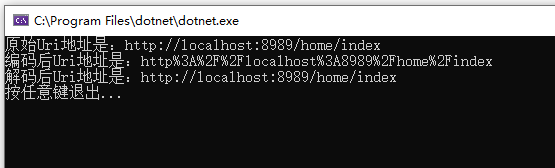
所以我们看到在.NET Core中使用WebUtility类,可以很方便地对Url进行编码和解码。
WebUtility.UrlEncode和HttpUtility.UrlEncode的空格转换问题
目前.NET Core中WebUtility.UrlEncode方法会将空格" "转换为加号"+",然而空格" "的Url编码应该是"%20",不知道这是不是目前.NET Core的一个Bug,因为这个问题实际上在WebUtility.UrlEncode和HttpUtility.UrlEncode两个方法中都存在。
但是也有说法,在Url编码中空格" ",既可以用加号"+"表示,也可以用"%20"表示,所以这也不一定是个Bug。
如果要将空格" "编码为"%20",可以使用Uri.EscapeDataString方法:
using System;

using System.Net;

using System.Web;

namespace WebUtilDemo

{

    class Program

    {

        static void Main(string[] args)

        {

            string rawUri = "http://ABC EFG";

            Console.WriteLine($"原始Uri地址是:{rawUri}");

            string encodedUri1 = WebUtility.UrlEncode(rawUri);

            string encodedUri2 = HttpUtility.UrlEncode(rawUri);

            Console.WriteLine($"encodedUri1 是 {encodedUri1}");//http%3A%2F%2FABC+EFG

            Console.WriteLine($"encodedUri2 是 {encodedUri2}");//http%3a%2f%2fABC+EFG

            string decodedUri1 = WebUtility.UrlDecode(encodedUri1);

            string decodedUri2 = WebUtility.UrlDecode(encodedUri2);

            Console.WriteLine($"decodedUri1 是 {decodedUri1}");//http://ABC EFG

            Console.WriteLine($"decodedUri2 是 {decodedUri2}");//http://ABC EFG

            string encodedUri3 = Uri.EscapeDataString(rawUri);

            Console.WriteLine($"encodedUri3 是 {encodedUri3}");//http%3A%2F%2FABC%20EFG

            string decodedUri3 = WebUtility.UrlDecode(encodedUri3);

            Console.WriteLine($"decodedUri3 是 {decodedUri3}");//http://ABC EFG

            Console.WriteLine("按任意键退出...");

            Console.ReadKey();

        }

    }

}
这个问题可以参考:
URL Encode and Decode in ASP.NET Core
.NET Core中如何对Url进行编码和解码的更多相关文章
- java中URL 的编码和解码函数
java中URL 的编码和解码函数java.net.URLEncoder.encode(String s)和java.net.URLDecoder.decode(String s);在javascri ...
- url在线编码和解码
在工作中,经常遇到encode之后的url.想查看里面的某个参数的时候,很不直观.今天在网上搜了一下对url在线编码和解码的网站.对我来说,使用起来很方便.而且这个网站里面,不仅仅有对url的编码和解 ...
- URL的编码和解码
URL的编码和解码 参考:阮一峰--关于URL编码 1 为什么要URL编码 在因特网上传送URL,只能采用ASCII字符集 也就是说URL只能使用英文字母.阿拉伯数字和某些标点符号,不能使用其他文字和 ...
- javascript对url进行编码和解码
这里总结下JavaScript对URL进行编码和解码的三个方法. 为什么要对URL进行编码和解码 只有[0-9[a-Z] $ - _ . + ! * ' ( ) ,]以及某些保留字,才能不经过编码直接 ...
- PHP中对汉字进行UNICODE编码和解码的实现
<?php /** PHP中对汉字进行UNICODE编码和解码的实现 **/ class Helper_Tool{ //php中的unicode编码转中文 static function uni ...
- 在线url网址编码、解码
>>在线url网址编码.解码<<
- JS对url进行编码和解码(三种方式区别)
Javascript语言用于编码的函数,一共有三个,最古老的一个就是escape().虽然这个函数现在已经不提倡使用了,但是由于历史原因,很多地方还在使用它,所以有必要先从它讲起. escape 和 ...
- URL地址编码和解码
0. 参考 [整理]关于http(GET或POST)请求中的url地址的编码(encode)和解码(decode) python3中的urlopen对于中文url是如何处理的? 中文URL的编码问题 ...
- js对url进行编码和解码
编码 只有 0-9[a-Z] $ - _ . + ! * ' ( ) , 以及某些保留字,才能不经过编码直接用于 URL. 例如:搜索的中文关键字,复制网址之后再粘贴就会发现该URL已经被转码. 1. ...
随机推荐
- go安装配置
https://www.cnblogs.com/wt645631686/p/8124626.html Win10下安装Go开发环境 关于Go语言有多么值得学习,这里就不做介绍了,既然看了这篇文章, ...
- AB PLC简述
一. PLC基础概念 PLC:可编程序控制器是一种数字运算的电子系统,专为在工业环境下应用而设计.采用可编程的存储器,用来在内部存储执行逻辑运算.顺序控制.定时.计算和算术运算等操作的指令,并通过数 ...
- postgresql设置max_connections太大无法启动 (转载)
本篇随笔转载自https://my.oschina.net/u/2381678/blog/552346. 在生产环境postgresql中,需要调整最大链接数,但是调整后无法启动 错误的意思就是内核中 ...
- 使用WIFI网卡iw
上篇博客中,配置修改了内核,以支持所选择的USB网卡,本篇博客需要去编写一些应用程序,将wifi网卡使用起来. 1.1 概念:认证/加密认证:就是用来判断哪些用户可以使用这个无线网络加密:是指手机和A ...
- C语言常用库函数实现
1.memcpy函数 memcpy 函数用于 把资源内存(src所指向的内存区域) 拷贝到目标内存(dest所指向的内存区域):拷贝多少个?有一个size变量控制拷贝的字节数: 函数原型:void * ...
- 面向对象高级C(元类补充及单例模式)
元类有关知识点补充 #类的名称空间 类的名称空间不能用类似字典的方法修改,例如School类里面有name属性xxx,那么我用School.__dict__['name'] = 'yyy'就会报错&q ...
- Ubuntu安装笔记
Ubuntu安装笔记 前言 先后在台式电脑&奇葩的SurfaceLaptop上装了Ubuntu18.04LTS 收获了去多经验,浪费了去多时间 为了让下次更加的方便, 写一篇博客记录一下 安装 ...
- 蒟蒻所见之DP
本文有错是正常的,因为这只是一部成长史,并非教学博文. 会常年更下去. 2019.10.24 DP,核心只是"表格法"而已. DP题真正所考察的,是: 1.对问题的描述.简化以及归 ...
- 三天精通Vue教程
在这里更新作为后端工程师想要快速掌握Vue需要看的重点内容,三天精通教程,加油! 学前摘要 ES6的常用语法 Vue的常用语法
- Windows快速批量删除大量文件的命令
命令分别如下: rmdir [drive:]path [/S] [/Q] del [drive:]path [/S] [/Q] 其中rmdir 与rd命令相同. /S 表示除目录本身外,还将删除指定目 ...