
Mybatis全部标签与解释说明
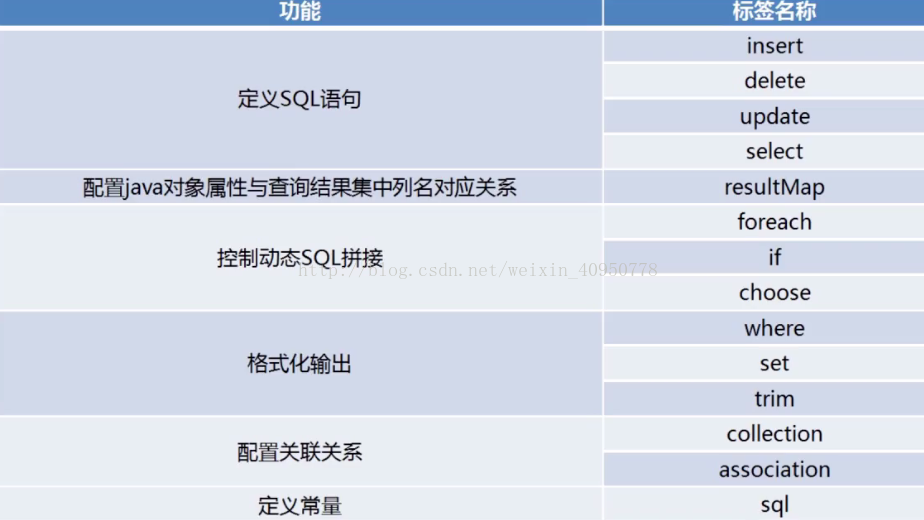
一、定义SQL语句
(1)select 标签的使用
属性介绍:
id :唯一的标识符.
parameterType:传给此语句的参数的全路径名或别名 例:com.test.poso.User或user
resultType :语句返回值类型或别名。注意,如果是集合,那么这里填写的
是集合的泛型,而不是集合本身(resultType 与resultMap 不能并用)
例子:
sql:
<select id="userList" parameterType="user" resultType="User">
select * from user where name =#{name}
</select>
(2)insert 标签的使用
属性介绍:
id :唯一的标识符
parameterType:传给此语句的参数的全路径名或别名 例:com.test.poso.User
(3)delete 标签的使用
例:
<delete id="deleteUser" parameterType="int">
delete from user
where id = #{id}
</delete>
(4)update 标签的使用
类似于insert
二、配置对象属性与查询结果集
(1)resultMap 标签的使用
基本作用:建立SQL查询结果字段与实体属性的映射关系信息
查询的结果集转换为java对象,方便进一步操作
将结果集中的列与java对象中的属性对应起来并将值填充进去
!注意:与java对象对应的列不是数据库中表的列名,而是查询后结果集的列名
例:
<resultMap id="getStudentRM" type="EStudnet">
<id property="id" column="ID"/>
<result property="studentName" column="Name"/>
<result property="studentAge" column="Age"/>
</resultMap>
<select id="getStudent" resultMap="getStudentRM">
SELECT ID, Name, Age
FROM TStudent
</select>
标签说明:
主标签
id:该resultMap的标志
type:返回值的类名,此例中返回EStudnet类
子标签:
id:用于设置主键字段与领域模型属性的映射关系,此处主键为ID,对应id。
result:用于设置普通字段与领域模型属性的映射关系
三、动态拼接SQL
(1)if 标签的使用
if标签通常用于WHERE语句中,通过判断参数值来决定是否使用某个查询条件, 他也经常用于UPDATE语句中判断是否更新某一个字段,还可以在INSERT语句中用来判断是否插入某个字段的值
例:
<select id="getStudentListLikeName" parameterType="StudentEntity" resultMap="studentResultMap">
SELECT * from STUDENT_TBL ST
WHERE ST.STUDENT_NAME LIKE CONCAT(CONCAT('%', #{studentName}),'%')
</select>
但是此时如果studentName是null或空字符串,此语句很可能报错或查询结果为空。此时我们使用if动态sql语句先进行判断,如果值为null或等于空字符串,我们就不进行此条件的判断。
修改为:
<select id=" getStudentListLikeName " parameterType="StudentEntity" resultMap="studentResultMap">
SELECT * from STUDENT_TBL ST
<if test="studentName!=null and studentName!='' ">
WHERE ST.STUDENT_NAME LIKE CONCAT(CONCAT('%', #{studentName}),'%')
</if>
</select>
(2)foreach 标签的使用
foreach标签主要用于构建in条件,他可以在sql中对集合进行迭代。如下:
<delete id="deleteBatch">
delete from user where id in
<foreach collection="array" item="id" index="index" open="(" close=")" separator=",">
#{id}
</foreach>
</delete>
我们假如说参数为---- int[] ids = {1,2,3,4,5} ----那么打印之后的SQL如下:
delete form user where id in (1,2,3,4,5)
释义:
collection :collection属性的值有三个分别是list、array、map三种,分别对应的参数类型为:List、数组、map集合,我在上面传的参数为数组,所以值为array
item : 表示在迭代过程中每一个元素的别名
index :表示在迭代过程中每次迭代到的位置(下标)
open :前缀
close :后缀
separator :分隔符,表示迭代时每个元素之间以什么分隔
我们通常可以将之用到批量删除、添加等操作中。
(3)choose 标签的使用
有时候我们并不想应用所有的条件,而只是想从多个选项中选择一个。MyBatis提供了choose 元素,按顺序判断when中的条件出否成立,如果有一个成立,则choose结束。当choose中所有when的条件都不满则时,则执行 otherwise中的sql。类似于Java 的switch 语句,choose为switch,when为case,otherwise则为default。
if是与(and)的关系,而choose是或(or)的关系。
例如下面例子,同样把所有可以限制的条件都写上,方面使用。选择条件顺序,when标签的从上到下的书写顺序:
<select id="getStudentListChooseEntity" parameterType="StudentEntity" resultMap="studentResultMap">
SELECT * from STUDENT_TBL ST
<where>
<choose>
<when test="studentName!=null and studentName!='' ">
ST.STUDENT_NAME LIKE CONCAT(CONCAT('%', #{studentName}),'%')
</when>
<when test="studentSex!= null and studentSex!= '' ">
AND ST.STUDENT_SEX = #{studentSex}
</when>
<when test="studentBirthday!=null">
AND ST.STUDENT_BIRTHDAY = #{studentBirthday}
</when>
<when test="classEntity!=null and classEntity.classID !=null and classEntity.classID!='' ">
AND ST.CLASS_ID = #{classEntity.classID}
</when>
<otherwise>
</otherwise>
</choose>
</where>
</select>
四、格式化输出
(1)where
当if标签较多时,这样的组合可能会导致错误。例如,like姓名,等于指定性别等:
Xml代码
[html] view plain copy
<!-- 查询学生list,like姓名,=性别 -->
<select id="getStudentListWhere" parameterType="StudentEntity" resultMap="studentResultMap">
SELECT * from STUDENT_TBL ST
WHERE
<if test="studentName!=null and studentName!='' ">
ST.STUDENT_NAME LIKE CONCAT(CONCAT('%', #{studentName}),'%')
</if>
<if test="studentSex!= null and studentSex!= '' ">
AND ST.STUDENT_SEX = #{studentSex}
</if>
</select>
如果上面例子,参数studentName为null或’’,则或导致此sql组合成“WHERE AND”之类的关键字多余的错误SQL。
这时我们可以使用where动态语句来解决。这个“where”标签会知道如果它包含的标签中有返回值的话,它就插入一个‘where’。此外,如果标签返回的内容是以AND 或OR 开头的,则它会剔除掉。
上面例子修改为:
Xml代码
[html] view plain copy
<!-- 查询学生list,like姓名,=性别 -->
<select id="getStudentListWhere" parameterType="StudentEntity" resultMap="studentResultMap">
SELECT * from STUDENT_TBL ST
<where>
<if test="studentName!=null and studentName!='' ">
ST.STUDENT_NAME LIKE CONCAT(CONCAT('%', #{studentName}),'%')
</if>
<if test="studentSex!= null and studentSex!= '' ">
AND ST.STUDENT_SEX = #{studentSex}
</if>
</where>
</select>
(2)set
当在update语句中使用if标签时,如果前面的if没有执行,则或导致逗号多余错误。使用set标签可以将动态的配置SET 关键字,和剔除追加到条件末尾的任何不相关的逗号。
没有使用if标签时,如果有一个参数为null,都会导致错误,如下示例:
Xml代码
[html] view plain copy
<!-- 更新学生信息 -->
<update id="updateStudent" parameterType="StudentEntity">
UPDATE STUDENT_TBL
SET STUDENT_TBL.STUDENT_NAME = #{studentName},
STUDENT_TBL.STUDENT_SEX = #{studentSex},
STUDENT_TBL.STUDENT_BIRTHDAY = #{studentBirthday},
STUDENT_TBL.CLASS_ID = #{classEntity.classID}
WHERE STUDENT_TBL.STUDENT_ID = #{studentID};
</update>
使用set+if标签修改后,如果某项为null则不进行更新,而是保持数据库原值。如下示例:
Xml代码
[html] view plain copy
<!-- 更新学生信息 -->
<update id="updateStudent" parameterType="StudentEntity">
UPDATE STUDENT_TBL
<set>
<if test="studentName!=null and studentName!='' ">
STUDENT_TBL.STUDENT_NAME = #{studentName},
</if>
<if test="studentSex!=null and studentSex!='' ">
STUDENT_TBL.STUDENT_SEX = #{studentSex},
</if>
<if test="studentBirthday!=null ">
STUDENT_TBL.STUDENT_BIRTHDAY = #{studentBirthday},
</if>
<if test="classEntity!=null and classEntity.classID!=null and classEntity.classID!='' ">
STUDENT_TBL.CLASS_ID = #{classEntity.classID}
</if>
</set>
WHERE STUDENT_TBL.STUDENT_ID = #{studentID};
</update>
(3)trim
trim是更灵活的去处多余关键字的标签,他可以实践where和set的效果。
where例子的等效trim语句:
[html] view plain copy
<!-- 查询学生list,like姓名,=性别 -->
<select id="getStudentListWhere" parameterType="StudentEntity" resultMap="studentResultMap">
SELECT * from STUDENT_TBL ST
<trim prefix="WHERE" prefixOverrides="AND|OR">
<if test="studentName!=null and studentName!='' ">
ST.STUDENT_NAME LIKE CONCAT(CONCAT('%', #{studentName}),'%')
</if>
<if test="studentSex!= null and studentSex!= '' ">
AND ST.STUDENT_SEX = #{studentSex}
</if>
</trim>
</select>
set例子的等效trim语句:
Xml代码
[html] view plain copy
<!-- 更新学生信息 -->
<update id="updateStudent" parameterType="StudentEntity">
UPDATE STUDENT_TBL
<trim prefix="SET" suffixOverrides=",">
<if test="studentName!=null and studentName!='' ">
STUDENT_TBL.STUDENT_NAME = #{studentName},
</if>
<if test="studentSex!=null and studentSex!='' ">
STUDENT_TBL.STUDENT_SEX = #{studentSex},
</if>
<if test="studentBirthday!=null ">
STUDENT_TBL.STUDENT_BIRTHDAY = #{studentBirthday},
</if>
<if test="classEntity!=null and classEntity.classID!=null and classEntity.classID!='' ">
STUDENT_TBL.CLASS_ID = #{classEntity.classID}
</if>
</trim>
WHERE STUDENT_TBL.STUDENT_ID = #{studentID};
</update>
五、配置关联关系
(1)collection
一对一
association通常用来映射一对一的关系,例如,有个类user,对应的实体类如下:(getter,setter方法省略)
private String id;//主键
private String userName;//用户姓名
有个类Article,对应的实体类如下:
private String id;//主键
private String articleTitle;//文章标题
private String articleContent;//文章内容
如果我想查询一个用户的时候,也查到他写的一篇文章,可以怎样写呢?在类user加入一个属性article
private String id;//主键
private String userName;//用户姓名
private Article article;//新增的文章属性
2、mapper.xml 我在user类的mapper.xml这样配置
<resultMap id="userResultMap" type="test.mybatis.entity.User">
<id column="id" property="id" jdbcType="VARCHAR" javaType="java.lang.String"/>
<result column="userName" property="userName" jdbcType="VARCHAR" javaType="java.lang.String"/>
//这里把user的id传过去
<association property="article" column="id"
select="test.mybatis.dao.articleMapper.selectArticleByUserId" />//test.mybatis.dao.articleMapper为命名空间
</resultMap>
同时,我的article对应的xml这样写:
1 <resultMap id="articleResultMap" type="test.mybatis.entity.Article">
2 <id column="id" property="id" jdbcType="VARCHAR" javaType="java.lang.String"/>
3 <result column="articleTitle" property="articleTitle" jdbcType="VARCHAR" javaType="java.lang.String"/>
4 <result column="articleContent" property="articleContent" jdbcType="VARCHAR" javaType="java.lang.String"/>
5 </resultMap>
(当然,这里还有查询user表的语句,省略)
同时,在article对应的xml有这样的select语句:
<select id="selectArticleByUserId"
parameterType="java.lang.String"
resultMap="ArticleResultMap" >
select * from
tb_article where userId=#{userId} </select>
(2)association
一对多
实体类增加对应属性
private String id;//主键
private String userName;//用户姓名
private List<Article> articleList;
userMapper.xml这样配置
<resultMap id="userResultMap" type="test.mybatis.entity.User">
<id column="id" property="id" jdbcType="VARCHAR" javaType="java.lang.String"/>
<result column="userName" property="userName" jdbcType="VARCHAR" javaType="java.lang.String"/>
//这里把user的id传过去
<collection property="articleList" column="id"
select="test.mybatis.dao.articleMapper.selectArticleListByUserId" />
</resultMap>
以下省略,类同,Mybatis会把结果封装成List类型。
三、如果我还想通过Article表另一张表,比如文章中有个fk_id,也可以像上面这样重复配置,把fk_id当做与另一张表关联的参数,那时就可以通过用户查到文章,查到文章关联的另一张表了。
六、SQL标签
更多用于写sql语句的一部分,写在配置文件中的常量
七、include标签
用于引用常量
Mybatis全部标签与解释说明的更多相关文章
- mybatis foreach标签的解释 与常用之处
情景:查询数据库中文章的相关文章 文章为一个表 字段tags为相关文章字符串中间用','逗号进行啦分割 查询完一个文章后可以把tags字段构造为一个List<String> 然后利用这 ...
- Mybatis foreach标签含义
背景 考虑以下场景: InfoTable(信息表): Name Gender Age Score 张三 男 21 90 李四 女 20 87 王五 男 22 92 赵六 女 19 94 孙七 女 23 ...
- mybatis foreach标签
一.批量插入数据 示例:添加订单商品表 1.模型层的相应代码 /** * 添加订单商品表 * @param ordergoods * @return */ public boolean addOrde ...
- 《深入理解mybatis原理》 Mybatis初始化机制具体解释
对于不论什么框架而言.在使用前都要进行一系列的初始化,MyBatis也不例外. 本章将通过下面几点具体介绍MyBatis的初始化过程. 1.MyBatis的初始化做了什么 2. MyBatis基于XM ...
- MyBatis 别名标签 & sql的复用
1.MyBatis 别名标签 如果在映射文件中,大量使用类名比较长,可以在sqlMapConfig.xml声明别名, 在映射文件中可以使用别名缩短配置,注意此配置要放在最前面 sqlMapConfig ...
- mybatis <forEach>标签的使用
MyBatis<forEach>标签的使用 你可以传递一个 List 实例或者数组作为参数对象传给 MyBatis.当你这么做的时候,MyBatis 会自动将它包装在一个 Map 中,用名 ...
- mybatis resultmap标签type属性什么意思
mybatis resultmap标签type属性什么意思? :就表示被转换的对象啊,被转换成object的类型啊 <resultMap id="BaseResultMap" ...
- MyBatis - 常用标签与动态Sql
MyBatis常用标签 ● 定义sql语句:select.insert.delete.update ● 配置JAVA对象属性与查询结构及中列明对应的关系:resultMap ● 控制动态sql拼接:i ...
- mybatis : trim标签, “等于==”经验, CDATA标签 ,模糊查询CONCAT,LIKE
一.My Batis trim标签有点类似于replace效果. trim 属性, prefix:前缀覆盖并增加其内容 suffix:后缀覆盖并增加其内容 prefixOverrides:前缀判断的条 ...
随机推荐
- 解决:E: Could not get lock /var/lib/dpkg/lock
问题: ubuntu16 执行 sudo apt install aria2 命令时,提示如下错误 E: Could not get lock /var/lib/dpkg/lock - open (1 ...
- MySQL索引知识点及面试常问题
索引的功能 索引可以大幅增加数据库的查询的性能,在实际业务场景中,或多或少都会使用到. 但是索引是有如下 2 个代价的: 需要额外的磁盘空间来保存索引 对于插入.更新.删除等操作由于更新索引会增加额外 ...
- PAT 甲级 1074 Reversing Linked List (25 分)(链表部分逆置,结合使用双端队列和栈,其实使用vector更简单呐)
1074 Reversing Linked List (25 分) Given a constant K and a singly linked list L, you are supposed ...
- EasyDSS高性能RTMP、HLS(m3u8)、HTTP-FLV、RTSP流媒体服务器同步输出http-flv协议流是怎么实现的?
http-flv是什么 http-flv是以http为传输协议,flv媒体格式为内容的方式实时下载flv音视频帧.为什么选择flv格式而非mp4?原因是mp4必须要有moov box或者moof bo ...
- django models.update
json/dict类型数据更新字段目前主流的web开放方式都讲究前后端分离,分离之后前后端交互的数据格式大都用通用的jason型,那么如何用最少的代码方便的更新json格式数据到数据库呢?同样可以使用 ...
- PLSQL Developer 11 使用技巧(持续更新)
PLSQL Developer 11 使用技巧 (持续更新) 目录(?)[-] 首先是我的颜色配置 常用快捷键 提升PLSQL编程效率 按空格自动替换 关闭Window窗口 PLSQL 实用技巧 TI ...
- python3 turtle
一.turtle 1.操控画笔画图,turtle相当于笔头(x头?),有方向 2.https://docs.python.org/3.6/library/turtle.html 二.移动和绘制 imp ...
- JavaScript原生封装ajax请求和Jquery中的ajax请求
前言:ajax的神奇之处在于JavaScript 可在不重载页面的情况与 Web 服务器交换数据,即在不需要刷新页面的情况下,就可以产生局部刷新的效果.Ajax 在浏览器与 Web 服务器之间使用异步 ...
- LeetCode 1047. 删除字符串中的所有相邻重复项(Remove All Adjacent Duplicates In String)
1047. 删除字符串中的所有相邻重复项 1047. Remove All Adjacent Duplicates In String 题目描述 LeetCode1047. Remove All Ad ...
- liunx 定时任务执行java程序配置流程
java jar包使用build fat jar进行打包 ------------------liunx任务创建--------------------------- 1.查看现有任务计划: cron ...