
ColdFusion 编写WebService 示例
1.开发 Web Services,编写cfcdemo.cfc组件,代码如下:
<cfcomponent style ="document"
namespace = "http://www.mycompany.com/"
serviceportname = "RestrictedEmpInfo"
porttypename = "RestrictedEmpInfo"
bindingname = "myns:RestrictedEmpInfo"
displayname = "RestrictedEmpInfo"
hint = "RestrictedEmpInfo">
<cffunction name = "getEname" access = "remote" returntype="xml" output="no" >
<cfargument name = "dname" type = "string" required = "false">
<cfargument name = "loc" type = "string" required = "false">
<cfquery name = "dt" datasource = "scott">
select * from dept where
<cfif arguments.dname neq "">
dname = #arguments.dname#
</cfif>
</cfquery>
<cfxml variable="Books">
<XML>
<cfoutput query="rs">
<book>
<bname>#deptno#</bname>
<isbn>#dname#</isbn>
<writer>#loc#</writer>
</book>
</cfoutput>
</XML>
</cfxml>
<cfreturn Books>
</cffunction>
</cfcomponent>
<!---
ColdFusion开发 Web Services,只需要在ColdFusion组件(.cfc文件)中,
把需要作为 Web Services 的method的access类型定义为remote就可以了(access="remote")。
--->
2.测试一下,访问这个cfc组件,注意URL路径后边要加上 ?wsdl 。
eg:http://localhost/mysys/cfcdemo.cfc?wsdl
显示效果如下:
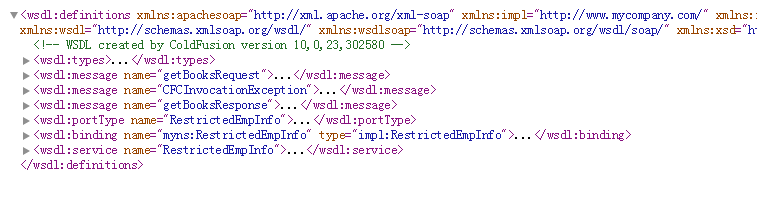
3.开发测试页面,编写webservice.cfm程序调用①开发的 Web service ,代码如下:
<cfset sWebServiceUrl = "http://localhost/cfcdemo.cfc?wsdl">
<cfinvoke webservice="#sWebServiceUrl#"
component = "cfcdemo"
method = "getdept"
returnVariable = "dept">
<cfinvokeargument name = "dname" value="10"/>
<!--- 访问参数,与参数值,对应.cfc中的 cfargument --->
<cfinvokeargument name = "loc" value=""/>
</cfinvoke>
<cfdump var="#dept#">
4.说明:调用 Web Service 时,webservice.cfm部分和cfcdemo.cfc?wsdl对应如下:
<cffunction></cffunction>
<!--- cfc组件中的方法,在cfcomponent中可以有多个 --->
method -- 对应cfc组件中的方法,<cffunction>标签内name属性的值
timeout -- 设置请求超时秒数
returnVariable -- 自定义的变量,里边存放的是 Web Service 返回的值
<!---传递参数--->
<cfinvokeargument name="empno" value="7788"/> --
<!---接收参数--->
<cfargument name="empno" type="string" required="true">
<cfoutput>#dept#</cfoutput> -- 输出 Web Service
<!--- 注意返回类型一定要与 returntype 对应--->
本文日期2018-11-08
ColdFusion 编写WebService 示例的更多相关文章
- ArcEngine编写WebService
开发环境:Windows7旗舰版64bit.VisualStudio2008 With SP1.ArcEngine10.0.NetFrameWork4.0.IIS7和C#开发语言. 背景:ArcEng ...
- Selenium2学习-002-Selenium2 Web 元素定位及 XPath 编写演示示例
此文主要对 Selenium2 的 Web 元素定位及 XPath 编写示例,敬请各位亲们参阅,共同探讨.若有不足之处,敬请各位大神指正,不胜感激! 通过 Firefox(火狐)浏览器的插件 Fire ...
- 使用RSA进行信息加密解密的WebService示例
使用RSA进行信息加密解密的WebService示例 按:以下文字涉及RSA对WebService传递的数据的加密解密,如果您已经熟知RSA或是有其它更好的方法请不要往下看以免浪费时间. WebSer ...
- Delphi编写WebService体会
源:Delphi编写WebService体会 Dispatch: 派遣,分派 Invoke: 调用 Invokable: 可调用接口 TReomtable: WebService中自定义类都是继承自该 ...
- delphi7编写客户端调用java服务器端webservice示例
1. 首先取得java-webservice服务器端地址.我的是:http://localhost:8080/mywebservice/services/mywebservice?wsdl 2. 然后 ...
- AXIS2远程调用WebService示例(Eclipse+AXIS)
转自:http://www.cnblogs.com/lanxuezaipiao/archive/2013/05/10/3071584.html 我们将Web Service发布在Tomcat或者其他应 ...
- Httpclient远程调用WebService示例(Eclipse+httpclient)
package cn.com.taiji.pos.httpserver; import java.io.BufferedInputStream;import java.io.ByteArrayOutp ...
- LR编写webservice协议接口
转自:http://lovesoo.org/use-loadrunner-call-webservice-interface-testing-optimization-summary.html 本文主 ...
- 使用Axis2编写webservice客户端,服务端
1.编写客户端 Axis2开发WebService客户端 的3种方式 [参考帖子] http://blog.csdn.net/wangjinwei6912/article/details/851259 ...
随机推荐
- sprintf格式化字符串漏洞(转)
深入解析sprintf格式化字符串漏洞 特征: 如何利用: 可以看到, php源码中只对15种类型做了匹配, 其他字符类型都直接break了,php未做任何处理,直接跳过,所以导致了这个问题: 没做字 ...
- HTTP APIs 设计/规范指南
根据REST APIs的成熟度模型 ,此规范关注的是Level 2的APIs. 1 设计指南 HTTP APIs主要由四部分组成:HTTP,URL,资源,资源的表述(JSON).资源的表述格式通常都 ...
- 【转】Android系统中Fastboot和Recovery所扮演的角色。
Android 刷机过程中 Fastboot 和 Recovery 的作用是什么? 自己在知乎的一篇回答,,现在翻出来放到博客,希望可以解答更多人的疑惑,抑或有什么理解上的错误,也望网友指出~ 今天恰 ...
- MetaPruning: Meta Learning for Automatic Neural Network Channel Pruning
MetaPruning: Meta Learning for Automatic Neural Network Channel Pruning 2019-08-11 19:48:17 Paper: h ...
- EMQ 与 mqtt 与 IOT设备
1.IOT设备的特性 IOT(物联网things of internet)设备和传统的智能设备有什么区别,笔者总结下的IOT设备有如下特点: 硬件能力差(存储能力基本只有几MB,CPU频率低连使用HT ...
- POST请求BODY格式区别
在PostMan中用Post方式,Body有form-data,x-www-form-urlencoded,raw,binary四种. Request Header示例:POST /upload.do ...
- java使用ssh连接Linux并执行命令
方式1:通过设置账号密码和链接地址 maven pom.xml配置: <dependency> <groupId>com.jcraft</groupId ...
- django项目模型字段
一个模型(model)就是一个单独的.确定的数据的信息源,包含了数据的字段和操作方法.通常,每个模型映射为一张数据库中的表. 基本的原则如下: 每个模型在Django中的存在形式为一个Python类 ...
- nvm安装、解决nvm command not found问题、卸载
安装 nvm是node的包版本管理工具,github地址如下:nvm 安装命令 1 curl -o- https://raw.githubusercontent.com/creationix/nvm/ ...
- 算法练习之x的平方根,爬楼梯,删除排序链表中的重复元素, 合并两个有序数组
1.x的平方根 java (1)直接使用函数 class Solution { public int mySqrt(int x) { int rs = 0; rs = (int)Math.sqrt(x ...