
C#反射机制(转自Binfire博客)
一:反射的定义
审查元数据并收集关于它的类型信息的能力。元数据(编译以后的最基本数据单元)就是一大堆的表,当编译程序集或者模块时,编译器会创建一个类定义表,一个字段定义表,和一个方法定义表等。
System.reflection命名空间包含的几个类,允许你反射(解析)这些元数据表的代码
System.Reflection.Assembly
System.Reflection.MemberInfo
System.Reflection.EventInfo
System.Reflection.FieldInfo
System.Reflection.MethodBase
System.Reflection.ConstructorInfo
System.Reflection.MethodInfo
System.Reflection.PropertyInfo
System.Type
层次模型:
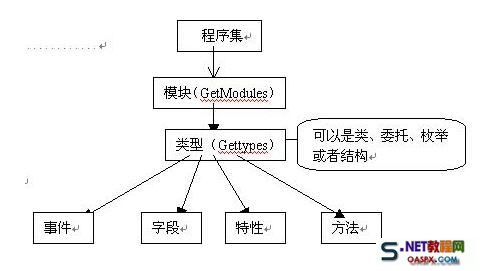
二:获取类型信息:

 1         class MyClass

 2         {

 3             public string m;

 4             public void test() { }

 5             public int MyProperty { get; set; }

 6         }

 7

 8         //获取类型信息

 9         protected void Button1_Click(object sender, EventArgs e)

10         {

11             Type type = typeof(MyClass);

12             Response.Write("类型名:" + type.Name);

13             Response.Write("<br/>");

14             Response.Write("类全名:" + type.FullName);

15             Response.Write("<br/>");

16             Response.Write("命名空间名:" + type.Namespace);

17             Response.Write("<br/>");

18             Response.Write("程序集名:" + type.Assembly);

19             Response.Write("<br/>");

20             Response.Write("模块名:" + type.Module);

21             Response.Write("<br/>");

22             Response.Write("基类名:" + type.BaseType);

23             Response.Write("<br/>");

24             Response.Write("是否类:" + type.IsClass);

25             Response.Write("<br/>");

26             Response.Write("类的公共成员:");

27             Response.Write("<br/>");

28             MemberInfo[] memberInfos = type.GetMembers();//得到所有公共成员

29             foreach (var item in memberInfos)

30             {

31                 Response.Write(string.Format("{0}:{1}", item.MemberType, item));

32                 Response.Write("<br/>");

33             }

34         }
三:获取程序集信息
protected void Button2_Click(object sender, EventArgs e){ //获取当前执行代码的程序集 Assembly assem = Assembly.GetExecutingAssembly(); Response.Write("程序集全名:"+assem.FullName); Response.Write("<br/>"); Response.Write("程序集的版本:"+assem.GetName().Version); Response.Write("<br/>"); Response.Write("程序集初始位置:"+assem.CodeBase); Response.Write("<br/>"); Response.Write("程序集位置:"+assem.Location); Response.Write("<br/>"); Response.Write("程序集入口:"+assem.EntryPoint); Response.Write("<br/>"); Type[] types = assem.GetTypes(); Response.Write("程序集下包含的类型:"); foreach (var item in types) { Response.Write("<br/>"); Response.Write("类:"+item.Name); }}<br> |
四:反射调用方法
|
1
2
3
4
5
6
7
8
9
10
11
12
13
14
15
16
|
protected void Page_Load(object sender, EventArgs e) { System.Reflection.Assembly ass = Assembly.LoadFrom(AppDomain.CurrentDomain.BaseDirectory+"bin\\WebApplication1.dll"); //加载DLL System.Type t = ass.GetType("WebApplication1.MainPage");//获得类型 string name=typeof(MainPage).AssemblyQualifiedName; System.Type t1 = Type.GetType(name);System.Type t2 = typeof(MainPage); object o = System.Activator.CreateInstance(t);//创建实例 System.Reflection.MethodInfo mi = t.GetMethod("RunJs1");//获得方法 mi.Invoke(o, new object[] { this.Page, "alert('测试反射机制')" });//调用方法 System.Reflection.MethodInfo mi1 = t.GetMethod("RunJs"); mi1.Invoke(t, new object[] { this.Page, "alert('测试反射机制1')" });//调用方法 }<br> |
五:反射调用用户/自定义控件
|
1
2
3
4
5
6
7
8
9
10
11
12
13
14
15
16
17
18
19
20
21
22
23
24
25
26
27
28
29
30
31
32
33
34
35
36
37
38
39
40
|
protected override void OnInit(EventArgs e) { //生成控件 CreateControl(); base.OnInit(e); } private void CreateControl() { Table tb = new Table(); TableRow dr = new TableRow(); TableCell cell = new TableCell(); Control c = <span style="color: #ff0000;">LoadControl("WebUserControl1.ascx");</span> cell.Controls.Add(c); dr.Cells.Add(cell); tb.Rows.Add(dr); this.PlaceHolder1.Controls.Add(tb); } protected void Button1_Click(object sender, EventArgs e) { foreach (TableRow tr in PlaceHolder1.Controls[0].Controls) { foreach (TableCell tc in tr.Controls) { foreach (Control ctl in tc.Controls) { if (ctl is UserControl) { Type type = ctl.GetType(); System.Reflection.MethodInfo methodInfo = type.GetMethod("GetResult"); string selectedValue = string.Concat(methodInfo.Invoke(ctl, new object[] { })); Response.Write(selectedValue); break; } } } } }<br> |
六:反射实现工厂模式
|
1
2
3
4
5
6
7
8
9
10
11
12
13
14
15
16
17
18
19
20
21
22
23
24
25
26
27
28
29
30
31
32
33
34
35
36
37
38
39
40
41
|
public partial class 反射 : System.Web.UI.Page { protected void Page_Load(object sender, EventArgs e) { string typeName = typeof(TestClass).AssemblyQualifiedName; ITestInterface iface = RawGenericFactory.Create<ITestInterface>(typeName); string result = iface.doSomething(); Response.Write(result); } } public static class RawGenericFactory { public static T Create<T>(string typeName) { //Activator.CreateInstance 反射 根据程序集创建借口或者类 //Type.GetType() 根据名称获得程序集信息 //typeof(ConcertProduct).AssemblyQualifiedName //_iproduct.GetType().AssemblyQualifiedName return (T)Activator.CreateInstance(Type.GetType(typeName)); } } public interface ITestInterface { string doSomething(); } public class TestClass : ITestInterface { public int Id { get; set; } public override string ToString() { return Id.ToString(); } public string doSomething() { return "ok"; } }<br> |
七:自定义ORM框架
|
1
2
3
4
5
6
7
8
9
10
11
12
13
14
15
16
17
18
19
20
21
22
23
24
25
26
27
28
29
30
31
32
33
34
35
36
37
38
39
40
41
42
43
44
45
46
47
48
49
50
51
52
53
54
55
56
57
58
59
60
61
62
63
64
65
66
67
68
69
70
71
72
73
74
75
76
77
78
79
80
81
82
83
84
85
86
87
88
89
90
91
92
93
94
95
96
97
98
99
100
101
102
103
104
105
106
107
108
109
110
111
112
113
114
115
116
117
118
119
120
121
122
123
124
125
126
127
128
129
130
131
132
133
134
135
136
137
138
139
140
141
142
143
144
145
146
147
148
149
150
151
152
153
154
155
156
157
158
159
|
[Orm.Table("TestORM")] public class TestORM { [Orm.Colum("Id",DbType.Int32)] public int Id { get; set; } [Orm.Colum("UserName", DbType.String)] public string UserName { get; set; } [Orm.Colum("Password", DbType.String)] public string Password { get; set; } [Orm.Colum("CreatedTime", DbType.DateTime)] public DateTime CreatedTime { get; set; } } protected void Button3_Click(object sender, EventArgs e) { TestORM t = new TestORM() { Id=1, UserName="binfire", Password="xxx", CreatedTime=DateTime.Now }; Orm.OrmHelp h=new Orm.OrmHelp(); h.Insert(t); }namespace Orm{ [AttributeUsageAttribute(AttributeTargets.Class, Inherited = false, AllowMultiple = false)] public class TableAttribute : Attribute { //保存表名的字段 private string _tableName; public TableAttribute() { } public TableAttribute(string tableName) { this._tableName = tableName; } /// /// 映射的表名(表的全名:模式名.表名) /// public string TableName { set { this._tableName = value; } get { return this._tableName; } } } [AttributeUsageAttribute(AttributeTargets.Property, Inherited = false, AllowMultiple = false)] public class ColumAttribute : Attribute { private string _columName; private DbType _dbType; public ColumAttribute() { } public ColumAttribute(string columName) : this() { this._columName = columName; } public ColumAttribute(string columName, DbType dbType) : this(columName) { this._dbType = dbType; } //列名 public virtual string ColumName { set { this._columName = value; } get { return this._columName; } } //描述一些特殊的数据库类型 public DbType DbType { get { return _dbType; } set { _dbType = value; } } } public class OrmHelp { public void Insert(object table) { Type type = table.GetType(); //定义一个字典来存放表中字段和值的对应序列 Dictionary<string,string> columValue = new Dictionary<string,string>(); StringBuilder SqlStr = new StringBuilder(); SqlStr.Append("insert into "); //得到表名子 TableAttribute temp = (TableAttribute)type.GetCustomAttributes(typeof(TableAttribute), false).First(); SqlStr.Append(temp.TableName); SqlStr.Append("("); PropertyInfo[] Propertys = type.GetProperties(); foreach (var item in Propertys) { object[] attributes = item.GetCustomAttributes(false); foreach (var item1 in attributes) { //获得相应属性的值 string value = table.GetType().InvokeMember(item.Name, System.Reflection.BindingFlags.GetProperty, null, table, null).ToString(); ColumAttribute colum = item1 as ColumAttribute; if (colum != null) { columValue.Add(colum.ColumName, value); } } } //拼插入操作字符串 foreach (var item in columValue) { SqlStr.Append(item.Key); SqlStr.Append(","); } SqlStr.Remove(SqlStr.Length - 1, 1); SqlStr.Append(") values('"); foreach (var item in columValue) { SqlStr.Append(item.Value); SqlStr.Append("','"); } SqlStr.Remove(SqlStr.Length - 2, 2); SqlStr.Append(")"); HttpContext.Current.Response.Write(SqlStr.ToString()); } }} |
C#反射机制(转自Binfire博客)的更多相关文章
- 【转】Java利用反射机制访问私有化构造器
Java利用反射机制访问私有化构造器 博客分类: java 我们都知道,当一个类的构造方法被设为私有的时候(private),在其他类中是无法用new来实例化一个对象的. 但是有一种方法可以把带有 ...
- 文顶顶iOS开发博客链接整理及部分项目源代码下载
文顶顶iOS开发博客链接整理及部分项目源代码下载 网上的iOS开发的教程很多,但是像cnblogs博主文顶顶的博客这样内容图文并茂,代码齐全,示例经典,原理也有阐述,覆盖面宽广,自成系统的系列教程 ...
- 我的Android进阶之旅------>经典的大牛博客推荐(排名不分先后)!!
本文来自:http://blog.csdn.net/ouyang_peng/article/details/11358405 今天看到一篇文章,收藏了很多大牛的博客,在这里分享一下 谦虚的天下 柳志超 ...
- 从零开始,搭建博客系统MVC5+EF6搭建框架(3),添加Nlog日志、缓存机制(MemoryCache、RedisCache)、创建控制器父类BaseController
一.回顾系统进度以及本章概要 目前博客系统已经数据库创建.以及依赖注入Autofac集成,接下来就是日志和缓存集成,这里日志用的是Nlog,其实还有其他的日志框架如log4,这些博客园都有很多介绍,这 ...
- QT在ui文件上建立信号操机制会不会对后期维护产生影响 - love4Mario的专栏 - 博客频道 - CSDN.NETQT在ui文件上建立信号操机制会不会对后期维护产生影响 - love4Mario的专栏 - 博客频道 - CSDN.NET
QT在ui文件上建立信号操机制会不会对后期维护产生影响 - love4Mario的专栏 - 博客频道 - CSDN.NET QT在ui文件上建立信号操机制会不会对后期维护产生影响 分类: 学习心得 2 ...
- 【干货】利用MVC5+EF6搭建博客系统(三)添加Nlog日志、缓存机制(MemoryCache、RedisCache)、创建控制器父类BaseController
PS:如果图片模糊,鼠标右击复制图片网址,然后在浏览器中打开即可. 一.回顾系统进度以及本章概要 目前博客系统已经数据库创建.以及依赖注入Autofac集成,接下来就是日志和缓存集成,这里日志用的是N ...
- linux IPC机制学习博客
要求 研究Linux下IPC机制:原理,优缺点,每种机制至少给一个示例,提交研究博客的链接 - 共享内存 - 管道 - FIFO - 信号 - 消息队列 研究博客 管道(PIPE) 管道(PIPE): ...
- 了解java内存回收机制-博客导读
此文作为读优质博客前的导读文 1.如何判断对象是否该回收 该对象是否被引用,是否处于不可达状态 2.对象的引用机制 强引用.软引用.弱引用.虚引用 3.垃圾回收机制如何回收.算法. 串行回收.并行回收 ...
- [技术博客]阿里云签名机制字符串的C语言实现
[技术博客]阿里云签名机制字符串的C语言实现 问题描述见:阿里云签名机制 话不多说,上字符串函数转化函数代码 bool AlicloudRequest::sendV2Request() { if( q ...
随机推荐
- JMeter5.1开发Java协议接口脚本【待完成】
JMeter5.1开发Java协议接口脚本
- wordpress面包屑导航简单实现
前面我们学了一行代码搞定WordPress面包屑导航breadcrumb,现在wordpress文档中有一个简单实现的方法,适用于page页面,有二级分类的情况(Simple breadcrumb t ...
- 类数组对象与arguments
类数组对象 所谓的类数组对象: 拥有一个 length 属性和若干索引属性的对象 举个例子: var array = ['name', 'age', 'sex']; var arrayLike = { ...
- redux:基于函数式编程的事件处理和状态维护机制
redux = monand + pipeline + highorder componet + decouple + middleware redex = store based + event h ...
- du -h
du命令用来查看目录或文件所占用磁盘空间的大小.常用选项组合为:du -sh 一.du的功能:`du` reports the amount of disk space used by the s ...
- selenium 2 设置浏览器安装路径
selenium 2由于调用的是真实的浏览器,所以当你的浏览器不是安装在默认路径下,你就需要设定浏览器启动路径:若是默认路径,则程序中不需设定浏览器启动路径. 比如说用firefox进行测试 1. f ...
- EasyExcel引入
好久没更了,都在有道云上面记录,没时间搬过来. easyexcel是最近项目做优化涉及的一个改善点吧. 简介 导出是后台管理系统的常用功能,当数据量特别大的时候会内存溢出和卡顿页面,曾经自己封装过一个 ...
- [Javascript] ES6 Class Constructors and the Super Keyword
When the ES6 class shipped back in 2015, a number of additional keywords came with it. Two of these ...
- Gcd HYSBZ - 2818 (莫比乌斯反演)
Gcd \[ Time Limit: 10000 ms\quad Memory Limit: 262144 kB \] 题意 求 \(gcd\left(x,y\right) = p\) 的对数,其中\ ...
- netflix conductor 2.x 版本新功能简单说明
netflix conductor 2.x 已经发布很长时间了,同时官方也发布了关于2.x 新特性的说明,当前github 行的release 版本为2.14.4 新特性 grpc 框架支持 一个可选 ...