
grafana部署安装
部署grafana
在prometheus& grafana server节点部署grafana服务。
1. 下载&安装

# 下载

[root@prometheus ~]# cd /usr/local/src/

[root@prometheus src]# wget https://dl.grafana.com/oss/release/grafana-6.3.2-1.x86_64.rpm

# 安装

[root@prometheus src]# yum localinstall grafana-6.3.2-1.x86_64.rpm
2. 配置文件
配置文件位于/etc/grafana/grafana.ini,这里暂时保持默认配置即可。
3. 设置开机启动
[root@prometheus src]# systemctl enable grafana-server

[root@prometheus src]# systemctl start grafana-server
4. 设置iptables
# grafana-server默认使用3000端口

[root@prometheus src]# vim /etc/sysconfig/iptables

-A INPUT -p tcp -m state --state NEW -m tcp --dport 3000 -j ACCEPT

[root@prometheus src]# service iptables restart
5. 添加数据源
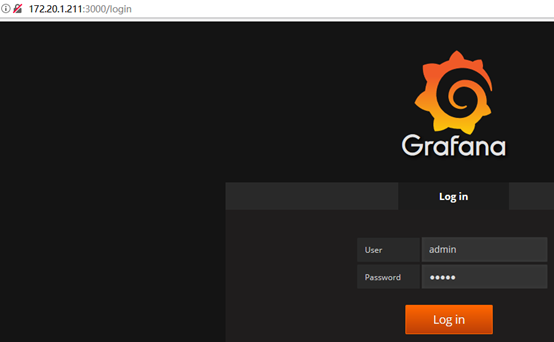
1)登陆
访问:http://172.20.1.211:3000,默认账号/密码:admin/admin
2)添加数据源
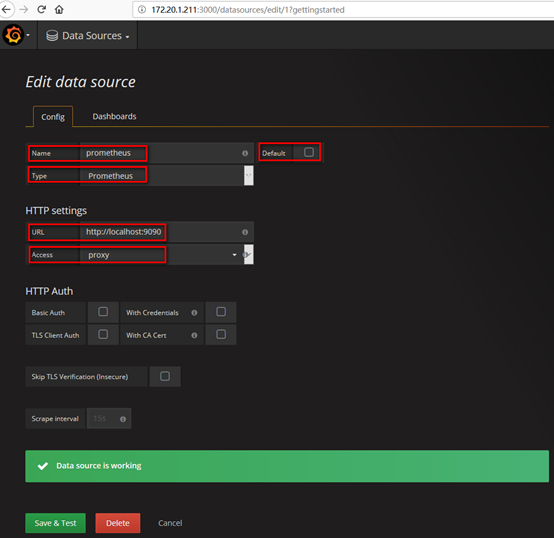
在登陆首页,点击"Add data source"按钮,跳转到添加数据源页面,配置如下:
Name: prometheus
Type: prometheus
URL: http://localhost:9090/
Access: proxy
取消Default的勾选,其余默认,点击"Add",如下:
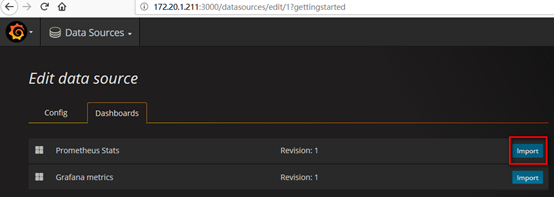
在"Dashboards"页签下"import"自带的模版,如下:
6. 导入dashboard
从grafana官网下载相关dashboaed到本地,如:https://grafana.com/dashboards/405
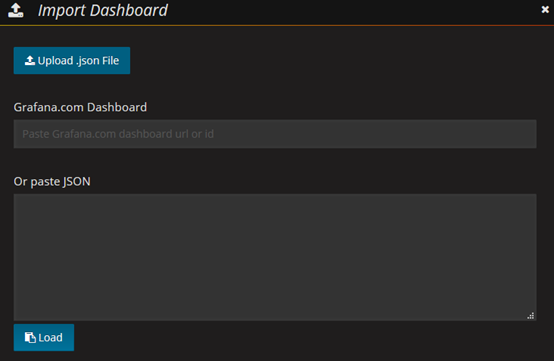
Grafana首页-->左上角图标-->Dashboard-->import
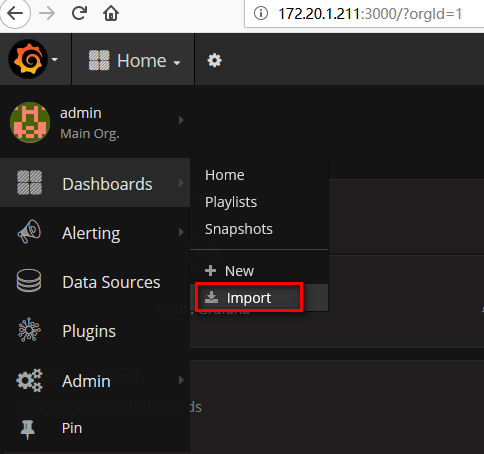
Upload已下载至本地的json文件(或者使用dashboard id,如这里的405),如下:
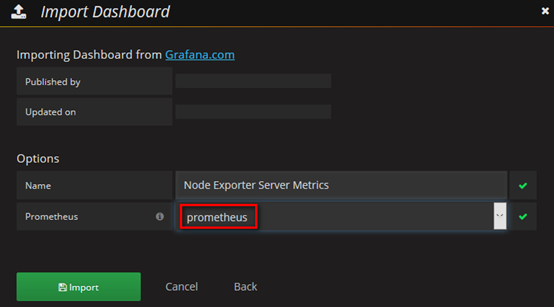
数据源选择"prometheus",即添加的数据源name,点击"Import"按钮,如下:
7. 查看dashboard
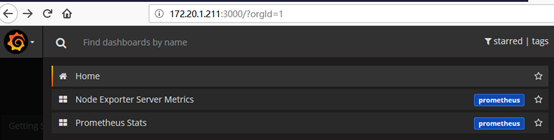
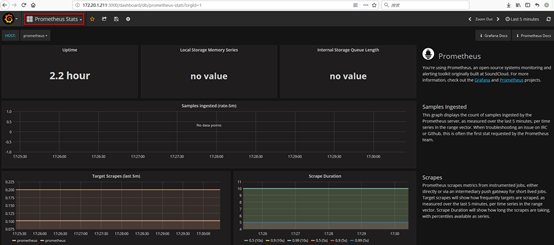
Grafana首页-->左上角图标-->Dashboard-->Home,Home下拉列表中可见有已添加的两个dashboard,"Prometheus Stats"与"Node Exporter Server Metrics",选择1个即可,如下:

grafana部署安装的更多相关文章
- Prometheus node_exporter grafana部署安装
1.环境 centos7 prometheus-2.10.0.linux-amd64.tar.gz node_exporter-0.18.1.linux-amd64.tar.gz 2.安装 创建sys ...
- Kubernetes+Prometheus+Grafana部署笔记
一.基础概念 1.1 基础概念 Kubernetes(通常写成“k8s”)Kubernetes是Google开源的容器集群管理系统.其设计目标是在主机集群之间提供一个能够自动化部署.可拓展.应用容器可 ...
- 容器编排系统K8s之Prometheus监控系统+Grafana部署
前文我们聊到了k8s的apiservice资源结合自定义apiserver扩展原生apiserver功能的相关话题,回顾请参考:https://www.cnblogs.com/qiuhom-1874/ ...
- Grafana部署监控docker服务
Grafana部署监控docker服务 一.使用InfluxDB+cAdvisor+Grafana配置Docker监控 1.1Docker监控组件 1.2cAdvisor: 1.3Docker监控安装 ...
- Android 开发环境在 Windows7 下的部署安装
Android SDK Android SDK 为 Android 应用的开发.测试和调试提了必要的API库和开发工具. ADT Bundle 下载 如果你是一个android 开发新手,推荐你下载使 ...
- Windows系统下部署安装一个/多个Tomcat8
首先从http://tomcat.apache.org/上下载Tomcat8.0压缩版的,解压到指定路径后即可. 第一:在Windows系统中安装部署单个Tomcat 对于这种情况, ...
- Zabbix监控windows部署安装
Zabbix agent 在windows上安装部署 1. 下载与解压 地址: http://www.zabbix.com/downloads/2.4.0/zabbix_agents_2.4.0.w ...
- Hadoop 2.2.0部署安装(笔记,单机安装)
SSH无密安装与配置 具体配置步骤: ◎ 在root根目录下创建.ssh目录 (必须root用户登录) cd /root & mkdir .ssh chmod 700 .ssh & c ...
- _00024 尼娜抹微笑伊拉克_云计算ClouderaManager以及CHD5.1.0群集部署安装文档V1.0
笔者博文:妳那伊抹微笑 itdog8 地址链接 : http://www.itdog8.com(个人链接) 博客地址:http://blog.csdn.net/u012185296 博文标题:_000 ...
随机推荐
- Cogs 732. [网络流24题] 试题库(二分图)
[网络流24题] 试题库 ★★ 输入文件:testlib.in 输出文件:testlib.out 评测插件 时间限制:1 s 内存限制:128 MB «问题描述: 假设一个试题库中有n道试题.每道试题 ...
- 干货 | 10分钟搞懂branch and bound(分支定界)算法的代码实现附带java代码
Outline 前言 Example-1 Example-2 运行说明 00 前言 前面一篇文章我们讲了branch and bound算法的相关概念.可能大家对精确算法实现的印象大概只有一个,调用求 ...
- 数据结构实验之排序四:寻找大富翁(SDUT 3401)
#include <stdio.h> #include <stdlib.h> #include <string.h> void Swap(int a[], int ...
- C++2.0新特性(六)——<Smart Pointer(智能指针)之shared_ptr>
Smart Pointer(智能指针)指的是一类指针,并不是单一某一个指针,它能知道自己被引用的个数以至于在最后一个引用消失时销毁它指向的对象,本文主要介绍C++2.0提供的新东西 一.Smart P ...
- element ui 里面的table怎么弹出一个框让表中数据点击出现弹框
<el-table-column label="团队" prop="name" min-width="120px" align=&qu ...
- 20189220 余超《Linux内核原理与分析》第一周作业
实验一 Linux系统简介 通过实验一主要是学习到了Linux 的历史简介,linux与windows之间的区别,主要是免费和收费,软件和支持,安全性,使用习惯,可制定性,应用范畴等.linux具有稳 ...
- NCCloud
NC后台核心服务开发模式不变 NC原Client代码废弃 增加NC Web端Java代码 增加前端JS代码 原有的NC公共能力基本保留:模板.精度.自定义项等
- 第10组 Beta冲刺(4/5)
链接部分 队名:女生都队 组长博客: 博客链接 作业博客:博客链接 小组内容 恩泽(组长) 过去两天完成了哪些任务 描述 将数据分析以可视化形式展示出来 新增数据分析展示等功能API 服务器后端部署, ...
- Facets:一款Google开源机器学习数据集可视化工具
Homepage/演示网站:https://pair-code.github.io/facets/ Pypi:https://pypi.org/project/facets-overview/ Git ...
- 006 vue监控
一:监视 1.使用keyup <!DOCTYPE html> <html lang="en"> <head> <meta charset= ...