
UE4 ios环境搭建备忘
1、windows、mac安装证书
2、安装xcode
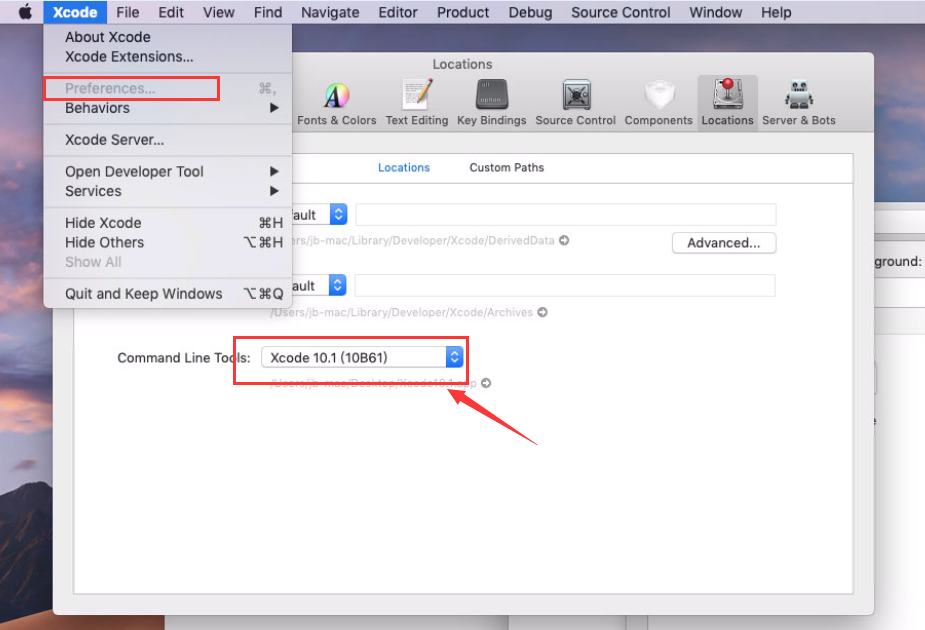
sudo xcode-select --switch /Applications/Xcode10..app   -- 路径可以拖入

sudo gem install xcodeproj
3、错误处理
Setting up Mono

    Running command : Engine/Binaries/DotNET/UnrealBuildTool.exe ZBGame IOS Development -SkipRulesCompile -XmlConfigCache=/Users/jb-mac/UE4/Builds/DESKTOP-H8OVF9H/E/PWMGame/3DS2Game/Branches/3DS2Inland190918Final/Engine/Engine/Intermediate/Build/XmlConfigCache.bin -remoteini=/Users/jb-mac/UE4/Builds/DESKTOP-H8OVF9H/E/PWMGame/3DS2Game/Branches/3DS2Inland190918Final/Client -Project=/Users/jb-mac/UE4/Builds/DESKTOP-H8OVF9H/E/PWMGame/3DS2Game/Branches/3DS2Inland190918Final/Client/ZBGame.uproject -skipdeploy -Log=/Users/jb-mac/UE4/Builds/DESKTOP-H8OVF9H/E/PWMGame/3DS2Game/Branches/3DS2Inland190918Final/Engine/Engine/Programs/AutomationTool/Saved/Logs/UBT-ZBGame-IOS-Development_Remote.txt -Manifest=/Users/jb-mac/UE4/Builds/DESKTOP-H8OVF9H/E/PWMGame/3DS2Game/Branches/3DS2Inland190918Final/Client/Intermediate/Remote/ZBGame/IOS/Development/Manifest.xml -CreateStub -NoUBTMakefiles -ImportProvision=/Users/jb-mac/UE4/Builds/DESKTOP-H8OVF9H/E/PWMGame/3DS2Game/Branches/3DS2Inland190918Final/Client/Intermediate/Remote/ZBGame/IOS/Development/dev_zb1.mobileprovision -ImportCertificate=/Users/jb-mac/UE4/Builds/DESKTOP-H8OVF9H/E/PWMGame/3DS2Game/Branches/3DS2Inland190918Final/Client/Intermediate/Remote/ZBGame/IOS/Development/Certificate.p12 -ImportCertificatePassword=A

    *** EMSCRIPTEN_ROOT directory NOT FOUND: /Users/jb-mac/UE4/Builds/DESKTOP-H8OVF9H/E/PWMGame/3DS2Game/Branches/3DS2Inland190918Final/Engine/Engine/Extras/ThirdPartyNotUE/emsdk/emscripten/1.38.

    *** NODE_JS NOT FOUND: /Users/jb-mac/UE4/Builds/DESKTOP-H8OVF9H/E/PWMGame/3DS2Game/Branches/3DS2Inland190918Final/Engine/Engine/Extras/ThirdPartyNotUE/emsdk/Mac/node/8.9.1_64bit/bin/node

    *** LLVMROOT directory NOT FOUND: /Users/jb-mac/UE4/Builds/DESKTOP-H8OVF9H/E/PWMGame/3DS2Game/Branches/3DS2Inland190918Final/Engine/Engine/Extras/ThirdPartyNotUE/emsdk/Mac/clang/e1..20_64bit

    ZBGame IOS Development -SkipRulesCompile -XmlConfigCache=/Users/jb-mac/UE4/Builds/DESKTOP-H8OVF9H/E/PWMGame/3DS2Game/Branches/3DS2Inland190918Final/Engine/Engine/Intermediate/Build/XmlConfigCache.bin -remoteini=/Users/jb-mac/UE4/Builds/DESKTOP-H8OVF9H/E/PWMGame/3DS2Game/Branches/3DS2Inland190918Final/Client -Project=/Users/jb-mac/UE4/Builds/DESKTOP-H8OVF9H/E/PWMGame/3DS2Game/Branches/3DS2Inland190918Final/Client/ZBGame.uproject -skipdeploy -Log=/Users/jb-mac/UE4/Builds/DESKTOP-H8OVF9H/E/PWMGame/3DS2Game/Branches/3DS2Inland190918Final/Engine/Engine/Programs/AutomationTool/Saved/Logs/UBT-ZBGame-IOS-Development_Remote.txt -Manifest=/Users/jb-mac/UE4/Builds/DESKTOP-H8OVF9H/E/PWMGame/3DS2Game/Branches/3DS2Inland190918Final/Client/Intermediate/Remote/ZBGame/IOS/Development/Manifest.xml -CreateStub -NoUBTMakefiles -ImportProvision=/Users/jb-mac/UE4/Builds/DESKTOP-H8OVF9H/E/PWMGame/3DS2Game/Branches/3DS2Inland190918Final/Client/Intermediate/Remote/ZBGame/IOS/Development/dev_zb1.mobileprovision -ImportCertificate=/Users/jb-mac/UE4/Builds/DESKTOP-H8OVF9H/E/PWMGame/3DS2Game/Branches/3DS2Inland190918Final/Client/Intermediate/Remote/ZBGame/IOS/Development/Certificate.p12 -ImportCertificatePassword=A

    Triggered an exception while looking for SDK directory in Xcode.app

    System.IO.DirectoryNotFoundException: Could not find a part of the path '/Applications/xcode10.1.app/Contents/Developer/Platforms/MacOSX.platform/Developer/SDKs'.

      at System.IO.__Error.WinIOError (System.Int32 errorCode, System.String maybeFullPath) [0x000f7] in <98fac219bd4e453693d76fda7bd96ab0>:

      at System.IO.FileSystemEnumerableIterator`[TSource].HandleError (System.Int32 hr, System.String path) [0x00006] in <98fac219bd4e453693d76fda7bd96ab0>:

      at System.IO.FileSystemEnumerableIterator`[TSource].CommonInit () [0x00054] in <98fac219bd4e453693d76fda7bd96ab0>:

      at System.IO.FileSystemEnumerableIterator`[TSource]..ctor (System.String path, System.String originalUserPath, System.String searchPattern, System.IO.SearchOption searchOption, System.IO.SearchResultHandler`[TSource] resultHandler, System.Boolean checkHost) [0x000d6] in <98fac219bd4e453693d76fda7bd96ab0>:

      at System.IO.FileSystemEnumerableFactory.CreateFileNameIterator (System.String path, System.String originalUserPath, System.String searchPattern, System.Boolean includeFiles, System.Boolean includeDirs, System.IO.SearchOption searchOption, System.Boolean checkHost) [0x00009] in <98fac219bd4e453693d76fda7bd96ab0>:

      at System.IO.Directory.InternalGetFileDirectoryNames (System.String path, System.String userPathOriginal, System.String searchPattern, System.Boolean includeFiles, System.Boolean includeDirs, System.IO.SearchOption searchOption, System.Boolean checkHost) [0x00000] in <98fac219bd4e453693d76fda7bd96ab0>:

      at System.IO.Directory.InternalGetDirectories (System.String path, System.String searchPattern, System.IO.SearchOption searchOption) [0x00000] in <98fac219bd4e453693d76fda7bd96ab0>:

      at System.IO.Directory.GetDirectories (System.String path) [0x0000e] in <98fac219bd4e453693d76fda7bd96ab0>:

      at UnrealBuildTool.AppleToolChainSettings.SelectSDK (System.String BaseSDKDir, System.String OSPrefix, System.String& PlatformSDKVersion, System.Boolean bVerbose) [0x00018] in <ce47cf5825fd4d26bbf096f28ea5583c>:

    ERROR: Invalid SDK MacOSX.sdk, not found in /Applications/xcode10..app/Contents/Developer/Platforms/MacOSX.platform/Developer/SDKs

  [Remote] Downloading E:\PWMGame\3DS2Game\Branches\3DS2Inland190918Final\Engine\Engine\Programs\AutomationTool\Saved\Logs\UBT-ZBGame-IOS-Development_Remote.txt

  Total execution time: 808.22 seconds
UE4 ios环境搭建备忘的更多相关文章
- 云效(阿里云)流水线 + nginx + uWsgi + flask + python3 基础环境搭建 --备忘
一.开发环境搭建 1.安装python3 yum -y groupinstall "Development tools" yum -y install zlib-devel bzi ...
- LAMP 环境搭建备忘 -- Linux的安装(一)
LAMP指的是 Linux + Apatch + MySQL / MariaDB + PHP/Perl/Python 一套搭建网站服务器的开源软件组合.工作原理图如下: 下面开始环境搭建 1 Linu ...
- 嵌入式Linux环境搭建备忘
嵌入式Linux开发平台搭建步骤: 1.安装宿主机Linux系统 如果选用最新的Linux发行版,应改主意其他软件是否能很好的兼容. 2.安装交叉编译器 交叉编译器的版本很多,一般到芯片厂家官网下载官 ...
- django项目环境搭建备忘
由于使用python3,所以尽量为每个项目配置虚拟环境来管理各个项目的=. 新建一个项目文件夹,进入该路径 python3 -m venv ll_env 然后激活虚拟环境 source ll_env/ ...
- LAMP环境搭建备忘 -- MariaDB 安装(三)
因为 MySQL 的一些原因,在 Linux 平台上的开源数据库渐渐被 MariaDB 取代. MariaDB 安装命令如下图 安装成功后,接下来就启动这个数据库服务 我们还需要对数据库做一些初始化的 ...
- LAMP环境搭建备忘 -- Apache、pHp 安装 (二)
上一篇 Linux 已经安装好了,我们选择了 CentOS 7 的最小化安装,即没有图形界面,并且我们在安装时设置了网络连接即能够连上外部网络,还设置了 root 密码.下面我们要在此基础上继续安装 ...
- React Native iOS环境搭建
前段时间React Native for Android发布,感觉React Native会越来越多的公司开始研究.使用.所以周六也抽空搭建了iOS的开发环境,以便以后利用空闲的时间能够学习一下. 废 ...
- Visual Studio 2013 Xamarin for iOS 环境搭建
原文:Visual Studio 2013 Xamarin for iOS 环境搭建 一.Mac安装Xamarin.iOS 1,我的Mac 环境:OSX 10.10.3.Xcode 6.3.2 (使用 ...
- Mac+appium+iOS 环境搭建
Mac+appium+iOS 环境搭建,需要用到的信息如下,参考搭建环境. 1.安装brew,安装介绍:https://jingyan.baidu.com/article/fec7a1e5ec3034 ...
随机推荐
- CentOS6.9下手动编译并安装Python3.7.0
CentOS6.9默认安装的python版本为2.6.6,若想安装python3以上版本,只能手工编译安装 下面介绍Python-3.7.0版本的手动编译并安装的步骤 1.下载Python-3.7.0 ...
- C# 验证控件的使用RequiredFieldValidator&CompareValidator
使用验证控件可以向服务器提交表单数据时验证表单内容,下面以RequiredFieldValidator和CompareValidator为例说明验证控件的用法 RequiredFieldValidat ...
- Json在序列化注意问题
Java中的Json序列化,不容忽视的getter 问题重现 public class AjaxJson { private boolean success; private String msg; ...
- LeetCode 742. Closest Leaf in a Binary Tree
原题链接在这里:https://leetcode.com/problems/closest-leaf-in-a-binary-tree/ 题目: Given a binary tree where e ...
- 基金名称中的ABC是什么意思,我们该如何选择?
作者:牛大 | 公众号:定投五分钟 大家好,我是牛大.每天五分钟,投资你自己:坚持基金定投,终会财富自由! 大家经常会看到基金名称后面有字母ABC,这个表示什么意思呢,以及我们该如何选择呢?今天牛大给 ...
- 用户价值和RFM模型
什么是用户价值? 用户价值就是对公司来说有用的地方,比如有的公司看中用户的消费能力,有的公司则看中用户的忠诚度 .各公司的业务目的不同,用户价值的体现自然也不同.这里主要说一下适用于电商的RFM模型. ...
- go语言new和make
1.new func new(Type) *Type 内建函数,内建函数 new 用来分配内存,它的第一个参数是一个类型,它的返回值是一个指向新分配类型默认值的指针! 2.make func make ...
- C++ 类型转换符区别分析
转载自:https://blog.csdn.net/legalhighhigh/article/details/87459995 1.static_cast用于将参数转换为指定类型.需要注意的是,进行 ...
- 高斯混合模型(GMM)及MATLAB代码
之前在学习中遇到高斯混合模型,卡了很长一段时间,在这里记下学习中的一些问题以及解决的方法.希望看到这篇文章的同学们对高斯混合模型能有一些基本的概念.全文不废话,直接上重点. 本文将从以下三个问题详解高 ...
- element-ui里面的table插入多张图片
<el-form-item label="身份证正反面" label-width="120px"> <section v-if="t ...