
[C#] Socket 通讯,一个简单的聊天窗口小程序
Socket,这玩意,当时不会的时候,抄别人的都用不好,简单的一句话形容就是“笨死了”;也是很多人写的太复杂,不容易理解造成的。最近在搞erlang和C的通讯,也想试试erlang是不是可以和C#简单通讯,就简单的做了些测试用例,比较简单,觉得新手也可以接受。
 using System;

 using System.Collections.Generic;

 using System.ComponentModel;

 using System.Data;

 using System.Drawing;

 using System.Linq;

 using System.Text;

 using System.Windows.Forms;

 using System.Net.Sockets;

 using System.Net;

 using System.Threading;

 namespace ChatClient

 {

     public partial class Form1 : Form

     {

         private System.Windows.Forms.RichTextBox richTextBox1;

         private System.Windows.Forms.TextBox textBox1;

         private System.ComponentModel.IContainer components = null;

         /// <summary>

         /// 服务端侦听端口

         /// </summary>

         private const int _serverPort = ;

         /// <summary>

         /// 客户端侦听端口

         /// </summary>

         private const int _clientPort = ;

         /// <summary>

         /// 缓存大小

         /// </summary>

         private const int _bufferSize = ;

         /// <summary>

         /// 服务器IP

         /// </summary>

         private const string ServerIP = "172.17.47.199";  //手动修改为指定服务器ip

         private Thread thread;

         private void Form1_Load(object sender, EventArgs e)

         {

             thread = new Thread(new ThreadStart(delegate { Listenning(); }));

             thread.Start();

         }

         void textBox_KeyUp(object sender, KeyEventArgs e)

         {

             if (e.KeyCode == Keys.Enter)

             {

                 string msg;

                 if ((msg = textBox1.Text.Trim()).Length > )

                 {

                     SendMessage(msg);

                 }

                 textBox1.Clear();

             }

         }

         void SendMessage(string msg)

         {

             try

             {

                 Socket socket = new Socket(AddressFamily.InterNetwork, SocketType.Stream, ProtocolType.Tcp);

                 IPEndPoint endPoint = new IPEndPoint(IPAddress.Parse(ServerIP), _serverPort);

                 socket.Connect(endPoint);

                 byte[] buffer = System.Text.ASCIIEncoding.UTF8.GetBytes(msg);

                 socket.Send(buffer);

                 socket.Close();

             }

             catch

             { }

         }

         void Listenning()

         {

             TcpListener listener = new TcpListener(_clientPort);

             listener.Start();

             while (true)

             {

                 Socket socket = listener.AcceptSocket();

                 byte[] buffer = new byte[_bufferSize];

                 socket.Receive(buffer);

                 int lastNullIndex = _bufferSize - ;

                 while (true)

                 {

                     if (buffer[lastNullIndex] != '\0')

                         break;

                     lastNullIndex--;

                 }

                 string msg = Encoding.UTF8.GetString(buffer, , lastNullIndex + );

                 WriteLine(msg);

                 socket.Close();

             }

         }

         void WriteLine(string msg)

         {

             this.Invoke(new MethodInvoker(delegate

             {

                 this.richTextBox1.AppendText(msg + Environment.NewLine);

             }));

         }

         public Form1()

         {

             this.richTextBox1 = new System.Windows.Forms.RichTextBox();

             this.textBox1 = new System.Windows.Forms.TextBox();

             this.SuspendLayout();

             //

             // richTextBox1

             //

             this.richTextBox1.Location = new System.Drawing.Point(, );

             this.richTextBox1.Name = "richTextBox1";

             this.richTextBox1.Size = new System.Drawing.Size(, );

             this.richTextBox1.TabIndex = ;

             this.richTextBox1.Text = "";

             this.richTextBox1.KeyUp += new System.Windows.Forms.KeyEventHandler(this.textBox_KeyUp);

             //

             // textBox1

             //

             this.textBox1.Location = new System.Drawing.Point(, );

             this.textBox1.Multiline = true;

             this.textBox1.Name = "textBox1";

             this.textBox1.Size = new System.Drawing.Size(, );

             this.textBox1.TabIndex = ;

             this.textBox1.KeyUp += new System.Windows.Forms.KeyEventHandler(this.textBox_KeyUp);

             //

             // Form1

             //

             this.AutoScaleDimensions = new System.Drawing.SizeF(6F, 12F);

             this.AutoScaleMode = System.Windows.Forms.AutoScaleMode.Font;

             this.ClientSize = new System.Drawing.Size(, );

             this.Controls.Add(this.richTextBox1);

             this.Controls.Add(this.textBox1);

             this.Name = "Form1";

             this.Text = "Form1";

             this.Load += new System.EventHandler(this.Form1_Load);

             this.ResumeLayout(false);

             this.PerformLayout();

         }

         protected override void Dispose(bool disposing)

         {

             if (disposing && (components != null))

             {

                 components.Dispose();

             }

             base.Dispose(disposing);

         }

     }

 }
Client端
 using System;

 using System.Collections.Generic;

 using System.ComponentModel;

 using System.Data;

 using System.Diagnostics;

 using System.Linq;

 using System.ServiceProcess;

 using System.Text;

 using System.Net;

 using System.Net.Sockets;

 using System.Collections;

 namespace ChatService

 {

     public partial class Service1 : ServiceBase

     {

         /// <summary>

         /// 服务端侦听端口

         /// </summary>

         private const int _serverPort = ;

         /// <summary>

         /// 客户端侦听端口

         /// </summary>

         private const int _clientPort = ;

         /// <summary>

         /// 缓存大小

         /// </summary>

         private const int _bufferSize = ;

         /// <summary>

         /// 服务器IP

         /// </summary>

         private const string ServerIP = "172.17.47.199";  //手动修改为指定服务器ip

         /// <summary>

         /// 客户端IP

         /// </summary>

         //private Hashtable ServerIPs = new Hashtable();  //存放ip + port

         private List<string> ServerIPs = new List<string>();

         public Service1()

         {

             //InitializeComponent();   //从控制台改为服务,需要注释下面的一行,打开本行

             Listenning();

         }

         void SendMessage(string from, string msg)

         {

             for (int i = ServerIPs.Count - ; i >= ; i--)

             {

                 try

                 {

                     Socket socket = new Socket(AddressFamily.InterNetwork, SocketType.Stream, ProtocolType.Tcp);

                     IPEndPoint endPoint = new IPEndPoint(IPAddress.Parse(ServerIPs[i]), _clientPort);

                     socket.Connect(endPoint);

                     byte[] buffer = System.Text.ASCIIEncoding.UTF8.GetBytes((from + " say: " + msg).Trim());

                     socket.Send(buffer);

                     socket.Close();

                 }

                 catch

                 {

                     ServerIPs.RemoveAt(i);

                 }

             }

         }

         void Listenning()

         {

             TcpListener listener = new TcpListener(_serverPort);

             listener.Start();

             while (true)

             {

                 Socket socket = listener.AcceptSocket();

                 var s = socket.RemoteEndPoint.ToString();

                 var ipstr = s.Substring(, s.IndexOf(":"));

                 if (!ServerIPs.Contains(ipstr))

                 {

                     ServerIPs.Add(ipstr);

                 }

                 byte[] buffer = new byte[_bufferSize];

                 socket.Receive(buffer);

                 int lastNullIndex = _bufferSize - ;

                 while (true)

                 {

                     if (buffer[lastNullIndex] != '\0')

                         break;

                     lastNullIndex--;

                 }

                 string msg = Encoding.UTF8.GetString(buffer, , lastNullIndex + );

                 SendMessage(ipstr,msg);

                 Console.WriteLine(msg);//服务模式下关闭

             }

         }

         protected override void OnStart(string[] args)

         {

             Listenning();

         }

         protected override void OnStop()

         {

         }

     }

 }
Server端
逻辑视图(比较简单):
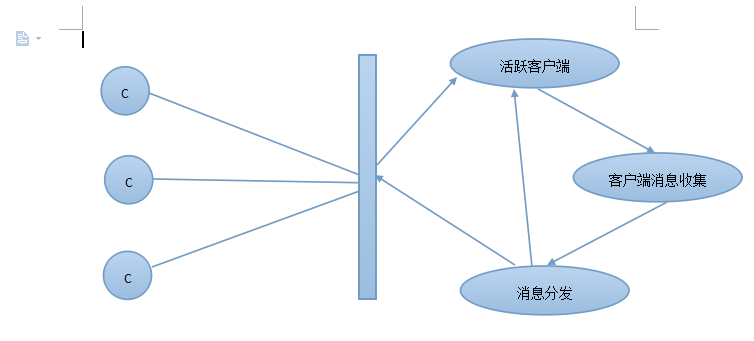
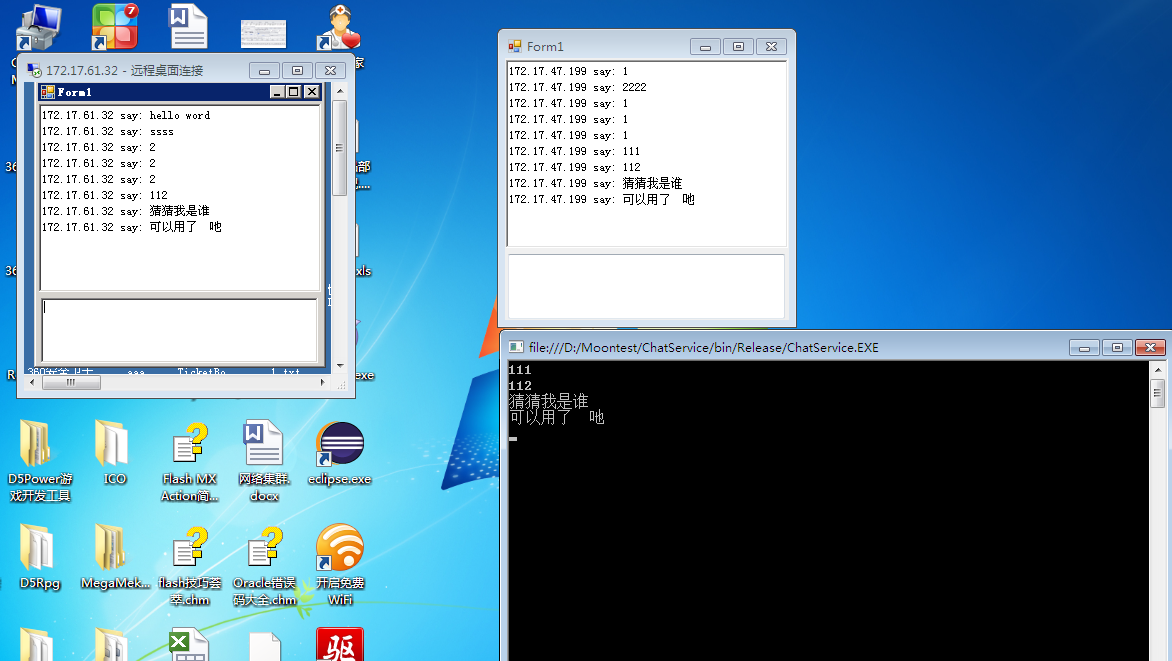
1.左上角的是一个远程客户端,右上角是本地客户端,右下角是本地服务端(暂时改为控制台程序)
2.这段程序只给不懂得如何用socket玩玩
3.这里面剔除了数据加密、异步获取等繁杂的过程,想要学习可以参照:http://yunpan.cn/cKT2ZHdKRMILz 访问密码 b610
[C#] Socket 通讯,一个简单的聊天窗口小程序的更多相关文章
- 使用vue+koa实现一个简单的图书小程序(1)
这个系列的博客用来记录我开发时候遇到的问题以及学习到的知识 边做边学: 前后端分离,高内聚低耦合小程序端使用了mpvue 内部使用了vuejs的语法 来做整个小程序的渲染层 后端使用的是koa2搭建一 ...
- 一个简单的servlet小程序
servlet是不能单独运行的,他是运行在web服务器或应用服务器上的java程序,或者可以说是在servlet容器上运行的,我们经常使用到的tomcat就是一个servlet容器. 他是处理HTTP ...
- java实现一个简单的爬虫小程序
前言 前些天无意间在百度搜索了一下以前写过的博客 我啥时候在这么多不知名的网站上发表博客了???点进去一看, 内容一模一样,作者却不是我... 然后又去搜了其他篇博客,果然,基本上每篇都在别的网站上有 ...
- 一个简单的Android小实例
原文:一个简单的Android小实例 一.配置环境 1.下载intellij idea15 2.安装Android SDK,通过Android SDK管理器安装或卸载Android平台 3.安装J ...
- 一个简单的Maven小案例
Maven是一个很好的软件项目管理工具,有了Maven我们不用再费劲的去官网上下载Jar包. Maven的官网地址:http://maven.apache.org/download.cgi 要建立一个 ...
- IOS开发之小实例--使用UIImagePickerController创建一个简单的相机应用程序
前言:本篇博文是本人阅读国外的IOS Programming Tutorial的一篇入门文章的学习过程总结,难度不大,因为是入门.主要是入门UIImagePickerController这个控制器,那 ...
- Linux下简单C语言小程序的反汇编分析
韩洋原创作品转载请注明出处<Linux内核分析>MOOC课程http://mooc.study.163.com/course/USTC-1000029000 写在开始,本文为因为参加MOO ...
- 【云开发】10分钟零基础学会做一个快递查询微信小程序,快速掌握微信小程序开发技能(轮播图、API请求)
大家好,我叫小秃僧 这次分享的是10分钟零基础学会做一个快递查询微信小程序,快速掌握开发微信小程序技能. 这篇文章偏基础,特别适合还没有开发过微信小程序的童鞋,一些概念和逻辑我会讲细一点,尽可能用图说 ...
- 一个简单的P2P传输程序
写了一个简单的P2P传输程序,在P2P的圈子中传输文件,不过为了简便,这个程序没有真正的传输文件,只是简单的判断一下文件的位置在哪里.这个程序可以处理当有一个peer闪退的情况,在这种情况下,剩下的p ...
随机推荐
- selenium获取Cookie操作
直接贴代码: Set cookies = dr.manage().getCookies(); for (Cookie cookie : cookies) { System.out.println(&q ...
- 代替jquery $.post 跨域提交数据的N种形式
跨域的N种形式: 1.直接用jquery中$.getJSON进行跨域提交 优点:有返回值,可直接跨域: 缺点:数据量小: 提交方式:仅get (无$.postJSON) $.getJSON(" ...
- 【oracle】union、union all、intersect、minus 的用法及区别
一.union与union all 首先建两个view create or replace view test_view_1 as as c from dual union as c from dua ...
- C++常用特性原理解析
在我的早期印象中,C++这门语言是软件工程发展过程中,出于对面向对象语言级支持不可或缺的情况下,一群曾经信誓旦旦想要用C统治宇宙的极客们妥协出来的一个高性能怪咖. 它驳杂万分,但引人入胜,出于多(mi ...
- MariaDB 双主复制的配置
环境 Master1/Master2 系统 IP 数据库版本 Master1 CentOS6.7 10.10.3.211 mariadb-10. ...
- javascript Date format(js日期格式化) (转)
方法一:这个很不错,好像是 csdn 的 Meizz 写的: // 对Date的扩展,将 Date 转化为指定格式的String // 月(M).日(d).小时(h).分(m).秒(s).季度(q) ...
- java空指针异常:java.lang.NullPointException
一.什么是java空指针异常 我们都知道java是没有指针的,这里说的"java指针"指的就是java的引用,我们不在这里讨论叫指针究竟合不合适,而只是针对这个异常本身进行分析.空 ...
- Spring Mvc的入门
SpringMVC也叫Spring Web mvc,属于表现层的框架.Spring MVC是Spring框架的一部分,是在Spring3.0后发布的. Spring Web MVC是什么: Sprin ...
- 分析错误:socket accept failed too many open files
步骤:1.--查看当前各个进程打开的文件句柄数,其结果的第一列表示句柄数,第二列表示进程号lsof -n|awk '{print $2}'|sort|uniq -c |sort -nr|more 2. ...
- Sublime Text 3 配置和使用方法
下载: Sublime Text 3 官方下载地址 Sublime Text 3 汉化破解版 资料: Sublime Text 非官方文档 技巧 -用户或-User后缀的菜单项,其对应的配置文件都 ...