
Setting up IPS/inline for Linux in Suricata
不多说,直接上干货!
见官网
https://suricata.readthedocs.io/en/latest/setting-up-ipsinline-for-linux.html
- Docs »
- 11. Setting up IPS/inline for Linux
- Edit on GitHub
11. Setting up IPS/inline for Linux
In this guide will be explained how to work with Suricata in layer3 inline mode and how to set iptables for that purpose.
First start with compiling Suricata with NFQ support. For instructions see Ubuntu Installation. For more information about NFQ and iptables, see NFQ.
To check if you have NFQ enabled in your Suricata, enter the following command:
suricata --build-info
and examine if you have NFQ between the features.
To run suricata with the NFQ mode, you have to make use of the -q option. This option tells Suricata which of the queue numbers it should use.
sudo suricata -c /etc/suricata/suricata.yaml -q 0
11.1. Iptables configuration
First of all it is important to know which traffic you would like to send to Suricata. Traffic that passes your computer or traffic that is generated by your computer.
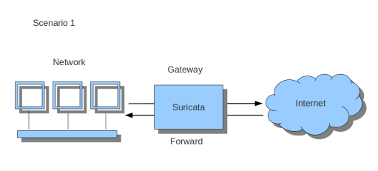
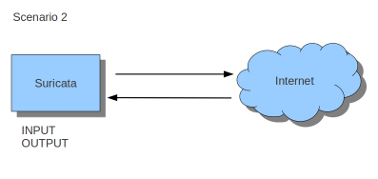
If Suricata is running on a gateway and is meant to protect the computers behind that gateway you are dealing with the first scenario: forward_ing . If Suricata has to protect the computer it is running on, you are dealing with the second scenario: host (see drawing 2). These two ways of using Suricata can also be combined.
The easiest rule in case of the gateway-scenario to send traffic to Suricata is:
sudo iptables -I FORWARD -j NFQUEUE
In this case, all forwarded traffic goes to Suricata.
In case of the host situation, these are the two most simple iptable rules;
sudo iptables -I INPUT -j NFQUEUE

sudo iptables -I OUTPUT -j NFQUEUE
It is possible to set a queue number. If you do not, the queue number will be 0 by default.
Imagine you want Suricata to check for example just TCP-traffic, or all incoming traffic on port 80, or all traffic on destination-port 80, you can do so like this:
sudo iptables -I INPUT -p tcp  -j NFQUEUE

sudo iptables -I OUTPUT -p tcp -j NFQUEUE
In this case, Suricata checks just TCP traffic.
sudo iptables -I INPUT -p tcp --sport 80  -j NFQUEUE

sudo iptables -I OUTPUT -p tcp --dport 80 -j NFQUEUE
In this example, Suricata checks all input and output on port 80.
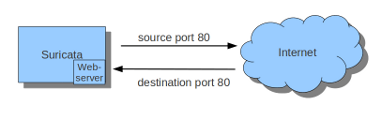
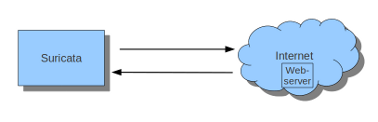
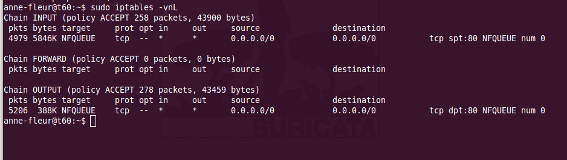
To see if you have set your iptables rules correct make sure Suricata is running and enter:
sudo iptables -vnL
In the example you can see if packets are being logged.
This description of the use of iptables is the way to use it with IPv4. To use it with IPv6 all previous mentioned commands have to start with ‘ip6tables’. It is also possible to let Suricata check both kinds of traffic.
There is also a way to use iptables with multiple networks (and interface cards). Example:
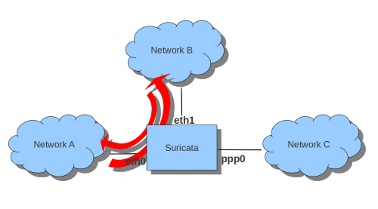
sudo iptables -I FORWARD -i eth0 -o eth1 -j NFQUEUE

sudo iptables -I FORWARD -i eth1 -o eth0 -j NFQUEUE
The options -i (input) -o (output) can be combined with all previous mentioned options
If you would stop Suricata and use internet, the traffic will not come through. To make internet work correctly, you have to erase all iptable rules.
To erase all iptable rules, enter:
sudo iptables -F
Setting up IPS/inline for Linux in Suricata的更多相关文章
- The Guideline of Setting Up Samba Server on linux(Ubuntu)
The Guideline of Setting Up Samba Server on linux(Ubuntu) From terminate command window, install the ...
- Suricata, to 10Gbps and beyond(X86架构)
Introduction Since the beginning of July 2012, OISF team is able to access to a server where one int ...
- Kali linux 2016.2(Rolling)中的payloads模块详解
不多说,直接上干货! 前期博客 Kali linux 2016.2(Rolling)中的Exploits模块详解 payloads模块,也就是shellcode,就是在漏洞利用成功后所要做的事情.在M ...
- Linux 驱动开发
linux驱动开发总结(一) 基础性总结 1, linux驱动一般分为3大类: * 字符设备 * 块设备 * 网络设备 2, 开发环境构建: * 交叉工具链构建 * NFS和tftp服务器安装 3, ...
- 使用.NetCore在Linux上写TCP listen 重启后无法绑定地址
拥抱.net core的过程中, 将公司的一套java项目改成了.net core 2.0版的. 里面的tcp服务被我用msdn的SocketAsyncEventArgs方式重写了, 然而在测试的过程 ...
- linux记录-docker配置mysql
docker部署mysql 1.拉取镜像 docker pull mysql 2.docker rm containerID 删除镜像iD 3.创建镜像 docker run --name=m ...
- linux从head.s到start_kernelstart_kernel之---内核重定位后分析
参考: https://biscuitos.github.io/blog/ARM-BOOT/ zImage 重定位之后实践 zImage 重定位之后,ARM 将 pc 指针指向了重定位 zImage ...
- Linux设备驱动中的阻塞和非阻塞I/O <转载>
Green 博客园 首页 新随笔 联系 订阅 管理 Linux设备驱动中的阻塞和非阻塞I/O [基本概念] 1.阻塞 阻塞操作是指在执行设备操作时,托不能获得资源,则挂起进程直到满足操作所需的条件 ...
- pytbull 手册
- Official documentation for pytbull v2.1 - Table of content Description Architecture Remote mode Lo ...
随机推荐
- apache benchmark
1 ab是什么 是一个web高并发测试工具,可以发送get.put.post请求. 2 ab -n和-c共存 -c是concurrency的缩写,即同一时间发送多个请求. -n是指本次总共发送多少个请 ...
- 大O符号
大O 就是 时间复杂度.时间复杂度是大概的描述一个算法的用时(实际上从侧面的表达了他的效率) 最好时间复杂度,通常指在最好情形下,这个算法用时.反之,最坏情况下的就是最坏时间复杂度.通常 冒泡算法 的 ...
- 关于O_DIRECT的那些事儿
很久之前落下的坑,一直没怎么记录-.- 一般地,如果在Linux内核中读写一个文件,其IO流程都需要经过Kernel内的page cache层次,如果程序员若想要使用自己开发的缓存系统,那么就可以在打 ...
- 使用TextView实现跑马灯的效果
1.定义textView标签的4个属性: android:singleLine="true"//使其只能单行 android:ellipsize="marquee&quo ...
- [原创]java调用PageOffice生成word
一.在开发OA办公或与文档相关的Web系统中,难免会遇到动态生成word文档的需求,为了解决工作中遇到导出word文档的需求,前一段时间上网找了一些资料,在word导出这方面有很多工具可以使用,jac ...
- UVA-10827(前缀和降维)
题意: 给一个n*n的正方形,第一行和最后一行粘在一块,第一列和最后一列粘在一块,求这个环面上的最大的子矩形; 思路: 直接暴力是O(n^6)的复杂度,可以把前缀和求出来,这样就可以只用枚举四条边界就 ...
- OpenCV——PS滤镜算法之 Ellipsoid (凸出)
// define head function #ifndef PS_ALGORITHM_H_INCLUDED #define PS_ALGORITHM_H_INCLUDED #include < ...
- CodeBlocks+Qt(MinGW)配置
1.安装CodeBlocks 官网:http://www.codeblocks.org/ 下载地址:http://www.codeblocks.org/downloads/26 有以下两种选择 cod ...
- threesixty.min.js 和jquery.threesixty.js使用总结----实现360度展示
最近公司做一个项目需要360度展示汽车的外观,就用到了threesixty.min.js,自己总结一下使用方法: treesixty.min.js 源码: /*! threesixty-slider ...
- File System Programming --- (一)
About Files and Directories The file system is an important part of any operating system. After all, ...