
vue工程化:返回顶部和底部的动画效果
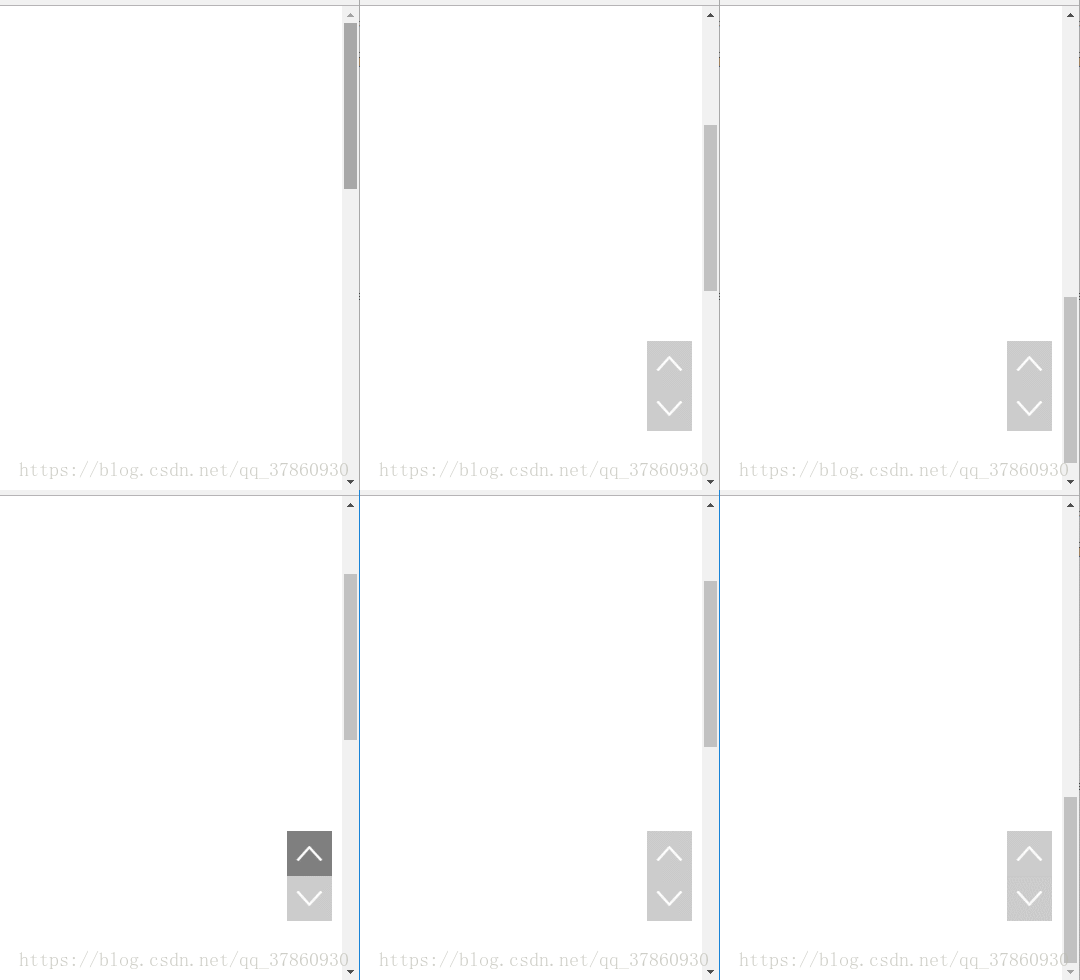
.
<template>
<div>
<div class="scroll" :class="{show:isActive}">
<div id="toTop" @click="toTop(step)"><</div>
<div id="toBottom" @click="toBottom(step)">></div>
</div>
</div>
</template>
<script>
export default{
props:{
step:{ //此数据是控制动画快慢的
type:Number,
default:
}
},
data(){
return {
isActive:false,
}
},
methods:{
toTop(i){
//参数i表示间隔的幅度大小,以此来控制速度
document.documentElement.scrollTop-=i;
if (document.documentElement.scrollTop>) {
var c=setTimeout(()=>this.toTop(i),);
}else {
clearTimeout(c);
}
},
toBottom(i){
var clientHeight=document.documentElement.clientHeight||document.body.clientHeight;
var scrollHeight=document.documentElement.scrollHeight;
var height=scrollHeight-clientHeight; //超出窗口上界的值就是底部的scrolTop的值
document.documentElement.scrollTop+=i;
if (document.documentElement.scrollTop<height) {
var c=setTimeout(()=>this.toBottom(i),);
}else {
clearTimeout(c);
}
}
},
created(){
var vm=this;
window.onscroll=function(){
if (document.documentElement.scrollTop>) {
vm.isActive=true;
}else {
vm.isActive=false;
}
}
}
}
</script>
<style scoped>
.scroll{
position: fixed;
right: 10px;
bottom: 60px;
width: 45px;
height: 90px;
cursor: pointer;
display: none;
}
.scroll>div{
width: 45px;
height: 45px;
transform: rotate(90deg);
line-height: 45px;
text-align: center;
font-size: 35px;
font-family: "黑体";
background-color: rgba(,,,.);
color: #fff;
}
.scroll>div:hover{
background-color: rgba(,,,.);
}
.show{
display: block;
}
</style>
vue工程化:返回顶部和底部的动画效果的更多相关文章
- jquery返回顶部和底部插件和解决ie6下fixed插件
(function($){ //返回顶部和底部插件 $.fn.extend({ goTopBootom:function (options){ //默认参数 var defaults = { &quo ...
- jQuery类级别插件--返回顶部,底部,去到任何部位
先引入js:<script type="text/javascript" src="jquery.js" ></script><s ...
- ListView(1)几个重要属性,关闭滚动到顶部,底部的动画,item之间的分割线,背景等
见表: android:stackFromBottom="true" 设置该属性之后你做好的列表就会显示你列表的最下面,值为true和false android:transcrip ...
- Vue 用第三方的库去实现动画效果
<!DOCTYPE html> <html lang="en"> <head> <meta charset="UTF-8&quo ...
- vue中使用transition和animate.css动画效果
一.单个动画中,使用div中引用animate动画 1.下载依赖 npm install animate.css –save 2.main.js中全局引用 import animate from 'a ...
- css 简单 返回顶部 代码及注释说明
1. 最简单的静态返回顶部,点击直接跳转页面顶部,常见于固定放置在页面底部返回顶部功能 方法一:用命名锚点击返回到顶部预设的id为top的元素 html代码 <a href="#top ...
- Web前端 页面功能——点击按钮返回顶部的实现方法
1. 最简单的静态返回顶部,点击直接跳转页面顶部,常见于固定放置在页面底部返回顶部功能 方法一:用命名锚点击返回到顶部预设的id为top的元素 html代码 <a href="#top ...
- 【Android】Listview返回顶部,快速返回顶部的功能实现,详解代码。
作者:程序员小冰,GitHub主页:https://github.com/QQ986945193 新浪微博:http://weibo.com/mcxiaobing 首先给大家看一下我们今天这个最终实现 ...
- 【Android】Scrollview返回顶部,快速返回顶部的功能实现,详解代码。
作者:程序员小冰,GitHub主页:https://github.com/QQ986945193 新浪微博:http://weibo.com/mcxiaobing 首先给大家看一下我们今天这个最终实现 ...
随机推荐
- servlet简单例子1
servlet简单例子1 分类: servlet jsp xml2012-04-18 21:54 3646人阅读 评论(3) 收藏 举报 servletloginjspaction浏览器 LoginS ...
- BZOJ_1532_[POI2005]Kos-Dicing_二分+网络流
BZOJ_1532_[POI2005]Kos-Dicing_二分+网络流 Description Dicing 是一个两人玩的游戏,这个游戏在Byteotia非常流行. 甚至人们专门成立了这个游戏的一 ...
- bzoj 4720: [Noip2016]换教室【期望dp】
状压dp,设f[i][j][0/1]为前i个时间段换了j间教室的期望体力消耗,转移很好想(但是写起来好长= =) #include<iostream> #include<cstdio ...
- 在代码里更新autolayout布局
//遍历view约束(高,宽) NSArray* constrains = self.View.constraints; for (NSLayoutConstraint* constraint in ...
- 12c debug 转 12C 连接CDB和PDB
来源:David Dai -- Focus on Oracle 连接到CDB 12c debug 和普通实例一样的连接. 指定ORACLE_SID 以后可以使用OS认证,也可以使用密码进行连接. [o ...
- APP统计
APP统计就是统计用户使用app的各项指标,比如说日活跃量,页面打开次数,新增用户数量,用户年龄分布,用户地区分布,用户性别分布以及用户使用时间段等等.将统计出来的用户信息进行比对分析,可以服务公司的 ...
- Java对象创建
今天发现一个问题: 如果加上第一个输出,那么两个per1的对象是不一样的,如果不加,那么下一个输出的对象的是和第一个是一致的? 思考为什么???? 代码如下: package com.lgq.serv ...
- Java操作pdf: JarsperReport的简单使用
在企业级应用开发中,报表生成.报表打印下载是其重要的一个环节.除了 Excel 报表之外,PDF 报表也有广泛的应用场景. 目前世面上比较流行的制作 PDF 报表的工具如下: iText PDF :i ...
- fastDFS shiro权限校验 redis FreeMark页面静态化
FastDFS是一个轻量级分布式文件系统, 使用FastDFS很容易搭建一套高性能的文件服务器集群提供文件上传.下载等服务 FastDFS服务端有两个角色:跟踪器(tracker)和存储节点( ...
- ES3之bind方法的实现模拟
扩展Function原型方法,此处用myBind来模拟bind实现 Function.prototype.myBind = function(o /*,args*/){ //闭包无法获取t ...