
在Android上使用酷狗歌词API
参考自http://blog.csdn.net/u010752082/article/details/50810190
代码先贴出来:
 public void searchLyric(){

     final String name = musicName.getText().toString();

     final String duration = musicDuration.getText().toString();

     new Thread(new Runnable() {

         @Override

         public void run() {

             try {

                 //建立连接 -- 查找歌曲

                 String urlStr = "http://lyrics.kugou.com/search?ver=1&man=yes&client=pc&keyword=" + name + "&duration=" + duration + "&hash=";

                 URL url = new URL(encodeUrl(urlStr));  //字符串进行URL编码

                 HttpURLConnection conn = (HttpURLConnection) url.openConnection();

                 conn.connect();

                 //读取流 -- JSON歌曲列表

                 InputStream input = conn.getInputStream();

                 String res = FileUtil.formatStreamToString(input);  //流转字符串

                 JSONObject json1 = new JSONObject(res);  //字符串读取为JSON

                 JSONArray json2 = json1.getJSONArray("candidates");

                 JSONObject json3 = json2.getJSONObject(0);

                 //建立连接 -- 查找歌词

                 urlStr = "http://lyrics.kugou.com/download?ver=1&client=pc&id=" + json3.get("id") + "&accesskey=" + json3.get("accesskey") + "&fmt=lrc&charset=utf8";

                 url = new URL(encodeUrl(urlStr));

                 conn = (HttpURLConnection) url.openConnection();

                 conn.connect();

                 //读取流 -- 歌词

                 input = conn.getInputStream();

                 res = FileUtil.formatStreamToString(input);

                 JSONObject json4 = new JSONObject(res);

                 //获取歌词base64,并进行解码

                 String base64 = json4.getString("content");

                 final String lyric = Base64.getFromBASE64(base64);

                 Log.i("lyric", lyric);

                 runOnUiThread(new Runnable() {

                     @Override

                     public void run() {

                         showLyric.setText(lyric);

                     }

                 });

             } catch (Exception e) {

                 e.printStackTrace();

             }

         }

     }).start();

 }
首先说明一下,要搜索到歌词,需要先搜索歌曲,得到歌曲对应的id和accesskey后才能进行歌词的获取。
那么我们先从搜索歌曲的URL开始说起:
String urlStr = "http://lyrics.kugou.com/search?ver=1&man=yes&client=pc&keyword=" + name + "&duration=" + duration + "&hash=";
其中的name为搜索条件,最好为文件名或者“歌手 - 标题”的形式,搜索比较准确。duration为歌曲时长,单位毫秒。
记得要先对字符串链接进行URL编码。
读取流并转换为字符串:
InputStream input = conn.getInputStream();

String res = FileUtil.formatStreamToString(input);  //流转字符串
接收到的数据res是这样的:
 {"ugccandidates":[],

         "ugc":0,

         "info":"OK",

         "status":200,

         "proposal":"22422076",

         "keyword":"Impossible",

         "candidates":[

             {

                 "soundname":"", "krctype":2, "nickname":"", "originame":"", "accesskey":

                 "C3D2BF9DD8A47A3FFB622B660D820B8D", "parinfo":[],"origiuid":"0", "score":60, "hitlayer":

                 7, "duration":227000, "sounduid":"0", "song":"Impossible", "uid":"410927974", "transuid":

                 "0", "transname":"", "adjust":0, "id":"22422076", "singer":"Måns Zelmerlöw", "language":""

             },

             {

                 "soundname":"", "krctype":2, "nickname":"", "originame":"", "accesskey":

                 "F92BD21B377150B8F3C67B2A034D6FE0", "parinfo":[],"origiuid":"0", "score":50, "hitlayer":

                 7, "duration":227000, "sounduid":"0", "song":"Impossible", "uid":"486959192", "transuid":

                 "0", "transname":"", "adjust":0, "id":"19445996", "singer":"The Top Hits Band", "language":

                 ""

             },

             {

                 "soundname":"", "krctype":2, "nickname":"", "originame":"", "accesskey":

                 "2B6A8E1CD4B59F475E28F2AF811F59E9", "parinfo":[],"origiuid":"0", "score":40, "hitlayer":

                 7, "duration":226750, "sounduid":"0", "song":"Impossible", "uid":"410927974", "transuid":

                 "0", "transname":"", "adjust":0, "id":"19201245", "singer":"Shontelle", "language":""

             },

             {

                 "soundname":"", "krctype":2, "nickname":"", "originame":"", "accesskey":

                 "D5B9AD83A10659CE2DAAD618C934F382", "parinfo":[],"origiuid":"0", "score":30, "hitlayer":

                 7, "duration":227000, "sounduid":"0", "song":"Impossible", "uid":"486958479", "transuid":

                 "0", "transname":"", "adjust":0, "id":"19160542", "singer":"The Top Hits Band", "language":

                 ""

             },

             {

                 "soundname":"", "krctype":2, "nickname":"", "originame":"", "accesskey":

                 "27C664BC593E1B60D486E34AE479EFE7", "parinfo":[],"origiuid":"0", "score":20, "hitlayer":

                 7, "duration":227000, "sounduid":"0", "song":"Impossible", "uid":"486953482", "transuid":

                 "0", "transname":"", "adjust":0, "id":"18918409", "singer":"Tiffany Evans", "language":""

             }
         ]

     }
我们可以用new JSONObject()将字符串转换为JSON对象,再取出candidates部分
JSONObject json1 = new JSONObject(res);  //字符串读取为JSON

JSONArray json2 = json1.getJSONArray("candidates");
现在json2就是一个搜索到的歌曲集合了,我们一般取第一个结果,是比较精确的:
JSONObject json3 = json2.getJSONObject(0);
好的,现在我们已经获取到了歌曲信息,接下来就是通过歌曲信息搜索歌词。
搜索歌词的URL需要两个参数,id和accesskey,都可以从刚刚取到的歌曲信息json3中得到:
urlStr = "http://lyrics.kugou.com/download?ver=1&client=pc&id=" + json3.get("id") + "&accesskey=" + json3.get("accesskey") + "&fmt=lrc&charset=utf8";
进行连接后,我们就能获取到歌词的相关数据了:
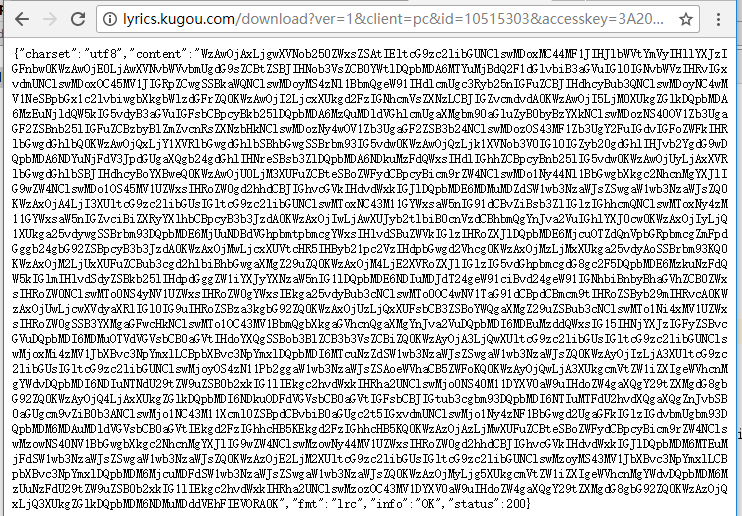
其中content就是歌词的内容,但是我们发现是经过base64编码过的,我们需要对其进行解码:
//读取流 -- 歌词

input = conn.getInputStream();

res = FileUtil.formatStreamToString(input);

JSONObject json4 = new JSONObject(res);

//获取歌词base64,并进行解码

String base64 = json4.getString("content");

String lyric = Base64.getFromBASE64(base64);
最后lyric就是我们解码后的歌词了:

到这里基本就结束了。
服务器返回的值有可能是空的,由于时间关系在这里就不写判断了。
流转String、字符串URL编码、base64解码都可以在网上找到,代码比较多这里就不贴出来了。
candidates
在Android上使用酷狗歌词API的更多相关文章
- 在线音乐播放器-----酷狗音乐api接口抓取
首先身为一个在线音乐播放器,需要前端和数据库的搭配使用. 在数据库方面,我们没有办法制作,首先是版权问题,再加上数据量.所以我们需要借用其他网络播放器的数据库. 但是这些在线播放器,如百度,酷狗,酷我 ...
- 记一次酷狗音乐API的获取,感兴趣的可以自己封装开发自己的音乐播放器
1.本教程仅供个人学习用,禁止用于任何的商业和非法用途,如涉及版权问题请联系笔者删除. 2.随笔系作者原创文档,转载请注明文档来源:http://www.cnblogs.com/apresunday/ ...
- 酷狗音乐API接口大全(40+个)
歌单分类部分 获取精选专区所有分类 http://mobilecdnbj.kugou.com/api/v3/tag/list?pid=0&apiver=2&plat=0 获取热门推荐分 ...
- Android耳机线控具体解释,蓝牙耳机button监听(仿酷狗线控效果)
转载请注明出处:http://blog.csdn.net/fengyuzhengfan/article/details/46461253 当耳机的媒体按键被单击后.Android系统会发出一个广播.该 ...
- [转]收集android上开源的酷炫的交互动画和视觉效果:Interactive-animation
原文链接:http://www.open-open.com/lib/view/open1411443332703.html 描述:收集android上开源的酷炫的交互动画和视觉效果. 1.交互篇 2. ...
- 【Python3爬虫】下载酷狗音乐上的歌曲
经过测试,可以下载要付费下载的歌曲(n_n) 准备工作:Python3.5+Pycharm 使用到的库:requests,re,json,time,fakeuseragent 步骤: 打开酷狗音乐的官 ...
- Python脚本之Lrc歌词去时间轴转Txt文件,附带酷狗音乐APP关联已有krc歌词
一.Lrc歌词去时间轴转Txt文件 环境:Python2.7.x, Mac(Windows需装cygwin环境,当然你也可以自己改代码,Python新手,勿喷) # -*- coding: UTF-8 ...
- [转]收集android上开源的酷炫的交互动画和视觉效果
原文链接:http://www.open-open.com/lib/view/open1411443332703.html 描述:收集android上开源的酷炫的交互动画和视觉效果. 1.交互篇 2. ...
- Redrain仿酷狗音乐播放器开发完毕,发布测试程序
转载请说明原出处,谢谢~~ 从暑假到现在中秋刚过,我用duilib开发仿酷狗播放器大概经历了50天.做仿酷狗的意图只是看原酷狗的界面比较漂亮,想做个完整一些的工程来练习一下duilib.今天把写好的程 ...
随机推荐
- Go——godoc命令简介
前言 godoc的一些简记 命令 godoc的列表 | godoc的chm下载 查看godoc的所有命令 `$ godoc -h` usage: godoc -http=localhost:6060 ...
- highchart学习网址
http://www.highcharts.me/api/index.html
- WAS:Thread "server.startup : 1" (00000020) and may be hung异常
有现场server启动时,启动不了,后台报错如下: [// ::: CST] ThreadMonitor W WSVR0605W: Thread ) has been active milliseco ...
- hdu 4268 Alice and Bob(贪心+multiset)
题意:卡牌覆盖,每张卡牌有高(height)和宽(width).求alice的卡牌最多可以覆盖多少bob的卡牌 思路:贪心方法就是找h可以覆盖的条件下找w最大的去覆盖. #include<ios ...
- php判断某个变量是否存在
sset— 检测变量是否设置,empty — 检查一个变量是否为空(是否存在也检测了,不存在或为空返回true)
- SPOJ:Dandiya Night and Violence(Bitset优化)
It is Dandiya Night! A certain way how dandiya is played is described: There are N pairs of people p ...
- iOS NSInteger/NSUInteger与int/unsigned int、long/unsigned long之间的区别!
在iOS开发中经常使用NSInteger和NSUInteger,而在其他的类似于C++的语言中,我们经常使用的是int.unsigned int.我们知道iOS也可以使用g++编译器,那么它们之间是否 ...
- 【USACO】 奶牛政坛
[题目链接] 点击打开链接 [算法] tarjan算法求LCA [代码] #include<bits/stdc++.h> #define MAXN 200010 #pragma GOC o ...
- 在 Ubuntu 系统中有三种设置环境变量 PATH 的方法。(ZT) repost
来源地址: http://blog.csdn.net/jernymy/article/details/6547671 第一种适用于为单一用户设置PATH.第二种是为全局设置 PATH.第三种方法适合于 ...
- 深度解密Go语言之 map
目录 什么是 map 为什么要用 map map 的底层如何实现 map 内存模型 创建 map 哈希函数 key 定位过程 map 的两种 get 操作 如何进行扩容 map 的遍历 map 的赋值 ...