
[转]JSon数据解析的四种方式
转至http://blog.csdn.net/enuola/article/details/7903632
作为一种轻量级的数据交换格式,json正在逐步取代xml,成为网络数据的通用格式。
有的json代码格式比较混乱,可以使用此“http://www.bejson.com/”网站来进行JSON格式化校验(点击打开链接)。此网站不仅可以检测Json代码中的错误,而且可以以视图形式显示json中的数据内容,很是方便。
从IOS5开始,APPLE提供了对json的原生支持(NSJSONSerialization),但是为了兼容以前的ios版本,可以使用第三方库来解析Json。
本文将介绍TouchJson、 SBJson 、JSONKit 和 iOS5所支持的原生的json方法,解析国家气象局API,TouchJson和SBJson需要下载他们的库
TouchJson包下载:http://download.csdn.net/detail/enuola/4523169
SBJson 包下载: http://download.csdn.net/detail/enuola/4523177
JSONKit包下载:http://download.csdn.net/detail/enuola/4523160
下面的完整程序源码包下载:http://download.csdn.net/detail/enuola/4523223
PS:
国家气象局提供的天气预报接口
接口地址有三个:
http://www.weather.com.cn/data/sk/101010100.html
http://www.weather.com.cn/data/cityinfo/101010100.html
http://m.weather.com.cn/data/101010100.html
第三接口信息较为详细,提供的是6天的天气,关于API所返回的信息请见开源免费天气预报接口API以及全国所有地区代码!!(国家气象局提供),全国各城市对应这一个id号,根据改变id好我们就可以解析出来各个城市对应天气;
下面介绍四种方法解析JSON:
首先建立一个新的工程,(注意不要选择ARC机制)添加如下控件:
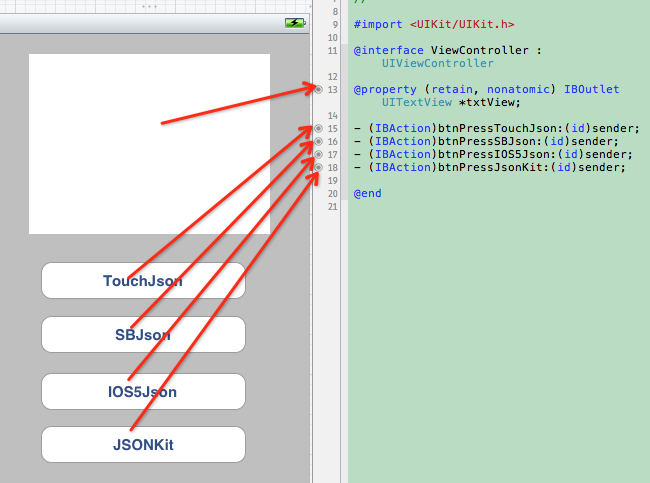
如上图所示。下面展出程序代码:
文件 ViewController.h 中:
- #import <UIKit/UIKit.h>
- @interface ViewController : UIViewController
- @property (retain, nonatomic) IBOutlet UITextView *txtView;
- - (IBAction)btnPressTouchJson:(id)sender;
- - (IBAction)btnPressSBJson:(id)sender;
- - (IBAction)btnPressIOS5Json:(id)sender;
- - (IBAction)btnPressJsonKit:(id)sender;
- @end
#import <UIKit/UIKit.h>

@interface ViewController : UIViewController

@property (retain, nonatomic) IBOutlet UITextView *txtView;

- (IBAction)btnPressTouchJson:(id)sender;

- (IBAction)btnPressSBJson:(id)sender;

- (IBAction)btnPressIOS5Json:(id)sender;

- (IBAction)btnPressJsonKit:(id)sender;

 @end
文件ViewController.m中主要代码:
(1)使用TouchJSon解析方法:(需导入包:#import "TouchJson/JSON/CJSONDeserializer.h")
- //使用TouchJson来解析北京的天气
- - (IBAction)btnPressTouchJson:(id)sender {
- //获取API接口
- NSURL *url = [NSURL URLWithString:@"http://m.weather.com.cn/data/101010100.html"];
- //定义一个NSError对象,用于捕获错误信息
- NSError *error;
- NSString *jsonString = [NSString stringWithContentsOfURL:url encoding:NSUTF8StringEncoding error:&error];
- NSLog(@"jsonString--->%@",jsonString);
- //将解析得到的内容存放字典中,编码格式为UTF8,防止取值的时候发生乱码
- NSDictionary *rootDic = [[CJSONDeserializer deserializer] deserialize:[jsonString dataUsingEncoding:NSUTF8StringEncoding] error:&error];
- //因为返回的Json文件有两层,去第二层内容放到字典中去
- NSDictionary *weatherInfo = [rootDic objectForKey:@"weatherinfo"];
- NSLog(@"weatherInfo--->%@",weatherInfo);
- //取值打印
- txtView.text = [NSString stringWithFormat:@"今天是 %@ %@ %@ 的天气状况是:%@ %@ ",[weatherInfo objectForKey:@"date_y"],[weatherInfo objectForKey:@"week"],[weatherInfo objectForKey:@"city"], [weatherInfo objectForKey:@"weather1"], [weatherInfo objectForKey:@"temp1"]];
- }
//使用TouchJson来解析北京的天气

- (IBAction)btnPressTouchJson:(id)sender {

    //获取API接口

    NSURL *url = [NSURL URLWithString:@"http://m.weather.com.cn/data/101010100.html"];

    //定义一个NSError对象,用于捕获错误信息

    NSError *error;

    NSString *jsonString = [NSString stringWithContentsOfURL:url encoding:NSUTF8StringEncoding error:&error];

    NSLog(@"jsonString--->%@",jsonString);

    //将解析得到的内容存放字典中,编码格式为UTF8,防止取值的时候发生乱码

    NSDictionary *rootDic = [[CJSONDeserializer deserializer] deserialize:[jsonString dataUsingEncoding:NSUTF8StringEncoding] error:&error];

    //因为返回的Json文件有两层,去第二层内容放到字典中去

    NSDictionary *weatherInfo = [rootDic objectForKey:@"weatherinfo"];

    NSLog(@"weatherInfo--->%@",weatherInfo);

    //取值打印

    txtView.text = [NSString stringWithFormat:@"今天是 %@  %@  %@  的天气状况是:%@  %@ ",[weatherInfo objectForKey:@"date_y"],[weatherInfo objectForKey:@"week"],[weatherInfo objectForKey:@"city"], [weatherInfo objectForKey:@"weather1"], [weatherInfo objectForKey:@"temp1"]];

}
(2)使用SBJson解析方法:(需导入包:#import "SBJson/SBJson.h")
- //使用SBJson解析南阳的天气
- - (IBAction)btnPressSBJson:(id)sender {
- NSURL *url = [NSURL URLWithString:@"http://m.weather.com.cn/data/101180701.html"];
- NSError *error = nil;
- NSString *jsonString = [NSString stringWithContentsOfURL:url encoding:NSUTF8StringEncoding error:&error];
- SBJsonParser *parser = [[SBJsonParser alloc] init];
- NSDictionary *rootDic = [parser objectWithString:jsonString error:&error];
- NSDictionary *weatherInfo = [rootDic objectForKey:@"weatherinfo"];
- txtView.text = [NSString stringWithFormat:@"今天是 %@ %@ %@ 的天气状况是:%@ %@ ",[weatherInfo objectForKey:@"date_y"],[weatherInfo objectForKey:@"week"],[weatherInfo objectForKey:@"city"], [weatherInfo objectForKey:@"weather1"], [weatherInfo objectForKey:@"temp1"]];
- }
//使用SBJson解析南阳的天气

- (IBAction)btnPressSBJson:(id)sender {

    NSURL *url = [NSURL URLWithString:@"http://m.weather.com.cn/data/101180701.html"];

    NSError *error = nil;

    NSString *jsonString = [NSString stringWithContentsOfURL:url encoding:NSUTF8StringEncoding error:&error];

    SBJsonParser *parser = [[SBJsonParser alloc] init];

    NSDictionary *rootDic = [parser objectWithString:jsonString error:&error];

    NSDictionary *weatherInfo = [rootDic objectForKey:@"weatherinfo"];

    txtView.text = [NSString stringWithFormat:@"今天是 %@  %@  %@  的天气状况是:%@  %@ ",[weatherInfo objectForKey:@"date_y"],[weatherInfo objectForKey:@"week"],[weatherInfo objectForKey:@"city"], [weatherInfo objectForKey:@"weather1"], [weatherInfo objectForKey:@"temp1"]];

}
(3)使用IOS5自带解析类NSJSONSerialization方法解析:(无需导入包,IOS5支持,低版本IOS不支持)
- - (IBAction)btnPressIOS5Json:(id)sender {
- NSError *error;
- //加载一个NSURL对象
- NSURLRequest *request = [NSURLRequest requestWithURL:[NSURL URLWithString:@"http://m.weather.com.cn/data/101180601.html"]];
- //将请求的url数据放到NSData对象中
- NSData *response = [NSURLConnection sendSynchronousRequest:request returningResponse:nil error:nil];
- //IOS5自带解析类NSJSONSerialization从response中解析出数据放到字典中
- NSDictionary *weatherDic = [NSJSONSerialization JSONObjectWithData:response options:NSJSONReadingMutableLeaves error:&error];
- NSDictionary *weatherInfo = [weatherDic objectForKey:@"weatherinfo"];
- txtView.text = [NSString stringWithFormat:@"今天是 %@ %@ %@ 的天气状况是:%@ %@ ",[weatherInfo objectForKey:@"date_y"],[weatherInfo objectForKey:@"week"],[weatherInfo objectForKey:@"city"], [weatherInfo objectForKey:@"weather1"], [weatherInfo objectForKey:@"temp1"]];
- NSLog(@"weatherInfo字典里面的内容为--》%@", weatherDic );
- }
- (IBAction)btnPressIOS5Json:(id)sender {

    NSError *error;

    //加载一个NSURL对象

    NSURLRequest *request = [NSURLRequest requestWithURL:[NSURL URLWithString:@"http://m.weather.com.cn/data/101180601.html"]];

    //将请求的url数据放到NSData对象中

    NSData *response = [NSURLConnection sendSynchronousRequest:request returningResponse:nil error:nil];

    //IOS5自带解析类NSJSONSerialization从response中解析出数据放到字典中

    NSDictionary *weatherDic = [NSJSONSerialization JSONObjectWithData:response options:NSJSONReadingMutableLeaves error:&error];

    NSDictionary *weatherInfo = [weatherDic objectForKey:@"weatherinfo"];

    txtView.text = [NSString stringWithFormat:@"今天是 %@  %@  %@  的天气状况是:%@  %@ ",[weatherInfo objectForKey:@"date_y"],[weatherInfo objectForKey:@"week"],[weatherInfo objectForKey:@"city"], [weatherInfo objectForKey:@"weather1"], [weatherInfo objectForKey:@"temp1"]];

    NSLog(@"weatherInfo字典里面的内容为--》%@", weatherDic );

}
(4)使用JSONKit的解析方法:(需导入包:#import "JSONKit/JSONKit.h")
- - (IBAction)btnPressJsonKit:(id)sender {
- //如果json是“单层”的,即value都是字符串、数字,可以使用objectFromJSONString
- NSString *json1 = @"{\"a\":123, \"b\":\"abc\"}";
- NSLog(@"json1:%@",json1);
- NSDictionary *data1 = [json1 objectFromJSONString];
- NSLog(@"json1.a:%@",[data1 objectForKey:@"a"]);
- NSLog(@"json1.b:%@",[data1 objectForKey:@"b"]);
- [json1 release];
- //如果json有嵌套,即value里有array、object,如果再使用objectFromJSONString,程序可能会报错(测试结果表明:使用由网络或得到的php/json_encode生成的json时会报错,但使用NSString定义的json字符串时,解析成功),最好使用objectFromJSONStringWithParseOptions:
- NSString *json2 = @"{\"a\":123, \"b\":\"abc\", \"c\":[456, \"hello\"], \"d\":{\"name\":\"张三\", \"age\":\"32\"}}";
- NSLog(@"json2:%@", json2);
- NSDictionary *data2 = [json2 objectFromJSONStringWithParseOptions:JKParseOptionLooseUnicode];
- NSLog(@"json2.c:%@", [data2 objectForKey:@"c"]);
- NSLog(@"json2.d:%@", [data2 objectForKey:@"d"]);
- [json2 release];
- }
- (IBAction)btnPressJsonKit:(id)sender {

    //如果json是“单层”的,即value都是字符串、数字,可以使用objectFromJSONString

    NSString *json1 = @"{\"a\":123, \"b\":\"abc\"}";

    NSLog(@"json1:%@",json1);

    NSDictionary *data1 = [json1 objectFromJSONString];

    NSLog(@"json1.a:%@",[data1 objectForKey:@"a"]);

    NSLog(@"json1.b:%@",[data1 objectForKey:@"b"]);

    [json1 release];

    //如果json有嵌套,即value里有array、object,如果再使用objectFromJSONString,程序可能会报错(测试结果表明:使用由网络或得到的php/json_encode生成的json时会报错,但使用NSString定义的json字符串时,解析成功),最好使用objectFromJSONStringWithParseOptions:

    NSString *json2 = @"{\"a\":123, \"b\":\"abc\", \"c\":[456, \"hello\"], \"d\":{\"name\":\"张三\", \"age\":\"32\"}}";

    NSLog(@"json2:%@", json2);

    NSDictionary *data2 = [json2 objectFromJSONStringWithParseOptions:JKParseOptionLooseUnicode];

    NSLog(@"json2.c:%@", [data2 objectForKey:@"c"]);

    NSLog(@"json2.d:%@", [data2 objectForKey:@"d"]);

    [json2 release];

}
另外,由于iOS5新增了JSON解析的API,我们将其和其他五个开源的JSON解析库进行了解析速度的测试,下面是测试的结果。
我们选择的测试对象包含下面的这几个框架,其中NSJSONSerialization是iOS5系统新增的JSON解析的API,需要iOS5的环境,如果您在更低的版本进行测试,应该屏蔽相应的代码调用。
- [SBJSON (json-framework)](http://code.google.com/p/json-framework/)
- [TouchJSON (from touchcode)](http://code.google.com/p/touchcode/)
- [YAJL (objective-C bindings)](http://github.com/gabriel/yajl-objc)
- [JSONKit](https://github.com/johnezang/JSONKit)
- [NextiveJson](https://github.com/nextive/NextiveJson)
-[NSJSONSerialization](http://developer.apple.com/library/ios/#documentation/Foundation/Reference/NSJSONSerialization_Class/Reference/Reference.html#//apple_ref/doc/uid/TP40010946)
我们选择了四个包含json格式的数据的文件进行测试。每一个文件进行100的解析动作,对解析的时间进行比较。
.....
测试的结果显示,系统的API的解析速度最快,我们在工程项目中选择使用,也是应用较为广泛的SBJSON的解析速度为倒数第二差,令我大跌眼镜。
与系统API较为接近的应该是JSONKit。
这里没有对API的开放接口和使用方式进行比较,若单纯基于以上解析速度的测试:
1:iOS5应该选择系统的API进行
2:不能使用系统API的应该选择JSONKit
[转]JSon数据解析的四种方式的更多相关文章
- 实现web数据同步的四种方式
http://www.admin10000.com/document/6067.html 实现web数据同步的四种方式 1.nfs实现web数据共享 2.rsync +inotify实现web数据同步 ...
- linux下实现web数据同步的四种方式(性能比较)
实现web数据同步的四种方式 ======================================= 1.nfs实现web数据共享2.rsync +inotify实现web数据同步3.rsyn ...
- XML解析的四种方式
1.说明 XML是EXtensible Markup Language, 即可扩展标记语言, 是一种通用的数据交换格式, 它的平台无关性.语言无关性.系统无关性, 给数据集成与交互带来了极大的方便. ...
- Asp.net Json数据解析的一种思路
在日常的编码中,经常会遇到JSON类型的数据,有简单的,也有复杂的.对于简单的,我们可以用正则等匹配,但是一旦遇到复杂的,就比较难办了. 数据分析 目前手头上需要制作一个天气预报功能,现成的接口已经有 ...
- android 数据存储的四种方式.
Android系统一共提供了四种数据存储方式.分别是:SharePreference.SQLite.Content Provider和File.由于Android系统中,数据基本都是私有的的,都是存放 ...
- android数据存取的四种方式
Android系统下有四种数据的存在形式,分别是SQLite,SharePreference,File,ContentProvider.一:特性介绍:SQLite:对于大多数开发者而言,这应该是大家非 ...
- IOS - JSON数据解析 小3种方法
[manager GET:serverURL parameters:nil success:^(AFHTTPRequestOperation *operation, id responseObject ...
- python爬虫数据解析的四种不同选择器Xpath,Beautiful Soup,pyquery,re
这里主要是做一个关于数据爬取以后的数据解析功能的整合,方便查阅,以防混淆 主要讲到的技术有Xpath,BeautifulSoup,PyQuery,re(正则) 首先举出两个作示例的代码,方便后面举例 ...
- Python网络爬虫数据解析的三种方式
request实现数据爬取的流程: 指定url 基于request发起请求 获取响应的数据 数据解析 持久化存储 1.正则解析: 常用的正则回顾:https://www.cnblogs.com/wqz ...
随机推荐
- SendMessage用法实例
转: http://blog.csdn.net/coolszy/article/details/5523700 SendMessage用法 windowsbuttonmenucommandlistc# ...
- asp.net软件测试学习
ormaping类是,将数据操作封装起来的一种数据操作方法,在测试的时候,如果说,insert之后对obj对象赋值赋值,每个属性应该对应自己的objDataRow["REGISTERID&q ...
- HTML之学习笔记(九)表单
html的表单标签是一个系列,用开闭的<form>标签包裹起来的组合.表单的作用是将我们要向服务器提交数据的数据包含起来,然后提交到服务器处理.(使用表单是浏览器提交客户端数据到服务端的方 ...
- validate 表单验证
转自博客园:http://www.cnblogs.com/easyinsc/archive/2009/02/27/1407826.html (1)required:true ...
- hive j简单邮件过滤
select min(call_log), a.mail_subject from (select mail_to,mail_subject from dw_user_deviler_201408 w ...
- ExtJS4.2学习(三)——入门基础
1.怎么给某一组件注册事件? 先画一个组件,然后在控制器中加入对这个组件的处理(包括组件对应的方法调用和方法定义). 2.ExtJS4的提示框和JS的差异: ExtJS4:一步走完程序: JS:让程序 ...
- Class类对象的三种实例化方法
class X { } public class GetClassDemo01 { public static void main(String[] args) { X x = ...
- [C++]Saving the Universe——Google Code Jam Qualification Round 2008
Google Code Jam 2008 资格赛的第一题:Saving the Universe. 问题描述如下: Problem The urban legend goes that if you ...
- RequireJS 和 SeaJS
RequireJS SeaJS CMD规范 CommonJS的规范: 根据CommonJS规范,一个单独的文件就是一个模块.加载模块使用require方法,该方法读取一个文件并执行,最后返回文件内部的 ...
- :last-child的诡异的问题!!
<!DOCTYPE html PUBLIC "-//W3C//DTD XHTML 1.0 Transitional//EN" "http://www.w3.org/ ...