
扩展ArcGIS API for Silverlight/WPF 中的TextSymbol支持角度标注
原文 http://blog.csdn.net/esricd/article/details/7587136
在ArcGIS API for Silverlight/WPF中原版的TextSymbol只能支持文字正向显示。在很多实际项目中,往往需要文字标注有一些角度甚至是沿线标注,下面 我们来看一下原装的TextSymbol和扩展后的TextSymbol的比较和实现思路。
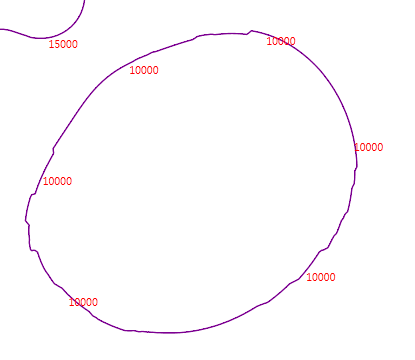
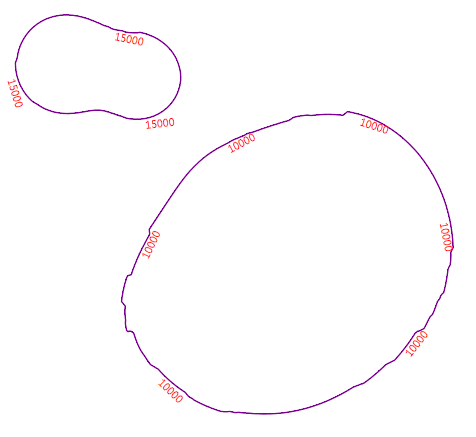
要实现右图的效果只需要从TextSymbol继承一个Symbol并增加Rotation属性,并加载相应的控件模板就行了。
以下是控件模板的代码:
- <ControlTemplate xmlns="http://schemas.microsoft.com/winfx/2006/xaml/presentation"
- xmlns:x="http://schemas.microsoft.com/winfx/2006/xaml"
- xmlns:esri="http://schemas.esri.com/arcgis/client/2009"
- xmlns:vsm="clr-namespace:System.Windows;assembly=System.Windows">
- <TextBlock Text="{Binding Symbol.Text}"
- FontFamily="{Binding Symbol.FontFamily}"
- FontSize="{Binding Symbol.FontSize}"
- Foreground="{Binding Symbol.Foreground}">
- <TextBlock.RenderTransform>
- <CompositeTransform Rotation="{Binding Symbol.TextRotation}"/>
- </TextBlock.RenderTransform>
- </TextBlock>
- </ControlTemplate>
控件模板中需要绑定对象中的文本、字体、字号、颜色、角度五个属性。
对象类的加载XAML代码如下:
- base.ControlTemplate = XamlReader.Load(LoadXaml("LabelSymbol.xaml")) as ControlTemplate;
- public static string LoadXaml(string FileName)
- {
- string xamlstring;
- var assemblyName = new AssemblyName(Assembly.GetExecutingAssembly().FullName);
- string CurrentAssemblyName = assemblyName.Name;
- string resourceName = string.Format("{0};component{1}{2}", CurrentAssemblyName, "/", FileName);
- Uri uri = new Uri(resourceName, UriKind.Relative);
- StreamResourceInfo streamResourceInfo = Application.GetResourceStream(uri);
- using (Stream resourceStream = streamResourceInfo.Stream)
- {
- using (StreamReader streamReader = new StreamReader(resourceStream))
- {
- xamlstring = streamReader.ReadToEnd();
- }
- }
- return xamlstring;
- }
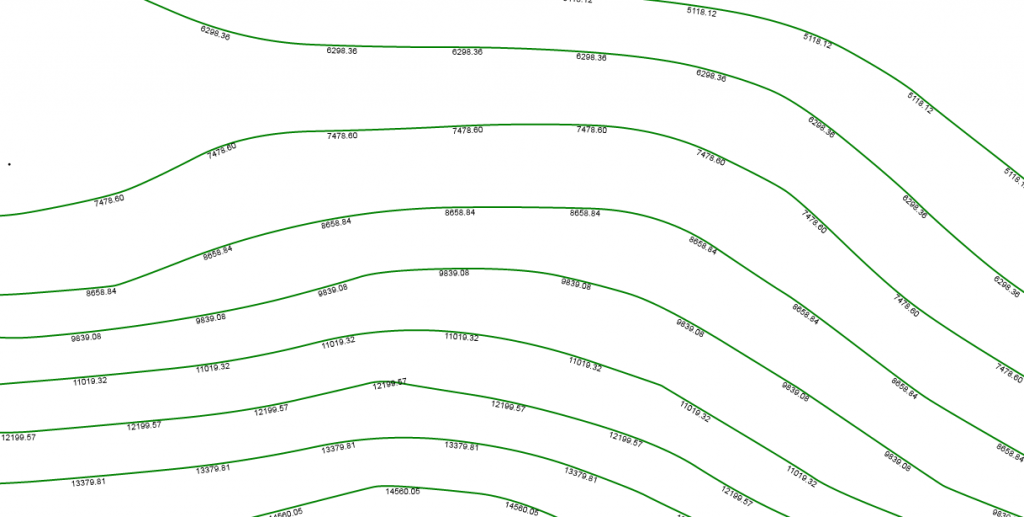
对象类中再定义对应的五个属性就能实现有倾斜角度的标注了。最终实现效果如图:
后话:
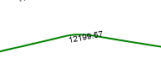
这个扩展的Symbol仅仅是对文字符号增加旋转角度,其中还有不完善的地方,在线路转角的地方标注的时候往往会与线交叉,如:
如果再深入完善一下,稍做修改可以将标注做成真正的沿线标注,如:
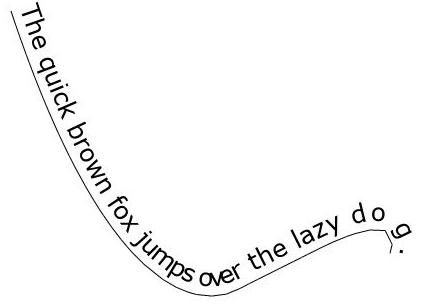
沿线文本在网上有大量的资料,在这里就不再啰嗦了,希望本文对各位ArcGIS API for Silverlight开发人员有帮助。
扩展ArcGIS API for Silverlight/WPF 中的TextSymbol支持角度标注的更多相关文章
- ArcGIS API for Silverlight代码中使用Template模板
原文:ArcGIS API for Silverlight代码中使用Template模板 在项目开发中,会遇到点选中聚焦闪烁效果,但是因为在使用Symbol的时候,会设置一定的OffSetX和OffS ...
- ArcGIS API for Silverlight/WPF 2.1学习笔记(一)——精简版
一.安装 1.Visual Studio: (1)Visual Studio 2010或Visual Web Developer Express 2010 (2)Silverlight 4 Tools ...
- 【转】ArcGIS API for Silverlight/WPF 2.1学习笔记(一)
源自:http://blog.163.com/zwx_gis/blog/static/32434435201122193611576/ (主页:http://blog.163.com/zwx_gis/ ...
- 【转】ArcGIS API for Silverlight/WPF 2.1学习笔记(三)
六.Feature Layer Feature Layer是一种特殊的Graphics layer(继承自Graphics layer),除了像Graphics layer一样包含和显示Graphic ...
- 【转】ArcGIS API for Silverlight/WPF 2.1学习笔记(二)
五.Graphics layer 1.新增Graphics layer Graphics layer用于显示用户自定义绘制的点.线.面图形.使用时确保xaml文件中Graphics layer定义 ...
- 【转】ArcGIS API for Silverlight/WPF 2.1学习笔记(四)
七.Editing ArcGIS Server 10提供了: 通过feature service,在Web上编辑Feature layers的geographic data的功能. 通过geome ...
- 【转】ArcGIS API for Silverlight/WPF 2.1学习笔记(五)
2.Find示例代码 (1)xaml文件: //添加Symbol命名空间 xmlns:esriSymbols="clr-namespace:ESRI.ArcGIS.Client.Symbol ...
- ArcGIS API for Silverlight开发入门
你用上3G手机了吗?你可能会说,我就是喜欢用nokia1100,ABCDEFG跟我 都没关系.但你不能否认3G是一种趋势,最终我们每个人都会被包裹在3G网络中.1100也不是一成不变,没准哪天为了打击 ...
- ArcGIS API for Silverlight学习笔记
ArcGIS API for Silverlight学习笔记(一):为什么要用Silverlight API(转) 你用上3G手机了吗?你可能会说,我就是喜欢用nokia1100,ABCDEFG跟我都 ...
随机推荐
- 【转】Notepad++ 快捷键 大全 官方整理过来的
原文网址:http://www.lianyue.org/2011/756/ Ctrl+C 复制Ctrl+X 剪切Ctrl+V 粘贴Ctrl+Z 撤消Ctrl+Y 恢复Ctrl+A 全选Ctrl+F 键 ...
- Android Studio 配置SVN实现代码管理
Refference From:http://iaiai.iteye.com/blog/2267346 一.Android Studio配置SVN Android Studio关联配置SVN很简单,在 ...
- UVa133.The Dole Queue
题目链接:http://uva.onlinejudge.org/index.php?option=com_onlinejudge&Itemid=8&page=show_problem& ...
- AsyncTask实现登录功能,上传图片,get,post
提交成功时,从服务器端返回数据“load success” 用户名.密码正确后成功登录,并且在服务器端的文件保存目录上看到了从客户端上传的图片. 客户端代码: MainActivity.java im ...
- MyWidget【简单自制控件】
#coding=gbk from PyQt4 import QtGui,QtCore import random class MyWidget(QtGui.QWidget): def __init__ ...
- 关于NetBeans IDE的配置优化
首先,IDE的版本最好对应着JDK的版本. NetBeans优化的目的是提高NetBeans的启动速度和运行速度.下面介绍的NetBeans优化技巧是在版本6.0beta2上的优化.经过实验,大大提高 ...
- [RxJS] Using Observable.create for fine-grained control
Sometimes, the helper methods that RxJS ships with such as fromEvent, fromPromise etc don't always p ...
- 学习Swift中的CoreImage(图形核心编程)
Core Image是一个可以让你轻松使用图形过虑器的强力框架.在这里你几乎可以获得所有不同种类的效果,比如修改图像饱和度,色彩范围,亮度等.它甚至也可以利用CPU或者GPU来处理图像数据并且它的速度 ...
- Linux文件权限管理
一.设置文件所属的用户以及所属的组(chown,chgrp) chgrp用来更改文件的组拥有者,其一般格式为:chgrp [option] group file(1)把文件test的组拥有者改为zfs ...
- boost::asio译文
Christopher Kohlhoff Copyright © 2003-2012 Christopher M. Kohlhoff 以Boost1.0的软件授权进行发布(见附带的LICENS ...