
扩展ArcGIS API for Silverlight/WPF 中的TextSymbol支持角度标注
原文 http://blog.csdn.net/esricd/article/details/7587136
在ArcGIS API for Silverlight/WPF中原版的TextSymbol只能支持文字正向显示。在很多实际项目中,往往需要文字标注有一些角度甚至是沿线标注,下面 我们来看一下原装的TextSymbol和扩展后的TextSymbol的比较和实现思路。
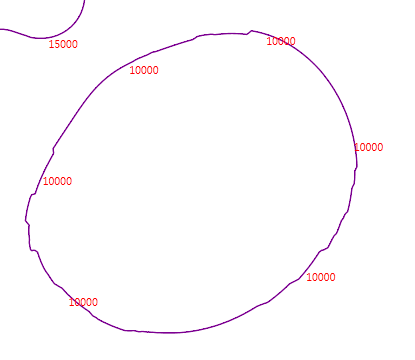
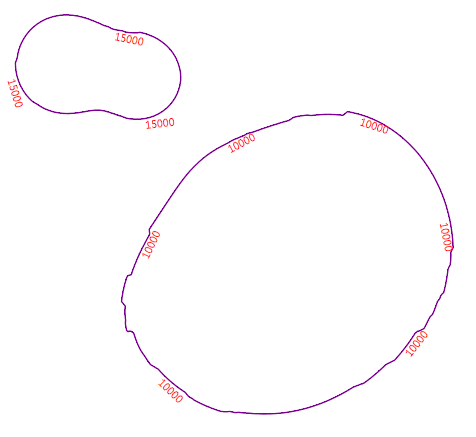
要实现右图的效果只需要从TextSymbol继承一个Symbol并增加Rotation属性,并加载相应的控件模板就行了。
以下是控件模板的代码:
- <ControlTemplate xmlns="http://schemas.microsoft.com/winfx/2006/xaml/presentation"
- xmlns:x="http://schemas.microsoft.com/winfx/2006/xaml"
- xmlns:esri="http://schemas.esri.com/arcgis/client/2009"
- xmlns:vsm="clr-namespace:System.Windows;assembly=System.Windows">
- <TextBlock Text="{Binding Symbol.Text}"
- FontFamily="{Binding Symbol.FontFamily}"
- FontSize="{Binding Symbol.FontSize}"
- Foreground="{Binding Symbol.Foreground}">
- <TextBlock.RenderTransform>
- <CompositeTransform Rotation="{Binding Symbol.TextRotation}"/>
- </TextBlock.RenderTransform>
- </TextBlock>
- </ControlTemplate>
控件模板中需要绑定对象中的文本、字体、字号、颜色、角度五个属性。
对象类的加载XAML代码如下:
- base.ControlTemplate = XamlReader.Load(LoadXaml("LabelSymbol.xaml")) as ControlTemplate;
- public static string LoadXaml(string FileName)
- {
- string xamlstring;
- var assemblyName = new AssemblyName(Assembly.GetExecutingAssembly().FullName);
- string CurrentAssemblyName = assemblyName.Name;
- string resourceName = string.Format("{0};component{1}{2}", CurrentAssemblyName, "/", FileName);
- Uri uri = new Uri(resourceName, UriKind.Relative);
- StreamResourceInfo streamResourceInfo = Application.GetResourceStream(uri);
- using (Stream resourceStream = streamResourceInfo.Stream)
- {
- using (StreamReader streamReader = new StreamReader(resourceStream))
- {
- xamlstring = streamReader.ReadToEnd();
- }
- }
- return xamlstring;
- }
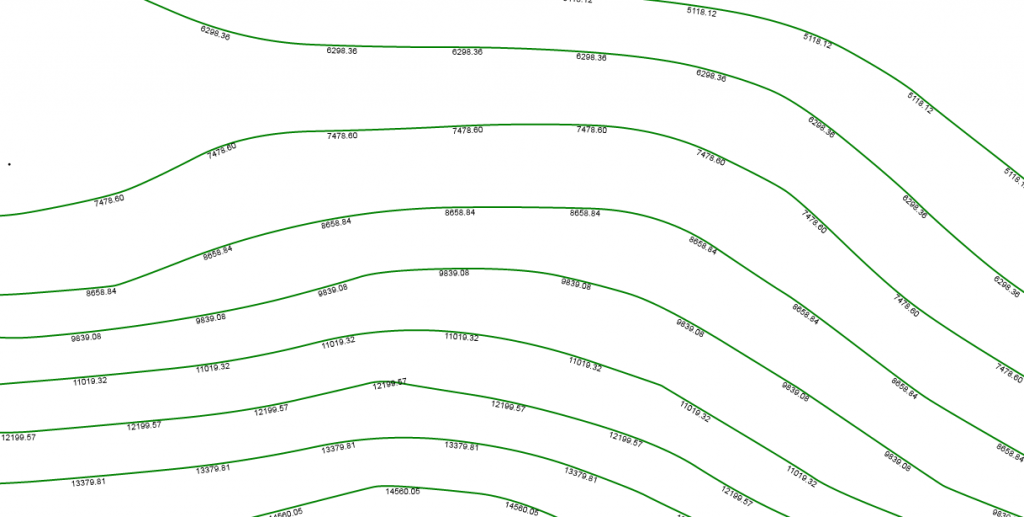
对象类中再定义对应的五个属性就能实现有倾斜角度的标注了。最终实现效果如图:
后话:
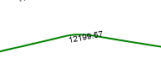
这个扩展的Symbol仅仅是对文字符号增加旋转角度,其中还有不完善的地方,在线路转角的地方标注的时候往往会与线交叉,如:
如果再深入完善一下,稍做修改可以将标注做成真正的沿线标注,如:
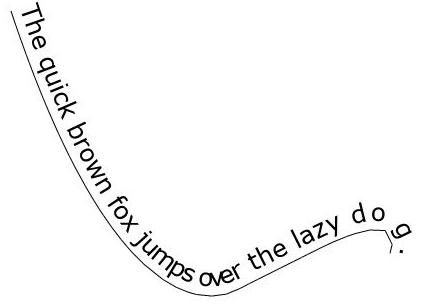
沿线文本在网上有大量的资料,在这里就不再啰嗦了,希望本文对各位ArcGIS API for Silverlight开发人员有帮助。
扩展ArcGIS API for Silverlight/WPF 中的TextSymbol支持角度标注的更多相关文章
- ArcGIS API for Silverlight代码中使用Template模板
原文:ArcGIS API for Silverlight代码中使用Template模板 在项目开发中,会遇到点选中聚焦闪烁效果,但是因为在使用Symbol的时候,会设置一定的OffSetX和OffS ...
- ArcGIS API for Silverlight/WPF 2.1学习笔记(一)——精简版
一.安装 1.Visual Studio: (1)Visual Studio 2010或Visual Web Developer Express 2010 (2)Silverlight 4 Tools ...
- 【转】ArcGIS API for Silverlight/WPF 2.1学习笔记(一)
源自:http://blog.163.com/zwx_gis/blog/static/32434435201122193611576/ (主页:http://blog.163.com/zwx_gis/ ...
- 【转】ArcGIS API for Silverlight/WPF 2.1学习笔记(三)
六.Feature Layer Feature Layer是一种特殊的Graphics layer(继承自Graphics layer),除了像Graphics layer一样包含和显示Graphic ...
- 【转】ArcGIS API for Silverlight/WPF 2.1学习笔记(二)
五.Graphics layer 1.新增Graphics layer Graphics layer用于显示用户自定义绘制的点.线.面图形.使用时确保xaml文件中Graphics layer定义 ...
- 【转】ArcGIS API for Silverlight/WPF 2.1学习笔记(四)
七.Editing ArcGIS Server 10提供了: 通过feature service,在Web上编辑Feature layers的geographic data的功能. 通过geome ...
- 【转】ArcGIS API for Silverlight/WPF 2.1学习笔记(五)
2.Find示例代码 (1)xaml文件: //添加Symbol命名空间 xmlns:esriSymbols="clr-namespace:ESRI.ArcGIS.Client.Symbol ...
- ArcGIS API for Silverlight开发入门
你用上3G手机了吗?你可能会说,我就是喜欢用nokia1100,ABCDEFG跟我 都没关系.但你不能否认3G是一种趋势,最终我们每个人都会被包裹在3G网络中.1100也不是一成不变,没准哪天为了打击 ...
- ArcGIS API for Silverlight学习笔记
ArcGIS API for Silverlight学习笔记(一):为什么要用Silverlight API(转) 你用上3G手机了吗?你可能会说,我就是喜欢用nokia1100,ABCDEFG跟我都 ...
随机推荐
- The Angles of a Triangle
The Angles of a Triangle You are given the lengths for each side on a triangle. You need to find all ...
- windows phone之获取当前连接WIFI的SSID
public string GetSSIDName() { foreach (var network in new NetworkInterfaceList()) { if ( (network.In ...
- UIScrollView入门与框架设计
一.概述 1.UIScrollView的contentSize, contentOffSet, contentInsets的作用和使用. 2.UIScrollView的一整个滚动过程的生命周期(开始滚 ...
- 【HDU1301】Jungle Roads(MST基础题)
爽爆.史上个人最快MST的记录7分40s..一次A. #include <iostream> #include <cstring> #include <cstdlib&g ...
- Python Open Flash Chart (pyOFC2) — Home
Python Open Flash Chart (pyOFC2) - Home pyOFC2 Python Open Flash Chart 2
- ZooKeeper架构设计及其应用
ZooKeeper是一个开源的分布式服务框架,它是Apache Hadoop项目的一个子项目,主要用来解决分布式应用场景中存在的一些问题,如:统一命名服务.状态同步服务.集群管理.分布式应用配置管理等 ...
- FZU 2108(dfs模拟,大数取余)
K Time Limit:1000MS Memory Limit:32768KB 64bit IO Format:%I64d & %I64u Submit Status Pr ...
- C#操作IE
操作IE主要使用两个Com Dll: 1.Microsoft Internet Controls 2.Microsoft HTML Object Library 使用Microsoft Interne ...
- HDU 4287 (13.08.17)
Problem Description We all use cell phone today. And we must be familiar with the intelligent Englis ...
- 十一招解决:系统IE部分网页打不开怎么办(转载)
网页打不开这问题,却实非常令人头痛,问过非常多人,都说不出真正的理由和解决方法.以下是在网络上面搜集的一些针对“网页打不开怎么办”解决方法,共十一条,希望可以对大家有帮助. Application M ...