
AngularJs(八) 过滤器filter创建
大纲
示例
过滤器的使用
创建过滤器
demo
这是整个示例demo
1、filter.js文件
angular.module("exampleApp", [])

    .constant("productsUrl", "http://localhost:27017/products")

    .controller("defaultCtrl", function ($scope, $http, productsUrl) {

        $http.get(productsUrl).success(function (data) {

            $scope.products = data;//直接转成了数组

        });

    });
这里我把引入的服务作为一个常量,这样写的好处是我便于修改。
对于如何使用$http 服务,请参考我的AngularJs(三) Deployed 使用
<!DOCTYPE html>

<html xmlns="http://www.w3.org/1999/xhtml" ng-app="exampleApp">

<head>

<meta http-equiv="Content-Type" content="text/html; charset=utf-8"/>

    <title></title>

    <script src="angular.js"></script>

    <link href="bootstrap-theme.css" rel="stylesheet" />

    <link href="bootstrap.css" rel="stylesheet" />

    <script src="filter.js"></script>

</head>

<body ng-controller="defaultCtrl" >

     <div class="panel">

         <div class="panel-heading">

             <h1 class="btn btn-primary">Products</h1>

         </div>

         <div class="panel-body">

             <table class="table table-striped table-condensed">

                 <thead>

                     <tr>

                         <td>Name</td><td>Category</td><td>Price</td><td>expiry</td>

                     </tr>

                 </thead>

                 <tbody>

                     <tr ng-repeat="item in products">

                         <td>{{item.name | uppercase}}</td>

                         <td>{{item.category}}</td>

                         <td>{{item.price | currency}}</td>

                         <td>{{item.expiry| number }}</td>

                         <td>{{item | json}}</td>

                     </tr>

                 </tbody>

             </table>

         </div>

     </div>

</body>

</html>
运行的结果:
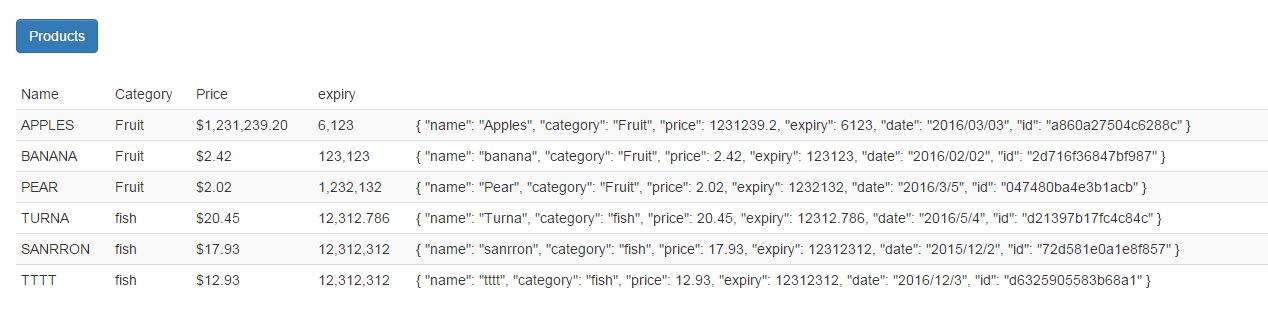
Use filter
过滤器分为两类:
1、对单个数据的过滤
2、对集合进行操作。
一、 对数据进行操作使用比较简单,如demo上所示,在{{item | currency}} 等,就可以进行格式化。
currency:“f" 就可以是价格过滤成英镑。
单个数据的过滤器 想过滤的数据格式,在过滤器后使用 :在相应的格式字符。
number:0 表示数据小数位保留0位,
二: 集合过滤,从集合中过滤出一定的数量。
在基本demo中我加入这样:
 <div class="panel-heading">

             <h1 class="btn btn-primary">Products</h1>

         </div>

         <div class="panel-body">

             Limit:<select ng-model="limitValue" ng-options="p for p in limitRange" ></select>

         </div>
filter.js中加入了:
 $http.get(productsUrl).success(function (data) {

            $scope.products = data;//直接转成了数组

            $scope.limitValue = "5";//要是字符串

            $scope.limitRange = [];

            for (var i = 0 ; i <= $scope.products.length; i++) {

                $scope.limitRange.push(i.toString());

            }

        });
 <tr ng-repeat="item in products|limitTo:limitValue">

                         <td>{{item.name | uppercase}}</td>

                         <td>{{item.category}}</td>

                         <td>{{item.price | currency}}</td>

                         <td>{{item.expiry| number }}</td>

                         <td>{{item | json}}</td>

                     </tr>
在写函数必须写在 success中,因为采用异步获取json数据。
结果:

limit :就可以调节在页面显示的个数。
Create filter
AngularJs有两种过滤器,首先我们可以创建对单个数据进行格式的过滤器,比如:输出的字符串首字母大写。
先说如何定义个过滤器: 过滤器是通过module.filter 创建的,创建的一般格式为:
angular.module("exampleApp")//表示获取一个模块。filter是在模块下创建的。

    .filter("labelCase", function () { //接收两个参数,第一个参数表示过滤器的名字,第二个是一个工厂函数

        return function (value, reverse) { //返回一个工人函数,对坐相应的过滤处理。第一个参数表示需要进行格式的对象,第二个参数表示配置,按照什么格式。

            if(angular.isString(value))

            {

                var intermediate = reverse ? value.toUpperCase() : value.toLowerCase();

                return (reverse ? intermediate[0].toLowerCase() : intermediate[0].toUpperCase() + intermediate.substr(1));

            }else

            {

                return value;

            }

        }

    });
这个 是我另写到一个js文件中 的。customFilter.js 不要忘记添加。
  <link href="bootstrap.css" rel="stylesheet" />

    <script src="filter.js"></script>

    <script src="customFilter.js"></script>
好了现在我来更改下数据:
<td>{{item.name | labelCase:true}}</td>
前面讲过如果需要添加配置信息,书写格式是 过滤器 :option
当然默认的参数也可以不写,就会默认给Null值或者undefined。
结果:

自定义一个对各数据处理的过滤器函数就是这么简单。
2、自定义个集合处理的函数,就像limitTo一样。
angular.module("exampleApp")

    .filter("labelCase", function () {

        return function (value, reverse) {

            if (angular.isString(value)) {

                var intermediate = reverse ? value.toUpperCase() : value.toLowerCase();

                return (reverse ? intermediate[0].toLowerCase() : intermediate[0].toUpperCase() + intermediate.substr(1));

            } else {

                return value;

            }

        }

    })

   .filter("skip", function () {

       return function(data,count)

       {

           if (angular.isArray(data) && angular.isNumber(count)) {

               if(data.length<count || count<1)

               {

                   return data;

               }else

               {

                   return data.slice(count);

               }

           } else {

               return data;

           }

       }

   });
html改的部分:
<tr ng-repeat="item in products | skip:2 ">
结果:总共是六条数据,有使用了skip过滤器给过掉2条。

在自定义过滤器时,发现有个过滤器已经定义了,我不想重复定义,怎么办,我们还可以利用一创建的过滤器进行创建。
angular.module("exampleApp")

    .filter("labelCase", function () {

        return function (value, reverse) {

            if (angular.isString(value)) {

                var intermediate = reverse ? value.toUpperCase() : value.toLowerCase();

                return (reverse ? intermediate[0].toLowerCase() : intermediate[0].toUpperCase() + intermediate.substr(1));

            } else {

                return value;

            }

        }

    })

   .filter("skip", function () {

       return function (data, count) {

           if (angular.isArray(data) && angular.isNumber(count)) {

               if (data.length < count || count < 1) {

                   return data;

               } else {

                   return data.slice(count);

               }

           } else {

               return data;

           }

       }

   })

.filter("take", function ($filter) {//大家可以看到,我在工厂函数引用了AngularJs的内置服务。

    return function (data, skipcount, takecount) {//大家看下我这里传了三个参数?

        var skipdata = $filter('skip')(data, skipcount);//这种写法大家是否迷糊了呢?函数式编程。

        return $filter("limitTo")(skipdata, takecount);//limitTo是内置的过滤器。

    }

});
$filter('skip') 调用的是skip过滤器,因为他返回的是一个函数,所以我们能继续传参。
<tr ng-repeat="item in products | take:2:2">
结果:

过滤器就是这样就已经完成了。是不是很简单。
AngularJs(八) 过滤器filter创建的更多相关文章
- AngularJS的过滤器$filter
过滤器(filter)主要用于数据的格式上,通过某个规则,把值处理后返回结果.例如获得数据集,可排序后再返回. ng内置的共有九种过滤器: currency 货币 使用currency可以将数字格式化 ...
- AngularJS学习--- 过滤器(filter),格式化要显示的数据 step 9
1.切换目录,启动项目 git checkout step- npm start 2.需求: 格式化要显示的数据. 比如要将true-->yes,false-->no,这样相互替换. 3. ...
- AngularJs自定义过滤器filter
AngularJs自带有很多过滤器,现在Insus.NET演示一个自定义的过滤器,如实现一个数据的平方. 本演示是在ASP.NET MVC环境中进行. 创建一个app: 创建一个控制器: 接下来是重点 ...
- 走进AngularJs(七) 过滤器(filter) - 吕大豹
时间 2013-12-15 16:22:00 博客园-原创精华区 原文 http://www.cnblogs.com/lvdabao/p/3475426.html 主题 AngularJS 过滤器 ...
- Angularjs在控制器(controller.js)的js代码中使用过滤器($filter)格式化日期/时间实例
Angularjs内置的过滤器(filter)为我们的数据信息格式化提供了比较强大的功能,比如:格式化时间,日期.格式化数字精度.语言本地化.格式化货币等等.但这些过滤器一般都是在VIEW中使用的,比 ...
- AngularJS过滤器filter入门
在开发中,经常会遇到这样的场景 如用户的性别分为“男”和“女”,在数据库中保存的值为1和0,用户在查看自己的性别时后端返回的值自然是1或0,前端要转换为“男”或“女”再显示出来: 如我要换个羽毛球拍, ...
- AngularJS 笔记系列(五)过滤器 filter
过滤器是用来格式化给用户展示的数据的. 在 HTML 中的模板绑定符号{{}} 内通过|符号来调用过滤器. 大写:{{ name | uppercase }} 也可以在 JS 中进行调用$filter ...
- 八:Filter(过滤器)
一.Filter简介 Filter也称之为过滤器,它是Servlet技术中最激动人心的技术,WEB开发人员通过Filter技术,对web服务器管理的所有web资源:例如Jsp, Servlet, 静态 ...
- JavaWeb学习笔记(二十二)—— 过滤器filter
一.什么是过滤器 过滤器filter是JavaWeb三大组件之一,它与Servlet很相似!不过过滤器是用来拦截请求的,而不是处理请求的.WEB开发人员通过Filter技术,对web服务器管理的所有w ...
随机推荐
- poj 1852 Ants_贪心
题目大意:很多的蚂蚁都在长度为L(cm)的膀子上爬行,它们的速度都是1cm/s,到了棒子终端的时候,蚂蚁就会掉下去.如果在爬行途中遇到其他蚂蚁,两只蚂蚁的方向都会逆转.已知蚂蚁在棒子的最初位置坐标,但 ...
- linux监控脚本,脚本支持传参,整合C程序
1,查看指定用户下的进程pid
- SAE利用storge上传文件 - myskies的专栏 - 博客频道 - CSDN.NET
SAE利用storge上传文件 - myskies的专栏 - 博客频道 - CSDN.NET SAE利用storge上传文件
- hdu 5570 balls(期望好题)
Problem Description There are n balls with m colors. The possibility of that the color of the i-th b ...
- 搭建MyBatis框架
一.开发环境 1.JDK 1.6.0_22 2.MyEclipse 10.7.1 3.Oracle_10g_10.2.0.4 注:各软件版本不是必须的,正常任意版本都行,文件较大就不附上下载地址了,推 ...
- 在 Parallels Desktop 中,全屏模式使用 Win7,唤醒时黑屏
在Parallels Desktop中,全屏模式下使用Win7,如果Mac电脑自动休眠了,则无法再次唤醒了,唤醒时黑屏. 博主的Mac是2014款MBPR,键盘上所有的键都试过,还是无法唤醒电脑,每次 ...
- 【27前端】背景半透明rgba LESS实践
今天有看到司徒正美<背景半透明rgba最佳实践>的文章和里面推荐的一个在线工具CSS背景颜色属性值转换 . 于是联系到自己的less库,新技能Get. 内容如下: /*在你的less库中 ...
- Nullable<T> 与 T?
Nullable<T> : 基础类型为值类型的对象,值类型的对象和引用类型的对象一样也可以分配 null.可空类型. Nullable<int> 与 int?是同样的意思. ; ...
- Android Studio 项目目录结构 英文版
I don't know if this is because of the Gradle Build System (I'd wager it is), but I'll tell you what ...
- C++ 动态分配类对象
1.概念 在C++中,类的对象建立分为两种,一种是静态建立,如A a:另一种是动态建立,如A* ptr=new A:这两种方式是有区别的. 静态建立一个类对象,是由编译器为对象在栈空间中分配内存,是通 ...