
kaptcha验证码的使用(转)
使用kaptcha可以方便的配置:
- 验证码的字体
- 验证码字体的大小
- 验证码字体的字体颜色
- 验证码内容的范围(数字,字母,中文汉字!)
- 验证码图片的大小,边框,边框粗细,边框颜色
- 验证码的干扰线(可以自己继承com.google.code.kaptcha.NoiseProducer写一个自定义的干扰线)
- 验证码的样式(鱼眼样式、3D、普通模糊……当然也可以继承com.google.code.kaptcha.GimpyEngine自定义样式)
……
详细信息请看下面的web.xml文件
下面介绍一下用法:
1.首先去官网下载jar:http://code.google.com/p/kaptcha/
2.建立一个web项目,导入kaptcha-2.3.jar到环境变量中。
3.配置web.xml文件

<!-- Kaptcha验证码配置 -->

  <servlet>

        <servlet-name>Kaptcha</servlet-name>

        <servlet-class>com.google.code.kaptcha.servlet.KaptchaServlet</servlet-class>

        <init-param>

            <param-name>kaptcha.border</param-name>

            <param-value>no</param-value>

        </init-param>

        <init-param>

            <param-name>kaptcha.border.color</param-name>

            <param-value>105,179,90</param-value>

        </init-param>

        <init-param>

            <param-name>kaptcha.textproducer.font.color</param-name>

            <param-value>red</param-value>

        </init-param>

        <init-param>

            <param-name>kaptcha.obscurificator.impl</param-name>

            <param-value>com.google.code.kaptcha.impl.FishEyeGimpy</param-value>

        </init-param>

        <init-param>

            <param-name>kaptcha.image.width</param-name>

            <param-value>250</param-value>

        </init-param>

        <init-param>

            <param-name>kaptcha.image.height</param-name>

            <param-value>90</param-value>

        </init-param>

        <init-param>

            <param-name>kaptcha.textproducer.font.size</param-name>

            <param-value>70</param-value>

        </init-param>

        <init-param>

          <!-- String kaptchaExpected = (String) session.getAttribute(com.google.code.kaptcha.Constants.KAPTCHA_SESSION_KEY);

                     必须改成

                    String kaptchaExpected = (String) session.getAttribute("code"); -->

            <param-name>kaptcha.session.key</param-name>

            <param-value>code</param-value>

        </init-param>

        <init-param>

            <param-name>kaptcha.textproducer.char.length</param-name>

            <param-value>4</param-value>

        </init-param>

        <init-param>

            <param-name>kaptcha.textproducer.font.names</param-name>

            <param-value>宋体,楷体,微软雅黑</param-value>

        </init-param>

</servlet>

<servlet-mapping>

        <servlet-name>Kaptcha</servlet-name>

        <url-pattern>/kaptcha</url-pattern>

</servlet-mapping>
4. jsp 页面使用
<form class="m-t" role="form"  id="loginform" method="post" action="">

                <div class="form-group"><input class="form-control"  name="userAccount" placeholder="用户名" required=""></div>

                <div class="form-group"><input type="password" class="form-control"   name="userPwd"  placeholder="密码" required=""></div>

                <input type="text" class="form-control login-yan-w" id="kaptcha" name="kaptcha" placeholder="验证码">

                 <span class="login-w"><img id="kaptchaImage" src="kaptcha"></span>

                <input type="button"  class="btn btn-primary block full-width m-b" onclick="login()"  value="登 录">

            </form>
function login(){

        $.ajax({

            cache: true,

            type: "POST",

            url:'${pageContext.request.contextPath}/login',

            data:$('#loginform').serialize(),

            dataType:'json',

            success: function(data) {

                if(data.status==200){

                    url="<%=request.getContextPath()%>/index.jsp";

                    window.location.href=url;

                }else{

                    alert(data.msg)

                }

            },

            error: function(){

                alert("请检查用户账户或密码");

            }

        });

        }
5. 如果想设置点击图片更换验证码,可以加上如下js
<script type="text/javascript">

    //点击图片验证码进行更新

    $(function(){

        $('#kaptchaImage').click(function () { $(this).attr('src', 'kaptcha?' + Math.floor(Math.random()*100) ); })

    });

</script>
5. KaptchaServlet会把验证码设置到session中,在Controller可以如下方式获取
@RequestMapping("/login")

@ResponseBody

public CRMResult  login(HttpServletRequest request ,HttpSession session) {

    String kaptcha = request.getParameter("kaptcha");

    String kaptchaExpected = (String) session.getAttribute("code");

    System.out.println(kaptcha +"......"+kaptchaExpected);

    if (!kaptcha.equalsIgnoreCase(kaptchaExpected)) {

        return CRMResult.build(201, "验证码填写错误");

    }

    return CRMResult.ok();

}
上面的配置在普通jsp环境下面是有效的,如果在spring mvc环境下,则取不到session值,对于sping mvc环境验证码配置如下:
1.不用在web.xml进行相关配置,在springmvc.xml中配置
<bean id="captchaProducer" class="com.google.code.kaptcha.impl.DefaultKaptcha">

        <property name="config">

            <bean class="com.google.code.kaptcha.util.Config">

                <constructor-arg>

                    <props>

                        <prop key="kaptcha.border">no</prop>

                        <prop key="kaptcha.border.color">105,179,90</prop>

                        <prop key="kaptcha.textproducer.font.color">red</prop>

                        <prop key="kaptcha.image.width">250</prop>

                        <prop key="kaptcha.textproducer.font.size">90</prop>

                        <prop key="kaptcha.image.height">90</prop>

                        <prop key="kaptcha.session.key">code</prop>

                        <prop key="kaptcha.textproducer.char.length">4</prop>

                        <prop key="kaptcha.textproducer.font.names">宋体,楷体,微软雅黑</prop>

                    </props>

                </constructor-arg>

            </bean>

        </property>

    </bean>
Java代码
import java.awt.image.BufferedImage;

import javax.imageio.ImageIO;

import javax.servlet.ServletOutputStream;

import javax.servlet.http.HttpServletRequest;

import javax.servlet.http.HttpServletResponse;

import org.springframework.beans.factory.annotation.Autowired;

import org.springframework.stereotype.Controller;

import org.springframework.web.bind.annotation.RequestMapping;

import org.springframework.web.servlet.ModelAndView;

import com.google.code.kaptcha.Constants;

import com.google.code.kaptcha.Producer;


@Controller

@RequestMapping("/")

public class CaptchaImageCreateController {


    private Producer captchaProducer = null;


    @Autowired

    public void setCaptchaProducer(Producer captchaProducer) {

        this.captchaProducer = captchaProducer;

    }


    @RequestMapping("/captcha-image")

    public ModelAndView handleRequest(HttpServletRequest request, HttpServletResponse response) throws Exception {


        response.setDateHeader("Expires", 0);

        // Set standard HTTP/1.1 no-cache headers.

        response.setHeader("Cache-Control", "no-store, no-cache, must-revalidate");

        // Set IE extended HTTP/1.1 no-cache headers (use addHeader).

        response.addHeader("Cache-Control", "post-check=0, pre-check=0");

        // Set standard HTTP/1.0 no-cache header.

        response.setHeader("Pragma", "no-cache");

        // return a jpeg

        response.setContentType("image/jpeg");

        // create the text for the image

        String capText = captchaProducer.createText();

        // store the text in the session

        request.getSession().setAttribute(Constants.KAPTCHA_SESSION_KEY, capText);

        // create the image with the text

        BufferedImage bi = captchaProducer.createImage(capText);

        ServletOutputStream out = response.getOutputStream();

        // write the data out

        ImageIO.write(bi, "jpg", out);

        try {

            out.flush();

        } finally {

            out.close();

        }

        return null;

    }


}
前台调用方式
<div class="chknumber">

       <label>验证码:

       <input name="kaptcha" type="text" id="kaptcha" maxlength="4" class="chknumber_input" />

       </label>

        <img src="/ClinicCountManager/captcha-image.do" width="55" height="20" id="kaptchaImage"  style="margin-bottom: -3px"/>

       <script type="text/javascript">

        $(function(){

            $('#kaptchaImage').click(function () {//生成验证码

             $(this).hide().attr('src', '/ClinicCountManager/captcha-image.do?' + Math.floor(Math.random()*100) ).fadeIn(); })

                  });


       </script>

     </div>
取验证码的方式
String code = (String)session.getAttribute(com.google.code.kaptcha.Constants.KAPTCHA_SESSION_KEY);
如果需要全部数字
<init-param>

    <param-name>kaptcha.textproducer.char.string</param-name>

    <param-value>0123456789</param-value>

</init-param>
去掉干扰线
<init-param>

    <param-name>kaptcha.noise.impl</param-name>

    <param-value>com.google.code.kaptcha.impl.NoNoise </param-value>

</init-param>
kaptcha验证码的使用(转)的更多相关文章
- Java实现验证码制作之一Kaptcha验证码
Kaptcha验证码 是google提供的验证码插件,使用起来相对简单,设置的干扰线以及字体扭曲不易让其他人读取破解. 这里我们需要 导入一个 kaptcha-2.3.jar 下载地址:http:/ ...
- kaptcha验证码插件的使用
kaptcha 是一个非常实用的验证码生成工具.有了它,你可以生成各种样式的验证码,因为它是可配置的.kaptcha工作的原理是调用 com.google.code.kaptcha.servlet.K ...
- kaptcha 验证码组件使用
kaptcha 验证码组件使用简介 kaptcha 是一个非常实用的验证码生成工具.有了它,你可以生成各种样式的验证码,因为它是可配置的.kaptcha工作的原理是调用 com.google.co ...
- KAPTCHA验证码使用步骤
使用kaptcha可以方便的配置: · 验证码的字体 · 验证码字体的大小 · 验证码字体的字体颜色 · 验证码内容的范围(数字,字母,中文汉字!) · 验证码图片的大小,边框,边框粗细,边框颜色 · ...
- kaptcha验证码的使用
使用kaptcha可以方便的配置: 验证码的字体 验证码字体的大小 验证码字体的字体颜色 验证码内容的范围(数字,字母,中文汉字!) 验证码图片的大小,边框,边框粗细,边框颜色 验证码的干扰线(可以自 ...
- jcaptcha和kaptcha验证码使用入门【转】
jcaptcha和kaptcha验证码使用入门 一.jcaptcha验证码使用 jcaptcha使用默认样式生成的验证码比较难以识别,所以需要自定义验证码的样式,包括,背景色.背景大小.字体.字体大小 ...
- kaptcha验证码实现,配合spring boot使用
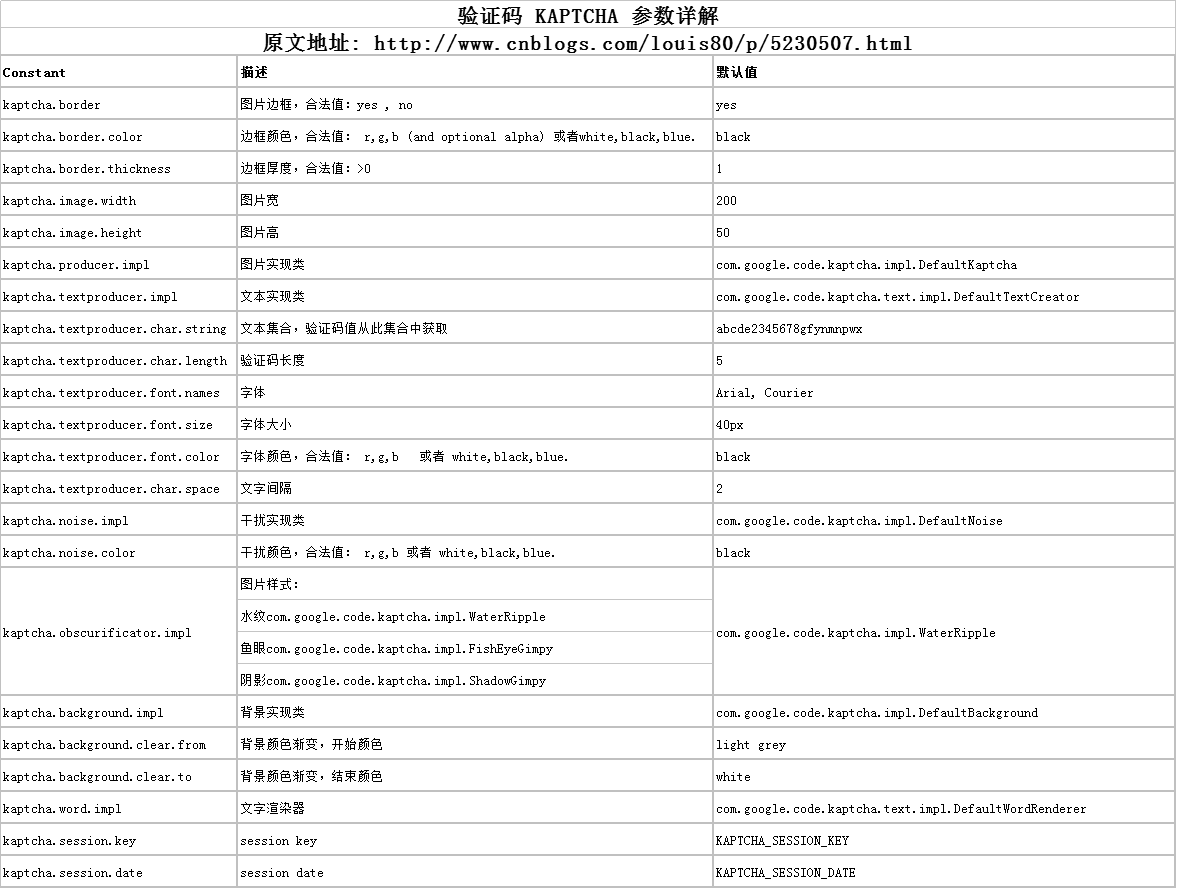
一.kaptcha介绍 Kaptcha是谷歌放在github上的一个验证码jar包,我们可以简单配置属性实现验证码的验证功能. kaptcha参数设置如下所示: Constant 描述 默认值 kap ...
- google kaptcha 验证码的使用
这边演示下idea+maven+servlet实现谷歌的kaptcha验证码的使用: web.xml, 这边主要是kaptcha验证器, <!DOCTYPE web-app PUBLIC &qu ...
- google kaptcha 验证码组件使用简介
kaptcha 是一个非常实用的验证码生成工具.有了它,你可以生成各种样式的验证码,因为它是可配置的.kaptcha工作的原理是调用 com.google.code.kaptcha.servlet.K ...
- kaptcha验证码组件使用简介
Kaptcha是一个基于SimpleCaptcha的验证码开源项目. 官网地址:http://code.google.com/p/kaptcha/ kaptcha的使用比较方便,只需添加jar包依赖之 ...
随机推荐
- 10-2-点击生成10个div
<!DOCTYPE html> <html lang="en"> <head> <meta charset="UTF-8&quo ...
- 如何做系列(2)- XML转义字符
< < 小于号 > > 大于号 & & 和 ' ' 单引号 " " 双引号 也可以使用<![CDATA[ ]]> ...
- Django中间件初始化过程
def load_middleware(self): """ Populate middleware lists from settings.MIDDLEWARE. Mu ...
- win 7下安装mysql zip格式
mysql 下载地址:https://dev.mysql.com/downloads/mysql/5.5.html#downloads 下载的mysql格式为zip: 下载完成放在除C盘以外的盘. 一 ...
- [转]Sql Server Alter语句
原文链接:http://www.cnblogs.com/yoolonet/archive/2010/12/10/1884782.html 在修改Sql Server表结构时,常用到Alter语句,把一 ...
- 解决maven项目创建过慢的问题
关键就在这里:添加以下键值对 archetypeCataloginternal 之后点击Next,再单击Finish即可.
- Django项目: 6.新闻详情页
一.功能需求分析 1.功能 新闻详情 加载评论功能 添加评论功能 二.新闻详情页 1.业务流程分析 业务流程: 判断前端传递新闻id是否为空,是否为整数,是否存在 2.接口设计 接口说明: 类目 说明 ...
- Python的格式化输出--制作名片
效果图 代码如下: name = input("Your name:")age = int(input("Your age:"))job = input(&qu ...
- ajax请求数据以及处理
html <div class="list-block media-list mp0 mbb" data-infos='infos' style="display: ...
- git学习记录——远程仓库(说白了就是代码放到githup上)
远程仓库 现在讲述的这些SVN都已经做到了,并没什么稀奇的地方 所以这节课赘述的是杀手级的东西——远程仓库githup ssh-keygen -t rsa -C "xxxxxxxxxxx@ ...