
【Kubernetes】创建Pod并分配到指定节点
一、编辑yaml文件###
[root@K8s-Master Tools]# cat hello-world-pod.yaml

apiVersion: v1

kind: Pod

metadata:

  name: hello-world

spec:

  nodeSelector:

    type: node1

  containers:

  - name: hello

    image: "ubuntu:14.04"

    command: [ "/bin/bash", "-ce", "tail -f /dev/null" ]
二、创建并查看运行状态###
[root@K8s-Master Tools]# kubectl create -f hello-world-pod.yaml

pod/hello-world created

[root@K8s-Master Tools]# kubectl get pod hello-world

NAME          READY   STATUS    RESTARTS   AGE

hello-world   1/1     Running   0          8m2s

[root@K8s-Master Tools]# kubectl get pods --all-namespaces

NAMESPACE     NAME                                    READY   STATUS    RESTARTS   AGE

default       hello-world                             1/1     Running   0          3s

kube-system   coredns-bccdc95cf-plst5                 1/1     Running   13         36d

kube-system   coredns-bccdc95cf-vkqzr                 1/1     Running   13         36d

kube-system   etcd-k8s-master                         1/1     Running   15         36d

kube-system   kube-apiserver-k8s-master               1/1     Running   15         36d

kube-system   kube-controller-manager-k8s-master      1/1     Running   15         36d

kube-system   kube-flannel-ds-amd64-4g6qc             1/1     Running   6          36d

kube-system   kube-flannel-ds-amd64-ccj8v             1/1     Running   14         36d

kube-system   kube-flannel-ds-amd64-fhrfj             1/1     Running   8          36d

kube-system   kube-proxy-jp6mp                        1/1     Running   13         36d

kube-system   kube-proxy-rkbcx                        1/1     Running   6          36d

kube-system   kube-proxy-rmkqm                        1/1     Running   8          36d

kube-system   kube-scheduler-k8s-master               1/1     Running   15         36d

kube-system   kubernetes-dashboard-6db4897b74-lqfl6   1/1     Running   1          24h
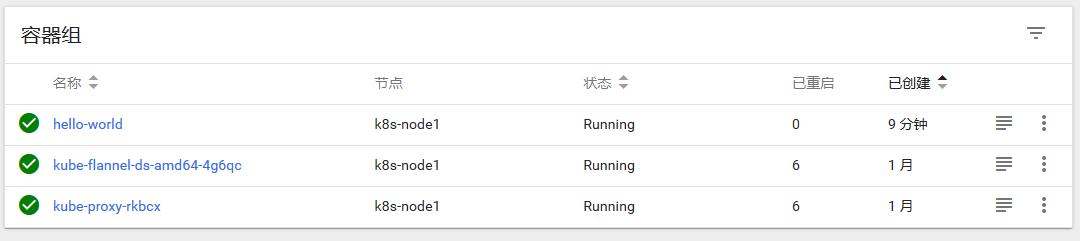
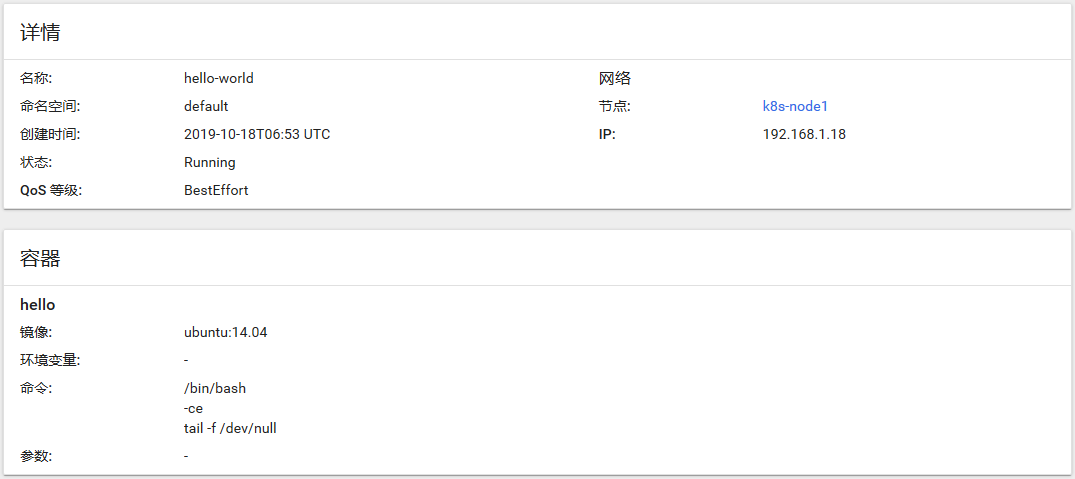
注意点:将pod分配到指定的节点
将pod调度到指定节点有2种方式:
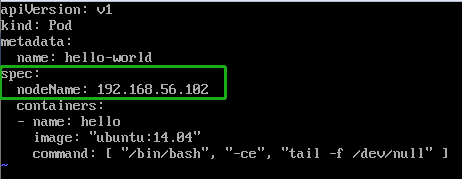
方式一:强制约束Pod调度到指定Node节点上
Pod.spec.nodeName
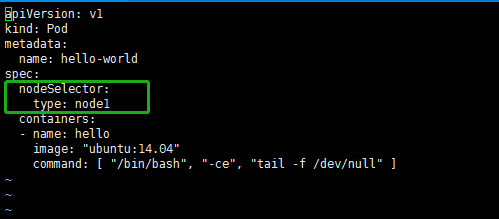
方式二:通过label-selector机制选择节点
Pod.spec.nodeSelector


以下使用第二种方式实现pod调度到指定节点。
①为Node添加label
kubectl label node k8s-node1 type=node1

kubectl get nodes --show-labels
[root@K8s-Master Tools]# kubectl get nodes --show-labels

NAME         STATUS   ROLES    AGE   VERSION   LABELS

k8s-master   Ready    master   37d   v1.15.3   beta.kubernetes.io/arch=amd64,beta.kubernetes.io/os=linux,kubernetes.io/arch=amd64,kubernetes.io/hostname=k8s-master,kubernetes.io/os=linux,node-role.kubernetes.io/master=,type=master

k8s-node1    Ready    <none>   37d   v1.15.3   beta.kubernetes.io/arch=amd64,beta.kubernetes.io/os=linux,kubernetes.io/arch=amd64,kubernetes.io/hostname=k8s-node1,kubernetes.io/os=linux,type=node1

k8s-node2    Ready    <none>   37d   v1.15.3   beta.kubernetes.io/arch=amd64,beta.kubernetes.io/os=linux,kubernetes.io/arch=amd64,kubernetes.io/hostname=k8s-node2,kubernetes.io/os=linux,type=node2
②将pod分配到带有指定label的node
Pod操作:
删除Pod
kubectl delete pod hello
更新Pod
kubctl replace hello-world.yaml
三、可能遇到的问题###
Error:Back-off restarting failed container
[root@K8s-Master Tools]# kubectl describe pod hello-world

Name:         hello-world

Namespace:    default

Priority:     0

Node:         k8s-node1/10.0.2.15

Start Time:   Fri, 18 Oct 2019 17:16:13 +1100

Labels:       <none>

Annotations:  <none>

Status:       Running

IP:           192.168.1.15

Containers:

  hello:

    Container ID:  docker://ae85d78070dc02a19fed619c6270732cd98bfc1d824262b2935bc2362d7b70e5

    Image:         ubuntu:14.04

    Image ID:      docker-pullable://ubuntu@sha256:2f7c79927b346e436cc14c92bd4e5bd778c3bd7037f35bc639ac1589a7acfa90

    Port:          <none>

    Host Port:     <none>

    Command:

      /bin/echo

      Hello

      world

    State:          Waiting

      Reason:       CrashLoopBackOff

    Last State:     Terminated

      Reason:       Completed

      Exit Code:    0

      Started:      Fri, 18 Oct 2019 17:18:10 +1100

      Finished:     Fri, 18 Oct 2019 17:18:10 +1100

    Ready:          False

    Restart Count:  4

    Environment:    <none>

    Mounts:

      /var/run/secrets/kubernetes.io/serviceaccount from default-token-hctt8 (ro)

Conditions:

  Type              Status

  Initialized       True

  Ready             False

  ContainersReady   False

  PodScheduled      True

Volumes:

  default-token-hctt8:

    Type:        Secret (a volume populated by a Secret)

    SecretName:  default-token-hctt8

    Optional:    false

QoS Class:       BestEffort

Node-Selectors:  type=node1

Tolerations:     node.kubernetes.io/not-ready:NoExecute for 300s

                 node.kubernetes.io/unreachable:NoExecute for 300s

Events:

  Type     Reason     Age                  From                Message

  ----     ------     ----                 ----                -------

  Normal   Scheduled  2m31s                default-scheduler   Successfully assigned default/hello-world to k8s-node1

  Normal   Pulling    2m30s                kubelet, k8s-node1  Pulling image "ubuntu:14.04"

  Normal   Pulled     2m10s                kubelet, k8s-node1  Successfully pulled image "ubuntu:14.04"

  Normal   Created    34s (x5 over 2m10s)  kubelet, k8s-node1  Created container hello

  Normal   Started    34s (x5 over 2m9s)   kubelet, k8s-node1  Started container hello

  Normal   Pulled     34s (x4 over 2m8s)   kubelet, k8s-node1  Container image "ubuntu:14.04" already present on machine

  Warning  BackOff    34s (x9 over 2m7s)   kubelet, k8s-node1  Back-off restarting failed container
解决方法:
As per Describe Pod command listing, your Container inside the Pod has been already completed with exit code 0, which states about successful completion without any errors/problems, but the life cycle for the Pod was very short. To keep Pod running continuously you must specify a task that will never finish.
apiVersion: v1

kind: Pod

metadata:

  name: ubuntu

spec:

  containers:

  - name: ubuntu

    image: ubuntu

    command: [ "/bin/bash", "-ce", "tail -f /dev/null" ]
参考链接:
将pod分配到指定的节点.
Back-off restarting failed container.
【Kubernetes】创建Pod并分配到指定节点的更多相关文章
- [置顶]
kubernetes创建资源yaml文件例子--pod
kubernetes创建pod的yaml文件,参数说明 apiVersion: v1 #指定api版本,此值必须在kubectl apiversion中 kind: Pod #指定创建资源的角色/类型 ...
- pod(一):Kubernetes(k8s)创建pod的两种方式
目录 一.系统环境 二.前言 三.pod 四.创建pod 4.1 环境介绍 4.2 使用命令行的方式创建pod 4.2.1 创建最简单的pod 4.2.2 创建pod,指定镜像下载策略 4.2.3 创 ...
- k8s创建pod流程
kubernetes 创建Pod 的 工作流: step.1 kubectl 向 k8s api server 发起一个create pod 请求(即我们使用Kubectl敲一个create pod命 ...
- K8s创建pod yaml文件详解
kubernetes创建pod的yaml文件,参数说明 apiVersion: v1 #指定api版本,此值必须在kubectl apiversion中 kind: Pod #指定创建资源的角色/类型 ...
- k8s创建pod和service的过程
一.概念介绍 更详细的参见:https://www.kubernetes.org.cn/5335.html 1.K8s K8s 是一种用于在一组主机上运行和协同容器化应用程序的系统,提供应用部署.规划 ...
- Kubernetes集群向指定节点上创建容器
如果需要限制Pod到指定的Node上运行,则可以给Node打标签并给Pod配置NodeSelector. 给节点添加标签 首先查看节点信息 [root@k8s-master ~]# kubectl g ...
- Docker Kubernetes 创建管理 Pod
Docker Kubernetes 容器扩容与缩容 环境: 系统:Centos 7.4 x64 Docker版本:18.09.0 Kubernetes版本:v1.8 管理节点:192.168.1.79 ...
- kubernetes创建资源对象yaml文件例子--pod详解
apiVersion: v1 #指定api版本,此值必须在kubectl apiversion中 kind: Pod #指定创建资源的角色/类型 metadata: #资源的元数据/属性 name: ...
- Kubernetes对Pod调度指定Node以及Node的Taint 和 Toleration
由于博客园不支持markdown,推荐以下url阅读: 原创url:https://blog.csdn.net/weixin_42495873/article/details/103364868 ## ...
随机推荐
- hdu4176 水题
#include<stdio.h> #include<string.h> #include<algorithm> using namespace std; #def ...
- html的select标签清空option!~~~~
最好的方法:document.getElementById("selectId").length = 1; 也可以document.getElementById("sel ...
- nodeJs学习-03 GET数据请求,js拆解/querystring/url
原生JS解析参数: const http = require('http'); http.createServer(function(req,res){ var GET = {}; //接收数据容器 ...
- @atcoder - AGC035F@ Two Histograms
目录 @description@ @solution@ @accepted code@ @details@ @description@ 给定一个 N*M 的方格,我们通过以下步骤往里面填数: (1)将 ...
- Android 使用Toolbar+DrawerLayout快速实现仿“知乎APP”侧滑导航效果
在以前,做策划导航的时候,最常用的组件便是SlidingMenu了,当初第一次用它的时候觉得那个惊艳啊,体验可以说是非常棒. 后来,Android自己推出了一个可以实现策划导航的组件DrawerLay ...
- art-template web模板引擎引入JS函数
art-template语法 可以在模板引擎中加入自定义的函数; template.defaults.imports.LocalShortDate = LocalShortDate; 在模板引擎中的用 ...
- 支付宝防并发方案之"一锁二判三更新"
每年支付宝在双11和双12的活动中,都展示了绝佳的技术能力.这个能力不但体现在处理高TPS量的访问,更体现在几乎不会出错,不会出现重复支付的情况,那这个是怎么做到的呢? 诚然,为了实现在高并发下仍不会 ...
- CSS引入的方式有哪些? link和@import的区别是?
CSS引入的方式包括内联 内嵌 外链 导入 link和@import的区别是 : ①link属于XHTML标签,除了加载CSS外,还能 用于定义RSS, 定义rel连接属性等作用:而@import是C ...
- Python--day65--模板语言之tags
Tags for循环 普通for循环 <ul> {% for user in user_list %} <li>{{ user.name }}</li> {% en ...
- HDU 5974"A Simple Math Problem"(GCD(a,b) = GCD(a+b,ab) = 1)
传送门 •题意 已知 $a,b$,求满足 $x+y=a\ ,\ LCM(x,y)=b$ 条件的 $x,y$: 其中,$a,b$ 为正整数,$x,y$ 为整数: •题解 关键式子:设 $a,b$ 为正整 ...