
通过脚本实现对web的健康检查
前面的文章中(https://www.cnblogs.com/zyxnhr/p/10707932.html),通过nginx的第三方模块实现对web端的一个监控,现在通过一个脚本实现对第三方的监控
脚本实现web的健康检查
1、编写脚本
[root@lb01 ~]# vim /script/nginx_check.sh
#!/bin/bash

#定义需要监控的节点

rs_arr=(

172.25.254.134

172.25.254.135

)

file_location=/usr/local/nginx/html/test.html

#定义函数web_result用于检测RS节点的web服务状态

function web_result {

  rs=`curl -I -s $/index.html|awk 'NR==1{print $2}'`

  return $rs

}

#定义函数new_row用于根据固定样式产生html表格框架

function new_row {

cat >> $file_location <<eof

<tr>

<td bgcolor="$4">$</td>

<td bgcolor="$4">$</td>

<td bgcolor="$4">$</td>

</tr>

eof

}

#定义函数auto_html通过并调用new_row冰箱其传递参数填充表格内容

function auto_html {

    web_result $

    rs=$?

    if [ $rs -eq  ]

    then

    new_row $ $ up green

    else

    new_row $ $ down red

    fi

}

while true

do

#产生头部部分

cat >> $file_location <<eof

<h4>The Status Of RS :</h4>

<table border="">

<tr>

<th>NO:</th>

<th>IP:</th>

<th>Status:</th>

</tr>

eof

#循环产生每个节点的表格信息

for ((i=;i<${#rs_arr[*]};i++));do

auto_html $i ${rs_arr[$i]}

done

#产生表格结尾部分

cat >> $file_location <<eof

</table>

eof

sleep

>$file_location #每一次循环晴空一次html文件

done
2、修改配置文件
[root@lb01 ~]# vim /usr/local/nginx/conf/nginx.conf
worker_processes  ;

events {

    worker_connections  ;

}

http {

    include       mime.types;

    default_type  application/octet-stream;

    sendfile        on;

    keepalive_timeout  ;

upstream  web_pools {

        server 172.25.254.134: weight=;

        server 172.25.254.135: weight=;

}

    server {

        listen       ;

        server_name  www.lbtest.com;

        location / {

            root   html;

            index  test.html index.htm;

           # proxy_set_header Host $host;

           # proxy_pass http://web_pools;

        }

    }

}
3、执行脚本
[root@lb01 ~]# sh /script/nginx_check.sh
4、 浏览器访问看结果
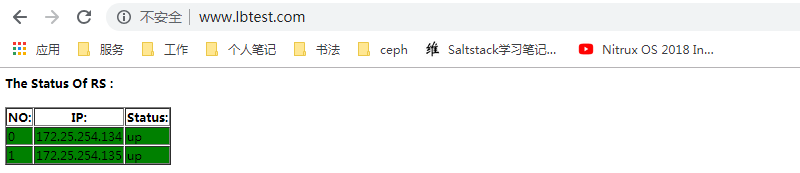
看test.html
[root@lb01 ~]# watch -n  "cat /usr/local/nginx/html/test.html"

<h4>The Status Of RS :</h4>

<table border="">

<tr>

<th>NO:</th>

<th>IP:</th>

<th>Status:</th>

</tr>

<tr>

<td bgcolor="green"></td>

<td bgcolor="green">172.25.254.134</td>

<td bgcolor="green">up</td>

</tr>

<tr>

<td bgcolor="green"></td>

<td bgcolor="green">172.25.254.135</td>

<td bgcolor="green">up</td>

</tr>

</table>
5、关闭172.25.254.134的httpd
[root@web1 image]# systemctl stop httpd

查看test.html
[root@lb01 ~]# watch -n  "cat /usr/local/nginx/html/test.html"

<h4>The Status Of RS :</h4>

<table border="">

<tr>

<th>NO:</th>

<th>IP:</th>

<th>Status:</th>

</tr>

<tr>

<td bgcolor="red"></td>

<td bgcolor="red">172.25.254.134</td>

<td bgcolor="red">down</td>

</tr>

<tr>

<td bgcolor="green"></td>

<td bgcolor="green">172.25.254.135</td>

<td bgcolor="green">up</td>

</tr>

</table>
6、 恢复
[root@web1 image]# systemctl start httpd
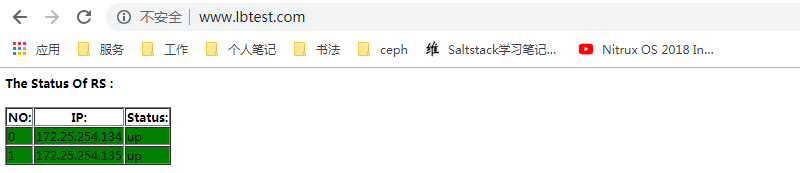
查看test.html
[root@lb01 ~]# watch -n 1 "cat /usr/local/nginx/html/test.html"
<h4>The Status Of RS :</h4>

<table border="">

<tr>

<th>NO:</th>

<th>Status:</th>

</tr>

<tr>

<td bgcolor="green"></td>

<td bgcolor="green">172.25.254.134</td>

<td bgcolor="green">up</td>

</tr>

<tr>

<td bgcolor="green"></td>

<td bgcolor="green">172.25.254.135</td>

<td bgcolor="green">up</td>

</tr>

</table
已经实现了对web端的监控
7、添加监控节点
当需要添加节点时。只要在脚本的 rs_arr定义新的IP节点就可以了
rs_arr=(

172.25.254.134

172.25.254.135

NEW_IP
)
同时,在我们启动了脚本之后,监控到web端有变化,这时html已经发生变化,但是浏览器仍然停留在上一个页面,需要刷新才能跟新页面,这里用的是Google浏览器,有同一个自动刷新插件,设置1秒刷新一次,就保证了html的实时性!
参考:老男孩教育视频公开课https://www.bilibili.com/video/av25869969/?p=33
通过脚本实现对web的健康检查的更多相关文章
- 用 Python 脚本实现对 Linux 服务器的监控
目前 Linux 下有一些使用 Python 语言编写的 Linux 系统监控工具 比如 inotify-sync(文件系统安全监控软件).glances(资源监控工具)在实际工作中,Linux 系统 ...
- c#调用js,以及js调用C#里的函数, c#自己生成js代码,实现对web的控制
using mshtml;using System;using System.Collections.Generic;using System.Linq;using System.Security.P ...
- 利用过滤器Filter和特性Attribute实现对Web API返回结果的封装和统一异常处理
在我们开发Web API应用的时候,我们可以借鉴ABP框架的过滤器Filter和特性Attribute的应用,实现对Web API返回结果的封装和统一异常处理,本篇随笔介绍利用AuthorizeAtt ...
- 用 Python 脚本实现对 Linux 服务器的网卡流量监控
*这篇文章网上已经有相关代码,为了加深印象,我做了相关批注,希望对朋友们有帮助 工作原理:基于/proc文件系统 Linux 系统为管理员提供了非常好的方法,使其可以在系统运行时更改内核,而不需要重新 ...
- 用PowerShell脚本实现对SharePoint页面Title的修改
存在这样一种情况,对应的page已经部署到product的SharePoint环境中,那么在部署下一个版本的时候就不允许把已经创建好的page删除再创建,因此page中修改过的属性就不能再次部署到Sh ...
- 利用Python实现对Web服务器的目录探测
今天是一篇提升技能的干货分享,操作性较强,适用于中级水平的小伙伴,文章阅读用时约3分钟. PART 1/Python Python是一种解释型.面向对象.动态数据类型的高级程序设计语言. Python ...
- 利用 python 实现对web服务器的目录探测
一.pythonPython是一种解释型.面向对象.动态数据类型的高级程序设计语言.python 是一门简单易学的语言,并且功能强大也很灵活,在渗透测试中的应用广泛,让我们一起打造属于自己的渗透测试工 ...
- Python 脚本实现对 Linux 服务器的监控
本文来自我的github pages博客http://galengao.github.io/ 即www.gaohuirong.cn 摘要: 原文地址 由于原文来自微信公众号,并且脚本都是图片,所以这里 ...
- 利用shell脚本实现对mysql数据库的备份
#!/bin/bash #保存备份个数 number=3 #备份保存路径 backup_dir=/root/mysqlbackup #日期 dd=`date +%Y%m%d` #备份工具 tool=m ...
随机推荐
- Nacos Committer 张龙:Nacos Sync 的设计原理和规划
图:Nacos Meetup @杭州 与你同行,抬头便是星空. 本文整理自Nacos Committer 张龙的现场分享,阿里巴巴中间件受权发布. 随着 Nacos 1.0.0 稳定版的发布,越来越多 ...
- Android 使用SwipeActionAdapter开源库实现简单列表的左右滑动操作
我们做listview左右滑动操作时,一般中情况下,都是像QQ那样,左滑弹出操作菜单(删除.编辑),然后选择菜单操作: 这样的效果不可谓不好,算是非常经典. 另外,有少数的APP,尤其是任务管理类的A ...
- AtCoder Regular Contest 059
C - いっしょ / Be Together 数据比较小,暴力就挺好的.O(n^2)可过的好题 #include <bits/stdc++.h> using namespace std; ...
- OpenStack组件系列☞glance简介
Glance项目提供虚拟机镜像的发现,注册,取得服务. Glance提供restful API可以查询虚拟机镜像的metadata,并且可以获得镜像. 通过Glance,虚拟机镜像可以被存储到多种存储 ...
- 2018-10-20-WPF-通过位处理合并图片
title author date CreateTime categories WPF 通过位处理合并图片 lindexi 2018-10-20 16:53:49 +0800 2018-10-20 1 ...
- 虎牙在全球 DNS 秒级生效上的实践
本文整理自虎牙中间件团队在 Nacos Meetup 的现场分享,阿里巴巴中间件受权发布. 这次分享的是全球 DNS 秒级生效在虎牙的实践,以及由此产生的一些思考,整体上,分为以下5各部分: 背景介绍 ...
- spring+mybatis 整合
项目目录: 一.导入pom.xml依赖 最下边有 二.在applicationContext.xml配置连接器和数据库的数据源 三.流程:用户请求数据,springmvc解析url,通过控制器和适配器 ...
- 洛谷P5019 铺设道路 题解 模拟/贪心基础题
题目链接:https://www.luogu.org/problemnew/show/P5019 这道题目是一道模拟题,但是它有一点贪心的思想. 我们假设当前最大的深度是 \(d\) ,那么我们需要把 ...
- 不通过DataRow,直接往DataTable中添加新行DataTable.LoadDataRow(object[],bool)
DataTable dtver = new DataTable(); dtver.Columns.Add("VERSION"); ...
- Python--day42--MySQL外键定义及创建
什么是外键? 外键的创建:constraint 外键名 foregin key ("表1值1",“ 表1值2”) references 表2的名字(“值1”)