
SSM项目 以及 springboot 中引入swagger2的方法
swagger2是一个非常好用的接口文档,在开发的过程中方便前后端接口的交接。
下面我们就来讲讲在使用java时,分别在SSM框架,以及springboot+mybatis框架中引入swagger2的方法。
一、在SSM框架中引入swagger2
需要加的maven依赖

1.在com.imooc.utils下创建一个swagger2的配置类
package com.imooc.utils;

import org.springframework.context.annotation.Bean;

import org.springframework.context.annotation.Configuration;

import springfox.documentation.builders.ApiInfoBuilder;

import springfox.documentation.builders.PathSelectors;

import springfox.documentation.builders.RequestHandlerSelectors;

import springfox.documentation.service.ApiInfo;

import springfox.documentation.service.Contact;

import springfox.documentation.spi.DocumentationType;

import springfox.documentation.spring.web.plugins.Docket;

import springfox.documentation.swagger2.annotations.EnableSwagger2;

@Configuration

@EnableSwagger2

public class Swagger2 {

   @Bean

public Docket createRestApi() {

      return new Docket(DocumentationType.SWAGGER_2).apiInfo(apiInfo()).select()

            .apis(RequestHandlerSelectors.basePackage("com.imooc.web")) //指明controller所在的包

.paths(PathSelectors.any()).build();

   }

   /**

    * @Description: 构建 api文档的信息

    */

private ApiInfo apiInfo() {

      return new ApiInfoBuilder()

            // 设置页面标题

.title("短视频后台管理系统api接口文档")

            // 设置联系人

.contact(new Contact("联系人姓名", "see more at..","邮箱"))

            // 描述

.description("controller层接口如下")

            // 定义版本号

.version("1.0").build();

   }

}
2.在springmvc.xml中进行配置

二、在springboot项目中引入swagger2
添加maven依赖
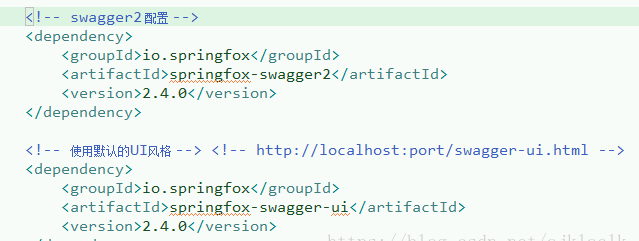
1.在com.imooc包下创建swagger2的配置类
package com.imooc;
import org.springframework.context.annotation.Bean;
import org.springframework.context.annotation.Configuration;
import springfox.documentation.builders.ApiInfoBuilder;
import springfox.documentation.builders.PathSelectors;
import springfox.documentation.builders.RequestHandlerSelectors;
import springfox.documentation.service.ApiInfo;
import springfox.documentation.service.Contact;
import springfox.documentation.spi.DocumentationType;
import springfox.documentation.spring.web.plugins.Docket;
import springfox.documentation.swagger2.annotations.EnableSwagger2;
@Configuration
@EnableSwagger2
public class Swagger2 {
/**
* @Description:swagger2的配置文件,这里可以配置swagger2的一些基本的内容,比如扫描的包等等
*/
@Bean
public Docket createRestApi() {
return new Docket(DocumentationType.SWAGGER_2).apiInfo(apiInfo()).select()
.apis(RequestHandlerSelectors.basePackage("com.imooc.controller"))
.paths(PathSelectors.any()).build();
}
/**
* @Description: 构建 api文档的信息
*/
private ApiInfo apiInfo() {
return new ApiInfoBuilder()
// 设置页面标题
.title("使用swagger2构建短视频后端api接口文档")
// 设置联系人
.contact(new Contact("联系人姓名", "see more at..","联系人的电子邮箱 "))
// 描述
.description("controller层接口如下")
// 定义版本号
.version("1.0").build();
}
}
2.在springboot的启动类中指明需要扫描的包,只要让swagger2.java被扫描到即可

3.在springboot的WebMvcConfig类中配置允许静态资源的访问
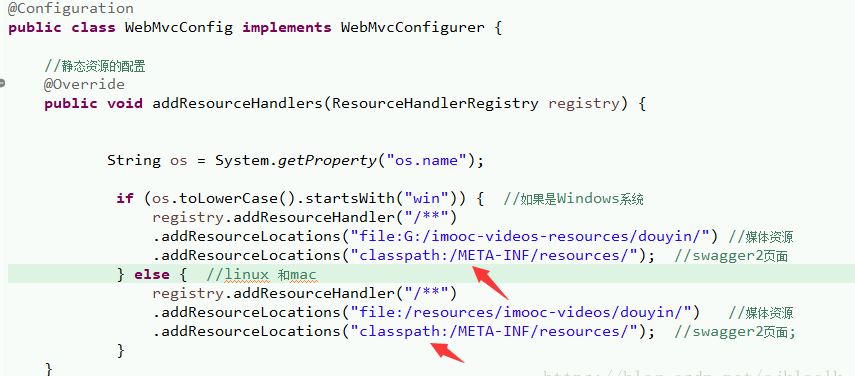
============================================================================
通过上面的方法,我们就已经在SSM项目或者springboot项目中成功引入了swagger2 接口文档。
此时我们就可以通过 ip+端口/swagger-ui.html 来访问接口文档,例如 http://localhost:8080/swagger-ui.html
====================================================================
在引入了swagger2之后,我们还需要加上一些注解,才能够达到我们想要的效果,swagger2中常用注解的使用:
https://blog.csdn.net/ajklaclk/article/details/80736042
SSM项目 以及 springboot 中引入swagger2的方法的更多相关文章
- vue-cli中引入jquery的方法
vue-cli中引入jquery的方法 以前写vue项目都没有引入过jquery,今天群里面的一位小伙伴问了我这个问题,我就自己捣鼓了一下,方法如下: 我们先进入webpack.base.conf.j ...
- HTML中引入CSS的方法
在HTML中引入CSS的方法主要有四种,它们分别是行内式.内嵌式.链接式和导入式. 1.行内式 行内式是在标记的style属性中设定CSS样式.这种方式没有体现出CSS的优势,不推荐使用. 2.内嵌式 ...
- 在springboot中使用swagger2
1.在springboot中使用swagger的话,首先在pom文件中引入依赖 <!-- https://mvnrepository.com/artifact/io.springfox/spri ...
- vue-cli3.0以上项目中引入jquery的方法
这里配置的是vue-cli3.0引入jquery的方法,不是vue-cli2.0的配置方法 一.安装jquery npm install jquery --save 二.在vue.config.js ...
- CSS系列:在HTML中引入CSS的方法
HTML与CSS是两个作用不同的语言,它们同时对一个网页产生作用,因此必须将CSS与HTML链接在一起使用.在HTML中,引入CSS的方法主要有4种:行内式.内嵌式.导入式和链接式. 1. 行内式 行 ...
- vue中引入awesomeswiper的方法以及编写轮播组件
1.先安装less-loader npm install less less-loader --save 2.再安装css-loader npm install css-loader --save 3 ...
- 在SpringBoot中引入Redis
前言 之前我们只是在Spring中加入Redis用于session的存放,并没有对redis进行主动的存放,这次我们需要加入redis工具类来方便我们在实际使用过程中操作redis 已经加入我的git ...
- SpringBoot中集成Swagger2
1.依赖jar <dependency> <groupId>io.springfox</groupId> <artifactId>springfox-s ...
- SpringBoot中部署Swagger2和Swagger-UI
1 Gradle配置在dependencies中添加以下依赖: implementation("io.springfox:springfox-swagger2:2.7.0") im ...
随机推荐
- 插入jupyter notebook代码
<iframe src="https://nbviewer.jupyter.org/gist/gaowenxin95/53408e0f1ce268430efaad2cb1f0ca4f& ...
- 使用ESLint+Prettier来统一前端代码风格
Prettier 简单使用 ESLint 与 Prettier配合使用 首先肯定是需要安装 prettier ,并且你的项目中已经使用了 ESLint ,有 eslintrc.js 配置文件. npm ...
- [tensorflow] tf.gather使用方法
tf.gather:用一个一维的索引数组,将张量中对应索引的向量提取出来 import tensorflow as tf a = tf.Variable([[1,2,3,4,5], [6,7,8,9, ...
- URL简介&HTTP协议
世界上任何一栋建筑必须有一个地址才能找到 互联网上任何一个资源必须有一个“URL”才能被访问 URL的完整格式: <scheme>://<user>:<pwd>@& ...
- PP: Neural ordinary differential equations
Instead of specifying a discrete sequence of hidden layers, we parameterize the derivative of the hi ...
- IIS 部署asp.net Core程序注意事项
Install the .NET Core Windows Server Hosting bundle Install the.NET Core Runtime 修改应用程序池的.net framew ...
- 3ds Max File Format (Part 4: The first useful data; Scene, AppData, Animatable)
The most interesting part of this file is, evidently, the Scene. Opening it up in the chunk parser, ...
- STM 32 内部功能回顾
EXTI 外部中断 NVIC 嵌套的向量式中断控制器 AHB 是高级高性能内部总线,主要是用在CPU.DMA.DSP(数字信号处理) APB 是外围总线,I2C. 串口 APB 分为高速APB2( ...
- 阿里云linux挂载云盘
阿里云购买的第2块云盘默认是不自动挂载的,需要手动配置挂载上. 1.查看SSD云盘 sudo fdisk -l 可以看到SSD系统已经识别为/dev/vdb 2.格式化云盘 sudo mkfs.ext ...
- 分类问题(一)MINST数据集与二元分类器
分类问题 在机器学习中,主要有两大类问题,分别是分类和回归.下面我们先主讲分类问题. MINST 这里我们会用MINST数据集,也就是众所周知的手写数字集,机器学习中的 Hello World.sk- ...