
vue-resourse简单使用方法
一、安装引用
安装:
npm install vue-resource --save-dev
引用:
/*引入Vue框架*/

import Vue from 'vue'

/*引入资源请求插件*/

import VueResource from 'vue-resource'

/*使用VueResource插件*/

Vue.use(VueResource)
二、简单语法
引入vue-resource后,可以基于全局的Vue对象使用http,也可以基于某个Vue实例使用http
// 基于全局Vue对象使用http

Vue.http.get('/someUrl', [options]).then(successCallback, errorCallback);

Vue.http.post('/someUrl', [body], [options]).then(successCallback, errorCallback);

// 在一个Vue实例内使用$http

this.$http.get('/someUrl', [options]).then(successCallback, errorCallback);

this.$http.post('/someUrl', [body], [options]).then(successCallback, errorCallback);
// 传统写法

this.$http.get('/Url', [options]).then(function(response){

    // 响应成功回调

}, function(response){

    // 响应错误回调

});

// ES6写法

this.$http.get('/Url', [options]).then((response) => {

    // 响应成功回调

}, (response) => {

    // 响应错误回调

});
1.有7种符合REST风格的请求API:
get(url, [options])

head(url, [options])

delete(url, [options])

jsonp(url, [options])

post(url, [body], [options])

put(url, [body], [options])

patch(url, [body], [options])
2.options对象:
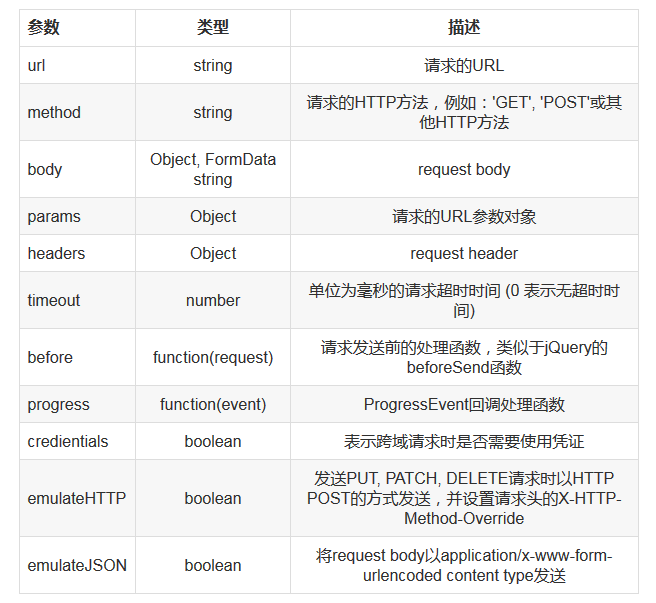
3.emulateHTTP
如果Web服务器无法处理PUT, PATCH和DELETE这种REST风格的请求,你可以启用enulateHTTP现象。启用该选项后,请求会以普通的POST方法发出,并且HTTP头信息的X-HTTP-Method-Override属性会设置为实际的HTTP方法。
Vue.http.options.emulateHTTP = true;
4.emulateJSON
如果Web服务器无法处理编码为application/json的请求,你可以启用emulateJSON选项。启用该选项后,请求会以application/x-www-form-urlencoded作为MIME type,就像普通的HTML表单一样。
Vue.http.options.emulateJSON = true;
三、实例
var demo = new Vue({

    el: '#app',

    data: {

        gridColumns: ['customerId', 'companyName', 'contactName', 'phone'],

        gridData: [],

        apiUrl: 'http://127.0.0.1:8080/api/customers'

    },

    mounted: function() {

        this.getCustomers()

    },

    methods: {

        getCustomers: function() {

            this.$http.get(this.apiUrl).then((response) => {

                this.$set('gridData', response.data)

            },(response) => {

                console.log("出错了");

            }).catch(function(response) {

                console.log(response)

            })

        }

    }

});
then方法里提供了successCallback,errorCallback。catch方法用于捕捉程序的异常,catch方法和errorCallback是不同的,errorCallback只在响应失败时调用,而catch则是在整个请求到响应过程中,只要程序出错了就会被调用。
四、inteceptor拦截器
拦截器可以在请求发送前和发送请求后做一些处理。在response返回给successCallback或errorCallback之前,你可以修改response中的内容,或做一些处理。 例如,响应的状态码如果是404,你可以显示友好的404界面。再比如我们就用拦截器做了登录处理,所以请求发送之前都要通过拦截器验证当前用户是否登陆,否则提示登录页面。
Vue.http.interceptors.push(function(request, next) {

    // ...

    // 请求发送前的处理逻辑

    // ...

    next(function(response) {

        // ...

        // 请求发送后的处理逻辑

        // ...

        // 根据请求的状态,response参数会返回给successCallback或errorCallback

        return response

    })

})
1)为请求添加loading效果
通过inteceptor,我们可以为所有的请求处理加一个loading:请求发送前显示loading,接收响应后隐藏loading。
//1、添加一个loading组件

<template id='loading-template'>

    <div class='loading-overlay'></div>

</template>

//2、将loading组件作为另外一个Vue实例的子组件

var help = new Vue({

    el: '#help',

    data: {

        showLoading: false

    },

    components: {

        'loading': {

            template: '#loading-template',

        }

    }

})

//3、将该Vue实例挂载到某个HTML元素

<div id='help'>

    <loading v-show='showLoading'></loading>

</div>

//4、添加inteceptor

Vue.http.interceptors.push((request, next) => {

    loading.show = true;

    next((response) => {

        loading.show = false;

        return response;

    });

});
2)为请求添加共同的错误处理方法
//1、继续沿用上面的loading组件,在#help元素下加一个对话框

<div id='help'>

    <loading v-show='showLoading' ></loading>

    <modal-dialog :show='showDialog'>

        <header class='dialog-header' slot='header'>

            <h3 class='dialog-title'>Server Error</h3>

        </header>

        <div class='dialog-body' slot='body'>

            <p class='error'>Oops,server has got some errors, error code: {{errorCode}}.</p>

        </div>

    </modal-dialog>

</div>

//2、给help实例的data选项添加两个属性

var help = new Vue({

        el: '#help',

        data: {

            showLoading: false,

            showDialog: false,

            errorCode: ''

        },

        components: {

            'loading': {

                template: '#loading-template',

            }

        }

    })

//3、修改inteceptor

Vue.http.interceptors.push((request, next) => {

    help.showLoading = true;

    next((response) => {

        if(!response.ok){

            help.errorCode = response.status;

            help.showDialog = true;

        }

        help.showLoading = false;

        return response;

    });

});
vue-resourse简单使用方法的更多相关文章
- vue.js之生命周期,防止闪烁,计算属性的使用,vue实例简单方法和循环重复数据
摘要:今天是比较糟糕的一天没怎么学习,原因是学校的wifi连不上了~~.今天学习一下vue的生命周期,如何防止闪烁(也就是用户看得到花括号),计算属性的使用,vue实例简单方法,以及当有重复数据时如何 ...
- vue教程2-04 vue实例简单方法
vue教程2-04 vue实例简单方法 vue实例简单方法: vm.$el -> 就是元素 vm.$data -> 就是data <!DOCTYPE html> <htm ...
- vue超简单加载字体方法,解决scss难加载字体的问题
vue超简单加载字体方法,解决scss难加载字体的问题 scss在加载字体方面一直不太好用,需要繁杂的配置才能达到想要的效果,这里说一种非常简单的方法 在App.vue的style标签下引入字体文件后 ...
- react构建淘票票webapp,及react与vue的简单比较。
前言 前段时间使用vue2.0构建了淘票票页面,并写了一篇相关文章vue2.0构建淘票票webapp,得到了很多童鞋的支持,因此这些天又使用react重构了下这个项目,目的无他,只为了学习和共同进步! ...
- 基于Django rest framework 和Vue实现简单的在线教育平台
一.基于api前端显示课程详细信息 1.调整Course.vue模块 ? 1 2 3 4 5 6 7 8 9 10 11 12 13 14 15 16 17 18 19 20 21 22 23 2 ...
- Vue的简单入门
Vue的简单入门 一.什么是Vue? vue.js也一个渐进式JavaScript框架,可以独立完成前后端分离式web项目 渐进式:vue可以从小到控制页面中的一个变量后到页面中一块内容再到整个页面, ...
- laravel5.4+vue+element简单搭建(gulp+laravel Elixir)(转)
如今laravel来到5.4版本,更方便引入vue了,具体步骤如下: 下图为我动到的文件 1.下载laravel5.4 2.命令行(laravel5.4目录下):composer install 3. ...
- 带二级目录的Nginx配置------目前找到的最简单的方法
由于项目不知一个,所以不得不为每一个项目建一个专有的文件夹,这就导致了在配置nginx的时候会出现二级目录 目前找到的最简单的方法 - step1:修改 vue.config.js 添加配 ...
- MySQL笔记-最简单的方法来解决找不到mysqld.sock文件的问题
首先,环境:ubuntu 14.04,采用apt-get的方式安装的,手动安装可能路径设置稍有区别. 1.安装MySQL后,用命令行首次启动时发现找不到Mysqld.sock文件,提示: ERROR ...
- mfc显示静态图片最简单的方法
一致都是研究如何调用opencv显示动态图片,但是很多时候在显示图标的时候,都是需要显示静态图片,现在将最简单的方法总结下: 1.添加picture控件 2.添加资源,要求为bmp 3.修改属性 结果 ...
随机推荐
- 自动化测试工具1-testcomplete
TestComplete是SmartBear公司开发的一套支持自动测试软件的工具.在当今的软件开发中,自动测试非常重要,大型软件开发公司很久以来就已经将其作为软件开发的一项重要环节.然而,自动测试软件 ...
- MySQL查询语句详解,排序、分组、聚合函数、约束
create database day20; 查询的时候from前面的字段是需要显示出来的内容,后面是条件use day20;create table phones(id int,pinpai var ...
- python 19 lambda函数
转自http://www.cnblogs.com/BeginMan/p/3178103.html 一.lambda函数 1.lambda函数基础: lambda函数也叫匿名函数,即,函数没有具体的名称 ...
- USACO2012 Haybale stacking /// 区间表示法 oj21556
题目大意:N个方块 标号1~N K个操作 操作a b 表示标号a~b区间每位多加一个方块 Input * Line 1: Two space-separated integers, N K. * ...
- Linux ls 命令实现(简化版)
在学习linux系统编程的时候,实现了ls命令的简化版本号. 实现的功能例如以下: 1. 每种文件类型有自己的颜色 (- 普通文件, d 文件夹文件, l 链接文件. c 字符设备文件. b 快设备文 ...
- 什么是 Hexo?
Hexo 文档 欢迎使用 Hexo,本文档将帮助您快速上手.如果您在使用过程中遇到问题,请查看 问题解答 中的解答,或者在 GitHub.Google Group 上提问. 什么是 Hexo? H ...
- vue-router 的重定向-redirect
1. 我们主要在index.js重新设置路由的重新定向redirect参数 index.js import Vue from 'vue' import Router from 'vue-router' ...
- 分享一些PPT模板
链接:https://pan.baidu.com/s/1ADlYzx7sWR2z0ltVt8kIAQ 提取码:tyzv
- hadoop高可用HA的配置
zk3 zk4 zk5 配置hadoop的HA大概可以分为以下几步: 配置zookpeer(namenode之间的通信要靠zk来实现) 配置hadoop的 hadoop-env.sh hdfs-sit ...
- VS2015遇到的自带报表的问题
1.设计报表时候,没有“报表数据”工具,直接在报表设计那里按ALT+CTRL+D 2.设计报表时候有时候找不到这些按钮,只需要重置窗口布局就行了.