
android actionbar标题栏
在android的actionBar中,actionBar的视图是固定的,左边是程序的图标和title,右边是添加的menuItem,如果想要定制actionbar中的view就要自定义视图。
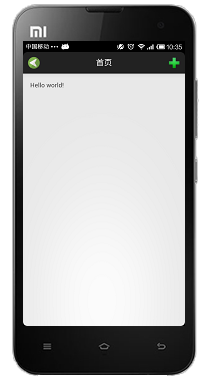
首先要定义actionbar的xml
<?xml version="1.0" encoding="utf-8"?>

<FrameLayout xmlns:android="http://schemas.android.com/apk/res/android"

    android:layout_width="match_parent"

    android:layout_height="fill_parent"

    android:id="@+id/layout01"

    >

<ImageButton android:id="@+id/left"

           android:layout_width="wrap_content"

           android:layout_height="fill_parent"

            android:background="@android:color/transparent"

           android:src="@drawable/show_left"

           android:layout_gravity="left|center_vertical"

           android:paddingLeft="8dip"

           android:clickable="true"/>

<TextView android:id="@+id/tv"

          android:background="@android:color/transparent"

          android:layout_width="wrap_content"

          android:layout_height="match_parent"

          android:text="首页"

          android:textColor="@android:color/white"

          android:textSize="18dip"

          android:paddingTop="2dip"

          android:layout_gravity="center"/>

<ImageButton android:id="@+id/more"

           android:layout_width="wrap_content"

           android:layout_height="fill_parent"

           android:background="@android:color/transparent"

           android:src="@drawable/cross"

           android:paddingRight="8dip"

           android:clickable="true"

           android:layout_gravity="right|center_vertical"/>

</FrameLayout>
然后在onCreateMenuItem设置actionBar的样式,一定要设 置 actionBar.setDisplayOptions(ActionBar.DISPLAY_SHOW_CUSTOM)和 actionBar.setDisplayShowCustomEnabled(true);
public boolean onCreateOptionsMenu(Menu menu) {

        // Inflate the menu; this adds items to the action bar if it is present.

        getMenuInflater().inflate(R.menu.main, menu);

        actionBar=this.getActionBar();

        ActionBar.LayoutParams params=new ActionBar.LayoutParams(LayoutParams.MATCH_PARENT,LayoutParams.MATCH_PARENT,Gravity.CENTER );

        View view=LayoutInflater.from(this).inflate(R.layout.actionbar, null);

        actionBar.setCustomView(view,params);

        actionBar.setDisplayOptions(ActionBar.DISPLAY_SHOW_CUSTOM);

        actionBar.setDisplayShowCustomEnabled(true);

       ImageButton more=(ImageButton) this.findViewById(R.id.more);

       ImageButton left=(ImageButton) this.findViewById(R.id.left);

       left.setOnTouchListener(new MyTouchListener());

       more.setOnTouchListener(new MyTouchListener());

        return true;

    }

}

class MyTouchListener implements OnTouchListener

{

    @Override

    public boolean onTouch(View view, MotionEvent arg1) {

         if(arg1.getAction()==MotionEvent.ACTION_DOWN)

           {

                view.setBackgroundColor(Color.LTGRAY);

           }

           if(arg1.getAction()==MotionEvent.ACTION_UP)

           {

                view.setBackgroundColor(Color.TRANSPARENT);

           }

         return true;

    }
android actionbar标题栏的更多相关文章
- Android应用:StatusBar状态栏、NavigationBar虚拟按键栏、ActionBar标题栏、Window屏幕内容区域等的宽高
一.屏幕中各种栏目以及屏幕的尺寸 当我们需要计算屏幕中一些元素的高度时,或许需要先获取到屏幕或者各种栏目的高度,下面这个类包含了Status bar状态栏,Navigation bar虚拟按键栏,Ac ...
- [Xamarin.Android] ActionBar Tips
[Xamarin.Android] ActionBar Tips ActionBar用途 快速搞懂 ActionBar的用途,可以参考下列文章: [Android]使用 ActionBarCompat ...
- Android ActionBar详解
Android ActionBar详解 分类: Android2014-04-30 15:23 1094人阅读 评论(0) 收藏 举报 androidActionBar 目录(?)[+] 第4 ...
- Android ActionBar(转)
本文内容 关于 ActionBar 必要条件 项目结构 环境 演示一:Action Bar 显示隐藏 演示二:Action Item 显示菜单选项 演示三:Action Home 启用“返回/向上”程 ...
- Android ActionBar应用实战,高仿微信主界面的设计
转载请注明出处:http://blog.csdn.net/guolin_blog/article/details/26365683 经过前面两篇文章的学习,我想大家对ActionBar都已经有一个相对 ...
- Android ActionBar完全解析,使用官方推荐的最佳导航栏(下) .
转载请注明出处:http://blog.csdn.net/guolin_blog/article/details/25466665 本篇文章主要内容来自于Android Doc,我翻译之后又做了些加工 ...
- Android ActionBar完全解析,使用官方推荐的最佳导航栏(上)
转载请注明出处:http://blog.csdn.net/guolin_blog/article/details/18234477 本篇文章主要内容来自于Android Doc,我翻译之后又做了些加工 ...
- [置顶]
xamarin android自定义标题栏(自定义属性、回调事件)
自定义控件的基本要求 这篇文章就当是自定义控件入门,看了几篇android关于自定义控件的文章,了解了一下,android自定义控件主要有3种方式: 自绘控件:继承View类,所展示的内容在OnDra ...
- Android ActionBar全然解析,使用官方推荐的最佳导航栏(上)
转载请注明出处:http://blog.csdn.net/guolin_blog/article/details/18234477 本篇文章主要内容来自于Android Doc.我翻译之后又做了些加工 ...
随机推荐
- unpipc.h&unpipc.c
unpipc.h #ifndef _UNPIPC_H #define _UNPIPC_H #include <stdio.h> #include <unistd.h> #inc ...
- 菜鸟学习Struts——简易计算器
这是学习Struts的一个简单的例子文件结构如下: 1.配置Struts环境 2.新建input.jsp,success.jsp,error.jsp input.jsp代码如下: <%@ pag ...
- QQ群里收集的外企iOS开发的笔试题
一组外企iOS开发的笔试题,您能回答出来吗?从群里收集来的. 1 why can't NSArray contain NSInteger Instance? with which extra step ...
- .net视图中日期格式化
昨天在做一个功能,要在界面上按照规定的格式显示一个时间,如果直接在expression那里格式化的话(如下:) @Html.DisplayFor(c => Convert.ToDateTime( ...
- <a href='?out=login'>是什么意思
<a href='?out=login'>退出</a>前面加上问号?就是GET方式传递out=login是要传递的数据点这个链接就可以执行 接下来通过$_GET["o ...
- 写一个EF的CodeFirst的Demo
写一个EF的CodeFirst的Demo 今天打算写一个关于EF的CodeFirs的一个小Demo.先略说一个EF的三种与数据库,怎么说,叫映射么,好吧,那就这么叫吧,就是一个是ModelFirst就 ...
- ADT 怎么删除logcat过滤规则
刚才新增了一个过滤规则,但是没有找到在哪里删除,也看不到全部的log输出, 解决方案如下:
- git@oschina.net源代码管理使用日记
git的优势: 1 可以创建分支: 2 版本控制是基于每一次提交的,而不需要考虑每次提交了多少个文件. 下载: 下载网址为:http://git-scm.com/download,根据您的操作系统选择 ...
- C#截取文件的文件夹地址
创建文件 if (!File.Exists(file_name)) { File.Create(file_name).Close(); } using System.IO; 如果没有.Close(), ...
- Winform 文件控件 - 转
1. OpenFileDialog private void openFileDialogBTN_Click(object sender, System.EventArgs e) { OpenFile ...