
SQL游标
本文涉及CentOS7下PostgreSQL9.6的yum安装,访问配置及简单使用。
一.验证环境
1. 操作系统
CentOS-7-x86_64-Everything-1511
2. PostgresSQL版本
PostgreSQL 9.6.3:https://www.postgresql.org/download/linux/RedHat/
二.安装
1. 安装rpm
[root@psql_master ~]# yum install -y https://download.postgresql.org/pub/repos/yum/9.6/redhat/rhel-7-x86_64/pgdg-centos96-9.6-3.noarch.rpm
2. 安装客户端
[root@psql_master ~]# yum install -y postgresql96
3. 安装服务器端
#yum安装postgresql,默认会建一个名为”postgres”的系统账号,用于执行PostgreSQL;

#同时数据库中也会生成一个名为”postgres”的数据库用户,且密码已自动生成,需要进入数据库后修改;

#PostgreSQL在数据库用户同名的系统账号下登录免密。

[root@psql_master ~]# yum install -y postgresql96-server
4. 初始化
[root@psql_master bin]# /usr/pgsql-9.6/bin/postgresql96-setup initdb
5. 设置开机启动
[root@psql_master ~]# systemctl enable postgresql-9.6
6. 启动
[root@psql_master ~]# systemctl start postgresql-9.6
三.配置使用
1. 修改用户密码
#yum安装postgresql,默认会建一个名为”postgres”的系统账号,用于执行PostgreSQL;

[root@psql_master ~]# su - postgres

#切换用户后,提示符变更为“-bash-4.2$”;

#同时数据库中也会生成一个名为”postgres”的数据库用户,且密码已自动生成;

#PostgreSQL在数据库用户同名的系统账号下登录免密;

-bash-4.2$ psql -U postgres

#进入数据库后修改密码;

postgres=# alter user postgres with password 'postgres'

2. 允许远程访问
修改postgreSQL的配置文件/var/lib/pgsql/9.6/data/postgresql.conf
#配置文件中,默认只能本机访问postgresql;

#修改listen_addresses = 'localhost'为listen_addresses = '*',允许所有远程访问;

#修改配置文件需要重启服务。

[root@psql_master ~]# sed -i "s|#listen_addresses = 'localhost'|listen_addresses = '*'|g" /var/lib/pgsql/9.6/data/postgresql.conf
3. 主机认证
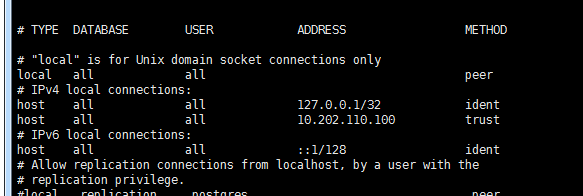
#在第82行之后,”IPv4 local connections”下新增允许的客户端;

#“host” 代表主机类型,第一个“all”代表db ,第二个“all”代表user ,“172.29.3.67/32” 代表client ip,“trust”代表认证方式;

#认证方式除“trust”外,还有“peer”, “ident”, “md5”, “password”等,具体可参考pg-hba文件: https://www.postgresql.org/docs/current/static/auth-pg-hba-conf.html

#修改pg.hba文件需要重启服务。

[root@psql_master ~]# vim /var/lib/pgsql/9.6/data/pg_hba.conf

host    all             all             172.29.3.67/32          trust
4. 设置环境变量
[root@psql_master ~]# vim /etc/profile

export PATH=$PATH:/usr/pgsql-9.6/bin

[root@psql_master ~]# source /etc/profile
5. 重启服务
[root@psql_master ~]# systemctl restart postgresql-9.6
6. iptables
#postgresql默认开启tcp5432端口

[root@psql_master ~]# vim /etc/sysconfig/iptables

-A INPUT -m state --state NEW -m tcp -p tcp --dport 5432 -j ACCEPT

[root@psql_master ~]# service iptables restart
四.使用验证
1. 查看端口
[root@psql_master ~]# netstat -tunlp

2. 简单使用
1)创建用户
postgres=# create user postuser1 with password 'user1@123';
2)创建数据库
#同时指定数据库的所有者

postgres=# create database postdb1 owner postuser1;
3)数据库赋权
#未赋权则账户只能登录控制台

postgres=# grant all privileges on database postdb1 to postuser1;

4)登录新建数据库
#在操作系统层使用新建的账号登录新建的数据库,登录后提示符为“postdb1=>”;

#如果在postgres账户下直接使用“postgres=# \c postdb1;”登录,则登录用户依然是postgres,

-bash-4.2$ psql -U postuser1 -d postdb1 -h 127.0.0.1 -p 5432

5)创建表
postdb1=> create table tb1(

          id int primary key,

          name VARCHAR(20),

          salary real

          );
6)插入数据
postdb1=> insert into tb1(

          id, name, salary)

          values(

          101, 'Mike', 5000.00

          );
7)查询
postdb1=>select * from tb1;

3. pgadmin连接postgresql
pgadmin下载地址:https://www.pgadmin.org/download/
截至2017-05-19的版本是:pgAdmin 4 v1.5
1)添加服务器
打开pgadmin—>添加新的服务器—>(通常标签)名称自定义—>(connection标签)主机名称与postgresql用户密码按需填写,其余可采用默认配置—>保存。

2)图形化查看

PostgreSQL 设置允许访问IP
PostgreSQL安装后默认只能localhost:5432访问
检验方法:
curl localhost:

# 访问成功提示

curl: () Empty reply from server
或
curl 127.0.0.1:

# 访问不成功提示

curl: () Failed to connect to 172.17.201.227 port : Connection refused
修改pg_hba.conf
pg_hba.conf和postgresql.conf的存放目录都在(9.5版本)/etc/postgresql/9.5/main
host all all 192.168.1.0/ trust
表示允许网段192.168.1.0上的所有主机使用所有合法的数据库用户名访问数据库,
其中,数字24是子网掩码,表示允许192.168.1.0–192.168.1.255的计算机访问
修改postgresql.conf
修改listen_addresses=’localhost’, 并放开注释(默认监听localhost)
# 192.168.1.111 为postgresql本机内网地址

listen_addresses='192.168.1.111'
重启postgresql
sudo /etc/init.d/postgresql restart
在本机
curl 192.168.1.111:

# 访问成功提示

curl: () Empty reply from server
在内网其他机器
curl 192.168.1.111:

# 访问成功提示

curl: () Empty reply from server
SQL游标的更多相关文章
- sql 游标例子 根据一表的数据去筛选另一表的数据
sql 游标例子 根据一表的数据去筛选另一表的数据 DECLARE @MID nvarchar(20)DECLARE @UTime datetime DECLARE @TBL_Temp table( ...
- sql 游标循环当中重新赋值
sql 游标循环当中的变量必须重新赋值不然变量的值就是前次循环的值
- SQL 游标的应用
----------------SQL游标应用-----------------if object_id('tempdb..#test0001') is not null drop table #te ...
- PL/SQL 游标 (实验七)
PL/SQL 游标 emp.dept 目标表结构及数据 要求 基于部门表建立游标dept_cursor1,使用记录变量接收游标数据,输出部门表信息: 显示格式: 部 门 号: XXX 部门名称: XX ...
- PL/SQL游标详解
刚打开游标的时候,是位于一个空行,要用fetch into 才能到第一行. 只是要注意用更新游标的时候,不能在游标期间commit. 否则会报ORA-01002: fetch out of seque ...
- 网上看到一份详细sql游标说明 《转载 https://www.cnblogs.com/xiongzaiqiren/p/sql-cursor.html》
SQL游标(cursor)详细说明及内部循环使用示例 游标 游标(cursor)是系统为用户开设的一个数据缓冲区,存放SQL语句的执行结果.每个游标区都有一个名字,用户可以用SQL语句逐一从游标中获 ...
- Oracle PL/SQL游标
游标的提出: SQL是面向集合的,其结果一般是集合量(多条记录),而PL/SQL的变量一本是标量,其一组变量异常一直只能存放一条记录.所以仅仅使用变量并不能完全满足SQL语句向应用程序输出数据的要求. ...
- PL/SQL 游标
本随笔不是原创,只是学习笔记,用于加深记忆,原创地址PL/SQL --> 游标 一.游标的相关概念和特性 1.定义: 映射到结果集中的某一行的特定位置,类似与C语言中的指针.即通过游标方式定位到 ...
- Library Cache优化与SQL游标
Library Cache主要用于存放SQL游标,而SQL游标最大化共享是Library Cache优化的重要途径,可以使SQL运行开销最低.性能最优. 1 SQL语句与父游标及子游标 在PL/SQL ...
- SQL Server游标 C# DataTable.Select() 筛选数据 什么是SQL游标? SQL Server数据类型转换方法 LinQ是什么? SQL Server 分页方法汇总
SQL Server游标 转载自:http://www.cnblogs.com/knowledgesea/p/3699851.html. 什么是游标 结果集,结果集就是select查询之后返回的所 ...
随机推荐
- VB语言基础
一.常用的关键字 Dim Private Sub Public End If Else Form Me Single As Integer Unload Do While MessageBox等 二 ...
- 收录一个简单的css类库
/* CSS liberary */.yahei { font-family: "Microsoft Yahei", "Tahoma", "Si ...
- Mapped Statements collection does not contain value for ResearcherMapper.方法名
搞了半天, 原来是映射文件没加, 新手常遇到的问题. Mapped Statements collection does not contain value for后面是什么类什么方法之类的: 错误原 ...
- 进入 App Store 打分
很多用户用了好软件后忘记或嫌麻烦而不去 App Store 进行打分评星,为此开发者可以在应用中加入打分按钮,点击后直接跳转到 App Store 的评分界面. App Store 上评论的链接地址是 ...
- (转)[C++语法] 关键字typedef用法
转自http://www.cnblogs.com/SweetDream/archive/2006/05/10/395921.html C/C++语言中的typedef相信大家已经不陌生,本文对C/C+ ...
- shell复习笔记----命令与参数
shell最基本的工作就是执行命令. 每键入一道命令, shell 就会执行. $cd work;ls -l whizprog.c 首先:格式很简单,以空白(Space 键或者 Tab键)隔开命令行中 ...
- Delphi XE5 android 蓝牙通讯传输
不多讲,直接上代码了. 代码来自网络 http://files.cnblogs.com/nywh2008/Bluetooth_LEDs_android.rar
- 我的vim配置
之前都在虚拟机下面捣鼓Linux,有种隔靴搔痒的感觉.为了更快地熟悉Linux系统,重新安装了Ubuntu,首先就是配置vim. 下面是我的vim配置,为了方便,我在代码后添加注释说明. 1.配置C/ ...
- POJ2527+多项式除法
模拟一遍即可. 注意一些特殊情况,见代码. #include<stdio.h> #include<stdlib.h> #include<math.h> #inclu ...
- 移动wabAPP 开发 viewport 注意事项
我们在开发移动设备的网站时,最常见的的一个动作就是把下面这个东西复制到我们的head标签中: <meta name="viewport" content="widt ...