
IOS动画隐式,显式,翻页
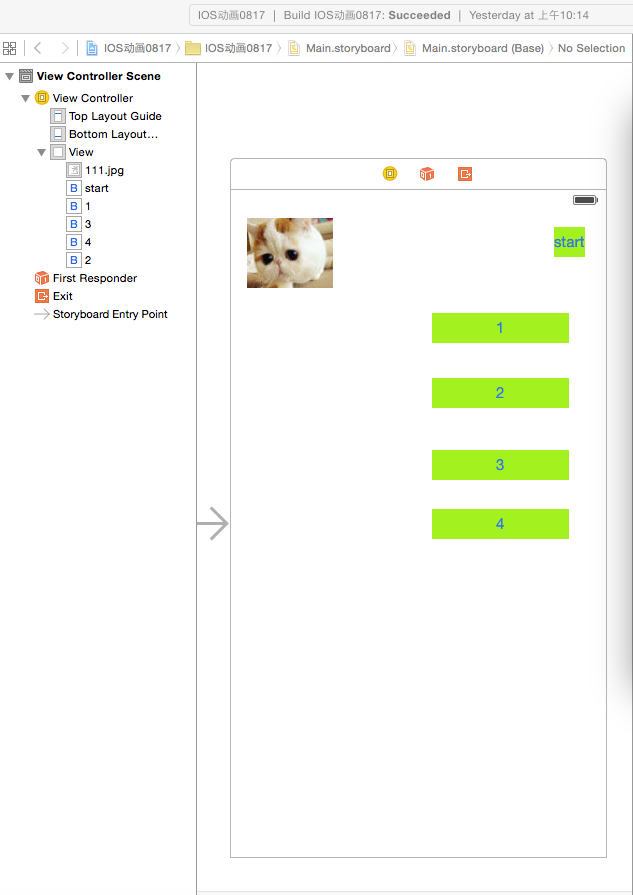
// ViewController.m
// IOS动画0817
//
// Created by 张艳锋 on 15/8/17.
// Copyright (c) 2015年 张艳锋. All rights reserved.
//
#import "ViewController.h"
@interface ViewController ()
@property (weak, nonatomic) IBOutlet UIImageView *imageview;
- (IBAction)doAnimationButton:(id)sender;
- (IBAction)doLeftButton:(id)sender;
- (IBAction)doRightButton:(id)sender;
- (IBAction)doUpButton:(id)sender;
- (IBAction)doDownButton:(id)sender;
@end
@implementation ViewController
- (void)viewDidLoad {
[super viewDidLoad];
// Do any additional setup after loading the view, typically from a nib.
}
- (void)didReceiveMemoryWarning {
[super didReceiveMemoryWarning];
// Dispose of any resources that can be recreated.
}
- (IBAction)doAnimationButton:(id)sender {
/********隐式动画********/
/*
[UIView beginAnimations:nil context:NULL];//动画开始标志
//定义一个仿射变换
CGAffineTransform moveTrans=CGAffineTransformMakeTranslation(300, 600);
// CGAffineTransformMakeTranslation//更改位置的函数
// CGAffineTransformMakeRotation//k控制旋转
//CGAffineTransformMakeScale//控制缩放
[_imageview.layer setAffineTransform:moveTrans];
[UIView commitAnimations];//提交动画
*/
/********显式动画********/
//定义显示动画的时候,我们不必定义CALayer的变化,也不必执行它,而是通过CABasicAnimation逐个定义动画,其中每个动画都含有各自的属性,然后通过addAnimation:方法添加到图层中
/*
CABasicAnimation *basic=[CABasicAnimation animationWithKeyPath:@"opacity"];//opacity表示透明度
basic.duration=6.0;//6秒内透明度变为零
basic.fromValue=[NSNumber numberWithFloat:0.2];//初始透明度
basic.toValue=[NSNumber numberWithFloat:1.0];//最终透明度
basic.cumulative=YES;//设置透明度递增
[_imageview.layer addAnimation:basic forKey:@"animateOpacity"];
CGAffineTransform moveTrans1=CGAffineTransformMakeTranslation(300, 600);
CABasicAnimation *basic_move=[CABasicAnimation animationWithKeyPath:@"transform"];//准备函数(为平移做准备)
basic_move.duration=6.0;
//CATransform3DMakeAffineTransform仿射变换为3D效果(仿射不能直接应用于显式动画)
basic_move.toValue=[NSValue valueWithCATransform3D:CATransform3DMakeAffineTransform(moveTrans1)];
[_imageview.layer addAnimation:basic_move forKey:@"animateTransform2"];
*/
/********关键帧动画********/
/*
CAKeyframeAnimation *keyAnimation=[CAKeyframeAnimation animationWithKeyPath:@"opacity"];//透明度
keyAnimation.duration=6.0;//动画时间
keyAnimation.values=[NSArray arrayWithObjects:[NSNumber numberWithFloat:0.0],[NSNumber numberWithFloat:0.6],[NSNumber numberWithFloat:1.0], nil];//
keyAnimation.keyTimes=[NSArray arrayWithObjects:[NSNumber numberWithFloat:0.0],[NSNumber numberWithFloat:0.3],[NSNumber numberWithFloat:1.0], nil];
[_imageview.layer addAnimation:keyAnimation forKey:@"animateOpcaty"];
CGAffineTransform moveTrans2=CGAffineTransformMakeTranslation(300, 600);
CABasicAnimation *basic_move2=[CABasicAnimation animationWithKeyPath:@"transform"];
basic_move2.duration=6.0;
basic_move2.toValue=[NSValue valueWithCATransform3D:CATransform3DMakeAffineTransform(moveTrans2)];
[_imageview.layer addAnimation:basic_move2 forKey:@"animateTransform2"];
*/
}
//系统自带反转动画(上下左右)
- (IBAction)doLeftButton:(id)sender {
//三次向左不返回
[UIView beginAnimations:nil context:NULL];
[UIView setAnimationDuration:1.5f];//动画时间
[UIView setAnimationCurve:UIViewAnimationCurveEaseOut];//设置动画曲线方式(动画的总体变化时间曲线,包含开始慢后来快,开始快后来慢,均匀曲线)
[UIView setAnimationRepeatAutoreverses:NO];//设置动画是否做一次反向操作
[UIView setAnimationRepeatCount:3];//执行次数
[UIView setAnimationTransition:UIViewAnimationTransitionFlipFromLeft forView:self.view cache:YES];//
[UIView commitAnimations];
}
- (IBAction)doRightButton:(id)sender {
//三次向右有返回
[UIView beginAnimations:nil context:NULL];
[UIView setAnimationDuration:1.5f];
[UIView setAnimationCurve:UIViewAnimationCurveEaseOut];
[UIView setAnimationRepeatAutoreverses:YES];
[UIView setAnimationRepeatCount:3];//执行次数
[UIView setAnimationTransition:UIViewAnimationTransitionFlipFromRight forView:self.view cache:YES];
[UIView commitAnimations];
}
- (IBAction)doUpButton:(id)sender {
[UIView beginAnimations:nil context:NULL];
[UIView setAnimationDuration:1.5f];
[UIView setAnimationCurve:UIViewAnimationCurveEaseOut];
[UIView setAnimationRepeatAutoreverses:YES];
[UIView setAnimationTransition:UIViewAnimationTransitionCurlUp forView:self.view cache:YES];
[UIView commitAnimations];
}
- (IBAction)doDownButton:(id)sender {
[UIView beginAnimations:nil context:NULL];
[UIView setAnimationDuration:1.5f];
[UIView setAnimationCurve:UIViewAnimationCurveEaseOut];
[UIView setAnimationRepeatAutoreverses:YES];
[UIView setAnimationTransition:UIViewAnimationTransitionCurlDown forView:self.view cache:YES];
[UIView commitAnimations];
}
IOS动画隐式,显式,翻页的更多相关文章
- 第一行Kotlin系列(二)Intent隐式显式跳转及向下传值
1.Intent显式跳转页面 val button5 = findViewById<Button>(R.id.mButton5) button5.setOnClickListener { ...
- 动画:UIKitAnimation 简单动画学习 iOS (一) 渐变 、 移动 、翻页、来回翻转 ——转载
转载请说明(谢谢) http://blog.csdn.net/a21064346/article/details/7851695 点击打开链接 以下 一个系列的 动画效果 在 UIView.h文件中可 ...
- iOS如何做出炫酷的翻页效果
详情链接http://www.jianshu.com/p/b6dc2595cc3e https://github.com/schneiderandre/popping
- CALayer的隐式动画和显式动画
隐式事务 任何对于CALayer属性的修改,都是隐式事务,都会有动画效果.这样的事务会在run-loop中被提交. - (void)viewDidLoad { //初始化一个layer,添加到主视图 ...
- CoreAnimation4-隐式动画和显式动画
事务 Core Animation基于一个假设,说屏幕上的任何东西都可以(或者可能)做动画.动画并不需要你在Core Animation中手动打开,相反需要明确地关闭,否则他会一直存在. 当你改变CA ...
- 6个超炫酷的HTML5电子书翻页动画
相信大家一定遇到过一些电子书网站,我们可以通过像看书一样翻页来浏览电子书的内容.今天我们要分享的HTML5应用跟电子书翻页有关,我们精选出来的6个电子书翻页动画都非常炫酷,而且都提供源码下载,有需要的 ...
- IOS动画总结
IOS动画总结 一.基本方式:使用UIView类的UIViewAnimation扩展 + (void)beginAnimations:(NSString *)animationID context ...
- iOS动画学习 -隐式动画
事务 Core Animation基于一个假设,说屏幕上的任何东西都可以(或者可能)做动画.你并不需要在Core Animation中手动打开动画,但是你需要明确地关闭它,否则它会一直存在. 当你改变 ...
- iOS 动画基础-显式动画
摘要 显式动画 属性动画 CABasicAnimation *animation = [CABasicAnimation animation]; [self updateHandsAn ...
随机推荐
- Linux内核分析笔记 与Linux内核开发理论
http://www.cnblogs.com/hanyan225/category/308793.html
- 话说C语言const用法
const在C语言中算是一个比较新的描述符,我们称之为常量修饰符,意即其所修饰 的对象为常量(immutable). 我们来分情况看语法上它该如何被使用. 1.函数体内修饰局部变量. 例: void ...
- MySQL ALTER语法的运用方法 && 操作索引和字段
语法:alter_specification: ADD [COLUMN] create_definition [FIRST | AFTER column_name ] or ADD INDEX [in ...
- php模拟多线程
一:应该知道的: php本身是不支持多线, 但是php的好搭档,apache和linux是支持的,故lamp才是最佳组合,还在使用win服务器的现在知道为什么要用linux吧.既然是模拟的, 就不是真 ...
- 用vim处理字符的大小写转换
转载: http://blog.csdn.net/ruixj/article/details/3765385 http://www.linuxsong.org/2010/09/vim-convert- ...
- GNU的ar,ranlib和nm
转:http://blog.csdn.net/yuntongsf/article/details/6284517 RANLIB 的作用: CC = CC=/usr/local/ndk/toolchai ...
- Java基础知识强化104:Serializable接口 与 Parcelable接口
1. 什么是 序列化 和 反序列化 ? 序列化 :序列化就是一种用来处理对象流的机制,所谓对象流也就是将对象的内容进行流化.可以对流化后的对象进行读写操作,也可将流化后的对象传输于网络之间.序 ...
- iphone 手机屏幕和UIView和UIWindowde 的主要的区别
在iPhone5之前的iphone1,2,3,3s,4,4s都是320x480 iPhone5和5s的屏幕是320x568 iphone6的屏幕是375x667 iPhone6Plus的414x736 ...
- Genymotion——PC上也能玩部落冲突 Clash of Clans
零.前言 部落冲突(Clash of Clans)是手机上一个很不错的联机对战游戏,安卓和iOS平台上都有. 最近玩这个略上瘾,前几天看到部落里有人说用模拟器可以在电脑上玩,就想自己试试. 不想看我啰 ...
- 在项目中使用SQLite数据库小结
------------------------------------------------------------------------推荐: - VS2012 使用 1.0.84 版的库 - ...