
基础学习总结(七)--子线程及Handler
使用子线程获取网络图片
1.采用httpUrlConnection直连方式获取图片
2.采用子线程方式获取
 <LinearLayout xmlns:android="http://schemas.android.com/apk/res/android"

     xmlns:tools="http://schemas.android.com/tools"

     android:layout_width="match_parent"

     android:layout_height="match_parent"

     android:orientation="vertical"

     tools:context=".MainActivity" >

     <ImageView android:id="@+id/iv_icon"

         android:layout_width="fill_parent"

         android:layout_height="0dip"

         android:layout_weight="1" />

     <LinearLayout

         android:layout_width="fill_parent"

         android:layout_height="wrap_content"

         android:orientation="horizontal" >

         <EditText android:id="@+id/et_url"

             android:layout_width="0dip"

             android:layout_height="wrap_content"

             android:layout_weight="1" />

         <Button android:id="@+id/btn_submit"

             android:layout_width="wrap_content"

             android:layout_height="wrap_content"

             android:textSize="20sp"

             android:text="Go" />

     </LinearLayout>

 </LinearLayout>
线性布局
 public class MainActivity extends Activity implements OnClickListener {

     private final int SUCESS = 0;

     private final int ERROR=-1;

     private EditText etUrl;

     private ImageView ivIcon;

     private Handler hand=new Handler(){

         /*

          * 接收信息

          * */

         @Override

         public void handleMessage(Message msg){

             super.handleMessage(msg);

             if(msg.what==SUCESS){//识别访问handle的程序集

                 ivIcon.setImageBitmap((Bitmap)msg.obj);//设置bitmap显示图片

             }else if(msg.what==ERROR){

                 Toast.makeText(MainActivity.this, "抓取异常", 0).show();

             }

         }

     };

     @Override

     protected void onCreate(Bundle savedInstanceState) {

         super.onCreate(savedInstanceState);

         setContentView(R.layout.activity_main);

         ivIcon = (ImageView)findViewById(R.id.iv_icon);

         etUrl = (EditText)findViewById(R.id.et_url);

         findViewById(R.id.btn_submit).setOnClickListener(this);

     }

     @Override

     public void onClick(View v) {

         // TODO Auto-generated method stub

         final String url=etUrl.getText().toString();

         //Bitmap bitmap=getImageFormat(url);

         //ivIcon.setImageBitmap(bitmap);//设置image显示图片

         new Thread(new Runnable(){

             @Override

             public void run(){

                 Bitmap bitmap=getImageFormat(url);

                 if(bitmap!=null){

                 Message msg=new Message();

                 msg.what=SUCESS;//设置handle区别码

                 msg.obj=bitmap;//将二进制数据放入msg

                 hand.sendMessage(msg);

                 }else{

                     Message msg=new Message();

                     msg.what=ERROR;

                     hand.sendMessage(msg);

                 }

             }

         }).start();

     }

     /**

      * 根据url链接网络获取图片返回

      * */

     private Bitmap getImageFormat(String url){

         HttpURLConnection conn=null;

         try {

             URL mUrl=new URL(url);

             conn =(HttpURLConnection)mUrl.openConnection();

             //设置传值方式

             conn.setRequestMethod("GET");

             //设置链接超时时间

             conn.setConnectTimeout(10000);

             //设置等待时间

             conn.setReadTimeout(5000);

             conn.connect();

             int code=conn.getResponseCode();//获得服务器响应对象

             if(code==200){

                 //访问成功

                 InputStream is=conn.getInputStream();//获得服务器返回的二进制数据

                 Bitmap bitmap = BitmapFactory.decodeStream(is);//将二进制流转换为bitmap图片

                 return bitmap;

             }else{

                 Log.i("MainActivity","链接不正常了...");

             }

         } catch (Exception e) {

             // TODO Auto-generated catch block

             e.printStackTrace();

         }finally{

             if(conn!=null){

                 conn.disconnect();

             }

         }

         return null;

     }

 }
权限:<uses-permission android:name="android.permission.INTERNET"/>
在不使用子线程的方式下:等待超时后程序异常
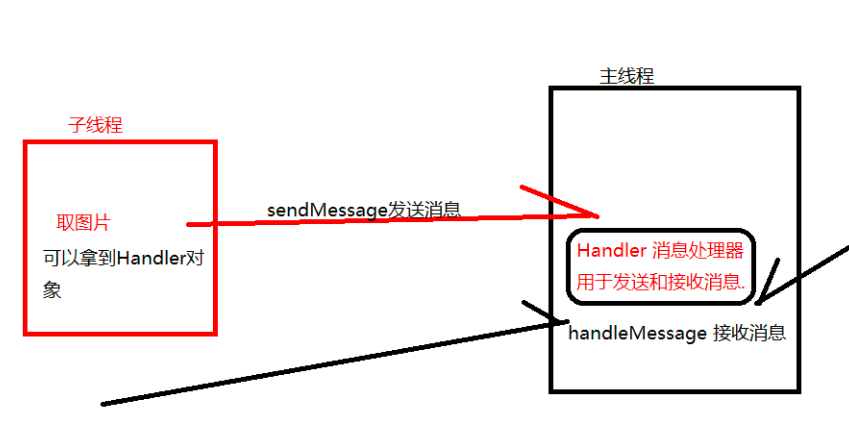
addroid not responding(应用程序无响应)因子程序等待阻塞了主线程 ANR异常
异常:
CalledFrowWrongThreadException:Only the original thread that creaded a view hierarchy can touch its views
只有原始的线程(主线程或ui线程)才能修改view对象
handler处理过程
 public class MainActivity extends Activity {

     private EditText etUserName;

     private EditText etPassword;

     @Override

     protected void onCreate(Bundle savedInstanceState) {

         super.onCreate(savedInstanceState);

         setContentView(R.layout.activity_main);

         etUserName = (EditText) findViewById(R.id.et_username);

         etPassword = (EditText) findViewById(R.id.et_password);

     }

     public void doGet(View v) {

         final String userName = etUserName.getText().toString();

         final String password = etPassword.getText().toString();

         new Thread(

                 new Runnable() {

                     @Override

                     public void run() {

                         // 使用get方式抓去数据

                         final String state = NetUtils.loginOfGet(userName, password);

                         // 执行任务在主线程中

                         runOnUiThread(new Runnable() {

                             @Override

                             public void run() {

                                 // 就是在主线程中操作

                                 Toast.makeText(MainActivity.this, state, 0).show();

                             }

                         });

                     }

                 }).start();

     }

     public void doPost(View v) {

         final String userName = etUserName.getText().toString();

         final String password = etPassword.getText().toString();

         new Thread(new Runnable() {

             @Override

             public void run() {

                 final String state = NetUtils.loginOfPost(userName, password);

                 // 执行任务在主线程中

                 runOnUiThread(new Runnable() {

                     @Override

                     public void run() {

                         // 就是在主线程中操作

                         Toast.makeText(MainActivity.this, state, 0).show();

                     }

                 });

             }

         }).start();

     }

 }
 public class NetUtils {

     private static final String TAG = "NetUtils";

     /**

      * 使用post的方式登录

      * @param userName

      * @param password

      * @return

      */

     public static String loginOfPost(String userName, String password) {

         HttpURLConnection conn = null;

         try {

             URL url = new URL("http://10.0.2.2:8080/ServerItheima28/servlet/LoginServlet");

             conn = (HttpURLConnection) url.openConnection();

             conn.setRequestMethod("POST");

             conn.setConnectTimeout(10000); // 连接的超时时间

             conn.setReadTimeout(5000); // 读数据的超时时间

             conn.setDoOutput(true);    // 必须设置此方法, 允许输出

 //            conn.setRequestProperty("Content-Length", 234);        // 设置请求头消息, 可以设置多个

             // post请求的参数

             String data = "username=" + userName + "&password=" + password;

             // 获得一个输出流, 用于向服务器写数据, 默认情况下, 系统不允许向服务器输出内容

             OutputStream out = conn.getOutputStream();

             out.write(data.getBytes());

             out.flush();

             out.close();

             int responseCode = conn.getResponseCode();

             if(responseCode == 200) {

                 InputStream is = conn.getInputStream();

                 String state = getStringFromInputStream(is);

                 return state;

             } else {

                 Log.i(TAG, "访问失败: " + responseCode);

             }

         } catch (Exception e) {

             e.printStackTrace();

         } finally {

             if(conn != null) {

                 conn.disconnect();

             }

         }

         return null;

     }

     /**

      * 使用get的方式登录

      * @param userName

      * @param password

      * @return 登录的状态

      */

     public static String loginOfGet(String userName, String password) {

         HttpURLConnection conn = null;

         try {

             String data = "username=" + URLEncoder.encode(userName) + "&password=" + URLEncoder.encode(password);

             URL url = new URL("http://10.0.2.2:8080/ServerItheima28/servlet/LoginServlet?" + data);

             conn = (HttpURLConnection) url.openConnection();

             conn.setRequestMethod("GET");        // get或者post必须得全大写

             conn.setConnectTimeout(10000); // 连接的超时时间

             conn.setReadTimeout(5000); // 读数据的超时时间

             int responseCode = conn.getResponseCode();

             if(responseCode == 200) {

                 InputStream is = conn.getInputStream();

                 String state = getStringFromInputStream(is);

                 return state;

             } else {

                 Log.i(TAG, "访问失败: " + responseCode);

             }

         } catch (Exception e) {

             e.printStackTrace();

         } finally {

             if(conn != null) {

                 conn.disconnect();        // 关闭连接

             }

         }

         return null;

     }

     /**

      * 根据流返回一个字符串信息

      * @param is

      * @return

      * @throws IOException

      */

     private static String getStringFromInputStream(InputStream is) throws IOException {

         ByteArrayOutputStream baos = new ByteArrayOutputStream();

         byte[] buffer = new byte[1024];

         int len = -1;

         while((len = is.read(buffer)) != -1) {

             baos.write(buffer, 0, len);

         }

         is.close();

         String html = baos.toString();    // 把流中的数据转换成字符串, 采用的编码是: utf-8

 //        String html = new String(baos.toByteArray(), "GBK");

         baos.close();

         return html;

     }

 }
基础学习总结(七)--子线程及Handler的更多相关文章
- (原)Android在子线程用handler发送的消息,主线程是怎么loop到的?
来自知乎:https://www.zhihu.com/question/48130951?sort=created 大家都知道Android的Looper是ThreadLocal方式实现,每个线程 ...
- android 网络技术基础学习 (七)
使用httpclient协议访问网络: public class MainActivity extends Activity implements OnClickListener{ public vo ...
- Android子线程创建Handler方法
如果我们想在子线程上创建Handler,通过直接new的出来是会报异常的比如: new Thread(new Runnable() { public void run() { Handler hand ...
- Java基础学习笔记七 Java基础语法之继承和抽象类
继承 继承的概念 在现实生活中,继承一般指的是子女继承父辈的财产.在程序中,继承描述的是事物之间的所属关系,通过继承可以使多种事物之间形成一种关系体系. 例如公司中的研发部员工和维护部员工都属于员工, ...
- salesforce零基础学习(七十六)顺序栈的实现以及应用
数据结构中,针对线性表包含两种结构,一种是顺序线性表,一种是链表.顺序线性表适用于查询,时间复杂度为O(1),增删的时间复杂度为O(n).链表适用于增删,时间复杂度为O(1),查询的时间复杂度为O(n ...
- javascript基础学习(七)
javascript之Object对象 学习要点: 创建Object对象 Object对象属性 Object对象方法 一.创建Object对象 new Object(); new Object(val ...
- salesforce 零基础学习(七十)使用jquery table实现树形结构模式
项目中UI需要用到树形结构显示内容,后来尽管不需要做了,不过还是自己做着玩玩,mark一下,免得以后项目中用到. 实现树形结构在此使用的是jquery的dynatree.js.关于dynatree的使 ...
- salesforce零基础学习(七十三)ProcessInstanceWorkItem/ProcessInstanceStep/ProcessInstanceHistory浅谈
对于审批流中,通过apex代码进行审批操作一般都需要获取当前记录对应的ProcessInstanceWorkitem或者ProcessInstanceStep然后执行Approval.process操 ...
- salesforce零基础学习(七十八)线性表链形结构简单实现
前两篇内容为栈和队列的顺序结构的实现,栈和队列都是特殊的线性表,线性表除了有顺序结构以外,还有线性结构. 一.线性表的链形结构--链表 使用顺序存储结构好处为实现方式使用数组方式,顺序是固定的.所以查 ...
随机推荐
- <转>一道面试题比较synchronized和读写锁
一.科普定义(原文:http://903497571.iteye.com/blog/1874752) 这篇博文的两个主角“synchronized”和“读写锁” 1)synchronized 这个同步 ...
- Collections.sort(List<T> Comparator) 自定义排序
Collections.sort(basicinfoList, new Comparator<MlisBasicinfo>() { @Override public int compare ...
- No Entertainment!
今天决定去打印一个“No Entertainment”的横幅,贴在电脑的旁边.这其实是很久以前的事了,却搁浅到了现在.也正因为如此,今天想起来也觉得格外刻不容缓,内心好似义愤填膺,便写下这愤慨的独白. ...
- VSS 之 未知的用户名或密码错误
原因:导致这种现象的原因并不是真的用户名和密码错误,而是验证失败.验证失败也自然就会提示成用户名或密码错误了,只需要做以下更改就能正常验证用户名和密码了.解决方案:运行 组策略编辑器 gpedit.m ...
- 安装TortoiseGit出现提示“您必须安装带有更新版本Windows Installer服务的Windows Service Pack”-解决方法
我的系统是xp sp3安装TortoiseGit时出现了错误提示“您必须安装带有更新版本Windows Installer服务的Windows Service Pack”. 解决方法,到微软官方下载相 ...
- poj 3417 树形dp+LCA
思路:我以前一直喜欢用根号n分段的LCA.在这题上挂了,第一次发现这样的LCA被卡.果断改用Tarjan离线算法求LCA. 当前节点为u,其子节点为v.那么: 当以v根的子树中含有连接子树以外点的边数 ...
- 干掉拖延症!写给新人的GTD方法
部门周会上有一个环节是每个同学讲述本周之最:最认可自己的.最反思的.最困惑的.其中,最认可自己,代表自己阶段性的成就感,在从外界取得成就感之前,首先自己要认可自己.最反思,要注意,不能只反不思,要记录 ...
- Macbook之设置Finder显示文件完整路径
终端里输入:defaults write com.apple.finder _FXShowPosixPathInTitle -bool TRUE;killall Finder 回复输入:default ...
- 表数据转换为insert语句
/* 对象:导出物理表数据为Insert语句 描述:可以传递条件精确导出sql 加条件的前提是只知道相应的字段名及类型 */ from sysobjects where name ='proc_ins ...
- OpenShare文档中心
文档是企业重要的智力资产.在企业中,文档一般都以电子文档的形式存在,比如微软.doc格式,xls格式,ppt格式,pdf格式,纯文本.txt格式等:从内容上,可能是商务合同.会议记录.产品手册.客户资 ...