
maven添加jetty插件
- pom.xml中增加jetty的配置
<properties>
    <jetty-version>8.1.13.v20130916</jetty-version>
    <productionMode>false</productionMode>
</properties>
<build>
  <plugins>

            <plugin>

                <groupId>org.mortbay.jetty</groupId>

                <artifactId>jetty-maven-plugin</artifactId>

                <configuration>

                    <webApp>

                        <contextPath>/</contextPath>

                    </webApp>

                    <stopKey>webx</stopKey>

                    <stopKey></stopKey>

                    <connectors>

                        <connector implementation="org.eclipse.jetty.server.nio.SelectChannelConnector">

                            <port></port>

                            <maxIdleTime></maxIdleTime>

                        </connector>

                    </connectors>

                    <requestLog implementation="org.eclipse.jetty.server.NCSARequestLog">

                        <filename>target/access.log</filename>

                        <retainDays></retainDays>

                        <append>false</append>

                        <extended>false</extended>

                        <logTimeZone>GMT+:</logTimeZone>

                    </requestLog>

                    <systemProperties>

                        <systemProperty>

                            <name>productionMode</name>

                            <value>${productionMode}</value>

                        </systemProperty>

                    </systemProperties>

                </configuration>

            </plugin>

        </plugins>

        <pluginManagement>

            <plugins>

                <plugin>

                    <groupId>org.mortbay.jetty</groupId>

                    <artifactId>jetty-maven-plugin</artifactId>

                    <version>${jetty-version}</version>

                </plugin>

            </plugins>

</pluginManagement></build>2 idea中选择用maven启动
2、idea中选择用maven启动
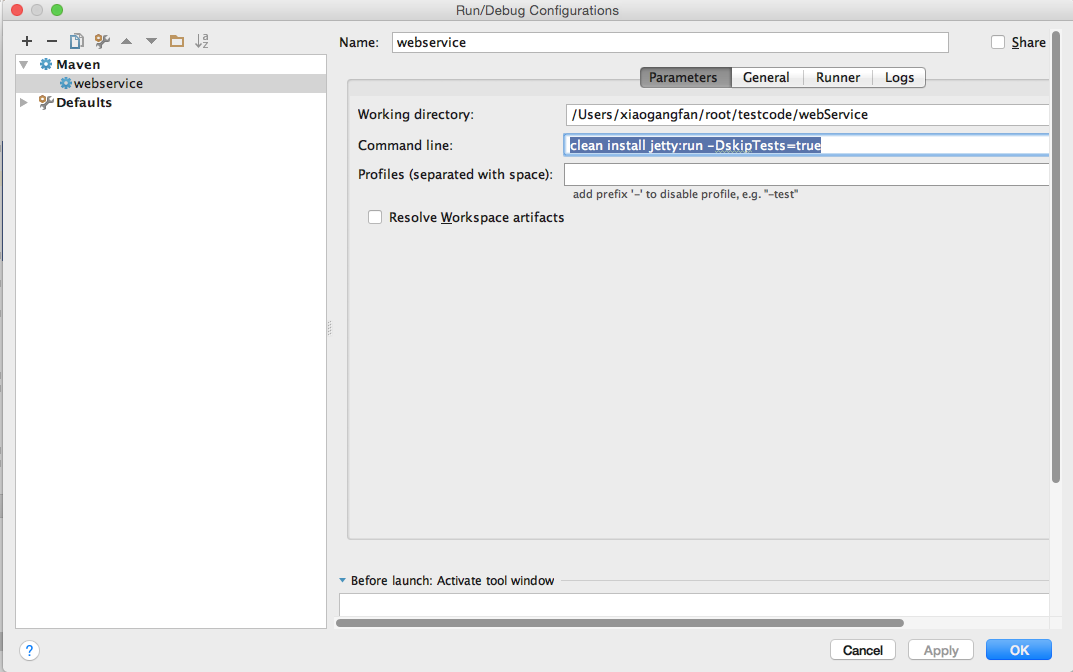
3、在idea中启动
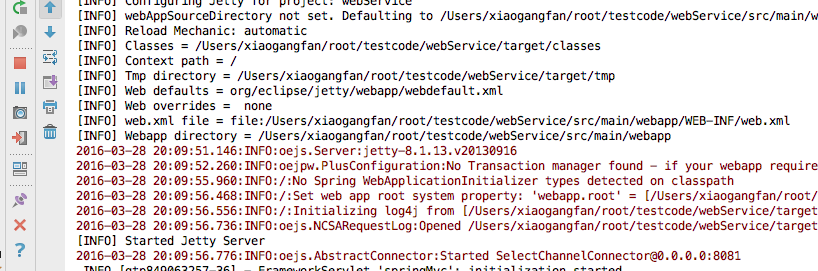
4、完成,在浏览器中输入:http://localhost:8081/xxx 即可访问了
maven添加jetty插件的更多相关文章
- maven添加jetty插件,同时运行多个实例
<plugins> <!-- jetty插件 --> <plugin> <groupId>org.eclipse.jetty</groupId&g ...
- maven中jetty插件配置
maven中jetty插件的配置,可用于项目在内置jetty服务器中的部署. <plugin> <groupId>org.mortbay.jetty</groupId&g ...
- eclipse运行maven的jetty插件内存溢出
系统运行在Maven中的Jetty插件下,当在Eclipse运行clean jetty:run时,系统提示OutOfMemoryError: PermGen space.解决办法:设置run as - ...
- Maven 添加 Tomcat 插件
若想在 Maven 中使用 Tomcat 服务器,需要在 pom.xml 文件中的 <build></build> 标签中添加以下代码 <!-- Maven项目编译插件 ...
- Maven集成jetty插件
本机环境 JDK 7 Maven 3.2 Jetty 8.1.9 Eclipse Luna pom.xml 配置 在你的 pom.xml 文件里加入 jetty 插件的描写叙述信息(查看Jetty很多 ...
- Eclipse中使用Maven的Jetty插件Debug Web项目
1.环境配置 JAVA_HOME=D:\Program Files\Java\jdk1.7.0_80 JRE_HOME=%JAVA_HOME%\jre CLASSPATH=.;%JAVA_HOME%/ ...
- maven 配置jetty 插件
<plugin> <groupId>org.eclipse.jetty</groupId> <artifactId>jetty-maven-plugin ...
- Maven添加Tomcat插件实现热部署
Maven热部署,顾名思义就是可以不影响项目在服务器中的运行情况,可以实现项目代码的更新,减少启动,编译时间,达到快速开发的目的,也不需要手动拷贝war包到远程项目,可以直接将项目以及war包部署到远 ...
- 如何通过Maven的Jetty插件运行Web工程
首先建议使用jetty9,因为据官方文档显示,Jetty 7 and Jetty 8 are now EOL (End of Life),如下.但是由于项目使用的版本一般都比较低,这里以jetty8为 ...
随机推荐
- 轻松学Linux之使用转义字符
转义字符是C语言中表示字符的一种特殊形式.通常使用转义字符表示ASCII码字符集中不可打印的控制字符和特定功能的字符,如用于表示字符常量的单撇号( '),在Unix操作系统中有一类特殊的字符 ...
- C++builder XE10 终于支持类内变量初始化了
Win32终于支持类内变量初始化了,C++11 用bcc32C编译器 llvm CLang.还支持Unicode 中文汉字 变量名. 用经典的bcc32编译还是不支持! class TPerson ...
- cisco tftp 备份/恢复
使用tftp服务器对cisco 3560 配置备份及恢复 Switch#copy running-config tftp:Address or name of remote host []? 192. ...
- class bool
class bool(int): """ bool(x) -> bool Returns True when the argument x is true, Fal ...
- class str
class str(object): """ str(object='') -> str str(bytes_or_buffer[, encoding[, erro ...
- manacher算法(转载)
原网址:http://blog.sina.com.cn/s/blog_70811e1a01014esn.html manacher算法是我在网上无意中找到的,主要是用来求某个字符串的最长回文子串.不过 ...
- myeclipse 8.6安装freemarker插件
1. 打开http://sourceforge.net/projects/freemarker-ide/files/ 下载插件.2. 将其解压,将hudson.freemarker_ide_0.9.1 ...
- 由Tencent://Message协议想到的一个解决方案
参考网址:http://www.cnblogs.com/phinecos/archive/2009/03/06/1404951.html 源代码下载:http://files.cnblogs.com/ ...
- Unity3d:加载Format是RGB24位的图片失败(加载图片显示问号)
问题描述:加载图片显示是个红色的问号,调试发现,Texture的Format=RGB24的都加载失败,ARGB32位的都能成功,按照常规,首先去度娘,看是否有人遇到和我同样的问题,结果一无所获.将用N ...
- jQuery Attributes vs. Properties
Attributes vs. Properties attributes和properties之间的差异在特定情况下是很重要.jQuery 1.6之前 ,.attr()方法在取某些 attribute ...