
iOS10全新推送功能的实现
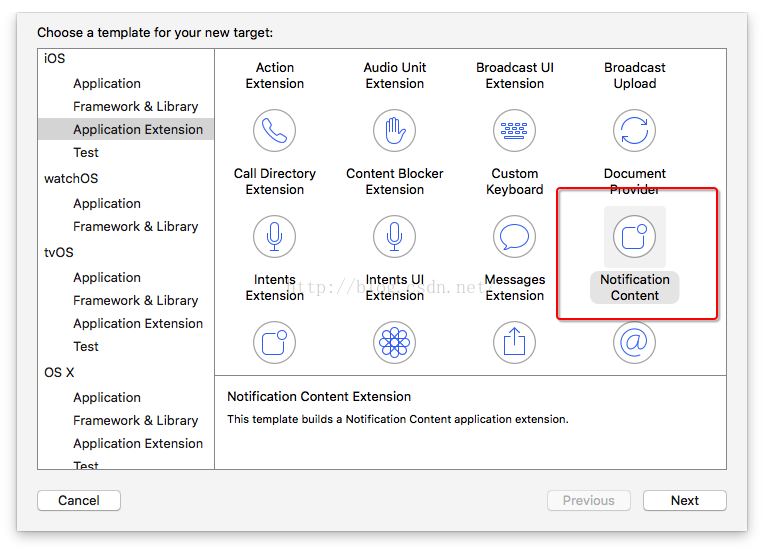
从iOS8.0开始推送功能的实现在不断改变,功能也在不断增加,iOS10又出来了一个推送插件的开发(见最后图),废话不多说直接上代码:
在开始之前需要打开一个推送开关,不然无法获取deviceToken,老项目或者出现deviceToken无效的情况:如图:

打开后会生成entitlements文件,需要有APS Environment

#import <UserNotifications/UserNotifications.h>

- (BOOL)application:(UIApplication *)application didFinishLaunchingWithOptions:(NSDictionary *)launchOptions {

    // Override point for customization after application launch.

    /* APP未启动,点击推送消息的情况下 iOS10遗弃UIApplicationLaunchOptionsLocalNotificationKey,使用代理UNUserNotificationCenterDelegate方法didReceiveNotificationResponse:withCompletionHandler:获取本地推送

     */

//    NSDictionary *localUserInfo = launchOptions[UIApplicationLaunchOptionsLocalNotificationKey];

//    if (localUserInfo) {

//        NSLog(@"localUserInfo:%@",localUserInfo);

//        //APP未启动,点击推送消息

//    }

    NSDictionary *remoteUserInfo = launchOptions[UIApplicationLaunchOptionsRemoteNotificationKey];

    if (remoteUserInfo) {

        NSLog(@"remoteUserInfo:%@",remoteUserInfo);

        //APP未启动,点击推送消息,iOS10下还是跟以前一样在此获取

    }

    [self registerNotification];

    return YES;

}
注册推送方法的改变:
新增库 #import <UserNotifications/UserNotifications.h> 推送单列UNUserNotificationCenter 等API
- (void)registerNotification{

    /*

     identifier:行为标识符,用于调用代理方法时识别是哪种行为。

     title:行为名称。

     UIUserNotificationActivationMode:即行为是否打开APP。

     authenticationRequired:是否需要解锁。

     destructive:这个决定按钮显示颜色,YES的话按钮会是红色。

     behavior:点击按钮文字输入,是否弹出键盘

     */

    UNNotificationAction *action1 = [UNNotificationAction actionWithIdentifier:@"action1" title:@"策略1行为1" options:UNNotificationActionOptionForeground];

    /*iOS9实现方法

    UIMutableUserNotificationAction * action1 = [[UIMutableUserNotificationAction alloc] init];

    action1.identifier = @"action1";

    action1.title=@"策略1行为1";

    action1.activationMode = UIUserNotificationActivationModeForeground;

    action1.destructive = YES;

     */

    UNTextInputNotificationAction *action2 = [UNTextInputNotificationAction actionWithIdentifier:@"action2" title:@"策略1行为2" options:UNNotificationActionOptionDestructive textInputButtonTitle:@"textInputButtonTitle" textInputPlaceholder:@"textInputPlaceholder"];

    /*iOS9实现方法

        UIMutableUserNotificationAction * action2 = [[UIMutableUserNotificationAction alloc] init];

        action2.identifier = @"action2";

        action2.title=@"策略1行为2";

        action2.activationMode = UIUserNotificationActivationModeBackground;

        action2.authenticationRequired = NO;

        action2.destructive = NO;

        action2.behavior = UIUserNotificationActionBehaviorTextInput;//点击按钮文字输入,是否弹出键盘

    */

    UNNotificationCategory *category1 = [UNNotificationCategory categoryWithIdentifier:@"Category1" actions:@[action2,action1]  intentIdentifiers:@[@"action1",@"action2"] options:UNNotificationCategoryOptionCustomDismissAction];

    //        UIMutableUserNotificationCategory * category1 = [[UIMutableUserNotificationCategory alloc] init];

    //        category1.identifier = @"Category1";

    //        [category1 setActions:@[action2,action1] forContext:(UIUserNotificationActionContextDefault)];

    UNNotificationAction *action3 = [UNNotificationAction actionWithIdentifier:@"action3" title:@"策略2行为1" options:UNNotificationActionOptionForeground];

    //        UIMutableUserNotificationAction * action3 = [[UIMutableUserNotificationAction alloc] init];

    //        action3.identifier = @"action3";

    //        action3.title=@"策略2行为1";

    //        action3.activationMode = UIUserNotificationActivationModeForeground;

    //        action3.destructive = YES;

    UNNotificationAction *action4 = [UNNotificationAction actionWithIdentifier:@"action4" title:@"策略2行为2" options:UNNotificationActionOptionForeground];

    //        UIMutableUserNotificationAction * action4 = [[UIMutableUserNotificationAction alloc] init];

    //        action4.identifier = @"action4";

    //        action4.title=@"策略2行为2";

    //        action4.activationMode = UIUserNotificationActivationModeBackground;

    //        action4.authenticationRequired = NO;

    //        action4.destructive = NO;

    UNNotificationCategory *category2 = [UNNotificationCategory categoryWithIdentifier:@"Category2" actions:@[action3,action4]  intentIdentifiers:@[@"action3",@"action4"] options:UNNotificationCategoryOptionCustomDismissAction];

    //        UIMutableUserNotificationCategory * category2 = [[UIMutableUserNotificationCategory alloc] init];

    //        category2.identifier = @"Category2";

    //        [category2 setActions:@[action4,action3] forContext:(UIUserNotificationActionContextDefault)];

    [[UNUserNotificationCenter currentNotificationCenter] setNotificationCategories:[NSSet setWithObjects:category1,category2, nil]];

    [[UNUserNotificationCenter currentNotificationCenter] requestAuthorizationWithOptions:UNAuthorizationOptionBadge | UNAuthorizationOptionSound | UNAuthorizationOptionAlert completionHandler:^(BOOL granted, NSError * _Nullable error) {

        NSLog(@"completionHandler");

    }];

    /*iOS9实现方法

    UIUserNotificationSettings *settings = [UIUserNotificationSettings settingsForTypes:(UIUserNotificationTypeAlert|UIUserNotificationTypeBadge|UIUserNotificationTypeSound) categories:[NSSet setWithObjects: category1,category2, nil]];

    [[UIApplication sharedApplication] registerUserNotificationSettings:settings];

    */

    [[UIApplication sharedApplication] registerForRemoteNotifications];

    [UNUserNotificationCenter currentNotificationCenter].delegate = self;

}
代理方法的改变:
一些本地和远程推送的回调放在了同一个代理方法
#pragma mark -

- (void)application:(UIApplication *)application didRegisterUserNotificationSettings:(UIUserNotificationSettings *)notificationSettings NS_AVAILABLE_IOS(8_0) __TVOS_PROHIBITED{

    NSLog(@"didRegisterUserNotificationSettings");

}

- (void)application:(UIApplication *)application didRegisterForRemoteNotificationsWithDeviceToken:(NSData *)deviceToken NS_AVAILABLE_IOS(3_0){

    NSLog(@"deviceToken:%@",deviceToken);

    NSString *deviceTokenSt = [[[[deviceToken description]

                                 stringByReplacingOccurrencesOfString:@"<" withString:@""]

                                stringByReplacingOccurrencesOfString:@">" withString:@""]

                               stringByReplacingOccurrencesOfString:@" " withString:@""];

    NSLog(@"deviceTokenSt:%@",deviceTokenSt);

}

- (void)application:(UIApplication *)application didFailToRegisterForRemoteNotificationsWithError:(NSError *)error NS_AVAILABLE_IOS(3_0){

    NSLog(@"didFailToRegisterForRemoteNotificationsWithError:%@",error);

}

/*iOS9使用方法

- (void)application:(UIApplication *)application didReceiveRemoteNotification:(NSDictionary *)userInfo NS_DEPRECATED_IOS(3_0, 10_0, "Use UserNotifications Framework's -[UNUserNotificationCenterDelegate willPresentNotification:withCompletionHandler:] or -[UNUserNotificationCenterDelegate didReceiveNotificationResponse:withCompletionHandler:] for user visible notifications and -[UIApplicationDelegate application:didReceiveRemoteNotification:fetchCompletionHandler:] for silent remote notifications"){

}

*/

- (void)userNotificationCenter:(UNUserNotificationCenter *)center willPresentNotification:(UNNotification *)notification withCompletionHandler:(void (^)(UNNotificationPresentationOptions))completionHandler{

    NSLog(@"willPresentNotification:%@",notification.request.content.title);

    // 这里真实需要处理交互的地方

    // 获取通知所带的数据

    NSString *notMess = [notification.request.content.userInfo objectForKey:@"aps"];

}

- (void)userNotificationCenter:(UNUserNotificationCenter *)center didReceiveNotificationResponse:(UNNotificationResponse *)response withCompletionHandler:(void (^)())completionHandler{

    //在没有启动本App时,收到服务器推送消息,下拉消息会有快捷回复的按钮,点击按钮后调用的方法,根据identifier来判断点击的哪个按钮

    NSString *notMess = [response.notification.request.content.userInfo objectForKey:@"aps"];

    NSLog(@"didReceiveNotificationResponse:%@",response.notification.request.content.title);

//    response.notification.request.identifier

}

//远程推送APP在前台

- (void)application:(UIApplication *)application didReceiveRemoteNotification:(NSDictionary *)userInfo fetchCompletionHandler:(void (^)(UIBackgroundFetchResult))completionHandler{

    NSLog(@"didReceiveRemoteNotification:%@",userInfo);

}

/*

- (void)application:(UIApplication *)application handleActionWithIdentifier:(nullable NSString *)identifier forRemoteNotification:(NSDictionary *)userInfo completionHandler:(void(^)())completionHandler NS_DEPRECATED_IOS(8_0, 10_0, "Use UserNotifications Framework's -[UNUserNotificationCenterDelegate didReceiveNotificationResponse:withCompletionHandler:]") __TVOS_PROHIBITED

{

}

*/

/*

// 本地通知回调函数,当应用程序在前台时调用

- (void)application:(UIApplication *)application didReceiveLocalNotification:(UILocalNotification *)notification NS_DEPRECATED_IOS(4_0, 10_0, "Use UserNotifications Framework's -[UNUserNotificationCenterDelegate willPresentNotification:withCompletionHandler:] or -[UNUserNotificationCenterDelegate didReceiveNotificationResponse:withCompletionHandler:]") __TVOS_PROHIBITED{

    NSLog(@"didReceiveLocalNotification:%@",notification.userInfo);

    // 这里真实需要处理交互的地方

    // 获取通知所带的数据

    NSString *notMess = [notification.userInfo objectForKey:@"aps"];

    UIAlertView *alert = [[UIAlertView alloc] initWithTitle:@"本地通知(前台)"

                                                    message:notMess

                                                   delegate:nil

                                          cancelButtonTitle:@"OK"

                                          otherButtonTitles:nil];

    [alert show];

    // 更新显示的徽章个数

    NSInteger badge = [UIApplication sharedApplication].applicationIconBadgeNumber;

    badge--;

    badge = badge >= 0 ? badge : 0;

    [UIApplication sharedApplication].applicationIconBadgeNumber = badge;

    // 在不需要再推送时,可以取消推送

    [FirstViewController cancelLocalNotificationWithKey:@"key"];

}

- (void)application:(UIApplication *)application handleActionWithIdentifier:(nullable NSString *)identifier forLocalNotification:(UILocalNotification *)notification completionHandler:(void(^)())completionHandler NS_DEPRECATED_IOS(8_0, 10_0, "Use UserNotifications Framework's -[UNUserNotificationCenterDelegate didReceiveNotificationResponse:withCompletionHandler:]") __TVOS_PROHIBITED

{

    //在非本App界面时收到本地消息,下拉消息会有快捷回复的按钮,点击按钮后调用的方法,根据identifier来判断点击的哪个按钮,notification为消息内容

    NSLog(@"%@----%@",identifier,notification);

    completionHandler();//处理完消息,最后一定要调用这个代码块

}

*/
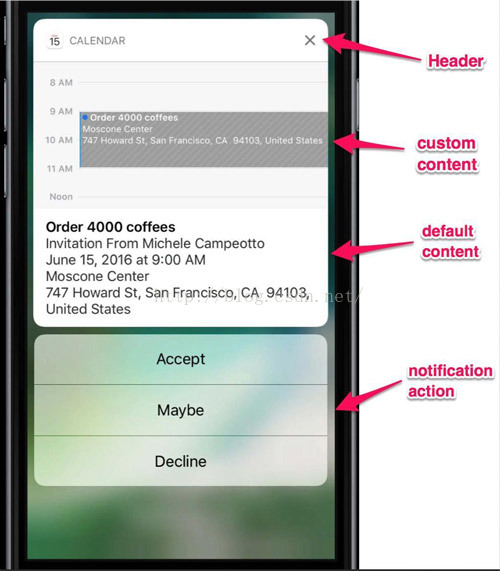
还有推送插件开发: 类似iOS tody widget插件开发
iOS10全新推送功能的实现的更多相关文章
- iOS10 关于推送-b
最近在研究iOS10关于推送的新特性, 相比之前确实做了很大的改变,总结起来主要是以下几点: 推送内容更加丰富,由之前的alert 到现在的title, subtitle, body 推送统一由tri ...
- 史上最全面的SignalR系列教程-3、SignalR 实现推送功能-集线器类实现方式
1.概述 通过前两篇 史上最全面的SignalR系列教程-1.认识SignalR 史上最全面的SignalR系列教程-2.SignalR 实现推送功能-永久连接类实现方式 文章对SignalR的介绍, ...
- Asp.NET MVC 使用 SignalR 实现推送功能二(Hubs 在线聊天室 获取保存用户信息)
简单介绍 关于SignalR的简单实用 请参考 Asp.NET MVC 使用 SignalR 实现推送功能一(Hubs 在线聊天室) 在上一篇中,我们只是介绍了简单的消息推送,今天我们来修改一下,实现 ...
- Android之使用个推实现三方应用的推送功能
PS:用了一下个推.感觉实现第三方应用的推送功能还是比较简单的.官方文档写的也非常的明确. 学习内容: 1.使用个推实现第三方应用的推送. 所有的配置我最后会给一个源代码,内部有相关的配置和 ...
- APP如何实现推送功能
一.推送功能的集成 (1)在Umeng开发者中心,申请新应用,开通推送功能.此时需要上传开发推送证书和生产推送证书的p12文件. 申请证书的流程如下: >>1 创建开发推送证书 >& ...
- Asp.NET MVC 中使用 SignalR 实现推送功能
一,简介Signal 是微软支持的一个运行在 Dot NET 平台上的 html websocket 框架.它出现的主要目的是实现服务器主动推送(Push)消息到客户端页面,这样客户端就不必重新发送请 ...
- 在 Asp.NET MVC 中使用 SignalR 实现推送功能
一,简介Signal 是微软支持的一个运行在 Dot NET 平台上的 html websocket 框架.它出现的主要目的是实现服务器主动推送(Push)消息到客户端页面,这样客户端就不必重新发送请 ...
- 实现推送功能APP端需要完成的工作
推送功能简介 实现推送的流程如下: 从APP注册推送功能,到APNS服务器发送推送消息给设备,有五个步骤. 一旦推送注册完成,应用自身的服务器以provider的身份提供推送. APP端实现 在代码方 ...
- 使用【百度云推送】第三方SDK实现推送功能具体解释
之前介绍过怎样使用shareSDK实现新浪微博分享功能,今天介绍怎样使用百度云推送SDK实现Android手机后台推送功能. 执行效果例如以下 第一步,假设使用百度的SDK,当然要先成为百度的开发人员 ...
随机推荐
- 从使用到原理学习Java线程池
线程池的技术背景 在面向对象编程中,创建和销毁对象是很费时间的,因为创建一个对象要获取内存资源或者其它更多资源.在Java中更是如此,虚拟机将试图跟踪每一个对象,以便能够在对象销毁后进行垃圾回收. 所 ...
- MySQL 主从架构配置详解
无论是哪一种数据库,数据的安全都是至关重要的,因此熟练掌握数据库的安全备份功能,是作为开发人员,特别是后端开发人员的一项必备技能.MySQL 数据库内建的复制功能,可以帮助我们对数据进行异地备份,读写 ...
- 第二百六十天 how can I 坚持
晚上去看了个电影,<万万没想到>,挺好看的,豆瓣评分不高.网络啊. 互联网会让聪明的人越来越聪明. 明天去看寻龙诀了. 懒惰会生根发芽,哈哈. 睡觉了.
- display:none;与visibility:hidden;的区别
visibility:隐藏对应的元素但不挤占该元素原来的空间.display:隐藏对应的元素并且挤占该元素原来的空间. 下面来看visibility和dispaly的一些参数 visibility用来 ...
- WinAPI: FindWindow、FindWindowEx - 查找窗口
FindWindow( lpClassName, {窗口的类名} lpWindowName: PChar {窗口的标题} ): HWND; {返回窗口的 ...
- [转]Oracle关于null的处理
转至:http://www.2cto.com/database/201209/157606.html 关于空值null的排序问题 Oracle排序中NULL值处理的五种常用方法: 1.缺省O ...
- TypeScript学习笔记(二):基本数据类型及数据转换
数据类型 我们来看看TypeScript中的基本数据类型都有哪些. boolean 布尔值,支持true和false. var isDone: boolean = false; 默认为undefine ...
- C#学习笔记(十二):正则表达式
Regex 正则表达式的类,我们可以通过该类来使用正则表达式. 比如下面我们使用Regex来判断输入的字符串是否符合指定的格式: using System; using System.Text.Reg ...
- 改变Oracle数据库连接端口
Oracle数据库默认数据库监听与连接端口是1521, 但是有时候项目中需要更改默认端口 这样做很多时候客户要求,基于安全考虑. 以Oracle 11g 为例, 更改Listener的端口大致 需要以 ...
- C++中void型指针
问题由来: PX_FORCE_INLINE void* operator new(size_t size, const char* handle, const char * filename, int ...