
iOS之文本属性Attributes的使用
1.NSKernAttributeName: @10 调整字句 kerning 字句调整
2.NSFontAttributeName : [UIFont systemFontOfSize:_fontSize] 设置字体
3.NSForegroundColorAttributeName :[UIColor redColor] 设置文字颜色
4.NSParagraphStyleAttributeName : paragraph 设置段落样式
5.NSMutableParagraphStyle *paragraph = [[NSMutableParagraphStyle alloc] init];
paragraph.alignment = NSTextAlignmentCenter;
6.NSBackgroundColorAttributeName: [UIColor blackColor] 设置背景颜色
7.NSStrokeColorAttributeName设置文字描边颜色,需要和NSStrokeWidthAttributeName设置描边宽度,这样就能使文字空心.
NSStrokeWidthAttributeName这个属性所对应的值是一个 NSNumber 对象(小数)。该值改变描边宽度(相对于字体size 的百分比)。默认为 0,即不改变。正数只改变描边宽度。负数同时改变文字的描边和填充宽度。例如,对于常见的空心字,这个值通常为3.0。
同时设置了空心的两个属性,并且NSStrokeWidthAttributeName属性设置为整数,文字前景色就无效果了

效果:


效果:

8. NSStrikethroughStyleAttributeName 添加删除线,strikethrough删除线

效果:

9. NSUnderlineStyleAttributeName 添加下划线

效果:

10. NSShadowAttributeName 设置阴影,单独设置不好使,必须和其他属性搭配才好使。
和这三个任一个都好使,NSVerticalGlyphFormAttributeName,NSObliquenessAttributeName,NSExpansionAttributeName
11.NSVerticalGlyphFormAttributeName
该属性所对应的值是一个 NSNumber 对象(整数)。0 表示横排文本。1 表示竖排文本。在 iOS 中,总是使用横排文本,0 以外的值都未定义。

效果:

12. NSObliquenessAttributeName设置字体倾斜。Skew 斜

效果:

13. NSExpansionAttributeName 设置文本扁平化

效果:

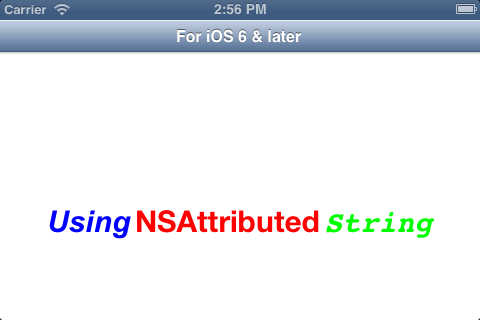
在项目开发中,我们经常会遇到在这样一种情形:在一个UILabel 使用不同的颜色或不同的字体来体现字符串,在iOS 6 以后我们可以很轻松的实现这一点,官方的API 为我们提供了UILabel类的attributedText, 使用不同颜色和不同字体的字符串,我们可以使用NSAttributedText 和 NSMutableAttributedText 类来实现。
现实代码:
.h 文件
1 |
@interface ViewController : UIViewController |
2 |
@property (nonatomic, strong) IBOutlet UILabel *attrLabel; |
3 |
- (IBAction)next:(id)sender; |
4 |
@end |
.m文件 在viewDidLoad方法中添加以下代码:
1 |
self.title = @"For iOS 6 & later"; |
2 |
NSMutableAttributedString *str = [[NSMutableAttributedString alloc] initWithString:@"Using NSAttributed String"]; |
3 |
[str addAttribute:NSForegroundColorAttributeName value:[UIColor blueColor] range:NSMakeRange(0,5)]; |
4 |
[str addAttribute:NSForegroundColorAttributeName value:[UIColor redColor] range:NSMakeRange(6,12)]; |
5 |
[str addAttribute:NSForegroundColorAttributeName value:[UIColor greenColor] range:NSMakeRange(19,6)]; |
6 |
[str addAttribute:NSFontAttributeName value:[UIFont fontWithName:@"Arial-BoldItalicMT"size:30.0] range:NSMakeRange(0, 5)]; |
7 |
[str addAttribute:NSFontAttributeName value:[UIFont fontWithName:@"HelveticaNeue-Bold"size:30.0] range:NSMakeRange(6, 12)]; |
8 |
[str addAttribute:NSFontAttributeName value:[UIFont fontWithName:@"Courier-BoldOblique"size:30.0] range:NSMakeRange(19, 6)]; |
9 |
attrLabel.attributedText = str; |
效果图:
如果想在iOS6.0以前版本实现这个效果,需要使用到一个第三方库TTTAttributedLabel,同时还有导入CoreText.frame框架.
iOS之文本属性Attributes的使用的更多相关文章
- iOS基础 - 文本属性Attributes
NSKernAttributeName: 调整字句 kerning 字句调整 NSFontAttributeName : [UIFont systemFontOfSize:_fontSize] 设置字 ...
- iOS中文本属性Attributes
NSFontAttributeName //设置字体大小 NSParagraphStyleAttributeName //设置段落格式 NSForegroundColorAttributeName / ...
- 给iOS开发新手送点福利,简述文本属性Attributes的用法
给iOS开发新手送点福利,简述文本属性Attributes的用法 文本属性Attributes 1.NSKernAttributeName: @10 调整字句 kerning 字句调整 2.NSF ...
- IOS开发UI基础文本属性Attributes
文本属性Attributes 1.NSKernAttributeName: @10 调整字句 kerning 字句调整 2.NSFontAttributeName : [UIFont systemFo ...
- iOS- 详解文本属性Attributes(转)
iOS- 详解文本属性Attributes 1.NSKernAttributeName: @10 调整字句 kerning 字句调整 2.NSFontAttributeName : [UIFont s ...
- zencart批量插入TEXT文本属性attributes
有时候上传的产品与多级分类比较多,在后台添加文本属性如Name,Number等需要顾客自定义的内容就比较费神了.现在只需将以下代码保存为insert_attributes.php,变量$options ...
- 文本属性Attributes
1.NSKernAttributeName: @10 调整字句 kerning 字句调整 2.NSFontAttributeName : [UIFont systemFontOfSize:_fontS ...
- iOS- 详解文本属性Attributes
1.NSKernAttributeName: @10 调整字句 kerning 字句调整 2.NSFontAttributeName : [UIFont systemFontOfSize:_fontS ...
- 【转】iOS- 详解文本属性Attributes
原文: http://www.cnblogs.com/qingche/p/3574995.html?utm_source=tuicool 1.NSKernAttributeName: @10 调整字句 ...
随机推荐
- HDU 3007 Buried memory & ZOJ 1450 Minimal Circle
题意:给出n个点,求最小包围圆. 解法:这两天一直在学这个神奇的随机增量算法……看了这个http://soft.cs.tsinghua.edu.cn/blog/?q=node/1066之后自己写了好久 ...
- 单点登录技术:微软Passport单点登录协议和自由联盟规范
随着互联网络应用的普及,越来越多的人开始使用互联网上提供的服务.然而目前提供服务的网站大多采用用户名.口令的方式来识别用户身份,这使得用户需要经常性的输入自己的用户名.口令.显然这种认证方式存在着弊端 ...
- UVA 10462 Is There A Second Way Left? 次小生成树
模板题 #include <iostream> #include <algorithm> #include <cstdio> #include <cstdli ...
- Oracle函数:求两个数的最小公倍数
CREATE or replace function GetGbs(num1 NUMBER,num2 NUMBER) RETURN NUMBER is resultnum NUMBER; maxnum ...
- Velocity - 单例还是非单例
在Velocity1.2版本以后,开发者现在又两种选择来使用Velocity引擎,单例模型(singleton model)和单独实例模型(separate instance model).这是相同的 ...
- NOR型flash与NAND型flash的区别
1) 闪存芯片读写的基本单位不同 应用程序对NOR芯片操作以“字”为基本单位.为了方便对大容量NOR闪存的管理,通常将NOR闪存分成大小为128KB或者64KB的逻辑块,有时候块内还分成扇区.读写时 ...
- 【转载】extern "C"的用法解析(原博主就是抄百度百科的,不如另外一篇好)
[说明]文章转载自Rollen Holt 的文章 http://www.cnblogs.com/rollenholt/archive/2012/03/20/2409046.html --------- ...
- HW6.27
import java.util.Scanner; import java.util.Arrays; public class Solution { public static void main(S ...
- adb 启动失败的原因和修改adb端口号
在我们使用Android Studio的时候,有时候就会出现adb打开失败或者启动不了的情况. adb 启动失败的原因:有其他程序占用了adb默认启动的端口号(像我就遇到过,每次只要提前启动了酷狗音乐 ...
- 浅谈OC运行时(RunTime)
常说OC是一门动态语言,这使得OC开发可以变得相当灵活,但是归根结底OC还是一种编译型的语言,其具有一定的动态性,但是其动态特性也比不上JavaScript这种解释型的语言.OC的动态性主要体现在这个 ...