
WPF DataGrid分组和排序
之前一直用的Dev的GridControl,控件自带分组排序啥的。今天试了下在wpf自带的Datagrid控件上实现分组和排序。
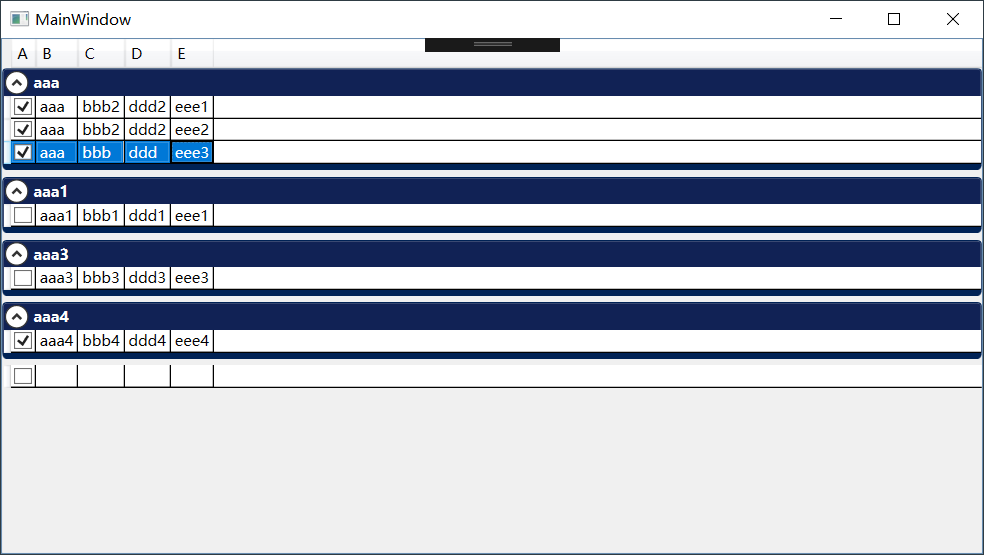
Datagrid上实现这些功能主要用到CollectionViewSource。CollectionViewSource有对数据进行分组和排序过滤的功能。
        <CollectionViewSource x:Key="cvsList" Source="{Binding List}"

                       >

            <CollectionViewSource.GroupDescriptions>

                <PropertyGroupDescription PropertyName="B"/>

            </CollectionViewSource.GroupDescriptions>

            <CollectionViewSource.SortDescriptions>

                <scm:SortDescription PropertyName="B"  Direction="Descending"/>

                <scm:SortDescription PropertyName="E"/>

            </CollectionViewSource.SortDescriptions>

        </CollectionViewSource>
将数据源绑定到CollectionViewSource,并设置分组列和排序列。倒序可以设置Direction属性为Descending
<DataGrid ItemsSource="{Binding Source={StaticResource cvsList}}" />
将CollectionViewSource绑定到DataGrid,并设置DataGrid的GroupStyle,分组功能就可以使用了。
下面是我的例子
<Window x:Class="DataGridTempalte.MainWindow"

        xmlns="http://schemas.microsoft.com/winfx/2006/xaml/presentation"

        xmlns:x="http://schemas.microsoft.com/winfx/2006/xaml"

        xmlns:d="http://schemas.microsoft.com/expression/blend/2008"

        xmlns:mc="http://schemas.openxmlformats.org/markup-compatibility/2006"

        xmlns:local="clr-namespace:DataGridTempalte"

      xmlns:scm="clr-namespace:System.ComponentModel;assembly=WindowsBase"

        mc:Ignorable="d"

        Title="MainWindow" Height="450" Width="800">

    <Window.Resources>

        <CollectionViewSource x:Key="cvsList" Source="{Binding List}"

                       >

            <CollectionViewSource.GroupDescriptions>

                <PropertyGroupDescription PropertyName="B"/>

            </CollectionViewSource.GroupDescriptions>

            <CollectionViewSource.SortDescriptions>

                <scm:SortDescription PropertyName="B" Direction="Descending"/>

                <scm:SortDescription PropertyName="E"/>

            </CollectionViewSource.SortDescriptions>

        </CollectionViewSource>

    </Window.Resources>

    <Grid>

        <DataGrid ItemsSource="{Binding Source={StaticResource cvsList}}" AutoGenerateColumns="False">

            <DataGrid.GroupStyle>

                <GroupStyle>

                    <GroupStyle.ContainerStyle>

                        <Style TargetType="{x:Type GroupItem}">

                            <Setter Property="Margin" Value="0,0,0,5"/>

                            <Setter Property="Template">

                                <Setter.Value>

                                    <ControlTemplate TargetType="{x:Type GroupItem}">

                                        <Expander IsExpanded="True" Background="#FF112255" BorderBrush="#FF002255"   BorderThickness="1,1,1,5"

                                                  >

                                            <Expander.Header>

                                                <DockPanel>

                                                    <TextBlock  Foreground="White" FontWeight="Bold" Text="{Binding Path=Name}"/>

                                                </DockPanel>

                                            </Expander.Header>

                                            <Expander.Content>

                                                <ItemsPresenter />

                                            </Expander.Content>

                                        </Expander>

                                    </ControlTemplate>

                                </Setter.Value>

                            </Setter>

                        </Style>

                    </GroupStyle.ContainerStyle>

                </GroupStyle>

            </DataGrid.GroupStyle>

            <DataGrid.Columns>

                <DataGridCheckBoxColumn Header="A" Binding="{Binding A}"/>

                <DataGridTextColumn  Header="B" Binding="{Binding B}"/>

                <DataGridTextColumn  Header="C" Binding="{Binding C}"/>

                <DataGridTextColumn  Header="D" Binding="{Binding D}"/>

                <DataGridTextColumn  Header="E" Binding="{Binding E}"/>

            </DataGrid.Columns>

        </DataGrid>

    </Grid>

</Window>
WPF DataGrid分组和排序的更多相关文章
- C# WPF DataGrid 分组(Group)
原文:C# WPF DataGrid 分组(Group) 效果如图,每个列的名字可以自定义.我随便用了”File”和”Attachment Name”. 在Window的Resources里面设置S ...
- WPF DataGrid 服务端排序
转载:http://www.kecq.com/artic-10322303.html 以前做了一个数据客户端,不过是直接连数据库的,现在认为这种方式不太好,于是改成服务端RESTful API+客户端 ...
- WPF DataGrid 分组
public ListCollectionView collection; collection = new ListCollectionView(obj.empData); collection.G ...
- WPF DataGrid某列使用多绑定后该列排序失效,列上加入 SortMemberPath 设置即可.
WPF DataGrid某列使用多绑定后该列排序失效 2011-07-14 10:59hdongq | 浏览 1031 次 悬赏:20 在wpf的datagrid中某一列使用了多绑定,但是该列排序失 ...
- WPF DataGrid常用属性记录
WPF DataGrid常用属性记录 组件常用方法: BeginEdit:使DataGrid进入编辑状态. CancelEdit:取消DataGrid的编辑状态. CollapseRowGroup:闭 ...
- WPF DataGrid分页功能实现代码 修改原作者不能实现的部分
这两天需要给Datagrid加个分页,查找了一些相关的文章,发现有一个写了一个控件比较好,地址是 http://blog.csdn.net/zdw_wym/article/details/822189 ...
- WPF DataGrid自定义样式
微软的WPF DataGrid中有很多的属性和样式,你可以调整,以寻找合适的(如果你是一名设计师).下面,找到我的小抄造型的网格.它不是100%全面,但它可以让你走得很远,有一些非常有用的技巧和陷阱. ...
- WPF DataGrid 控件的运用
WPF DataGrid 控件的运用 运行环境:Window7 64bit,.NetFramework4.61,C# 6.0: 编者:乌龙哈里 2017-02-23 参考: King Cobra 博客 ...
- WPF DATAGRID - COMMITTING CHANGES CELL-BY-CELL
In my recent codeproject article on the DataGrid I described a number of techniques for handling the ...
随机推荐
- win7 64位远程连接oracle11g64位
1.首先下载即时客户端 instantclient-basic-windows.x64-11.2.0.4.0,下载地址:http://www.oracle.com/technetwork/topics ...
- pygame小记
pygame.display.set_mode(x, y)设置显示窗口大小pygame.sprite.Sprite方法中有image, rect, speed等参数 其中image 可以通过 pyga ...
- JavaScript函数和内置对象
一.函数 function f1(){ console.log("666"); } f1(); //调用函数 1.普通函数定义 function f1(a,b){ console. ...
- Codeforces 1093 简要题解
文章目录 A题 B题 C题 D题 E题 F题 G题 传送门 GGG题手速慢了没有在比赛的时候码出来233,FFF题居然没想出来? 五道题滚粗. 先谈谈其他几道题. A题 传送门 不小心看错题 直接看奇 ...
- react native的注释
在react native 中是这样写注释的: {/*这里是注释*/}
- boost--线程同步
1.互斥锁(互斥量) mutex是独占式的互斥锁.timed_mutex增加了超时功能. 成员函数:lock()用于锁定,try_lock()为非阻塞版本的锁定,unlock()用于解锁.timed_ ...
- Solidity合约:玉米生产溯源
实现思路: 首先用地址与每个结构进行映射,将关键信息储存在结构体中:或者将关键信息在外部通过json储存,内部储存对应的hash值: 使用issue函数表示:玉米地中收获足够数量的玉米并进行记录: 使 ...
- UVa 11762 Race to 1 (数学期望 + 记忆化搜索)
题意:给定一个整数 n ,然后你要把它变成 1,变换操作就是随机从小于等于 n 的素数中选一个p,如果这个数是 n 的约数,那么就可以变成 n/p,否则还是本身,问你把它变成 1 的数学期望是多少. ...
- python中的取整
处理数据时,经常会遇到取整的问题,现总结如下 1,向下取整 int() >>>a = 3.1 >>>b = 3.7 >>>int(a) 3 > ...
- Android 全局搜索条写成自定义控件-曹永思
图文: 1.Android 自定义控件的布局文件 2.编写Android 自定义控件的要处理的逻辑代码(曹永思) 3.在调用自定义控件的 Activity的布局文件中调用Android 称之为控件,控 ...