
WPF DataGrid分组和排序
之前一直用的Dev的GridControl,控件自带分组排序啥的。今天试了下在wpf自带的Datagrid控件上实现分组和排序。
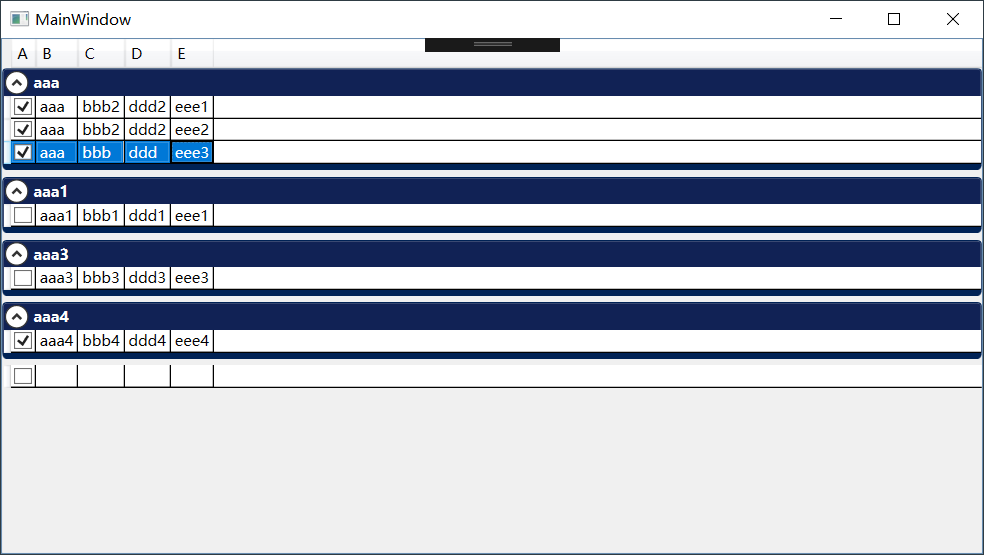
Datagrid上实现这些功能主要用到CollectionViewSource。CollectionViewSource有对数据进行分组和排序过滤的功能。
        <CollectionViewSource x:Key="cvsList" Source="{Binding List}"

                       >

            <CollectionViewSource.GroupDescriptions>

                <PropertyGroupDescription PropertyName="B"/>

            </CollectionViewSource.GroupDescriptions>

            <CollectionViewSource.SortDescriptions>

                <scm:SortDescription PropertyName="B"  Direction="Descending"/>

                <scm:SortDescription PropertyName="E"/>

            </CollectionViewSource.SortDescriptions>

        </CollectionViewSource>
将数据源绑定到CollectionViewSource,并设置分组列和排序列。倒序可以设置Direction属性为Descending
<DataGrid ItemsSource="{Binding Source={StaticResource cvsList}}" />
将CollectionViewSource绑定到DataGrid,并设置DataGrid的GroupStyle,分组功能就可以使用了。
下面是我的例子
<Window x:Class="DataGridTempalte.MainWindow"

        xmlns="http://schemas.microsoft.com/winfx/2006/xaml/presentation"

        xmlns:x="http://schemas.microsoft.com/winfx/2006/xaml"

        xmlns:d="http://schemas.microsoft.com/expression/blend/2008"

        xmlns:mc="http://schemas.openxmlformats.org/markup-compatibility/2006"

        xmlns:local="clr-namespace:DataGridTempalte"

      xmlns:scm="clr-namespace:System.ComponentModel;assembly=WindowsBase"

        mc:Ignorable="d"

        Title="MainWindow" Height="450" Width="800">

    <Window.Resources>

        <CollectionViewSource x:Key="cvsList" Source="{Binding List}"

                       >

            <CollectionViewSource.GroupDescriptions>

                <PropertyGroupDescription PropertyName="B"/>

            </CollectionViewSource.GroupDescriptions>

            <CollectionViewSource.SortDescriptions>

                <scm:SortDescription PropertyName="B" Direction="Descending"/>

                <scm:SortDescription PropertyName="E"/>

            </CollectionViewSource.SortDescriptions>

        </CollectionViewSource>

    </Window.Resources>

    <Grid>

        <DataGrid ItemsSource="{Binding Source={StaticResource cvsList}}" AutoGenerateColumns="False">

            <DataGrid.GroupStyle>

                <GroupStyle>

                    <GroupStyle.ContainerStyle>

                        <Style TargetType="{x:Type GroupItem}">

                            <Setter Property="Margin" Value="0,0,0,5"/>

                            <Setter Property="Template">

                                <Setter.Value>

                                    <ControlTemplate TargetType="{x:Type GroupItem}">

                                        <Expander IsExpanded="True" Background="#FF112255" BorderBrush="#FF002255"   BorderThickness="1,1,1,5"

                                                  >

                                            <Expander.Header>

                                                <DockPanel>

                                                    <TextBlock  Foreground="White" FontWeight="Bold" Text="{Binding Path=Name}"/>

                                                </DockPanel>

                                            </Expander.Header>

                                            <Expander.Content>

                                                <ItemsPresenter />

                                            </Expander.Content>

                                        </Expander>

                                    </ControlTemplate>

                                </Setter.Value>

                            </Setter>

                        </Style>

                    </GroupStyle.ContainerStyle>

                </GroupStyle>

            </DataGrid.GroupStyle>

            <DataGrid.Columns>

                <DataGridCheckBoxColumn Header="A" Binding="{Binding A}"/>

                <DataGridTextColumn  Header="B" Binding="{Binding B}"/>

                <DataGridTextColumn  Header="C" Binding="{Binding C}"/>

                <DataGridTextColumn  Header="D" Binding="{Binding D}"/>

                <DataGridTextColumn  Header="E" Binding="{Binding E}"/>

            </DataGrid.Columns>

        </DataGrid>

    </Grid>

</Window>
WPF DataGrid分组和排序的更多相关文章
- C# WPF DataGrid 分组(Group)
原文:C# WPF DataGrid 分组(Group) 效果如图,每个列的名字可以自定义.我随便用了”File”和”Attachment Name”. 在Window的Resources里面设置S ...
- WPF DataGrid 服务端排序
转载:http://www.kecq.com/artic-10322303.html 以前做了一个数据客户端,不过是直接连数据库的,现在认为这种方式不太好,于是改成服务端RESTful API+客户端 ...
- WPF DataGrid 分组
public ListCollectionView collection; collection = new ListCollectionView(obj.empData); collection.G ...
- WPF DataGrid某列使用多绑定后该列排序失效,列上加入 SortMemberPath 设置即可.
WPF DataGrid某列使用多绑定后该列排序失效 2011-07-14 10:59hdongq | 浏览 1031 次 悬赏:20 在wpf的datagrid中某一列使用了多绑定,但是该列排序失 ...
- WPF DataGrid常用属性记录
WPF DataGrid常用属性记录 组件常用方法: BeginEdit:使DataGrid进入编辑状态. CancelEdit:取消DataGrid的编辑状态. CollapseRowGroup:闭 ...
- WPF DataGrid分页功能实现代码 修改原作者不能实现的部分
这两天需要给Datagrid加个分页,查找了一些相关的文章,发现有一个写了一个控件比较好,地址是 http://blog.csdn.net/zdw_wym/article/details/822189 ...
- WPF DataGrid自定义样式
微软的WPF DataGrid中有很多的属性和样式,你可以调整,以寻找合适的(如果你是一名设计师).下面,找到我的小抄造型的网格.它不是100%全面,但它可以让你走得很远,有一些非常有用的技巧和陷阱. ...
- WPF DataGrid 控件的运用
WPF DataGrid 控件的运用 运行环境:Window7 64bit,.NetFramework4.61,C# 6.0: 编者:乌龙哈里 2017-02-23 参考: King Cobra 博客 ...
- WPF DATAGRID - COMMITTING CHANGES CELL-BY-CELL
In my recent codeproject article on the DataGrid I described a number of techniques for handling the ...
随机推荐
- oracle 视图带参数
-- create or replace package p_view_param is --参数一 function set_ID(num number) return number; functi ...
- IOS初级:UIwindow
AppDelegate.h @property (strong, nonatomic) UIWindow *window; AppDelegate.m - (BOOL)application:(UIA ...
- activiti如何获取当前节点以及下一步路径或节点(转)
ACTIVITI相对于JBPM来说,比较年轻,用的人少,中文方面的资料更少,我根据网上到处找得资料以及看官方文档总结出来了代码,非常不容易啊.废话不多说,直接上代码吧: 首先是根据流程ID获取当前任务 ...
- Activiti任务认领
Activiti任务认领 TaskService taskService; taskService.setAssignee(String taskId, String userId);taskServ ...
- 使用vmware安装ubuntu不能上网
桌面版的话,进入桌面后还可以配置,服务版,我是在安装过程中提示的网络配置时候按照下面的方法手动配置的 安装虚拟机时候要安装网络服务,有的虚拟机在安装过程中可能已经安装好了,主机保持VMware NAT ...
- Mac下Maven安装与配置
Mac下Maven安装与配置 下载maven http://maven.apache.org/download.cgi main->download菜单下的Files 下载后解压在Documen ...
- docker使用自定义镜像zabbix服务
一.关闭firewall,永久关闭,使用iptables防火墙 systemctl stop firewalld.service #停止firewall systemctl disable firew ...
- rails 新建user的phonenumber字段
1.新建字段 //rails g migration add_字段名_to_表名 字段名:字段类型 rails g migration add_title_to_contents title:stri ...
- ssh 常用命令
1.复制SSH密钥到目标主机,开启无密码SSH登录 ssh-copy-id user@host 如果还没有密钥,请使用ssh-keygen命令生成. 2.从某主机的80端口开启到本地主机2001端口的 ...
- ThinkPHP redirect 传参
重定向带参 $this->redirect('pay/under_line_success',array('order_id'=>$stuInfo),5,'页面跳转中….'); 第一个参数 ...