
OpenStack API部分高可用配置(一)
一、概况与原理
SHAPE \* MERGEFORMAT
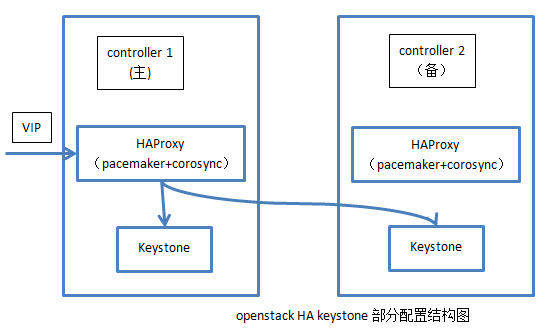
1)所需要的配置组件有:pacemaker+corosync+HAProxy
2)主要原理:HAProxy作为负载均衡器,将对openstack api服务的请求分发到两个镜像的控制节点上,由于openstack api服务是无状态的服务,所以不存在数据同步的问题。具体为在pacemaker中配置一个VIP,HAProxy负责监听这个VIP,将对这个VIP的请求分发到两台控制节点上,同时HAProxy本身作为pacemaker的资源实现高可用性。另外,需在openstack中修改API服务的endpoint为VIP,同时对于服务的调用地址改为VIP。
3) 目前只配置了keystone部分,其他部分情况类似。
二、pacemaker+corosync+crmsh安装
一、前提条件
node1:
(1)各节点之间主机名互相解析
uname -n
>node1.test.com
vim /etc/hosts
>127.0.0.1 localhost localhost.localdomain localhost4 localhost4.localdomain4
>::1 localhost localhost.localdomain localhost6 localhost6.localdomain6
>192.168.18.201 node1.test.com node1
>192.168.18.202 node2.test.com node2
ping node1
ping node2
(2).各节点之间时间同步
ntpdate 210.72.145.44
(3).各节点之间ssh互信
ssh-keygen -t rsa -f ~/.ssh/id_rsa -P ''
ssh-copy-id -i .ssh/id_rsa.pub root@node2.test.com
node2:
(1).各节点之间主机名互相解析
uname -n
>node2.test.com
vim /etc/hosts
>127.0.0.1 localhost localhost.localdomain localhost4 localhost4.localdomain4
>::1 localhost localhost.localdomain localhost6 localhost6.localdomain6
>192.168.18.201 node1.test.com node1
>192.168.18.202 node2.test.com node2
ping node1
ping node2
(2).各节点之间时间同步
ntpdate 210.72.145.44
(3).各节点之间ssh互信
ssh-keygen -t rsa -f ~/.ssh/id_rsa -P ''
ssh-copy-id -i .ssh/id_rsa.pub root@node1.test.com
配置yum源(EPEL源)
node1:
wget http://download.fedoraproject.org/pub/epel/5/x86_64/epel-release-5-4.noarch.rpm
rpm -ivh epel-release-5-4.noarch.rpm
rpm --import /etc/pki/rpm-gpg/RPM-GPG-KEY-CentOS-5
yum list
node2:
wget http://download.fedoraproject.org/pub/epel/5/x86_64/epel-release-5-4.noarch.rpm
rpm -ivh epel-release-5-4.noarch.rpm
rpm --import /etc/pki/rpm-gpg/RPM-GPG-KEY-CentOS-5
yum list
关闭防火墙与SELinux
node1:
service iptables stop
vim /etc/selinux/config
># This file controls the state of SELinux on the system.
># SELINUX= can take one of these three values:
># enforcing - SELinux security policy is enforced.
># permissive - SELinux prints warnings instead of enforcing.
># disabled - SELinux is fully disabled.
>SELINUX=disabled
># SELINUXTYPE= type of policy in use. Possible values are:
># targeted - Only targeted network daemons are protected.
># strict - Full SELinux protection.
>SELINUXTYPE=targeted
node2:
service iptables stop
vim /etc/selinux/config
>SELINUX=disabled
>SELINUXTYPE=targeted
二、安装pacemaker+corosync+crmsh
node1+node2:
安装pacemaker+corosync
yum install -y corosync*
yum install -y pacemaker*
安装crmsh
1)crmsh官方网站
https://savannah.nongnu.org/forum/forum.php?forum_id=7672
2)crmsh下载地址
http://download.opensuse.org/repositories/network:/ha-clustering:/Stable/
3)安装crmsh【如果缺少依赖包再安装依赖包】
rpm -ivh crmsh-1.2.6-0.rc2.2.1.x86_64.rpm
4)验证配置:
crm
三、Corosync 详细配置
node1:
修改配置文件
vim /etc/corosync/corosync.conf
>>>
totem {
version: 2
# Time (in ms) to wait for a token 1
token: 10000
# How many token retransmits before forming a new
# configuration
token_retransmits_before_loss_const: 10
# Turn off the virtual synchrony filter
vsftype: none
# Enable encryption 2
secauth: on
# How many threads to use for encryption/decryption
threads: 0
# This specifies the redundant ring protocol, which may be
# none, active, or passive. 3
rrp_mode: active
# The following is a two-ring multicast configuration. 4
interface {
ringnumber: 1
bindnetaddr: 10.0.42.0#心跳线网段
mcastaddr: 239.255.42.2
mcastport: 5405
}
}
amf {
mode: disabled
}
service {
# Load the Pacemaker Cluster Resource Manager 5
ver: 1
name: pacemaker
}
aisexec {
user: root
group: root
}
logging {
fileline: off
to_stderr: yes
to_logfile: yes
to_syslog: yes
logfile: /var/log/cluster/corosync.log #日志位置
syslog_facility: daemon
debug: off
timestamp: on
logger_subsys {
subsys: AMF
debug: off
tags: enter|leave|trace1|trace2|trace3|trace4|trace6
}
}
>>>
生成密钥文件
注:corosync生成key文件会默认调用/dev/random随机数设备,一旦系统中断的IRQS的随机数不够用,将会产生大量的等待时间,因此,为了节约时间,我们在生成key之前讲random替换成urandom,以便节约时间。
mv /dev/{random,random.bak}
ln -s /dev/urandom /dev/random
corosync-keygen
查看生成的key文件
ll
>总用量 24
>-r-------- 1 root root 128 8月 13 14:16 authkey
>-rw-r--r-- 1 root root 521 8月 13 11:11 corosync.conf
>-rw-r--r-- 1 root root 445 5月 15 05:09 corosync.conf.example
>-rw-r--r-- 1 root root 1084 5月 15 05:09 corosync.conf.example.udpu
>drwxr-xr-x 2 root root 4096 5月 15 05:09 service.d
>drwxr-xr-x 2 root root 4096 5月 15 05:09 uidgid.d
将key文件authkey与配置文件corosync.conf复制到node2上
scp -p authkey corosync.conf node2:/etc/corosync/
检查配置
node1+node2:
corosync-cfgtool -s
启动corosync
node1+node2:
service corosync start
四、pacemaker详细配置
启动pacemaker
node1+node2:
service pacemaker start
node1 or node2:
配置集群基本属性
crm configure
>property no-quorum-policy="ignore" \
> pe-warn-series-max="1000" \
> pe-input-series-max="1000" \
> pe-error-series-max="1000" \
> cluster-recheck-interval="5min"
【具体资源的配置另当别论】
OpenStack API部分高可用配置(一)的更多相关文章
- OpenStack API部分高可用配置(二)
一.安装与配置HAProxy 1.调整内核参数,允许绑定VIP: vim /etc/sysctl.conf [内容] net.ipv4.ip_nonlocal_bind=1 sysctl -p 2.安 ...
- OpenStack中MySQL高可用配置
采用Heartbeat+DRBD+mysql高可用方案,配置两个节点的高可用集群 l 配置各节点互相解析 gb07 gb06 l 配置各节点时间同步 gb07 [root@gb07 ~]# ntp ...
- Spring Cloud之踩坑01 -- Eureka高可用配置
转载:https://blog.csdn.net/dear_Alice_moon/article/details/79373955 问题描述: 在进行Eureka高可用配置时,控制台一直出现“.... ...
- springCloud 之 Eureka注册中心高可用配置
springCloud的eureka高可用配置方案思路是:几个服务中心之间相互注册,比如两个注册中心,A注册到B上,B注册到A上,如果是三个注册中心则是:A注册到BC上,B注册到AC上,C注册到AB上 ...
- ES数据库高可用配置
ES高可用集群部署 1.ES高可用架构图 2.创建ES用户组 1.Elasticsearch不能在 root 用户下启动,我们需要在三台机器上分创建一个普通用户# 创建elastic用户 userad ...
- MariaDB+Keepalived双主高可用配置MySQL-HA
利用keepalived构建高可用MySQL-HA,保证两台MySQL数据的一致性,然后用keepalived实现虚拟VIP,通过keepalived自带的服务监控功能来实现MySQL故障时自动切换. ...
- ResourceManager高可用配置
ResourceManager高可用配置 1. yarn-site.xml配置 <property> <name>yarn.resourcemanager.cluster-id ...
- Redis Sentinel实现高可用配置
一般情况下yum安装redis的启动目录在:”/usr/sbin” :配置目录在”/etc/redis/”在其目录下会有默认的redis.conf和redis-sentinel.conf redis高 ...
- Flume 高可用配置案例+load balance负载均衡+ 案例:日志的采集及汇总
高可用配置案例 (一).failover故障转移 在完成单点的Flume NG搭建后,下面我们搭建一个高可用的Flume NG集群,架构图如下所示: (1)节点分配 Flume的Agent和Colle ...
随机推荐
- JQ_插件开发
在开发过很多 jQuery 插件以后,我慢慢的摸索出了一套开发jQuery插件比较标准的结构和模式.这样我就可以 copy & paste 大部分的代码结构,只要专注最主要的逻辑代码就行了. ...
- 【亲测有效】Win10家庭版Microsoft Edge页面出现乱码的两种解决方案及gpedit.msc命令无法使用的解决策略
昨天在爬取电影的时候生成的表单打开result.html时,发现页面出现如下乱码: 第一种方法: 上网找了半天,网上的解决方案是这样的: 1.Win + R输入gpedit.msc打开组策略编辑器; ...
- 【原】python3.7 无法pip安装提示ssl错误解决方案
问题 pip is configured with locations that require TLS/SSL, however the ssl module in Python is not av ...
- camscanner(扫描全能王)功能解析与复现
早就在用camscanner(扫描全能王)这个软件,感觉很不错. 主要功能: 1.页面截取校正 2.增强处理(灰度与颜色) 刚好最近工作与此相关,静心做点仿真,看看其中的操作原理,也做个demo玩玩. ...
- unity ray和line射线检测
RaycastHit 光线投射碰撞 Struct Structure used to get information back from a raycast. 用来获取从raycast函数中得到的信息 ...
- 剑指offer——滑动窗口的最大值
给定一个数组和滑动窗口的大小,找出所有滑动窗口里数值的最大值.例如,如果输入数组{2,3,4,2,6,2,5,1}及滑动窗口的大小3,那么一共存在6个滑动窗口,他们的最大值分别为{4,4,6,6,6, ...
- YQCB冲刺第二周第六天
今天的任务为界面的美化. 昨天的任务为实现由用户设置每月初始额度的功能. 暂未遇到问题. 站立会议 任务面板
- 使用SSH过程中遇到的几个问题及解决方案
一.HTTP Status 500 - org.springframework.orm.hibernate3.HibernateOptimisticLockingFailureException: B ...
- visual studio-2013之单元测试
安装个vs把一个寝室搞得欲仙欲死的,,已经安装好了vs2013,那些欲仙欲死的事就都不说了.开始我们的正式作业——单元测试. 要做单元测试前提有: 1.要有Unit Test Generator工具 ...
- week6:个人博客作业
这周主要是参与团队编程的讨论 团队编程中发现很多问题: 1,每个人共同空闲的时间不好找 就我组来说,我是考研,每天晚上都要去外面上课,有的人在进行大创,,也有的像我一样在整考研的东西,还有的进行其他, ...