
在IDEA中使用gradle配置打可执行jar包[可执行jar与其所依赖的jar分离]
下面是我的项目的build.gradle文件的所有内容,注意高亮部分是关键:

group 'com.xbs'

version '1.0-SNAPSHOT'

apply plugin: 'java'

apply plugin: 'idea'

sourceCompatibility = 1.8

ext {

    profile = System.getProperty("env") ?: "dev"

    println "[current profile]:" + profile

}

repositories {

    mavenCentral()

}

dependencies {

    compile group: 'org.postgresql', name: 'postgresql', version: '9.4-1201-jdbc41'

    mybatisGenerator 'org.mybatis.generator:mybatis-generator-core:1.3.5'

    mybatisGenerator 'mysql:mysql-connector-java:5.1.32'

    mybatisGenerator 'tk.mybatis:mapper:3.3.9'

    compile group: 'joda-time', name: 'joda-time', version:'2.5'

    compile group: 'org.apache.commons', name: 'commons-lang3', version:'3.3.2'

    compile group: 'org.apache.commons', name: 'commons-io', version:'1.3.2'

    compile group: 'commons-net', name: 'commons-net', version:'3.3'

    compile group: 'com.fasterxml.jackson.core', name: 'jackson-databind', version:'2.4.2'

    compile group: 'org.apache.httpcomponents', name: 'httpclient', version:'4.3.5'

    compile group: 'org.slf4j', name: 'slf4j-log4j12', version:'1.6.4'

    compile group: 'org.mybatis', name: 'mybatis', version:'3.2.8'

    compile group: 'org.mybatis', name: 'mybatis-spring', version:'1.2.2'

    compile group: 'com.github.miemiedev', name: 'mybatis-paginator', version:'1.2.15'

    compile group: 'com.github.pagehelper', name: 'pagehelper', version:'3.4.2'

    compile group: 'mysql', name: 'mysql-connector-java', version:'5.1.32'

    compile group: 'com.alibaba', name: 'druid', version:'1.0.9'

    compile group: 'org.springframework', name: 'spring-context', version:'4.1.3.RELEASE'

    compile group: 'org.springframework', name: 'spring-beans', version:'4.1.3.RELEASE'

    compile group: 'org.springframework', name: 'spring-webmvc', version:'4.1.3.RELEASE'

    compile group: 'org.springframework', name: 'spring-jdbc', version:'4.1.3.RELEASE'

    compile group: 'org.springframework', name: 'spring-aspects', version:'4.1.3.RELEASE'

    compile group: 'jstl', name: 'jstl', version:'1.2'

    compile group: 'commons-fileupload', name: 'commons-fileupload', version:'1.3.1'

    compile group: 'redis.clients', name: 'jedis', version:'2.7.2'

    compile group: 'org.apache.solr', name: 'solr-solrj', version:'4.10.3'

    compile group: 'com.alibaba', name: 'fastjson', version:'1.2.4'

    compile group: 'org.springframework.integration', name: 'spring-integration-kafka', version:'1.3.0.RELEASE'

    compile group: 'org.springframework.kafka', name: 'spring-kafka', version:'1.1.3.RELEASE'

    compile group: 'org.apache.kafka', name: 'kafka_2.10', version:'0.10.0.0'

    compile 'com.mashape.unirest:unirest-java:1.4.9'

    testCompile group: 'junit', name: 'junit', version:'4.12'

}

sourceSets {

    main {

        resources {

            srcDirs = ["src/main/resources", "env/$profile"]

        }

    }

}

jar {

    String someString = ''

    configurations.runtime.each {someString = someString + " lib//"+it.name}

    manifest {

        attributes 'Main-Class': 'com.xbs.AppMain'

        attributes 'Class-Path': someString

    }

}

//清除上次的编译过的文件

task clearPj(type:Delete){

    delete 'build','target'

}

task copyJar(type:Copy){

    from configurations.runtime

    into ('build/libs/lib')

}

//把JAR复制到目标目录

task release(type: Copy,dependsOn: [build,copyJar]) {

// from 'conf'

// into ('build/libs/eachend/conf') // 目标位置

}
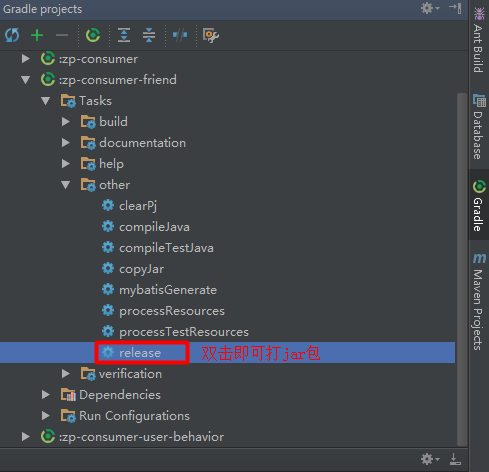
展开右侧的Gradle侧边栏,找到在other下可以看到clearPj,copyJar以及release,双击release即可打jar包(它默认会执行copyJar,就是把所有的第三方依赖包放到lib目录下):
如果看到控制台输出"BUILD SUCCESSFUL",说明打包成功:

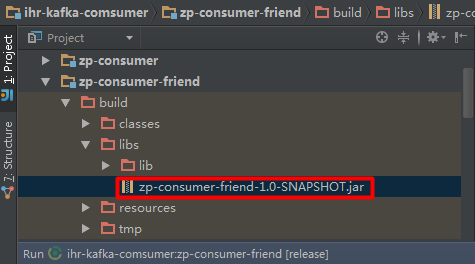
打好的jar默认放在项目中的build目录中:
打开jar包所在目录,可以使用反编译工具查看jar包中的目录结构和文件内容:

打开命令行窗口,使用java -jar命令来执行jar包:

在IDEA中使用gradle配置打可执行jar包[可执行jar与其所依赖的jar分离]的更多相关文章
- maven项目引入外部第三方jar包,引入、本地编译、第三方jar一起打到jar中、在linux机器中解决classnotfound(配置classpath),笔记整理。
文章目录 引用的第三方jar的目录结构(示例) 引入第三方jar进行dependency使项目内能import 本地编译 第三方jar一起打到jar中 在linux机器中解决classnotfound ...
- eclipse java项目中明明引入了jar包 为什么项目启动的时候不能找到jar包 项目中已经 引入了 com.branchitech.app 包 ,但时tomcat启动的时候还是报错? java.lang.ClassNotFoundException: com.branchitech.app.startup.AppStartupContextListener java.lang.ClassN
eclipse java项目中明明引入了jar包 为什么项目启动的时候不能找到jar包 项目中已经 引入了 com.branchitech.app 包 ,但时tomcat启动的时候还是报错?java. ...
- 【Gradle】配置中引用的jar包版本后面自动加冒号导致引入jar包失败的问题/gradle中引用jar包版本不一致的问题/gradle中引用jar失败的问题 解决方法
idea中 gradle中 引用jar包,版本后面默认加:的问题 gradle中引用jar包版本不一致的问题 gradle中引用jar失败的问题 如上题目所示,三个问题其实都是同一样的简单又恶心,因为 ...
- java eclipse打jar包和执行jar中的main函数
jar包使用eclipse打包步骤 右键需要打包的项目->选择Export 到这里有两种打包的方式 1.如果项目中没有使用其他第三方包等,则直接选择下图中的第一种即可(JAR file) 2.如 ...
- maven本地仓库中存在jar包,但编译不成功,显示jar包不存在
介绍一下背景,项目要迁移进坑人的离线的内网开发,将在同事那编译通过的代码和maven仓库拷进内网,打算编译通过之后再上传私服,结果配好maven之后,本地库中的部分jar包显示没有引入,如下面的波浪线 ...
- 【android studio】 gradle配置成本地离线zip包
http://blog.csdn.net/jingleye/article/details/52689260 关键词:distributionUrl修改成本地路径,android stud ...
- 深入Jar包:Gradle构建可执行jar包与访问jar包中文件夹与文件
前言 Java的跨平台功能听起来很诱人可口,号称"Write Once,Run Everywhere",实际上是"Run Once,Debug Everywh" ...
- spring入门(六)【springMVC中各数据源配置】
在使用spring进行javaWeb开发的过程中,需要和数据库进行数据交换,为此要经常获取数据库连接,使用JDBC的方式获取数据库连接,使用完毕之后再释放连接,这种过程对系统资源的消耗无疑是很大的,这 ...
- Eclipse中Ant的配置与测试 转
欢迎关注我的社交账号: 博客园地址: http://www.cnblogs.com/jiangxinnju/p/4781259.html GitHub地址: https://github.com/ji ...
随机推荐
- SpringBoot配置定时任务的两种方式
一.导入相关的jar包 <dependency> <groupId>org.springframework.boot</groupId> <artifactI ...
- 尚硅谷springboot学习12-profile
一个项目对应不同的环境可以会有不同的配置,如开发,测试,生产环境使用不同的端口,这时可以设置profile变换不同的环境 通过spring.profiles.active切换环境 1.多Profile ...
- Delphi 中的颜色常量及效果图
颜色名称 颜色效果 Hex HTML clBlack $000000 #000000 clMaroon $000080 #800000 clGreen $008000 #00800 ...
- Unable to locate Spring NamespaceHandler for XML schema namespace
1. 问题 本文将讨论Spring中最常见的配置问题 —— Spring的一个命名空间的名称空间处理程序没有找到. 大多数情况下,是由于一个特定的Spring的jar没有配置在classpath下,让 ...
- Servlet之ServletContext获取web上下文路径、全局参数、和Attribute(域)
1)获取web上下文路径 public void doGet(HttpServletRequest request, HttpServletResponse response) throws Serv ...
- 如何使用JDBC删除一条记录
//根据学生id删除操作 public void deleteOne(int id) { Statement stmt=null; // 发送SQL语句,返回执行结果 ...
- adb INSTALL_FAILED_UPDATE_INCOMPATIBLE
今天用Eclipse运行项目时出错: LOG: [2018-05-09 14:16:19 - Module_Android_Demo] ------------------------------ [ ...
- Python异常和调试.md
异常捕获 try 基本概念 我们使用try except来捕获异常,python的try except有几个特点: 不管函数内部嵌套几层,只要在try的范围内就可以被捕获.这句话的意思是一个函数被tr ...
- Hibernate 再接触 核心开发接口
1.可以重载方法进行配置文件的指定 sessionFactory = new AnnotationConfiguration().configure("hibernate.xml" ...
- Android计时器和倒计时
Android计时器和倒计时 计时器两个核心类 Timer 和 TimerTask 1) Timer核心方法 Java代码 //Schedules the specified task for ex ...