
消息队列系统 -- RabbitMQ
消息队列系统 -- RabbitMQ
RabbitMQ是一个在AMQP基础上完整的,可复用的企业消息系统。他遵循Mozilla Public License开源协议。
MQ全称为Message Queue, 消息队列(MQ)是一种应用程序对应用程序的通信方法。应用程序通过读写出入队列的消息(针对应用程序的数据)来通信,而无需专用连接来链接它们。消 息传递指的是程序之间通过在消息中发送数据进行通信,而不是通过直接调用彼此来通信,直接调用通常是用于诸如远程过程调用的技术。排队指的是应用程序通过 队列来通信。队列的使用除去了接收和发送应用程序同时执行的要求。
RabbitMQ安装
安装配置epel源

   $ rpm -ivh http://dl.fedoraproject.org/pub/epel/6/i386/epel-release-6-8.noarch.rpm

安装erlang

   $ yum -y install erlang

安装RabbitMQ

   $ yum -y install rabbitmq-server
注意:service rabbitmq-server start/stop
安装API
pip install pika

or

easy_install pika

or

源码

https://pypi.python.org/pypi/pika
使用API操作RabbitMQ
基于Queue实现生产者消费者模型
#!/usr/bin/env python

# -*- coding:utf-8 -*-

import Queue

import threading

message = Queue.Queue(10)

def producer(i):

    while True:

        message.put(i)

def consumer(i):

    while True:

        msg = message.get()

for i in range(12):

    t = threading.Thread(target=producer, args=(i,))

    t.start()

for i in range(10):

    t = threading.Thread(target=consumer, args=(i,))

    t.start()
对于RabbitMQ来说,生产和消费不再针对内存里的一个Queue对象,而是某台服务器上的RabbitMQ Server实现的消息队列。
#!/usr/bin/env python

import pika

# ######################### 生产者 #########################

connection = pika.BlockingConnection(pika.ConnectionParameters(

        host='localhost'))

channel = connection.channel()

channel.queue_declare(queue='hello')

channel.basic_publish(exchange='',

                      routing_key='hello',

                      body='Hello World!')

print(" [x] Sent 'Hello World!'")

connection.close()

#!/usr/bin/env python

import pika

# ########################## 消费者 ##########################

connection = pika.BlockingConnection(pika.ConnectionParameters(

        host='localhost'))

channel = connection.channel()

channel.queue_declare(queue='hello')

def callback(ch, method, properties, body):

    print(" [x] Received %r" % body)

channel.basic_consume(callback,

                      queue='hello',

                      no_ack=True)

print(' [*] Waiting for messages. To exit press CTRL+C')

channel.start_consuming()
1、acknowledgment 消息不丢失
no-ack = False,如果消费者遇到情况(its channel is closed, connection is closed, or TCP connection is lost)挂掉了,那么,RabbitMQ会重新将该任务添加到队列中。
消费之:
import pika

connection = pika.BlockingConnection(pika.ConnectionParameters(

        host='10.211.55.4'))

channel = connection.channel()

channel.queue_declare(queue='hello')

def callback(ch, method, properties, body):

    print(" [x] Received %r" % body)

    import time

    time.sleep(10)

    print 'ok'

    ch.basic_ack(delivery_tag = method.delivery_tag)

channel.basic_consume(callback,

                      queue='hello',

                      no_ack=False)

print(' [*] Waiting for messages. To exit press CTRL+C')

channel.start_consuming()
2、durable 消息不丢失
生产者
#!/usr/bin/env python

import pika

connection = pika.BlockingConnection(pika.ConnectionParameters(host='10.211.55.4'))

channel = connection.channel()

# make message persistent

channel.queue_declare(queue='hello', durable=True)

channel.basic_publish(exchange='',

                      routing_key='hello',

                      body='Hello World!',

                      properties=pika.BasicProperties(

                          delivery_mode=2, # make message persistent

                      ))

print(" [x] Sent 'Hello World!'")

connection.close()
消费者
#!/usr/bin/env python

# -*- coding:utf-8 -*-

import pika

connection = pika.BlockingConnection(pika.ConnectionParameters(host='10.211.55.4'))

channel = connection.channel()

# make message persistent

channel.queue_declare(queue='hello', durable=True)

def callback(ch, method, properties, body):

    print(" [x] Received %r" % body)

    import time

    time.sleep(10)

    print 'ok'

    ch.basic_ack(delivery_tag = method.delivery_tag)

channel.basic_consume(callback,

                      queue='hello',

                      no_ack=False)

print(' [*] Waiting for messages. To exit press CTRL+C')

channel.start_consuming()
3、消息获取顺序
默认消息队列里的数据是按照顺序被消费者拿走,例如:消费者1 去队列中获取 奇数 序列的任务,消费者1去队列中获取 偶数 序列的任务。
channel.basic_qos(prefetch_count=1) 表示谁来谁取,不再按照奇偶数排列
#!/usr/bin/env python

# -*- coding:utf-8 -*-

import pika

connection = pika.BlockingConnection(pika.ConnectionParameters(host='10.211.55.4'))

channel = connection.channel()

# make message persistent

channel.queue_declare(queue='hello')

def callback(ch, method, properties, body):

    print(" [x] Received %r" % body)

    import time

    time.sleep(10)

    print 'ok'

    ch.basic_ack(delivery_tag = method.delivery_tag)

channel.basic_qos(prefetch_count=1)

channel.basic_consume(callback,

                      queue='hello',

                      no_ack=False)

print(' [*] Waiting for messages. To exit press CTRL+C')

channel.start_consuming()
4、发布订阅

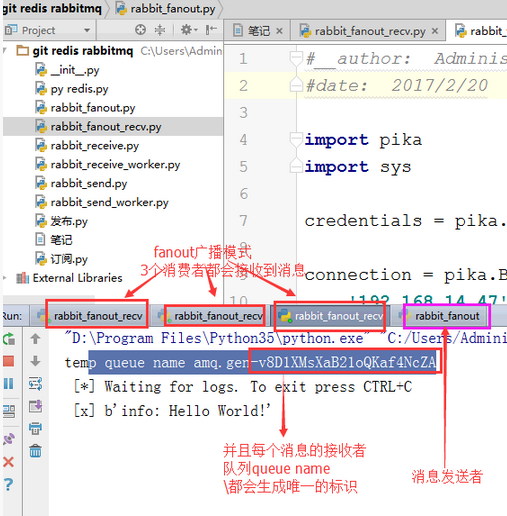
发布订阅和简单的消息队列区别在于,发布订阅会将消息发送给所有的订阅者,而消息队列中的数据被消费一次便消失。所以,RabbitMQ实现发布和订阅时,会为每一个订阅者创建一个队列,而发布者发布消息时,会将消息放置在所有相关队列中。
exchange type = fanout
发布者:
#!/usr/bin/env python

import pika

import sys

connection = pika.BlockingConnection(pika.ConnectionParameters(

        host='localhost'))

channel = connection.channel()

channel.exchange_declare(exchange='logs',

                         type='fanout')

message = ' '.join(sys.argv[1:]) or "info: Hello World!"

channel.basic_publish(exchange='logs',

                      routing_key='',

                      body=message)

print(" [x] Sent %r" % message)

connection.close()
订阅者:
#!/usr/bin/env python

import pika

connection = pika.BlockingConnection(pika.ConnectionParameters(

        host='localhost'))

channel = connection.channel()

channel.exchange_declare(exchange='logs',

                         type='fanout')

result = channel.queue_declare(exclusive=True)

queue_name = result.method.queue

channel.queue_bind(exchange='logs',

                   queue=queue_name)

print(' [*] Waiting for logs. To exit press CTRL+C')

def callback(ch, method, properties, body):

    print(" [x] %r" % body)

channel.basic_consume(callback,

                      queue=queue_name,

                      no_ack=True)

channel.start_consuming()
5、关键字发送

exchange type = direct
之前事例,发送消息时明确指定某个队列并向其中发送消息,RabbitMQ还支持根据关键字发送,即:队列绑定关键字,发送者将数据根据关键字发送到消息exchange,exchange根据 关键字 判定应该将数据发送至指定队列。
消费者:
#!/usr/bin/env python

import pika

import sys

connection = pika.BlockingConnection(pika.ConnectionParameters(

        host='localhost'))

channel = connection.channel()

channel.exchange_declare(exchange='direct_logs',

                         type='direct')

result = channel.queue_declare(exclusive=True)

queue_name = result.method.queue

severities = sys.argv[1:]

if not severities:

    sys.stderr.write("Usage: %s [info] [warning] [error]\n" % sys.argv[0])

    sys.exit(1)

for severity in severities:

    channel.queue_bind(exchange='direct_logs',

                       queue=queue_name,

                       routing_key=severity)

print(' [*] Waiting for logs. To exit press CTRL+C')

def callback(ch, method, properties, body):

    print(" [x] %r:%r" % (method.routing_key, body))

channel.basic_consume(callback,

                      queue=queue_name,

                      no_ack=True)

channel.start_consuming()
生产者:
#!/usr/bin/env python

import pika

import sys

connection = pika.BlockingConnection(pika.ConnectionParameters(

        host='localhost'))

channel = connection.channel()

channel.exchange_declare(exchange='direct_logs',

                         type='direct')

severity = sys.argv[1] if len(sys.argv) > 1 else 'info'

message = ' '.join(sys.argv[2:]) or 'Hello World!'

channel.basic_publish(exchange='direct_logs',

                      routing_key=severity,

                      body=message)

print(" [x] Sent %r:%r" % (severity, message))

connection.close()
6、模糊匹配

exchange type = topic
在topic类型下,可以让队列绑定几个模糊的关键字,之后发送者将数据发送到exchange,exchange将传入”路由值“和 ”关键字“进行匹配,匹配成功,则将数据发送到指定队列。
- # 表示可以匹配 0 个 或 多个 单词
- * 表示只能匹配 一个 单词
发送者路由值              队列中

old.boy.python          old.*  -- 不匹配

old.boy.python          old.#  -- 匹配
消费者
#!/usr/bin/env python

import pika

import sys

connection = pika.BlockingConnection(pika.ConnectionParameters(

        host='localhost'))

channel = connection.channel()

channel.exchange_declare(exchange='topic_logs',

                         type='topic')

result = channel.queue_declare(exclusive=True)

queue_name = result.method.queue

binding_keys = sys.argv[1:]

if not binding_keys:

    sys.stderr.write("Usage: %s [binding_key]...\n" % sys.argv[0])

    sys.exit(1)

for binding_key in binding_keys:

    channel.queue_bind(exchange='topic_logs',

                       queue=queue_name,

                       routing_key=binding_key)

print(' [*] Waiting for logs. To exit press CTRL+C')

def callback(ch, method, properties, body):

    print(" [x] %r:%r" % (method.routing_key, body))

channel.basic_consume(callback,

                      queue=queue_name,

                      no_ack=True)

channel.start_consuming()
生产者:
#!/usr/bin/env python

import pika

import sys

connection = pika.BlockingConnection(pika.ConnectionParameters(

        host='localhost'))

channel = connection.channel()

channel.exchange_declare(exchange='topic_logs',

                         type='topic')

routing_key = sys.argv[1] if len(sys.argv) > 1 else 'anonymous.info'

message = ' '.join(sys.argv[2:]) or 'Hello World!'

channel.basic_publish(exchange='topic_logs',

                      routing_key=routing_key,

                      body=message)

print(" [x] Sent %r:%r" % (routing_key, message))

connection.close()
实例测试:
topic 执行过滤

消息队列系统 -- RabbitMQ的更多相关文章
- 【翻译】DotNetMQ: 一个.NET版完整的消息队列系统
在一个大型的分布式系统中,消息队列是不可缺少的中间件,能很好的解决异步消息.应用解耦.均衡并发等问题.在.net中,偶然发现一个效率不错.安全可靠.功能齐全的消息组件,忍不住翻译过来,供大家快速预览. ...
- Spring Boot 揭秘与实战(六) 消息队列篇 - RabbitMQ
文章目录 1. 什么是 RabitMQ 2. Spring Boot 整合 RabbitMQ 3. 实战演练4. 源代码 3.1. 一个简单的实战开始 3.1.1. Configuration 3.1 ...
- 消息队列之 RabbitMQ
https://www.jianshu.com/p/79ca08116d57 关于消息队列,从前年开始断断续续看了些资料,想写很久了,但一直没腾出空,近来分别碰到几个朋友聊这块的技术选型,是时候把这块 ...
- RabbitMQ,Apache的ActiveMQ,阿里RocketMQ,Kafka,ZeroMQ,MetaMQ,Redis也可实现消息队列,RabbitMQ的应用场景以及基本原理介绍,RabbitMQ基础知识详解,RabbitMQ布曙
消息队列及常见消息队列介绍 2017-10-10 09:35操作系统/客户端/人脸识别 一.消息队列(MQ)概述 消息队列(Message Queue),是分布式系统中重要的组件,其通用的使用场景可以 ...
- 转 消息队列之 RabbitMQ
转 https://www.jianshu.com/p/79ca08116d57 消息队列之 RabbitMQ 预流 2017.05.06 16:03* 字数 4884 阅读 80990评论 18喜欢 ...
- 快速入门分布式消息队列之 RabbitMQ(2)
目录 目录 前文列表 RabbitMQ 的特性 Message Acknowledgment 消息应答 Prefetch Count 预取数 RPC 远程过程调用 vhost 虚拟主机 插件系统 最后 ...
- 快速入门分布式消息队列之 RabbitMQ(1)
目录 目录 前言 简介 安装 RabbitMQ 基本对象概念 Message 消息 Producer 生产者 Consumer 消费者 Queue 队列 Exchange 交换机 Binding 绑定 ...
- 消息队列,RabbitMQ、Kafka、RocketMQ
目录 1.消息列队概述 1.1消息队列MQ 1.2AMQP和JMS 1.2.1AMQP 1.2.2JMS 1.2.3AMOP 与 JMS 区别 1.3消息队列产品 1.3.1 Kafka 1.3.2 ...
- 消息队列之rabbitmq学习使用
消息队列之rabbitmq学习使用 1.RabbitMQ简介 1.1.什么是RabbitMQ? RabbitMQ是一个开源的消息代理和队列服务器,用来通过普通协议在完全不同的应用之间共享数据,Rabb ...
随机推荐
- Codeforces Round #523 (Div. 2) E. Politics(最小费+思维建图)
https://codeforces.com/contest/1061/problem/E 题意 有n个点(<=500),标记第i个点的代价a[i],然后分别在这n个点建两棵树,对于每颗树的每个 ...
- linux学习--查看操作系统版本及cpu及内存信息
查看版本当前操作系统内核信息 uname -a 查看当前操作系统版本信息 cat /proc/version 查看物理cpu个数: cat /proc/cpuinfo| grep "phy ...
- Java,数据库中的数据导入到Excel
private static void executeMethod(JobExecutionContext arg0) throws Exception{ try { TContrastService ...
- 实习番外篇:解决C语言使用Makefile无法实现更好的持续集成问题
工作中遇见的一个问题,提供项目源代码的情况下,希望对项目进行持续集成,达到一个C项目增量编译的效果.原本第一天是想通过模拟Makefile执行步骤来实现整个过程的,但是事实上发现整个Makefile显 ...
- oracle死锁解决方法
select SESS.sid, SESS.SERIAL#, LO.ORACLE_USERNAME, LO.OS_USER_NAME, AO.OBJECT_NAME, LO.LOCKED_M ...
- urb的处理流程
USB分析 2013年11月11日 16:06:24 阅读数:1807 转载自:http://blog.csdn.net/aaa6695798/article/details/4776202 很久 ...
- 周鸿祎与85后的座谈(一):人人需要Mentor,世界没有奇迹
我们公司现在有将近 4000 人,我觉得里面肯定是卧虎藏龙.百里挑一的话,也有 40 个伟大的人才.但是,即使是天才,如果没有前辈的帮助,最后也会变成庸才,是做不出什么大事的.举例来说,每一个跳水冠军 ...
- Java数据类型、赋值、类型转换、==运算
数据类型 基本数据类型:即int/char等这样的数值类型,共8种 引用类型:除了基本数据类型之外都是引用类型:包括API中的类:如String.File:也包括自定义的类:如Personal.ABC ...
- hive 实现类似 contain 包含查询
如何用hive sql 实现 contain 查询? 需求:判断某个字符串是否在另一个字符串中? 方法: 可以自定义函数,但是用正则匹配regexp更方便 代码如下: 首先,查看regexp正则函数的 ...
- iOS笔记之UIKit_UINavigationController
//设置导航条的样式 self.navigationController.navigationBar.barStyle = UIBarStyleBlackTranslucent; //默认是白色 B ...