
window 服务
c#写windows服务
序言
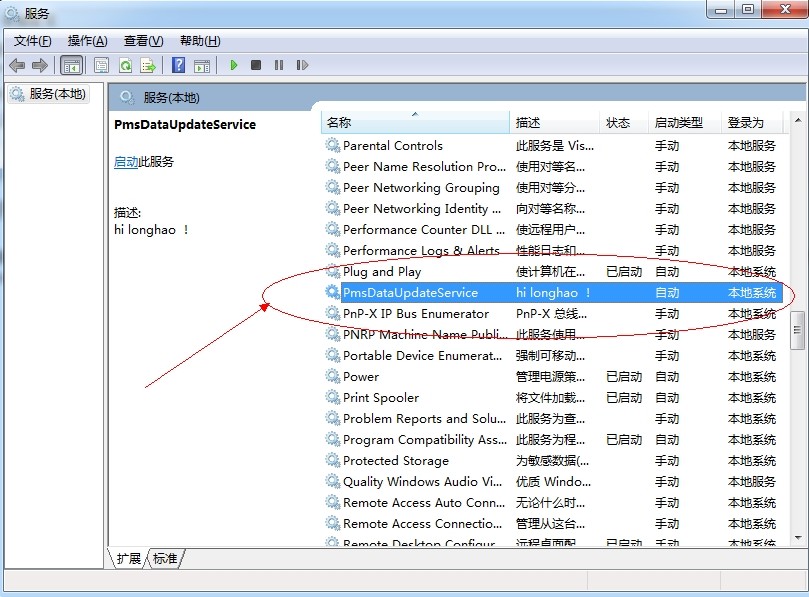
前段时间做一个数据迁移项目,刚开始用B/S架构做的项目,但B/S要寄存在IIs中,而IIs又不稳定因素,如果重启IIs就要打开页面才能运行项目。有不便之处,就改用Windows服务实现。这篇就总结下,windows服务的编写,调试,安装卸载。
Windows服务介绍
Microsoft Windows 服务能够创建在它们自己的 Windows 会话中可长时间运行的可执行应用程序。这些服务可以在计算机启动时自动启动,可以暂停和重新启动而且不显示任何用户界面。这使服务非常适合在服务器上使用,或任何时候,为了不影响在同一台计算机上工作的其他用户,需要长时间运行功能时使用。还可以在不同于登录用户的特定用户帐户或默认计算机帐户的安全上下文中运行服务。本文就向大家介绍如何运用Visual C#来一步一步创建一个文件监视的Windows服务程序,然后介绍如何安装、测试和调试该Windows服务程序。
创建Windows服务

创建好项目之后 --- >> 双击 Service1.cs ---- >> 出现一个设计界面 ---->> 右键界面 --- >> 弹出对话框选择添加安装程序
上面一系列操作完成后,就可以对windows服务名称描述以及启动方式等进行修改。

[RunInstaller(true)]

    public class Installer1 : System.Configuration.Install.Installer

    {

        /// <summary>

        /// 必需的设计器变量。

        /// </summary>

        private System.ComponentModel.Container components = null;

        private System.ServiceProcess.ServiceProcessInstaller spInstaller;

        private System.ServiceProcess.ServiceInstaller sInstaller;

        public Installer1()

        {

            // 该调用是设计器所必需的。

            InitializeComponent();

            // TODO: 在 InitComponent 调用后添加任何初始化

        }

        #region Component Designer generated code

        /// <summary>

        /// 设计器支持所需的方法 - 不要使用代码编辑器修改

        /// 此方法的内容。

        /// </summary>

        private void InitializeComponent()

        {

            components = new System.ComponentModel.Container();

            // 创建ServiceProcessInstaller对象和ServiceInstaller对象

            this.spInstaller = new System.ServiceProcess.ServiceProcessInstaller();

            this.sInstaller = new System.ServiceProcess.ServiceInstaller();

            // 设定ServiceProcessInstaller对象的帐号、用户名和密码等信息

            this.spInstaller.Account = System.ServiceProcess.ServiceAccount.LocalSystem;

            this.spInstaller.Username = null;

            this.spInstaller.Password = null;

            // 设定服务名称

            this.sInstaller.ServiceName = "PmsDataUpdateService";

            //服务描述

            this.sInstaller.Description = "hi longhao !";

            // 设定服务的启动方式

            this.sInstaller.StartType = System.ServiceProcess.ServiceStartMode.Automatic;

            this.Installers.AddRange(

                new System.Configuration.Install.Installer[] { this.spInstaller, this.sInstaller });

        }

        #endregion

    }
修改好后回头,写入自己想要的操作。Service1.cs出现设计界面,双击设计界面进入cs代码页。可以重写这些方法。
  protected override void OnStart(string[] args)

       {

           //服务开启执行代码

       }

       protected override void OnStop()

       {

           //服务结束执行代码

       }

       protected override void OnPause()

       {

           //服务暂停执行代码

           base.OnPause();

       }

       protected override void OnContinue()

       {

           //服务恢复执行代码

           base.OnContinue();

       }

       protected override void OnShutdown()

       {

           //系统即将关闭执行代码

           base.OnShutdown();

       }
除此之外还有一个Program.cs文件:打开看下。
使得一个Windows服务程序能够正常运行,我们需要像创建一般应用程序那样为它创建一个程序的入口点。在Windows服务程序中,我们也是在Main()函数中完成这个操作的。首先我们在Main()函数中创建一个Windows服务的实例,该实例应该是ServiceBase类的某个子类的对象,然后我们调用由基类ServiceBase类定义的一个Run()方法。然而Run()方法并不就开始了Windows服务程序,我们必须通过前面提到的服务控制管理器调用特定的控制功能来完成Windows服务程序的启动,也就是要等到该对象的OnStart()方法被调用时服务才真正开始运行。如果你想在一个Windows服务程序中同时启动多个服务,那么只要在Main()函数中定义多个ServiceBae类的子类的实例对象就可以了,方法就是创建一个ServiceBase类的数组对象,使得其中的每个对象对应于某个我们已预先定义好的服务。
 /// <summary>

        /// 应用程序的主入口点。

        /// </summary>

        static void Main()

        {

            ServiceBase[] ServicesToRun;

            ServicesToRun = new ServiceBase[]

            {

                new Service1(),

                new Service2()

            };

            ServiceBase.Run(ServicesToRun);

        }
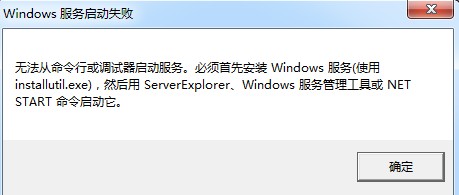
如果你在你需要的函数里面写过你需要的方法后,点运行则不可运行。
安装卸载windows服务
1、安装需要用 ,这个小玩意可以在网上下载到的。
2、把他放到你编写好的服务程序/bin/Debug文件夹下。
3、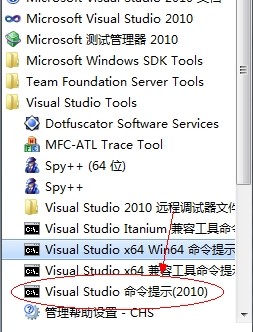 打开
打开
4、用命令读到你服务.exe文件夹下。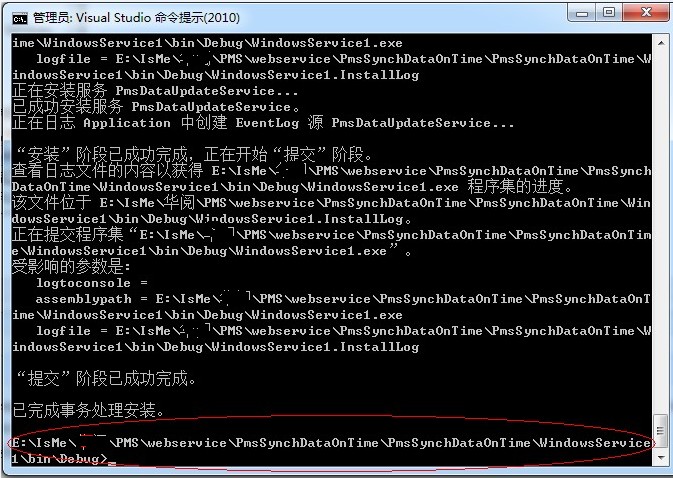
5、运行 installutil.exe
6、安装服务命令: installutil yourservices.exe
7、卸载服务命令: installutil /u yourservices.exe
注意的是:安装跟卸载需要保证程序是一样的,没有变更过的,要不会提示卸载不干净。也就是在已安装过服务的时候,不要在vs中修改你的程序。
调试windows服务
保证你的服务已安装成功,且处于启动模式。
点调试--->> 附加到进程

即可。
注意的是:

打开任务管理器: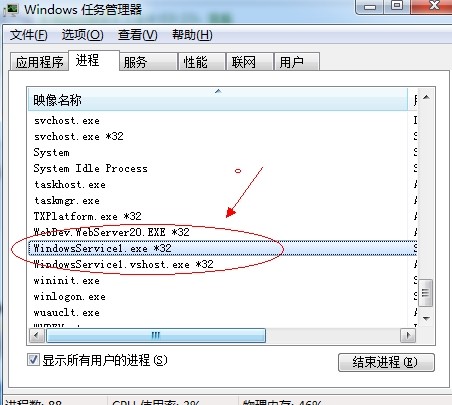 结束进程。
结束进程。
ASP.NET实现WEB站点的后台定时任务
在ASP.net的WEB开发中经常会碰到这样的一个问题:即用户操作响应慢的情况。这时候就可以用后台定时任务来提前实现,并且将结果存放好或分解成响应快的任务。
可以采用Asp.net的定时处理方式,直接在WEB服务器层来进行处理。
关于C#中timer类,在C#里关于定时器类就有3个,分别是System.Windows.Forms,System.Timers.Timer和System.Threading.Timer.在这里我们主要使用System.Threading.Timer,因为它是一个使用回调方法的计时器,而且由线程池线程服务,简单且对资源要求不高。
public class ScheduledTask
{
private static readonly ScheduledTask _ScheduledTask = null;
private System.Threading.Timer UpdateTimer = null;
private int Interval = 1 * 60000;//间隔时间,这里设置为15分钟
private int _IsRunning;//上一个时间间隔触发的任务是否运行完成
static ScheduledTask()
{
_ScheduledTask = new ScheduledTask();
}
public static ScheduledTask Instance()
{
return _ScheduledTask;
}
/// <summary>
/// timer启动
/// </summary>
public void Start()
{
if (UpdateTimer == null)
{
UpdateTimer = new System.Threading.Timer(new TimerCallback(UpdateTimerCallback), null, Interval, Interval);
}
}
/// <summary>
/// 时钟callback事件
/// </summary>
/// <param name="sender"></param>
private void UpdateTimerCallback(object sender)
{
if (Interlocked.Exchange(ref _IsRunning, 1) == 0)
{
try
{
//要处理后台任务
}
catch (Exception ex)
{
}
finally
{
Interlocked.Exchange(ref _IsRunning, 0);
}
}
}
/// <summary>
///timer停止
/// </summary>
public void Stop()
{
if (UpdateTimer != null)
{
UpdateTimer.Dispose();
UpdateTimer = null;
}
}
}
建议在Application_Start中调用这个类,具体调用方法如下
public class Global : System.Web.HttpApplication
{
protected void Application_Start(object sender, EventArgs e)
{
ScheduledTask.Instance().Start();
}
protected void Application_End(object sender, EventArgs e)
{
ScheduledTask.Instance().Stop();
}
}
其中_IsRunning是一个标志,它代表上一个时间间隔触发的任务是否运行完成。因为,如果我们执行的任务时间很长,就可能造成上一个时间段触发的任务还没有执行完成,下一个任务又开始了,这样就会造成重入的问题。为了解决这个问题,我们用_IsRunning作为一个标志,表示上次的任务是否完成了,如果完成了,我们就执行新的任务,如果没完成就跳过这次的任务继续执行上次的任务。
所以在程序中,我使用了Interlocked.Exchange这个方法。该方法的作用是保证多线程下给对象赋值的安全性。因为在多线程下,我们直接给_IsRunning赋值是不安全的,所以在这种情况下Interlocked.Exchange就派上了用场
using System;

using System.Collections.Generic;

using System.ComponentModel;

using System.Data;

using System.Diagnostics;

using System.IO;

using System.Linq;

using System.ServiceProcess;

using System.Text;

using System.Threading;

using System.Threading.Tasks;

namespace clockDemo

{

    public partial class Service1 : ServiceBase

    {

        public Service1()

        {

            InitializeComponent();

        }

        protected override void OnStart(string[] args)

        {

            ScheduledTask.Instance().Start();

        }

        protected override void OnStop()

        {

            ScheduledTask.Instance().Stop();

        }

    }

    public class ScheduledTask

    {

        private static readonly ScheduledTask _ScheduledTask = null;

        private System.Threading.Timer UpdateTimer = null;

        private int Interval = 1 * 10000;//间隔时间,这里设置为15分钟

        private int _IsRunning;//上一个时间间隔触发的任务是否运行完成

        static ScheduledTask()

        {

            _ScheduledTask = new ScheduledTask();

        }

        public static ScheduledTask Instance()

        {

            return _ScheduledTask;

        }

        /// <summary>

        /// timer启动

        /// </summary>

        public void Start()

        {

            if (UpdateTimer == null)

            {

                UpdateTimer = new System.Threading.Timer(new TimerCallback(UpdateTimerCallback), null, Interval, Interval);

            }

        }

        /// <summary>

        /// 时钟callback事件

        /// </summary>

        /// <param name="sender"></param>

        private void UpdateTimerCallback(object sender)

        {

            if (Interlocked.Exchange(ref _IsRunning, 1) == 0)

            {

                try

                {

                    File.ReadAllText("c:\\a.txt");

                    File.AppendText("c:\\a.txt");

                }

                catch (Exception ex)

                {

                }

                finally

                {

                    Interlocked.Exchange(ref _IsRunning, 0);

                }

            }

        }

        /// <summary>

        ///timer停止

        /// </summary>

        public void Stop()

        {

            if (UpdateTimer != null)

            {

                UpdateTimer.Dispose();

                UpdateTimer = null;

            }

        }

    }

}
window 服务的更多相关文章
- C#编写window服务,一步一步(1)
Window服务是啥,这里就不废话了,如何用在哪里用也不废话了,这里我这篇文章只是详述了我在vs2012中创建window服务的经过,希望对你有所帮助. 另外:我在编写服务过程中参考了 Profess ...
- WPF Window 服务安装
一.安装服务 1.已管理员的身份启动CMD 2.输入 cd C:\Windows\Microsoft.NET\Framework\v4.0.30319 回车 3.输入 InstallUtil.exe ...
- Window服务初级教程以及log4net配置文件初始化
Window服务初级教程:http://www.jb51.net/article/48987.htm 另外,配置log4net这个日志功能的时候需要初始化,不然会报没有初始化的错误,而且初始化的节点应 ...
- C# 编写Window服务基础(一)
一.Windows服务介绍: Windows服务以前被称作NT服务,是一些运行在Windows NT.Windows 2000和Windows XP等操作系统下用户环境以外的程序.在以前,编写Wind ...
- C# 编写短信发送Window服务
我们做项目过程中,一般都会有发送短信的需求.最常见的就是户注册或者登录时发送短信验证码.不同类型的短信发送,我们都可以放到到一张短信表中,然后通过一个定时的作业去执行短信发送.而定时作业的执行,我们就 ...
- 自定义Window 服务
自定义window 服务 开发到使用的流程: 1.完成对应的代码之后(代码在底下),右键MyService.cs 添加安装程序 2.添加window服务安装程序打开Service1.cs[设计]页面, ...
- window服务创建
第一步:创建服务 第二步:在Service1.cs视图中 右键 选择”添加安装程序” 这里要注意几个细节 设置上面的属性 这两个分别有属性,具体网上查使用方式 3 实例代码编写 主要下面几个方法 pr ...
- C#在window服务配置Log4Net.dll
1.使用背景: C#window服务下添加一个日志记录程序集(Log4Net.dll) 2.添加和使用步骤如下: 一.下载并引入Log4Net.dll程序集到项目中 下载地址:http://loggi ...
- 创建一个MongoDB数据库再到配置成Window服务再设置用户名密码
1.安装MongoDB数据在官网下载安装 然后在C盘找到C:\Program Files\MongoDB\Server\4.0\bin这个可执行目录 使用cmd进入到这: 2.在C盘根目录创建一个名为 ...
- Window服务项目脚手架
本人最近工作用到window服务程序,于是尝试分享下经验,开源了一个window服务脚手架项目,把window服务程序必不可少的组件集成进去,如日志组件log4net,window服务挂在后台,用日志 ...
随机推荐
- 进程间通信IPC (InterProcess Communication)
一.进程间通信的概念 每个进程各自有不同的用户地址空间,任何一个进程的全局变量在另一个进程中都看不到,所以进程之间要交换数据必须通过内核,在内核中开辟一块缓冲区,进程1把数据从用户空间拷到内核缓冲区, ...
- (转)Java调用Weservice
原文地址:http://www.cnblogs.com/jiangxu1989/p/6491483.html https://www.cnblogs.com/neughj/p/5145630.html ...
- Java连接postgreSQL数据库,找不到表。
postgreSQL数据库遵守SQL标准,表名库名不区分大小写. 数据库中是存在 gongan_address_ALL的表的,但是执行下列代码就会出错. stmt = c.createStatemen ...
- angularjs的路由ui.router
<!-- 引入路由插件 --> <script src="vendor/angular-ui-router/release/angular-ui-router.min. ...
- 03-spark kafka
1.概念 Kafka是一个开源的消息系统.由Scala编写,它具备以下特点: ①消息持久化: 为了从大数据中获取有价值的信息,任何信息的丢失都是负担不起的.使用Kafka时,message会被存储并且 ...
- 人工智能时代,是时候学点Python了!
“是时候学点Python了”.作为一名不怎么安分的程序员,你或许觉得,产生这样的想法并不奇怪,但学习Python却是出于自己对工作现状以及如何应对未来挑战所作出的思考.读过我以前博客的朋友,可能都知道 ...
- for循环执行时在,每执行一次for循环中弹出提示框,延时问题
在需求中,ajax的返回值,根据数组内容的长度去做循环,每循环一次弹出提示框,发现for循环的执行速度非常之快,想到了延时,但是在for循环中延时并不能解决这个问题. 查到setTimeout的递归处 ...
- python3基础:基本语句(2017)
http://www.cnblogs.com/qq21270/p/4591318.html 字符串.文本文件 http://www.cnblogs.com/qq21270/p/7872824.htm ...
- maven 下载jar失败: resolution will not be reattempted until the update interval of central has elapsed or updates are forced
Multiple annotations found at this line: - ArtifactTransferException: Failure to transfer com.faster ...
- mybatis中xml文件的${}和#{}区别
之前的笔记:#{}相当于JDBC的? ${}是字符串连接符,如果入参为普通类型{}中只写value 在项目中要实现所有业务批量提交的功能,实现方式,把表名,表主键字段当做参数传递,在xml文件中全部使 ...